2019 YAMAHA XT1200Z engine
[x] Cancel search: enginePage 18 of 118

Instrument and control functions
3-4
3
EAU11259Oil level warnin g li ght “ ”
This warning light comes on when the
engine oil level is low. To prevent en-
gine damage, replenish the engine oil
as soon as possible.
Even if the oil level is sufficient, the
warning light may flicker when riding
on a slope or during sudden accelera-
tion or deceleration, but this is not a
malfunction. If a problem is detected in
the oil level detection circuit, the oil lev-
el warning light will flash repeatedly. If
this occurs, have a Yamaha dealer
check the vehicle.
TIP
When the vehicle is turned on, the light
will come on for a few seconds and
then go off. If the light does not come
on, or if the light remains on after con-
firming that the oil level is correct (see
page 6-10), have a Yamaha dealer
check the vehicle.
EAU58402Cruise control in dicator li ghts “ ”
an d “SET”
These indicator lights come on when
the cruise control system is activated.
(See page 3-6.)
TIP
When the vehicle is turned on, these
lights should come on for a few sec-
onds and then go off. If the lights do
not come on, have a Yamaha dealer
check the vehicle.
EAU73172En gine trou ble warnin g lig ht “ ”
This warning light comes on if a prob-
lem is detected in the engine or other
vehicle control system. If this occurs,
have a Yamaha dealer check the on-
board diagnostic system.
TIP
When the vehicle is turned on, the light
will come on for a few seconds and
then go off. If the light does not come
on, or if the light remains on, have a
Yamaha dealer check the vehicle.
EAU69892ABS warnin g li ght “ ”
This warning light comes on when the
vehicle is first turned on, and goes off
after starting riding. If the warning light
comes on while riding, the anti-lock
brake system may not work correctly.
(See page 3-24.)
TIP
If the light does not come at all, or if the
light does not go off after traveling 10
km/h (6 mi/h), have a Yamaha dealer
check the vehicle.
WARNING
EWA16041
If the ABS warnin g li ght does not go
off after travelin g at a speed of 10
km/h (6 mi/h) or hi gher, or if the
warnin g li ght comes on or flashes
while ri din g, the b rake system re-
verts to conventional brakin g. If ei-
ther of the ab ove occurs, or if the
warnin g li ght does not come on at
all, use extra caution to avoi d possi-
b le wheel lock durin g emer gency
ABS
UBP8E1E0.book Page 4 Friday, September 14, 2018 11:35 AM
Page 19 of 118

Instrument and control functions
3-5
3
b
rakin g. Have a Yamaha d ealer
check the brake system an d electri-
cal circuits as soon as possi ble.
EAU74082Traction control system in dicator
li g ht “ ”
This indicator light will flash when trac-
tion control has engaged.
If the traction control system is turned
off, this indicator light will come on.
TIP
When the vehicle is turned on, the light
should come on for a few seconds and
then go off. If the light does not come
on, or if the light remains on, have a
Yamaha dealer check the vehicle.
EAU73120Immo bilizer system in dicator
li g ht “ ”
When the key is turned to “OFF” and
30 seconds have passed, the indicator
light will flash steadily to indicate the
immobilizer system is enabled. After 24
hours have passed, the indicator light
will stop flashing, however the immobi-
lizer system is still enabled.
The electrical circuit of the indicator
light can be checked by turning the key
to “ON”. The indicator light should
come on for a few seconds, and then
go off.
If the indicator light does not come on
initially when the key is turned to “ON”,
if the indicator light remains on, or if the
indicator light flashes in a pattern (if a
problem is detected in the immobilizer
system, the immobilizer system indica-
tor light will flash in a pattern), have a
Yamaha dealer check the vehicle.
TIP
If the immobilizer system indicator light
flashes in the pattern, slowly 5 times
then quickly 2 times, this could be
caused by transponder interference. If
this occurs, try the following.
1. Make sure there are no other im- mobilizer keys close to the main
switch. Other immobilizer system
keys may cause signal interfer-
ence and prevent the engine from
starting.
2. Use the code re-registering key to start the engine.
3. If the engine starts, turn it off, and try starting the engine with the
standard keys.
4. If one or both of the standard keys do not start the engine, take the
vehicle and all 3 keys to a Yamaha
dealer to have the standard keys
re-registered.
UBP8E1E0.book Page 5 Friday, September 14, 2018 11:35 AM
Page 22 of 118

Instrument and control functions
3-8
3
WARNING
EWA16351
It is d angerous to use the resume
function when the previously set
cruisin g speed is too hi gh for current
con ditions.
TIP
Pushing the power switch while the
system is operating will turn the system
off completely and erase the previously
set cruising speed. You will not be able
to use the resume function until a new
cruising speed has been set.
Automatic deactivation of the cruise
control system
The cruise control system for this mod-
el is electronically controlled and is
linked with the other control systems.
The cruise control system will auto-
matically become deactivated under
the following conditions:
The cruise control system is not
able to maintain the set cruising
speed.
Wheel slip or wheel spin is detect-
ed. (If the traction control system
has not been turned off, the trac-
tion control system will work.)
The start/engine stop switch is set
to the “ ” position.
The engine stalls.
The sidestand is lowered.
When traveling with a set cruising
speed, if the cruise control system is
deactivated under the above condi-
tions, the “ ” indicator light will go off
and the “SET” indicator light will flash
for 4 seconds, and then go off. When not traveling with a set cruising
speed, if the start/engine stop switch is
set to the “ ” position, the engine
stalls, or the sidestand is lowered, then
the “ ” indicator light will go off (the
“SET” indicator light will not flash).
If the cruise control system is automat-
ically deactivated, please stop and
confirm that your vehicle is in good op-
erating condition.
Before using the cruise control system
again, activate it using the power
switch.
TIP
In some cases, the cruise control sys-
tem may not be able to maintain the set
cruising speed when the vehicle is
traveling uphill or downhill.
When the vehicle is traveling up-
hill, the actual traveling speed may
become lower than the set cruis-
ing speed. If this occurs, acceler-
ate to the desired traveling speed
using the throttle.
When the vehicle is traveling
downhill, the actual traveling
speed may become higher than
the set cruising speed. If this oc-
curs, the setting switch cannot be
used to adjust the set cruising
speed. To reduce the traveling
speed, apply the brakes. When
the brakes are applied, the cruise
control system will become deac-
tivated.
UBP8E1E0.book Page 8 Friday, September 14, 2018 11:35 AM
Page 24 of 118

Instrument and control functions
3-10
3 Tachometer
The tachometer shows the engine
speed.
NOTICE
ECA23050
Do not operate the en
gine in the ta-
chometer hi gh-r/min zone.
Hi gh-r/min zone: 7750 r/min an d
a b ove
Fuel meter
The fuel meter indicates the amount of
fuel in the fuel tank. The display seg-
ments of the fuel meter disappear from
“F” (full) towards “E” (empty) as the fuel
level decreases. When the last seg-
ment starts flashing, refuel as soon as
possible.
TIP
If a problem is detected in the fuel me-
ter circuit, all display segments of the
fuel meter will start flashing. If this oc-
curs, have a Yamaha dealer check the
vehicle.
Eco in dicator
This indicator comes on when the vehi-
cle is being operated in an environ-
mentally friendly, fuel-efficient manner.
The indicator goes off when the vehicle
is stopped.
TIP
Consider the following tips to reduce
fuel consumption: Avoid high engine speeds during
acceleration.
Travel at a constant speed.
Select the transmission gear that
is appropriate for the vehicle
speed.
1. Tachometer
2. High-r/min zone
1. Fuel meter
12
1
1. Eco indicator “ECO”
1
UBP8E1E0.book Page 10 Friday, September 14, 2018 11:35 AM
Page 27 of 118
Instrument and control functions
3-13
3
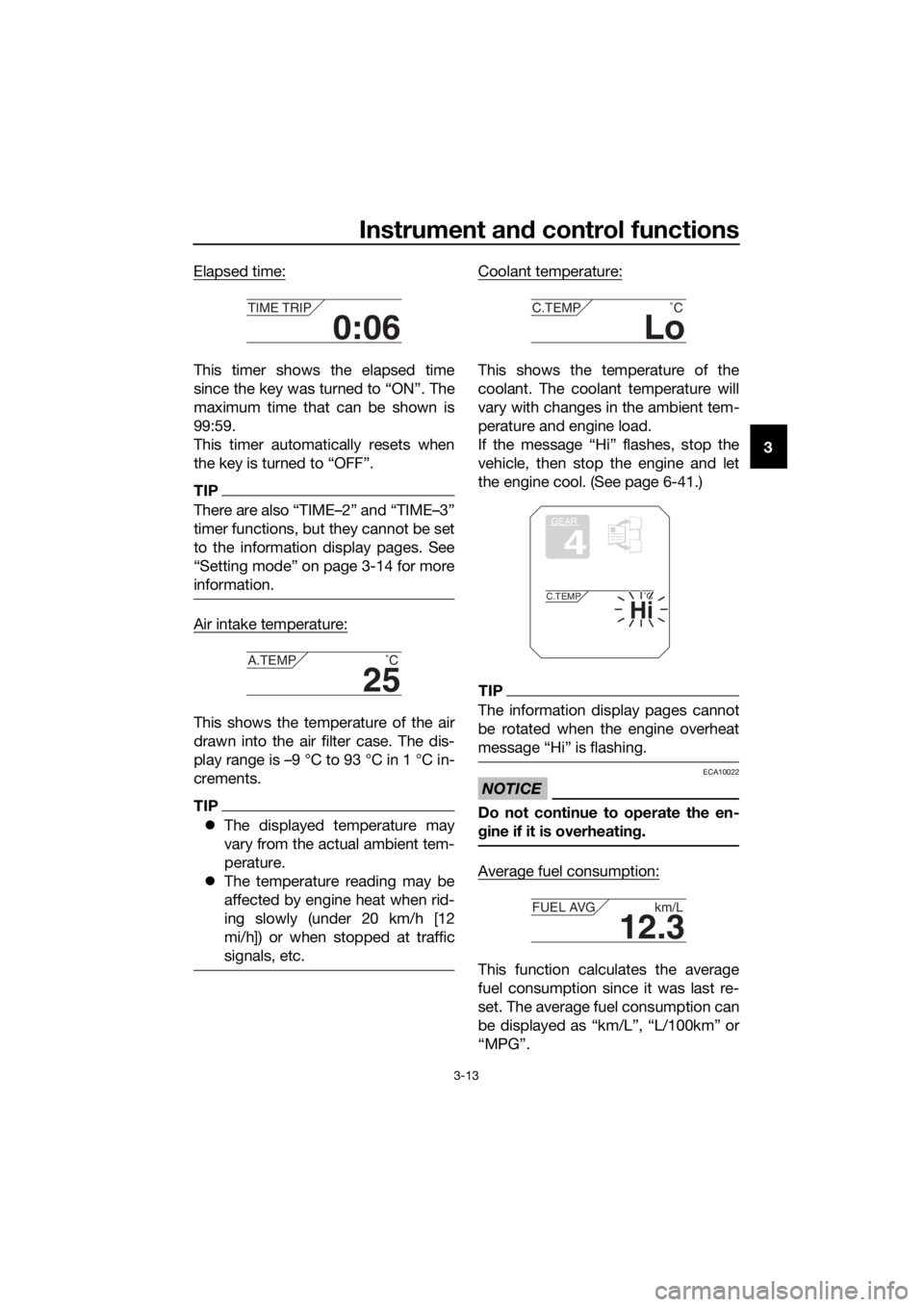
Elapsed time:
This timer shows the elapsed time
since the key was turned to “ON”. The
maximum time that can be shown is
99:59.
This timer automatically resets when
the key is turned to “OFF”.
TIP
There are also “TIME–2” and “TIME–3”
timer functions, but they cannot be set
to the information display pages. See
“Setting mode” on page 3-14 for more
information.
Air intake temperature:
This shows the temperature of the air
drawn into the air filter case. The dis-
play range is –9 °C to 93 °C in 1 °C in-
crements.
TIP
The displayed temperature may
vary from the actual ambient tem-
perature.
The temperature reading may be
affected by engine heat when rid-
ing slowly (under 20 km/h [12
mi/h]) or when stopped at traffic
signals, etc.
Coolant temperature:
This shows the temperature of the
coolant. The coolant temperature will
vary with changes in the ambient tem-
perature and engine load.
If the message “Hi” flashes, stop the
vehicle, then stop the engine and let
the engine cool. (See page 6-41.)
TIP
The information display pages cannot
be rotated when the engine overheat
message “Hi” is flashing.
NOTICE
ECA10022
Do not continue to operate the en-
gine if it is overheatin g.
Average fuel consumption:
This function calculates the average
fuel consumption since it was last re-
set. The average fuel consumption can
be displayed as “km/L”, “L/100km” or
“MPG”.
0:06
TIME TRIP
25
A.TEMP ˚C
Lo
C.TEMP˚C
GEAR
4
Hi
C.TEMP˚C
12.3
FUEL AVG km/L
UBP8E1E0.book Page 13 Friday, September 14, 2018 11:35 AM
Page 33 of 118

Instrument and control functions
3-19
3
6. Push the menu switch “MENU” to
return to the setting mode main
screen.
Resetting all of the display items
1. Use the select switch to highlight “All Reset”.
2. Push the menu switch “MENU”.
3. Use the select switch to highlight “YES”, and then push the menu
switch “MENU”.
TIP
The odometer and the clock will not be
reset.
EAU49433
D-mo de ( drive mo de)
D-mode is an electronically controlled
engine performance system with two
mode selections (touring mode “T” and
sports mode “S”).
Push the drive mode switch “MODE”
to switch between modes. (See page
3-21 for an explanation of the drive
mode switch.)
TIP
Before using D-mode, make sure you
understand its operation along with the
operation of the drive mode switch.
Tourin g mo de “T”
The touring mode “T” is suitable for
various riding conditions.
This mode allows the rider to enjoy
smooth drivability from the low-speed
range to the high-speed range.
Sports mod e “S”
This mode offers a sportier engine re-
sponse in the low- to mid-speed range
compared to the touring mode.
MENU
Maintenance
Time Trip
Unit
Display
Brightness
Clock
All Reset
All Reset
YES
NO
1. Drive mode switch “MODE”
M ODE
STOP
RUNSTA R
T
1
UBP8E1E0.book Page 19 Friday, September 14, 2018 11:35 AM
Page 34 of 118

Instrument and control functions
3-20
3
EAU1234M
Han dle bar switches
Left
Ri ght
EAUM4031Dimmer/Pass switch “ / /PASS”
Set this switch to “ ” for the high
beam and to “ ” for the low beam.
To flash the high beam, press the
switch down to “PASS” while the
headlights are on low beam.
TIP
When the switch is set to low beam,
both headlights come on. When the switch is set to high beam,
both headlights come on.
EAU12461Turn si
gnal switch “ / ”
To signal a right-hand turn, push this
switch to “ ”. To signal a left-hand
turn, push this switch to “ ”. When
released, the switch returns to the cen-
ter position. To cancel the turn signal
lights, push the switch in after it has re-
turned to the center position.
EAU12501Horn switch “ ”
Press this switch to sound the horn.
EAU54212Stop/Run/Start switch “ / / ”
To crank the engine with the starter,
set this switch to “ ”, and then push
the switch down towards “ ”. See
page 5-2 for starting instructions prior
to starting the engine.
Set this switch to “ ” to stop the en-
gine in case of an emergency, such as
when the vehicle overturns or when the
throttle cable is stuck.
EAU12735Hazar d switch “ ”
With the key in the “ON” or “ ” posi-
tion, use this switch to turn on the haz-
ard lights (simultaneous flashing of all
turn signal lights).
The hazard lights are used in case of an
emergency or to warn other drivers
when your vehicle is stopped where it
might be a traffic hazard.
1. Menu switch “MENU”
2. Select switch “ / ”
3. Cruise control switches
4. Horn switch “ ”
5. Turn signal switch “ / ”
6. Dimmer/Pass switch “ / /PASS”
1. Stop/Run/Start switch “ / / ”
2. Drive mode switch “MODE”
3. Hazard switch “ ”
R ES
SETPA S S
1
6
5
4
2
3
MODE
STOP
RUNSTA R
T
3
2
1
UBP8E1E0.book Page 20 Friday, September 14, 2018 11:35 AM
Page 36 of 118

Instrument and control functions
3-22
3
EAU12833
Clutch lever
The clutch lever is located on the left
side of the handlebar. Pull the clutch
lever to disengage the engine from the
drivetrain. Release the lever to engage
the clutch and transmit power to the
rear wheel.
TIP
The lever should be pulled rapidly
and released slowly for smooth
shifting. (See page 5-3.)
The clutch lever is equipped with a
switch, which is part of the ignition
circuit cut-off system. (See page
3-40.)
The position of the clutch lever can be
adjusted. To adjust the distance be-
tween the clutch lever and the handle-
bar, gently push the lever away from
the handlebar and rotate the position
adjusting dial.
TIP
Make sure the setting number on the
position adjusting dial aligns with the
match mark.
EAU12876
Shift pe dal
The shift pedal is located on the left
side of the motorcycle. To shift the
transmission to a higher gear, move
the shift pedal up. To shift the trans-
mission to a lower gear, move the shift
pedal down. (See page 5-3.)
1. Clutch lever
2. Clutch lever position adjusting dial
3. Match mark
4. Distance
1 2 3 4
1
4
32
1. Shift pedal
1
UBP8E1E0.book Page 22 Friday, September 14, 2018 11:35 AM