2019 YAMAHA NIKEN GT Shift
[x] Cancel search: ShiftPage 29 of 108
Instrument and control functions
3-14
3
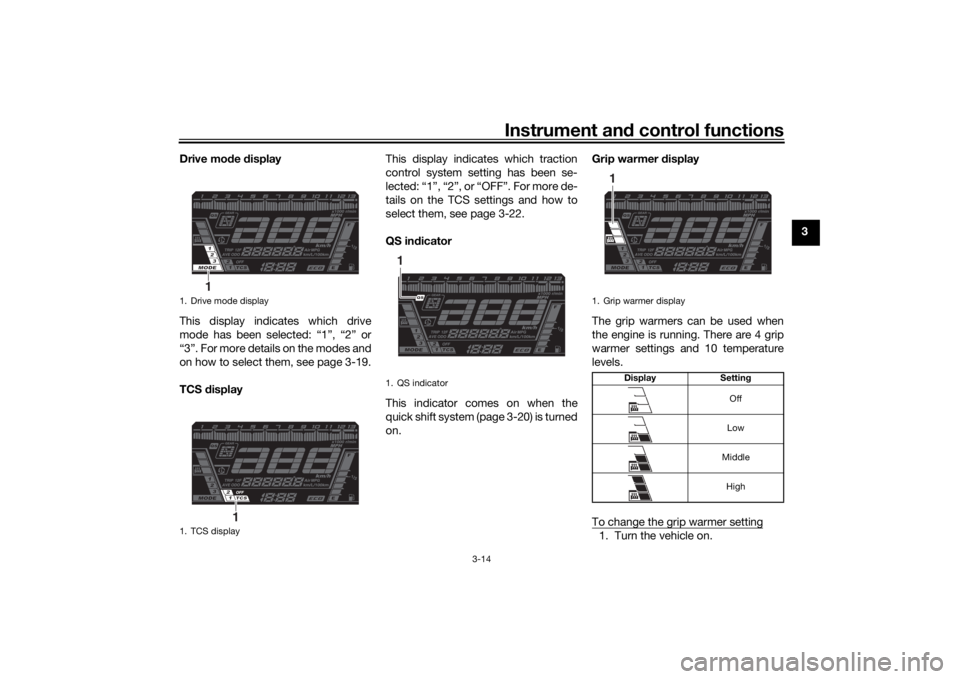
Drive mo
de display
This display indicates which drive
mode has been selected: “1”, “2” or
“3”. For more details on the modes and
on how to select them, see page 3-19.
TCS display This display indicates which traction
control system setting has been se-
lected: “1”, “2”, or “OFF”. For more de-
tails on the TCS settings and how to
select them, see page 3-22.
QS in
dicator
This indicator comes on when the
quick shift system (page 3-20) is turned
on. Grip warmer
display
The grip warmers can be used when
the engine is running. There are 4 grip
warmer settings and 10 temperature
levels.
To change the grip warmer setting
1. Turn the vehicle on.
1. Drive mode display
1. TCS display
1
1
1. QS indicator1
1. Grip warmer display Display Settin g
Off
Low
Middle High
1
UB5BE0E0.book Page 14 Friday, September 7, 2018 10:34 AM
Page 32 of 108

Instrument and control functions
3-17
3
“AVE – –.– MPG”: the average dis-
tance that can be traveled on
1.0 Imp.gal of fuel
TIPTo reset the average fuel con-
sumption, push the “RESET” but-
ton for one second.
After resetting, “– –.–” will be
shown until the vehicle has trav-
eled a sufficient distance.
The display units cannot be
switched between “km/L”, “L/100
km”, and “MPG” in this mode;
change to the instantaneous fuel
consumption mode first.Coolant temperature The temperature of the engine coolant
from 40 °C to 124 °C is shown in 1 °C
increments.
If the message “Hi” flashes, stop the
vehicle, then stop the engine and let it
cool. (See page 6-36.)
TIP
When the coolant temperature is
below 40 °C, “Lo” will be dis-
played.
The coolant temperature varies
with changes in the weather and
engine load.Air temperature The temperature of the air drawn into
the intake system from –9 °C to 50 °C
is shown in 1 °C increments.
TIP
–9 °C will be displayed even if the
air temperature falls below –9 °C.
The temperature displayed may
vary from the actual ambient tem-
perature.Bri ghtness and shift light control
mo de
This mode cycles through five control
functions in the order listed below. Display brightness
Shift light on / flash / off
Shift light on r/min
1. Coolant temperature display
1
1. Air temperature display
1
1. Brightness level display
1
UB5BE0E0.book Page 17 Friday, September 7, 2018 10:34 AM
Page 33 of 108

Instrument and control functions
3-18
3
Shift light off r/min
Shift light brightness
TIPThe brightness level display shows the
selected brightness level.To adjust the display brightness1. Turn the key to “OFF”.
2. Push and hold the “MENU”
switch.
3. Turn the key to “ON”, and then re- lease the “MENU” switch after five
seconds.
4. Push the “SELECT” switch up or down to select the desired bright-
ness level.
5. Push the “MENU” switch to con- firm the selected brightness level.
The control mode changes to the
shift light on / flash / off setting
function.
To set the shift light on / flash / off1. Push the “SELECT” switch up or down to select one of the follow-
ing style settings:
On setting: the shift light will
come on when the set engine
speed is reached. This setting
is selected when the indicator
light is lit continuously.
Flash setting: the shift light
will flash when the set engine
speed is reached. This setting
is selected when the indicator
light flashes four times per
second.
Off setting: the shift light is
deactivated. This setting is
selected when the indicator
light flashes once every two
seconds.
2. Push the “MENU” switch to con- firm the selection. The control
mode changes to the shift light on
r/min setting function.
To set the shift light on r/min
The shift light can be set between 6000
r/min and 12000 r/min in increments of
200 r/min. 1. Push the “SELECT” switch up or down to select the desired engine
speed for activating the indicator
light. 2. Push the “MENU” switch to con-
firm the selected engine speed.
The control mode changes to the
shift light off r/min setting function.
To set the shift light off r/min
The shift light can be set between 6000
r/min and 12000 r/min in increments of
200 r/min. Be sure to set the off r/min
to a higher engine speed than the on
r/min setting, otherwise the shift light
will not come on. 1. Push the “SELECT” switch up or down to select the desired engine
speed for deactivating the indica-
tor light.
2. Push the “MENU” switch to con- firm the selected engine speed.
The control mode changes to the
shift light brightness setting func-
tion.
To adjust the shift light brightness1. Push the “SELECT” switch up or down to select the desired shift
light brightness level.
2. Push the “MENU” switch to con- firm the selected brightness level
and exit the control mode.
UB5BE0E0.book Page 18 Friday, September 7, 2018 10:34 AM
Page 35 of 108

Instrument and control functions
3-20
3
EAU84321
Shift pe dalThe shift pedal is located on the left
side of the engine. To shift the trans-
mission to a higher gear, move the shift
pedal up. To shift the transmission to a
lower gear, move the shift pedal down.
(See page 5-2.)TIPWhen the quick shift system is turned
on, the shift switch senses shift pedal
movement and allows for upshifting
without operating the clutch lever.
EAU84560
Quick shift systemThe quick shift system (QS) allows for
full-throttle, clutch lever-less, electron-
ically-assisted upshifts. When the shift
switch detects motion in the shift ped-
al, engine power and drive torque are
momentarily adjusted to allow the up-
shift to occur.TIP QS operates when traveling at
least 20 km/h (12 mi/h) with an en-
gine speed of 4000 r/min or high-
er, and only when accelerating.
QS does not operate when the
clutch lever is pulled.To turn the system off1. Turn the main switch off.
2. Move the shift pedal upward so
that the shift rod is partially re-
tracted into the shift switch, and
hold it in that position. 3. Turn the main switch on, and after
10 seconds release the shift ped-
al.
4. “ ” will disappear.
TIPTo turn on the quick shift system, per-
form the same procedure.
1. Shift pedal
2. Shift switch
2
1
1. Shift switch
2. Rod
1
2
UB5BE0E0.book Page 20 Friday, September 7, 2018 10:34 AM
Page 51 of 108

Instrument and control functions
3-36
3
With the engine turned off:
1. Move the sidestand down.
2. Set engine stop switch to run position.
3. Turn main switch to on position.
4. Shift transmission into neutral.
5. Push the start switch.
Does the engine start?
With the engine still running:
6. Move the sidestand up.
7. Pull the clutch lever.
8. Shift transmission into gear.
9. Move the sidestand down.
Does the engine stall?
After the engine has stalled:
10. Move the sidestand up.
11. Pull the clutch lever.
12. Push the start switch.
Does the engine start?
The system is OK. The motorcycle can be ridden.
YES NO YES NO YES NO
The neutral switch may not be working.
The motorcycle should not be ridden until
checked by a Yamaha dealer.
The clutch switch may not be working.
The motorcycle should not be ridden until
checked by a Yamaha dealer.The sidestand switch may not be working.
The motorcycle should not be ridden until
checked by a Yamaha dealer.If a malfunction is found, have the vehicle
inspected before riding.
WARNING
UB5BE0E0.book Page 36 Friday, September 7, 2018 10:34 AM
Page 53 of 108

For your safety – pre-operation checks
4-2
4
Rear brake • Check operation.
• If soft or spongy, have Yamaha dealer bleed hydraulic system.
• Check brake pads for wear.
• Replace if necessary.
• Check fluid level in reservoir.
• If necessary, add specified brake fluid to specified level.
• Check hydraulic system for leakage. 6-21, 6-22
Clutch • Check operation.
• Lubricate cable if necessary.
• Check lever free play.
• Adjust if necessary.
6-19
Throttle grip • Make sure that operation is smooth.
• Check throttle grip free play.
• If necessary, have Yamaha dealer adjust throttle grip free play and lubricate ca-
ble and grip housing. 6-16, 6-26
Control ca bles • Make sure that operation is smooth.
• Lubricate if necessary. 6-25
Drive chain • Check chain slack.
• Adjust if necessary.
• Check chain condition.
• Lubricate if necessary.
6-23, 6-25
Wheels an d tires • Check for damage.
• Check tire condition and tread depth.
• Check air pressure.
• Correct if necessary.
6-16, 6-19
Brake an d shift pe dals • Make sure that operation is smooth.
• Lubricate pedal pivoting points if necessary. 6-26
Brake an d clutch levers • Make sure that operation is smooth.
• Lubricate lever pivoting points if necessary.
6-27
Centerstan d, si destan d • Make sure that operation is smooth.
• Lubricate pivots if necessary.
6-27
ITEM CHECKS PAGE
UB5BE0E0.book Page 2 Friday, September 7, 2018 10:34 AM
Page 55 of 108

Operation and important ri din g points
5-1
5
EAU15952
Read the Owner’s Manual carefully to
become familiar with all controls. If
there is a control or function you do not
understand, ask your Yamaha dealer.
WARNING
EWA10272
Failure to familiarize yourself with
the controls can lead to loss of con-
trol, which coul d cause an acci dent
or injury.
EAUM3632
TIPThis model is equipped with: a lean angle sensor. This sensor
stops the engine in case of a vehi-
cle turnover. If this happens, the
engine trouble warning light will
come on, but this is not a malfunc-
tion. Turn the vehicle power off
and then back on again to cancel
the warning light. Failing to do so
will prevent the engine from start-
ing even though the engine will
crank when pushing the start
switch.
an engine auto-stop system. The
engine stops automatically if left
idling for 20 minutes. If the engine
stops, simply push the start
switch to restart the engine.
EAU84620
Startin g the en gineUnder normal conditions, shift the
transmission into neutral before start-
ing the engine. To start the engine with
the transmission in gear, the sidestand
must be up and the clutch lever pulled.
To start the engine1. Set the engine stop switch to “ ”.
2. Turn the main switch to “ ”.
3. Confirm the following lights per-
form a circuit check. Coolant temperature warning
light
Oil level warning light
Engine trouble warning light
ABS warning light
Traction control system indi-
cator light
Cruise control indicator lights
Shift indicator light
Immobilizer system indicator
lightTIP The ABS warning light should go
off after reaching a speed of 10
km/h (6 mi/h) or higher.
UB5BE0E0.book Page 1 Friday, September 7, 2018 10:34 AM
Page 56 of 108

Operation and important rid ing points
5-2
5
The neutral position indicator light
should be on when the transmis-
sion is in neutral.
NOTICE
ECA24110
If a warnin g or in dicator li ght does
not work as d escribed a bove, have a
Yamaha dealer check the vehicle.4. Push the start switch “ ”.
Release the start switch when the
engine starts, or after 5 seconds.
Wait 10 seconds before pressing
the switch again to allow battery
voltage to restore.NOTICE
ECA11043
For maximum en gine life, never ac-
celerate har d when the en gine is
col d!
EAU84370
Shiftin gShifting gears lets you control the
amount of engine power available for
starting off, accelerating, climbing hills,
etc.
The gear positions are shown in the il-
lustration.TIPTo shift the transmission into the
neutral position ( ), press the
shift pedal down repeatedly until it
reaches the end of its travel, and
then slightly raise it.
This model is equipped with a
quick shift system. (See page
3-20.)
NOTICE
ECA23990
Even with the transmission in
the neutral position, do not
coast for lon g period s of time
with the eng ine off, and d o not
tow the motorcycle for lon g d is-
tances. The transmission is
properly lu bricated only when
the en gine is runnin g. Ina de-
quate lu brication may damag e
the transmission.
Except when upshiftin g with the
quick shift system, always use
the clutch while chan gin g g ears
to avoi d d amag ing the en gine,
transmission, an d drive train,
which are not desi gne d to with-
stan d the shock of forced shift-
in g.
EAU85370
To start out an d accelerate
1. Pull the clutch lever to disengage the clutch.
1. Gear positions
2. Shift pedal
2
1
1
N 2 3 4
5
6
UB5BE0E0.book Page 2 Friday, September 7, 2018 10:34 AM