2019 VOLVO XC90 TWIN ENGINE phone
[x] Cancel search: phonePage 151 of 697

DISPLAYS AND VOICE CONTROL
149
Related information
Voice control (p. 145)
Using voice commands (p. 146)
Voice control for cellular phones (p. 147)
Climate control system voice commands
(p. 205)
Voice control for radio and media (p. 148)
Sound settings (p. 496)
Changing system language (p. 132) 20
Certain markets only.
Page 202 of 697

SEATS AND STEERING WHEEL
* Option/accessory.
200
Adjusting the second row backrest tilt
(p. 197)
Getting into and out of the third row of
seats* (p. 198) Steering wheel controls and horn
The steering wheel has a horn and controls for
e.g. driver support systems and voice control. Steering wheel keypads and paddles*.
Driver support system controls
5
. Paddle* for manually shifting gears (auto-
matic transmission). Controls for voice commands, adjusting the
head-up display, accessing menus and mes-
sages, and handling phone calls.
Horn The horn is located in the center of the steering wheel.
Related information
Adjusting the steering wheel (p. 201) 5
Speed limiter, Cruise Control, Adaptive Cruise Control*, Distance Alert* and Pilot Assist.
Page 235 of 697

CLIMATE CONTROL
}}
* Option/accessory. 233
Starting and stopping
preconditioning
Preconditioning heats or cools the passenger
compartment before driving. Preconditioning
can be started in the center display or from a
cellular phone.
Starting and stopping from the vehicle Preconditioning button in the Parking climate tab in
Climate view.
1. Open Climate view in the center display.
2. Select the Parking climate tab. Window for seat/steering wheel heating in the Parking
climate tab in Climate view.
3. Tap the boxes to select if seat/steering
wheel heating should be activated along with
preconditioning.
4. Tap Preconditioning.
>
Preconditioning starts/stops and the but-
ton lights up/goes out.
NOTE Preconditioning is only available when the car
is connected to an electrical outlet. A charg-
ing post that is not always active, for example
because of a timer, can cause loss of function
for preconditioning.
If the car is not connected to an electrical
socket it is still possible in a warm climate to
achieve brief cooling of the passenger com-
partment by direct starting preconditioning.
NOTE
The vehicle doors and windows should be
closed during preconditioning of the passen-
ger compartment.
Starting from app*
A device with the Volvo On Call* app can be used
to start preconditioning or check settings. Pre-
conditioning heats or cools the passenger com-
partment (using the vehicle's air conditioning) to
a comfortable temperature.
The passenger compartment can also be precon-
ditioned using the Engine Remote Start (ERS) 3
function using the Volvo On Call* app. 3
Certain markets only.
Page 247 of 697

KEY, LOCKS AND ALARM
* Option/accessory.245
NOTEBe aware of the risk of locking the remote
key in the vehicle.
If the remote key or Key Tag is left in the
vehicle, it will be deactivated when the
vehicle is locked and the alarm set using
another valid key. The deactivated key will
be reactivated when the vehicle is
unlocked.
If the remote key or Red Key is left in the
vehicle, it will be deactivated even if the
vehicle is locked using Volvo On Call, and
will be reactivated when the vehicle is
unlocked using Volvo On Call or by
pressing the unlock button on the key.
InterferenceElectromagnetic fields or obstructing objects may
interfere with the remote key's functions for key-
less start and keyless locking and unlocking*.
NOTE Avoid storing the remote control key near
metal objects or electronic devices, e.g. cell
phones, tablets, laptops or chargers – pref-
erably no closer than 10-15 cm (4-6 in.).
If you experience interference, use the remote
key's detachable blade to unlock the vehicle and place the remote key in the backup key reader in
the tunnel console cup holder to disarm the
alarm.
NOTE When the remote control key is placed in the
cup holder, make sure that no other vehicle
keys, metal objects or electronic devices (e.g.
cell phones, tablets, laptops or chargers) are
found in the cup holder. Multiple vehicle keys
close to each other in the cup holder can dis-
rupt their functionality.
WARNING
California Proposition 65
Operating, servicing and maintaining a pas-
senger vehicle can expose you to chemicals
including engine exhaust, carbon monoxide,
phthalates, and lead, which are known to the
State of California to cause cancer and birth
defects or other reproductive harm. To mini-
mize exposure, avoid breathing exhaust, do
not idle the engine except as necessary, serv-
ice your vehicle in a well ventilated area and
wear gloves or wash your hands frequently
when servicing your vehicle. For more infor-
mation go to www.P65Warnings.ca.gov/
passenger-vehicle.
Related information
Locking and unlocking using the remote key
(p. 246)
Remote key range (p. 248)
Replacing the remote key's battery (p. 249)
Detachable key blade (p. 254)
Electronic immobilizer (p. 257)
Linking a remote key to a driver profile
(p. 138)
Page 437 of 697
STARTING AND DRIVING
}}
435
In some situations, such as in cold weather or if
the hybrid battery's charge level is too low, the
gasoline engine will start instead.
The vehicle should not be started with the charg-
ing cable connected. However, if the cable can-
not be pulled out or if the vehicle incorrectly
detects a cable that is not connected, the vehicle
can be started using an override procedure:
1.
Press the brake pedal and turn the start
knob clockwise.
2. Charge cable Remove before start will
appear in the instrument panel.
3.
Turn the start knob clockwise again.
4. Removed? Turn and hold start knob 7s
will appear. Turn the knob clockwise and hold
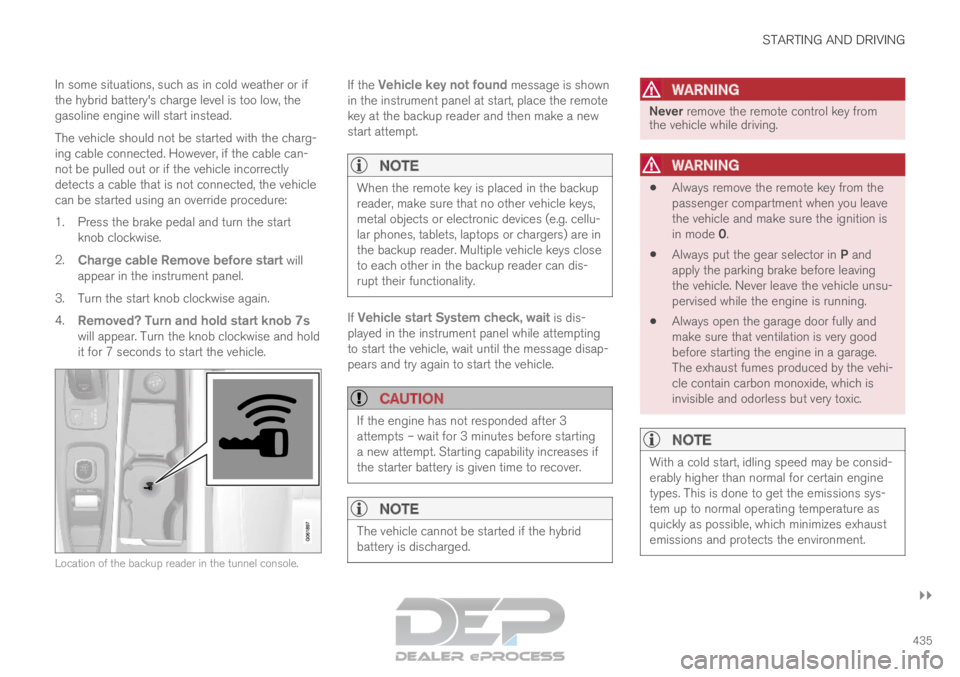
it for 7 seconds to start the vehicle. Location of the backup reader in the tunnel console. If the
Vehicle key not found message is shown
in the instrument panel at start, place the remote
key at the backup reader and then make a new
start attempt.
NOTE When the remote key is placed in the backup
reader, make sure that no other vehicle keys,
metal objects or electronic devices (e.g. cellu-
lar phones, tablets, laptops or chargers) are in
the backup reader. Multiple vehicle keys close
to each other in the backup reader can dis-
rupt their functionality.
If Vehicle start System check, wait is dis-
played in the instrument panel while attempting
to start the vehicle, wait until the message disap-
pears and try again to start the vehicle.
CAUTION If the engine has not responded after 3
attempts – wait for 3 minutes before starting
a new attempt. Starting capability increases if
the starter battery is given time to recover.
NOTE
The vehicle cannot be started if the hybrid
battery is discharged.
WARNING Never remove the remote control key from
the vehicle while driving.
WARNING
Always remove the remote key from the
passenger compartment when you leave
the vehicle and make sure the ignition is
in mode 0.
Always put the gear selector in P and
apply the parking brake before leaving
the vehicle. Never leave the vehicle unsu-
pervised while the engine is running.
Always open the garage door fully and
make sure that ventilation is very good
before starting the engine in a garage.
The exhaust fumes produced by the vehi-
cle contain carbon monoxide, which is
invisible and odorless but very toxic.
NOTE With a cold start, idling speed may be consid-
erably higher than normal for certain engine
types. This is done to get the emissions sys-
tem up to normal operating temperature as
quickly as possible, which minimizes exhaust
emissions and protects the environment.
Page 439 of 697

STARTING AND DRIVING
* Option/accessory.437
Ignition modes
The vehicle's ignition can be put in various
modes (levels) to make different functions availa-
ble.
To enable the use of a limited number of func-
tions when the engine is not running, the ignition
can be put in one of three different levels: 0, I
and II. These levels are referred to as "ignition
modes" in the Owner's Manual.
The following table shows which functions are
available in each ignition mode: Mode
Functions
0 The odometer, clock and tem-
perature gauge are illuminated A
.
The power* seats can be
adjusted.
The power windows can be used.
The center display is activated
and can be used A
.
The infotainment system can be
used A
.
In this mode, the functions are availa-
ble for a limited time and then switch
off automatically.
I The panoramic roof, power win-
dows, 12-volt electrical socket in
the passenger compartment,
Bluetooth, navigation, phone,
blower and windshield wipers can
be used.
The power seats can be adjusted.
The 12-volt electrical socket* in
the cargo compartment can be
used.
Electrical current will be taken
from the battery in this ignition
mode. Mode
Functions
II The headlights illuminate.
Warning/indicator lights illumi-
nate for 5 seconds.
A number of other systems are
activated. However, seat and rear
window heating can only be acti-
vated when the engine is running.
This ignition mode uses a lot of
current from the battery and
should be avoided whenever pos-
sible! A
Also activated when the door is opened.
Related information
Starting the vehicle (p. 434)
Adjusting the steering wheel (p. 201)
Jump starting using another battery (p. 481)
Selecting ignition mode (p. 438)
Page 480 of 697

||STARTING AND DRIVING
478
NOTE
When switching to higher octane fuel or
changing gasoline brands, it may be neces-
sary to fill the tank more than once before a
difference in engine operation is noticeable.
Fuel FormulationsDo not use gasoline that contains lead or manga-
nese as a knock inhibitor, and do not use lead
additives. Besides damaging the exhaust emis-
sion control systems on your vehicle, lead has
been strongly linked to certain forms of cancer.
Many fuels contain benzene as a solvent.
Unburned benzene has been strongly linked to
certain forms of cancer. If you live in an area
where you must fill your own gas tank, take pre-
cautions. These may include:
standing upwind away from the filler nozzle
while refueling
refueling only at gas stations with vapor
recovery systems that fully seal the mouth of
the filler neck during refueling
wearing neoprene gloves while handling a
fuel filler nozzle.
Use of AdditivesWith the exception of gas line antifreeze during
winter months, do not add solvents, thickeners, or other store-bought additives to your vehicle's
fuel, cooling, or lubricating systems. Overuse may
damage your engine, and some of these additives
contain organically volatile chemicals. Do not
needlessly expose yourself to these chemicals.
WARNING Never carry a cell phone that is switched on
while refueling your vehicle. If the phone rings,
this may cause a spark that could ignite gaso-
line fumes, resulting in fire and injury.
WARNING
Carbon monoxide is a poisonous, colorless,
and odorless gas. It is present in all exhaust
gases. If you ever smell exhaust fumes inside
the vehicle, make sure the passenger com-
partment is ventilated, and immediately return
the vehicle to a trained and qualified Volvo
service technician for correction.
Demanding drivingIn demanding driving conditions, such as when
towing a trailer or driving in hot weather or for
prolonged periods at high altitudes, it may be a
good idea to switch to a higher-octane fuel (AKI
6
91 or higher) or to switch to another brand of
gasoline in order to fully utilize the vehicle's
engine capacity and optimize traction.
Related information
Fuel (p. 476)
Emission controls (p. 479) 6
AKI (Anti Knock Index) is an average value of RON (Research Octane Nu\
mber) and MON (Motor Octane Number) - (RON)+(MON)/2
Page 498 of 697

AUDIO, MEDIA AND INTERNET
* Option/accessory.
496 Audio, media and Internet
The audio and media system consists of a media
player and a radio. A cellular phone can also be
connected through Bluetooth to use hands-free
functions or play music in the vehicle. When the
vehicle is connected to the Internet, it is also
possible to use apps to play media. Audio and media overview
The functions can be controlled using voice com-
mands, the steering wheel keypad or the center
display. The number of speakers and amplifiers
varies depending on the audio system installed in
the vehicle.
System updates
The audio and media system is continuously
improved. When the vehicle has an Internet con-
nection, system updates can be downloaded for
optimal functionality; see support.volvocars.com.
Related information
Media player (p. 518)
Radio (p. 501)
Phone (p. 532)
Internet-connected vehicle* (p. 541)
Apps (p. 498)
Voice control (p. 145)
Ignition modes (p. 437)
Driver distraction (p. 39)
Handling system updates via Download Cen-
ter (p. 613)
License agreement for audio and media
(p. 549) Sound settings
The sound system is precalibrated for optimal
sound reproduction, but these settings can be
personalized.
The system's volume is normally adjusted using
the volume control below the center display or
the right-side steering wheel keypad. This
applies, for example, when playing music or the
radio or during phone calls and active traffic mes-
sages.
Optimal sound reproductionThe audio system is precalibrated for optimal
sound reproduction using digital signal process-
ing. This calibration takes into account speakers,
amplifiers, passenger compartment acoustics, lis-
tener position, etc. for each combination of vehi-
cle model and audio system. There is also a
dynamic calibration that takes into account the
volume control setting and the vehicle's speed.
Personal settingsDifferent settings are available in Top view under
Settings Sound
depending on the vehicle's
sound system.