2019 VOLVO XC90 TWIN ENGINE charging
[x] Cancel search: chargingPage 457 of 697

STARTING AND DRIVING
}}
455
Available drive modes
WARNING Keep in mind that the vehicle does not emit
any engine noise when using the electric
motor and may therefore be difficult to detect
for children, pedestrians, cyclists or animals.
This is particularly true at low speeds, e.g. in
parking lots.
WARNING
Do not leave the vehicle in an unventilated
area with a drive mode activated and the com-
bustion engine switched off. The engine will
start automatically if the charge level in the
hybrid battery is low and the resulting exhaust
gases can be very harmful to people and ani-
mals.
HYBRID
This is the default mode in which the electric
motor and combustion engine work together.
The vehicle starts in Hybrid mode. The control
system uses both the electric motor and the gas-
oline engine - separately or in tandem - and cal-
culates optimal utilization with regard to perform-
ance, fuel consumption and comfort. At high
speeds, ground clearance is automatically low-
ered 3
to reduce air resistance. Driving capacity on
the electric motor alone is determined by factors such as the hybrid battery's charge level, the
need for heat/cooling in the passenger compart-
ment, etc.
If there is sufficient charge in the battery, it is
possible to drive solely on electric power. When
the accelerator pedal is pressed, only the electric
motor will be activated until the battery reaches a
certain charge level. Above this level, the current
in the battery cannot supply the power requested
by the accelerator pedal and the combustion
engine will start.
When the hybrid battery's charge level is low, the
combustion engine will start more frequently to
save the remaining current in the battery. Charge
the hybrid battery from a 120-240 volt outlet
using a charging cable, or activate
Charge in
Function view to reset the option of only using
the electric motor.
This drive mode is designed for low energy con-
sumption with an optimized mix between the
electric motor and gasoline engine, without com-
promising on climate comfort or driving experi-
ence. When faster acceleration is requested by
the driver, the electric driveline will be utilized to
help provide maximum additional power. The
vehicle also monitors the driving conditions and
automatically engages all-wheel drive if neces-
sary. All-wheel drive and extra electric power are
always available regardless of the battery's
charging status.
Information in the instrument panel
When driving in Hybrid mode, a hybrid gauge will
be displayed in the instrument panel. The gauge
will indicate the amount of electrical current
required when the driver depresses the accelera-
tor pedal. The marker between the lightning and
the drop shows how much current is available. The instrument panel gauge when both the electric
motor and the combustion engine are being used.
The instrument panel also shows how
much current is being restored to the
battery (regenerated) during light brak-
ing. 3
For vehicles with pneumatic suspension.
Page 462 of 697

STARTING AND DRIVING
* Option/accessory.
460 Energy distribution in hybrid mode
using map data*
The Hybrid drive mode is the vehicle's default
drive mode in which the electric motor and the
combustion engine work separately or together
in hybrid mode. If a destination has been
selected in the navigation system*, the Predictive
Efficiency 5
function can use map data to effec-
tively distribute the electric power throughout the
trip.
This can lower fuel consumption in comparison
with normal hybrid mode, in which the vehicle first
runs on electricity and then switches to the com-
bustion engine when the hybrid battery is dis-
charged.
If the distance to the destination is greater than
the calculated range on the electric motor, the
function will distribute electric power optimally for
the entire trip. This makes it possible to avoid sit-
uations in which normal hybrid mode would oth-
erwise use a large portion of the electric power
to e.g. use the electric motor at high speeds on a
highway and then use the combustion engine at
lower speeds during city driving.
The greatest fuel savings are attained when the
trip begins on a highway, is between 50 and 100
km (30 and 60 miles) long, and the hybrid battery
is fully charged at the start of the trip.
Requirements for the functionCertain conditions must be met for the function
to be possible: A destination must be set in the navigation
system and the distance to the destination
must be longer than the possible range
using only the electric motor.
Hybrid drive mode must be selected.
The
Hold and Charge functions must be
disabled.
The hybrid battery must be charged.
Usage tipsIf you commute and it is not possible to charge
the vehicle at work, enter your workplace as a
waypoint and your home as the destination. Dis-
charging of the hybrid battery will then be distrib-
uted over the entire commute to and from work.
Add similar commutes, i.e. the route between two
charges, as
Favorites in the navigation system to
facilitate access.
Related information
Drive modes (p. 454)
Economical driving (p. 467) 5
Certain markets only.
Page 469 of 697

STARTING AND DRIVING
}}
467
Activating and deactivating Hill
Descent Control using the function
button
There is a function button for assistance on
steep gradients with Hill Descent Control in
the center display's Function view if the vehicle
is not equipped with a drive mode control in the
tunnel console.
Selecting Hill Descent Control in the
center display's Function view
HDC only works at low speeds.
– Tap the Hill Descent Control button to
activate or deactivate the function. > An indicator light in the button will illumi-
nate when the function is activated.
When the engine is switched off, the function will
be automatically deactivated.
NOTE The function is deactivated when driving at
high speeds and must be reactivated at lower
speeds if so desired.
Related information
Hill Descent Control (p. 466)
Changing drive mode (p. 459) Economical driving
Drive economically and more environmentally
conscious by thinking ahead, avoiding rapid
starts and stops and adapting driving style and
speed to the current traffic conditions.
To help achieve the greatest distance with the
lowest fuel consumption with Twin Engine,
observe the following:
Charge
Charge the vehicle regularly by plugging it
into an electrical outlet. Make it a habit to
always begin trips with the hybrid battery fully
charged.
Locate charging stations along your route.
If possible, choose parking spots with charg-
ing stations.
NOTE Charge the vehicle from the electricity grid as
often as possible!
Page 470 of 697

||STARTING AND DRIVING
* Option/accessory.
468
Preconditioning
Whenever possible, precondition the vehicle
before driving by connecting the charging
cable to an electrical outlet.
Avoid parking the vehicle somewhere where
the interior will become too hot or too cold
while the vehicle is parked. If possible, park
the vehicle in a climate-controlled garage.
During a short drive after passenger com-
partment preconditioning, turn off the pas-
senger compartment fan or the air condition-
ing in a hot climate.
If preconditioning is not possible when it is
cold outside, use seat and steering wheel
heating first. Avoid heating the entire pas-
senger compartment to reduce the amount
of current being taken from the hybrid bat-
tery.
Driving
Choose the Pure drive mode to help mini-
mize electric power consumption.
Maintain a steady speed and a generous fol-
lowing distance to traffic ahead to minimize
braking. This drive mode has the lowest
power consumption.
Balance energy requirements using the
accelerator pedal. Use the indicator on the
instrument panel to see available electric
power and avoid starting the combustion
engine unnecessarily. The electric motor is more effective than the combustion engine,
especially at low speeds.
When braking is necessary, brake gently
using the brake pedal. This will help recharge
the hybrid battery. A regenerative function is
integrated in the brake pedal and can be
augmented by the electric motor's braking
capacity when the gear selector is in mode
B.
Higher speeds increase energy consumption
- air resistance increases with speed.
Activate the Hold function in the Function
view at high speeds when traveling farther
than is possible using the hybrid battery's
capacity.
Whenever possible, avoid using the Charge
function to charge the hybrid battery. Charg-
ing the battery using the combustion engine
increases fuel consumption and carbon diox-
ide emissions.
In a cold climate, reduce heating of the wind-
shield/rear window, mirrors, seats and the
steering wheel.
Maintain the correct pressure in the tires and
check pressure regularly.
The type of tires used could affect energy
consumption - consult a retailer for advice on
suitable tires.
Remove unnecessary items from the vehicle
- the heavier the load, the higher the fuel
consumption.
Roof loads increase air resistance and
increase fuel consumption. Remove roof
boxes, ski racks, etc. that are not in use.
Avoid driving with the windows open.
Do not keep the vehicle still on an upward
gradient by using the accelerator pedal. Use
the brakes instead.
Related information
Drive-E ‒ purer driving pleasure (p. 27)
Energy distribution in hybrid mode using map
data* (p. 460)
Factors affecting electric motor range
(p. 469)
Using the electric motor only (p. 469)
Hybrid gauge (p. 87)
Checking tire pressure (p. 567)
Page 472 of 697

||STARTING AND DRIVING
470
Factors the driver cannot control
There are several outside conditions that affect
range to varying degrees:
the current traffic situation
driving short distances
topography
ambient temperature and headwinds
road conditions and road surface.
The following table shows the approximate rela-
tionship between ambient temperature and driv-
ing range with normal climate settings and with
climate settings turned off.
Up to a certain limit, warmer ambient tempera-
tures increase the electric motor's driving range. Ambient tem-
perature
Climate set-
tings turned
offNormal cli-
mate set-
tings
30 °C (86 °F) 95 %
80 %
20 °C (68 °F) 100 % 90%
10 °C (50 °F) 90 % 80 %
0 °C (32 °F) 80 % 60 %
-10 °C (14 °F) 70 % 40 %
Factors the driver can control
The driver should be aware that the following fac-
tors help conserve energy and improve driving
range:
charging the battery regularly
preconditioning
Pure drive mode
climate control settings
speed and acceleration
the
Hold function
tires and tire pressure.
The following table shows the approximate rela-
tionship between constant speed and driving
range. Driving at a lower constant speed helps
increase the electric motor's driving range. Constant speed
100 km/h (62 mph)
50 %
80 km/h (50 mph) 70 %
60 km/h (37 mph) 90 %
50 km/h (31 mph) 100 %
NOTE
The figures shown in the tables pertain to
a new vehicle.
None of the figures are absolute and are
affected by e.g. driving style, environment
and other conditions.
Related information
Using the electric motor only (p. 469)
Economical driving (p. 467)
"Hold" and "Charge" functions (p. 471)
Drive modes (p. 454)
Page 483 of 697

STARTING AND DRIVING
}}
481
Jump starting using another battery
If the start battery is discharged, current from
another battery can be used to start the vehicle. Jumper cable connecting points.
CAUTION
The charging point of the vehicle is only
intended for jump starting the vehicle in ques-
tion. The charging point is not intended for
jump-starting another vehicle. Using the
charging point to start another vehicle could
cause a fuse to blow, which would cause the
charging point to stop working.
If a fuse has blown, 12 V Battery Fuse failure
Service required will be displayed in the instru-
ment panel. Volvo recommends contacting an
authorized Volvo workshop. To avoid short circuits or other damage, the fol-
lowing steps are recommended when jump star-
ting the battery:
1.
Put the ignition in mode 0.
2.
Make sure the auxiliary battery (the battery
used to jump start the discharged battery)
has a voltage of 12 volts.
3. If the auxiliary battery is in another vehicle, turn off that vehicle's engine and make sure
that the vehicles are not touching each other.
4. Clamp the red jumper cable onto the auxiliary battery's positive (+) terminal (1).
CAUTION Connect the jump cable carefully to prevent
short circuits with other components in the
engine compartment.
5. Fold back the cover over your vehicle's posi-
tive (+) jump start terminal (2).
6.
Clamp the other end of the red jumper cable
to your vehicle's positive (+) jump start termi-
nal (2).
7. Clamp the black jumper cable onto the auxili- ary battery's negative (-) terminal (3).
8. Clamp the other end of the black jumper cable to your vehicle's negative (-) ground
point (4). 9. Make sure the jumper cables are securely
attached to help prevent sparks while jump
starting.
10. Start the engine of the assisting vehicle and let it run for a few minutes at a higher idling
speed than normal, about 1500 rpm.
11. Start your vehicle's engine. If the engine does not start, allow an additional 10
minutes of charging time and then try to start
the engine again.
NOTE When the engine is started under normal
conditions, the vehicle's electrical drive motor
is prioritized – the gasoline engine remains
off. This means that the electric motor has
"started" and the vehicle is ready to be driven
once the start knob has been turned clock-
wise. Start of the electric motor is indicated
by the indicator lights on the instrument panel
going out and its preselected theme illuminat-
ing.
CAUTION
Do not touch the connections between the
cable and the vehicle during the start attempt.
Risk of sparking.
Page 518 of 697

AUDIO, MEDIA AND INTERNET
* Option/accessory.
516 SiriusXM Travel Link
®
* - Fuel 5
This SiriusXM Travel Link service provides infor-
mation and guidance to service stations near the
vehicle providing the type of fuel that you prefer/
require for your vehicle.
From the SiriusXM Travel Link home screen, to
show fuel information:
– Tap the Fuel button to display the main fuel
screen.
The following categories are shown:
Search (the magnifying glass icon)
Nearby
Recommended
Favorites
Brands
Tap one of the alternatives to display its screen.
NOTE In each of the categories listed, tapping the
Select fuel type button near the bottom of
the screen opens a sub-view where you can
specify the type of fuel preferred/required
(Regular, Midrange, Premium, Diesel,
Electric 120V, etc.) Tap Done to return to
the previous screen.
SearchTap the magnifying glass icon. If the function is
supported in the current context, a keyboard will
appear on the screen. Enter the text of your
choice and tap Search for detailed information if
available.
NearbyTap for a list of service stations in the vicinity of
the vehicle, with the nearest station at the top of
the list.
The following information will be provided where
available:
For vehicles using gasoline, the price infor-
mation for regular gasoline (unless another
grade/type of fuel has been selected in
Select fuel type)
For electric vehicles/hybrids, information
about charging stations, showing the total
number of charging ports and the number of
ports currently not in use
the distance to the station
a star icon to set the service station as a
favorite
Tap the name of a service station to display more
detailed information.
For guidance to the service station, tap the Start
navigation or Add as waypoint buttons. See the Sensus Navigation* supplement for additional
information about using the navigation system.
RecommendedTap for a list of service stations near the vehicle,
displayed according to the price of regular gaso-
line (unless another grade/type of fuel has been
selected in Select fuel type) or of stations
offering the greatest number of available charg-
ing ports for electric vehicles/hybrids. The station
offering the lowest price/most available charging
ports will be displayed at the top of the list. Tap
the name of a service station to display more
detailed information.
FavoritesTap for a list of service stations that have been
stored as favorites. Tap the name of a service
station to display more detailed information.
In addition to the
Select fuel type button at the
bottom of the screen, tap the Edit button to
delete individual stations from the list or tap
Delete to clear the list. Tap Done to return to
the previous screen.
Brands1. Tap Brands to display a list of service sta-
tion brands in the area. 5
This service is not available in Canada.
Page 629 of 697
MAINTENANCE AND SERVICE
}}
627
Start battery
The vehicle has a single-pole electrical system
that uses the chassis and engine mount as con-
ductors.
The start battery is used to start the electrical
system and power electrical equipment in the
vehicle. The hybrid battery is used to start the
combustion engine.
The start battery should only be replaced by a
workshop 15
.
The start battery is a 12 V AGM (Absorbed Glass
Mat) battery, dimensioned for regenerative charg-
ing and to support the function of the vehicle's
various systems.
The service life and performance of the start bat-
tery are affected by factors such as driving style,
driving conditions, climate, battery discharges,
number of starts, etc.
Never disconnect the start battery while the
engine is running.
Make sure the cables to the start battery are
correctly connected and the clamps are
securely tightened.
WARNING
Batteries generate hydrogen gas, which
is flammable and explosive.
Do not connect the jumper cable to any
part of the fuel system or to any moving
parts. Avoid touching hot manifolds.
Battery fluid contains sulfuric acid. Do not
allow battery fluid to contact eyes, skin,
fabrics or painted surfaces.
If contact occurs, flush the affected area
immediately with water. Obtain medical
help immediately if eyes are affected.
Never expose the battery to open flame
or electric spark. Do not smoke near the
battery. Failure to follow the instructions
for jump starting can lead to injury.
Connection points
WARNING PROPOSITION 65 WARNING
Battery posts, terminals, and related accesso-
ries contain lead and lead compounds, chemi-
cals known to the state of California to cause
cancer and reproductive harm. Wash hands
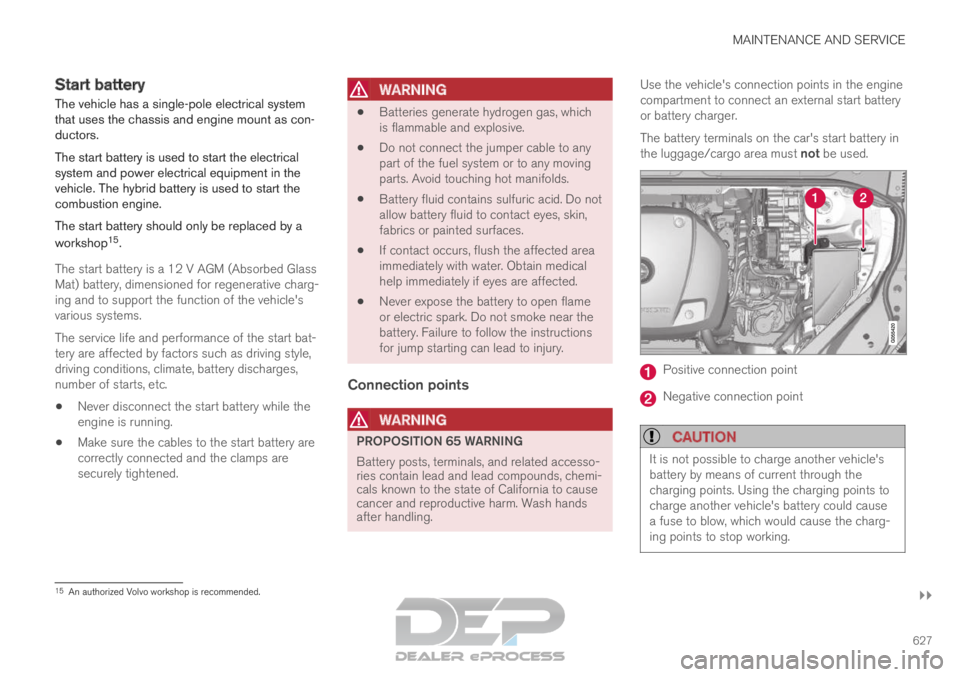
after handling.Use the vehicle's connection points in the engine
compartment to connect an external start battery
or battery charger.
The battery terminals on the car's start battery in
the luggage/cargo area must not be used.
Positive connection point
Negative connection point
CAUTION
It is not possible to charge another vehicle's
battery by means of current through the
charging points. Using the charging points to
charge another vehicle's battery could cause
a fuse to blow, which would cause the charg-
ing points to stop working.
15
An authorized Volvo workshop is recommended.