Page 260 of 394
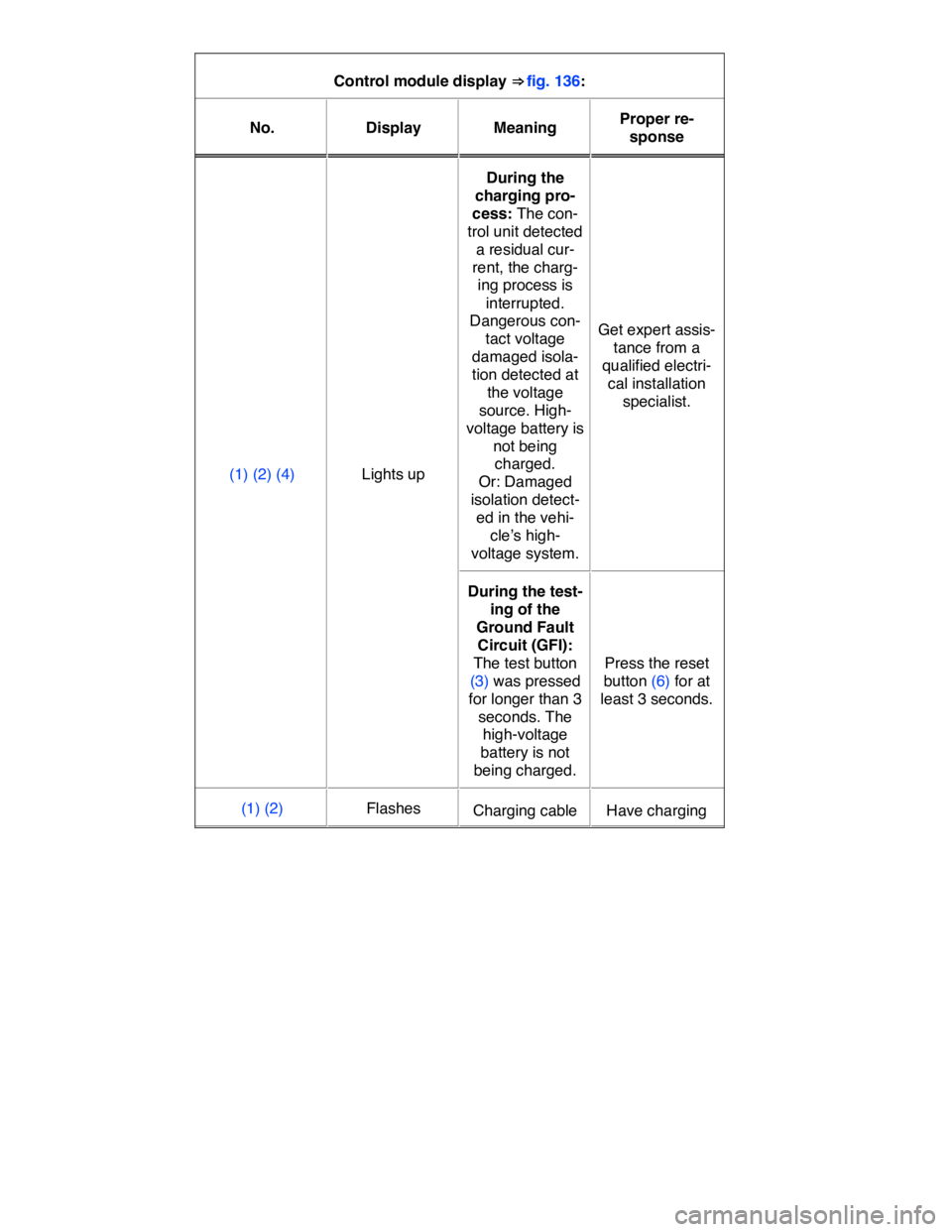
Control module display ⇒ fig. 136:
No. Display Meaning Proper re-
sponse
(1) (2) (4) Lights up
During the
charging pro-
cess: The con-
trol unit detected
a residual cur-
rent, the charg-
ing process is
interrupted.
Dangerous con-
tact voltage
damaged isola-
tion detected at
the voltage
source. High-
voltage battery is
not being
charged.
Or: Damaged
isolation detect-
ed in the vehi-
cle’s high-
voltage system.
Get expert assis-
tance from a
qualified electri-
cal installation
specialist.
During the test-
ing of the
Ground Fault
Circuit (GFI):
The test button
(3) was pressed
for longer than 3
seconds. The
high-voltage
battery is not
being charged.
Press the reset
button (6) for at
least 3 seconds.
(1) (2) Flashes Charging cable Have charging
Page 261 of 394
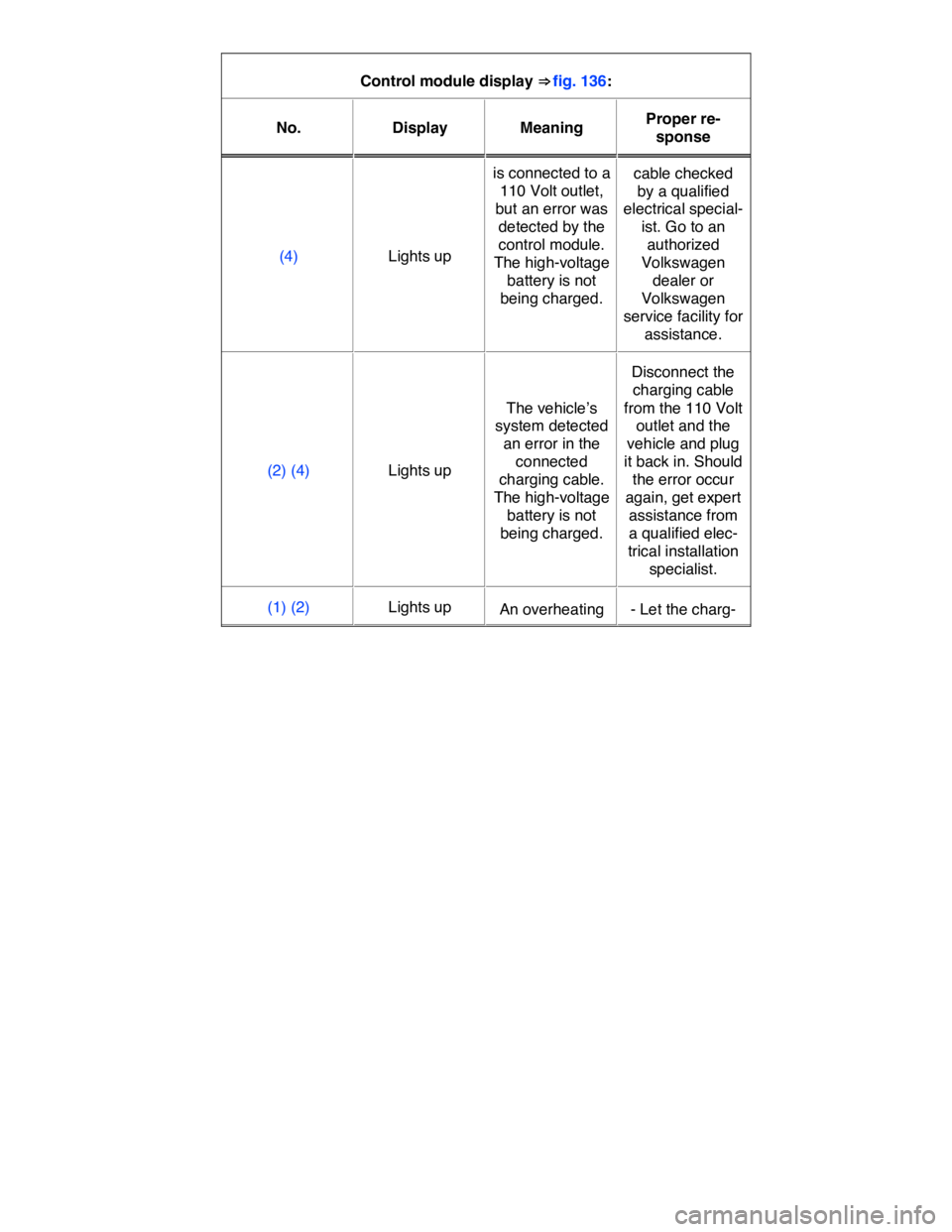
Control module display ⇒ fig. 136:
No. Display Meaning Proper re-
sponse
(4) Lights up
is connected to a
110 Volt outlet,
but an error was
detected by the
control module.
The high-voltage
battery is not
being charged.
cable checked
by a qualified
electrical special-
ist. Go to an
authorized
Volkswagen
dealer or
Volkswagen
service facility for
assistance.
(2) (4) Lights up
The vehicle’s
system detected
an error in the
connected
charging cable.
The high-voltage
battery is not
being charged.
Disconnect the
charging cable
from the 110 Volt
outlet and the
vehicle and plug
it back in. Should
the error occur
again, get expert
assistance from
a qualified elec-
trical installation
specialist.
(1) (2) Lights up An overheating - Let the charg-
Page 262 of 394
Control module display ⇒ fig. 136:
No. Display Meaning Proper re-
sponse
(4) Flashes
of the charging
cable was de-
tected. The high-
voltage battery is
not being
charged. An
overheating can
be caused by:
- A damaged 110
Volt outlet
- Ambient tem-
perature above
113 °F (45 °C)
- A damaged
charging cable
ing cable cool
down.
- Should the
error occur
again, have
charging cable
checked by a
qualified electri-
cal specialist. Go
to an authorized
Volkswagen
dealer or
Volkswagen
service facility for
assistance.
(1) Lights up
The system de-
tected fluctua-
tions in the volt-
age. The high-
voltage battery is
not being
charged
- The charging
process will con-
tinue automati-
cally once the
voltage is stable
again.
- If necessary try
connecting the
cable to another
110 Volt outlet.
- Should the
error occur
again, get expert
assistance from
a qualified elec-
trical installation
specialist.
(4) Flashes
(2) Flashes Excess voltage - Disconnect the
Page 263 of 394
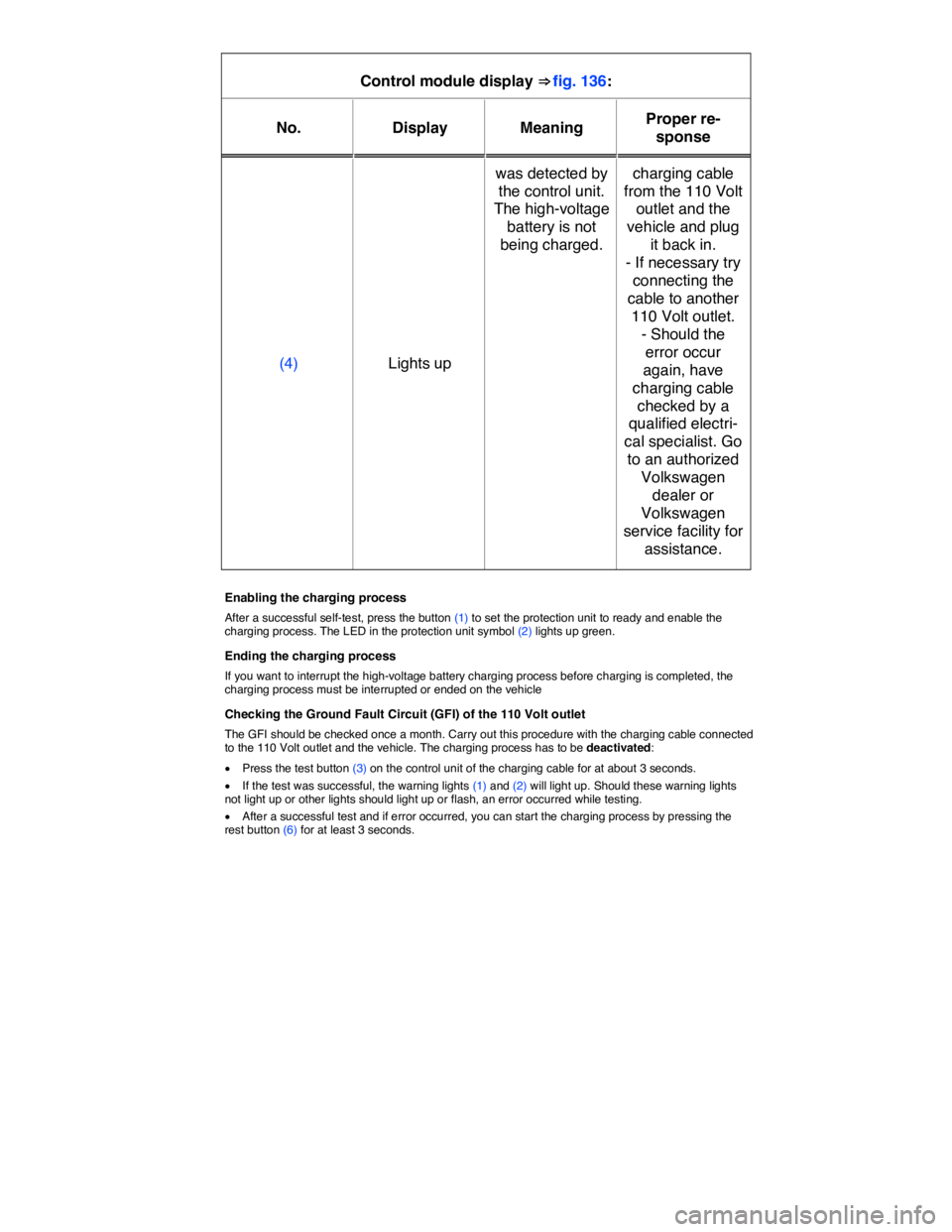
Control module display ⇒ fig. 136:
No. Display Meaning Proper re-
sponse
(4) Lights up
was detected by
the control unit.
The high-voltage
battery is not
being charged.
charging cable
from the 110 Volt
outlet and the
vehicle and plug
it back in.
- If necessary try
connecting the
cable to another
110 Volt outlet.
- Should the
error occur
again, have
charging cable
checked by a
qualified electri-
cal specialist. Go
to an authorized
Volkswagen
dealer or
Volkswagen
service facility for
assistance.
Enabling the charging process
After a successful self-test, press the button (1) to set the protection unit to ready and enable the charging process. The LED in the protection unit symbol (2) lights up green.
Ending the charging process
If you want to interrupt the high-voltage battery charging process before charging is completed, the charging process must be interrupted or ended on the vehicle
Checking the Ground Fault Circuit (GFI) of the 110 Volt outlet
The GFI should be checked once a month. Carry out this procedure with the charging cable connected to the 110 Volt outlet and the vehicle. The charging process has to be deactivated:
x Press the test button (3) on the control unit of the charging cable for at about 3 seconds.
x If the test was successful, the warning lights (1) and (2) will light up. Should these warning lights not light up or other lights should light up or flash, an error occurred while testing.
x After a successful test and if error occurred, you can start the charging process by pressing the rest button (6) for at least 3 seconds.
Page 317 of 394

should always be replaced by a qualified technician, since the vehicle's onboard electrical system management has to be reset after replacing the battery. Only a qualified service facility is able to perform this necessary adjustment. Therefore, Volkswagen recommends to always have the 12 volt vehicle battery replaced by an authorized Volkswagen dealer or an authorized Volkswagen Service Facility.
Only use maintenance-free vehicle batteries meeting standards TL 825 06 and VW 7 50 73. These standards must date from July 2012 or later.
Disconnecting the 12 Volt vehicle battery
If the battery must be disconnected from the vehicle's electrical system, note the following:
x Switch off all electrical systems and devices and the ignition.
x Unlock the vehicle before disconnecting the battery; otherwise the alarm system will go off.
x First disconnect the negative cable (-) and then the positive cable (+) ⇒ .
Connecting the 12 volt vehicle battery
x Prior to reconnecting the battery, switch off all electrical systems and devices and the ignition.
x Connect the positive cable (+) first and then the negative cable (-) ⇒ .
After the battery is connected and the ignition is switched on, different indicator lights may light up. They should go out after you drive a short distance at 10–12 mph (15–20 km/h). If the indicator lights do not go out, contact an authorized Volkswagen dealer or an authorized Volkswagen Service Facility and have the vehicle checked.
If the battery was disconnected for a long time, the next scheduled service may not be correctly calcu-
lated and displayed ⇒ Instrument cluster. The maximum permissible service and maintenance inter-
vals are shown in the ⇒ Booklet Warranty and Maintenance.
Vehicles with Keyless Access
If the ignition will not start after reconnecting the vehicle battery, lock the vehicle from the outside and
unlock it again ⇒ Unlocking or locking the vehicle with Keyless Access. Then try to start the ignition again. If the ignition cannot be switched on, contact an authorized Volkswagen dealer, an authorized Volkswagen Service Facility, or another qualified workshop for assistance.
Automatic electrical load deactivation
If the vehicle battery drain is high, the intelligent onboard electrical system management automatically takes steps to help prevent battery drain.
x The idle speed is increased so that the alternator provides more power.
x The power to devices that consume a lot of electricity is cut back or switched off completely.
The onboard electrical system management cannot always keep the battery from being drained. For example, the battery will drain if the electric motor is not activated, but the ignition is switched on or the parking lights are left on for a long time when parked.
What drains the vehicle battery?
x Long periods when the electric motor is not activated, especially when the ignition is on.
x Using electrical systems or devices when the electric motor is switched off.
x Leaving the vehicle unlocked for several days when not in use.
x The selector lever is left for a long period of time in any position other than Park (P) when the
ignition is switched off ⇒ Selector lever.