Page 101 of 261

Instruments and controls99
Adjust position of Head-up
display image
1. Adjust the driver's seat.
2. Start the engine.
3. Press ä or å to centre the image.
It can only be adjusted up and
down, not side to side.
9 Warning
If the head-up display image is too
bright or too high in your field of
view, it may obstruct your view
when it is dark outside. Be sure to
keep the head-up display image dim and placed low in your field of
view.
Adjust brightness
The Head-up display image will
automatically dim and brighten to
compensate for outside lighting.
Brightness can also be adjusted
manually as needed:
Press e to brighten the display. Press
æ to dim the display.
The image can temporarily light up
depending on angel and position of
sunlight.
Switching off
Press æ and hold to turn the Head-up
display off.
Language Preferred language can be set in
vehicle personalisation menu 3 101.
Units
Units can be changed in vehicle
personalisation menu 3 101.
Care of Head-up display
Clean the screen of the Head-up
display with a soft cloth sprayed with
glass cleaner. Wipe the lens gently, then dry it.
System limitations Head-up display may not operate
properly when:
● The lens in the instrument panel is covered by objects or not
clean.
● Display brightness is too dim or bright.
● Image is not adjusted to the proper height.
● The driver wears polarized sunglasses.
If the head-up image is not correct for
other reasons, contact a workshop.
Page 111 of 261

Lighting109LightingExterior lighting.......................... 109
Light switch .............................. 109
Automatic light control .............110
High beam ............................... 110
Headlight flash ......................... 110
Headlight range adjustment ....111
Headlights when driving abroad .................................... 111
Daytime running lights .............111
Adaptive forward lighting .........111
Hazard warning flashers ..........112
Turn lights ................................ 113
Front fog lights ......................... 113
Rear fog light ........................... 114
Parking lights ........................... 114
Reversing lights .......................114
Misted light covers ...................114
Interior lighting ........................... 115
Instrument panel illumination control ..................................... 115
Interior lights ............................ 115
Reading lights .......................... 115
Sunvisor lights ......................... 116
Lighting features ........................116
Centre console lighting ............116Entry lighting ............................ 116
Exit lighting .............................. 116
Battery discharge protection ....117Exterior lighting
Light switch
Turn light switch:
AUTO:automatic light control
switches automatically
between daytime running
light and headlight8:sidelights9:headlights
Control indicator 8 3 92.
Tail lights Tail lights are illuminated together
with low / high beam and sidelights.
Page 117 of 261
Lighting115Interior lighting
Instrument panel
illumination control
Brightness of the following lights can
be adjusted in position AUTO when
the light sensor detects night
conditions, or in position 8 or 9:
● instrument panel illumination
● Info Display
● illuminated switches and operation elements
Turn thumb wheel A and hold until
the desired brightness is obtained.
Interior lights
During entry and exit of the vehicle,
the front and rear courtesy lights
automatically switch on and then off
after a delay.
Notice
In the event of an accident with
airbag deployment the courtesy
lights are turned on automatically.
Front courtesy lightw:automatic switching on
and offpress u:onpress v:offRear courtesy lights
Illuminate in conjunction with the front courtesy light.
Reading lights
Operated by pressing s and t in the
courtesy lights.
Page 118 of 261

116Lighting
Illustration shows rear courtesy lights.
Sunvisor lights Illuminates when the cover is opened.
Lighting features
Centre console lighting A spotlight integrated in the overheadconsole illuminates the centre
console when headlights are
switched on.
Entry lighting
Welcome lighting Some or all of the following lights are
switched on for a short time by
unlocking the vehicle with the radio
remote control:
● headlights
● tail lights
● number plate lights
● instrument panel light
● interior lights
The number of activated lights
depends on the surrounding light
conditions.
The lighting switches off immediately
when the ignition is switched on.
Starting off 3 16.This function can be activated or
deactivated in the vehicle
personalisation.
Vehicle personalisation 3 101.
The following lights will additionally
switch on when the driver's door is
opened:
● illumination of some switches
● Driver Information Centre
● door pocket lights
Exit lighting The following lights are switched on if
the key is removed from the ignition
switch:
● interior lights
● instrument panel light
They will switch off automatically after
a delay. This function works only in
the dark.
Page 128 of 261
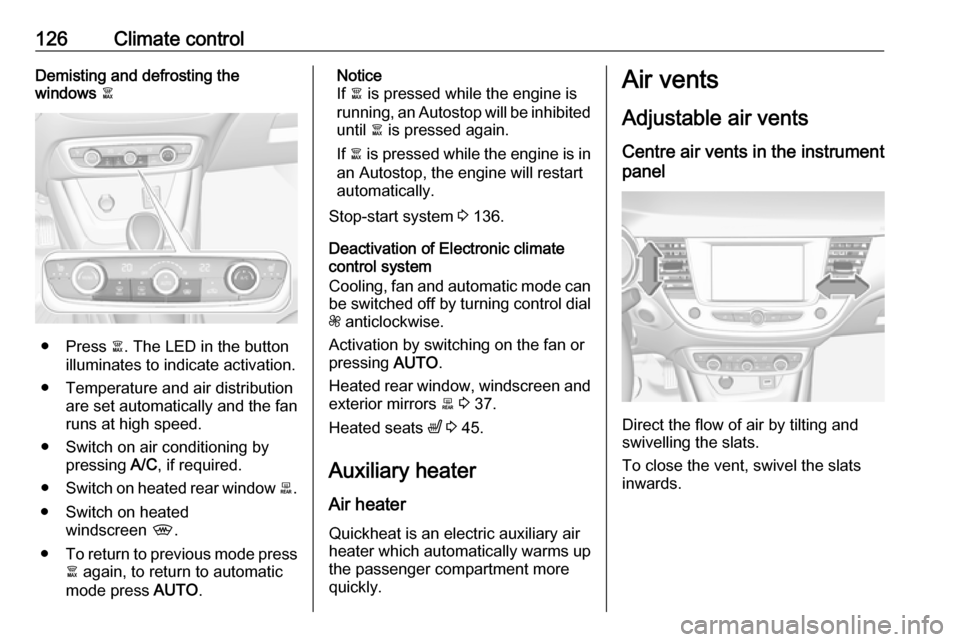
126Climate controlDemisting and defrosting the
windows à
● Press à. The LED in the button
illuminates to indicate activation.
● Temperature and air distribution are set automatically and the fan
runs at high speed.
● Switch on air conditioning by pressing A/C, if required.
● Switch on heated rear window b.
● Switch on heated windscreen ,.
● To return to previous mode press
à again, to return to automatic
mode press AUTO.
Notice
If à is pressed while the engine is
running, an Autostop will be inhibited until à is pressed again.
If à is pressed while the engine is in
an Autostop, the engine will restart
automatically.
Stop-start system 3 136.
Deactivation of Electronic climate
control system
Cooling, fan and automatic mode can
be switched off by turning control dial
Z anticlockwise.
Activation by switching on the fan or
pressing AUTO.
Heated rear window, windscreen and exterior mirrors b 3 37.
Heated seats ß 3 45.
Auxiliary heater Air heater Quickheat is an electric auxiliary air
heater which automatically warms up
the passenger compartment more
quickly.Air vents
Adjustable air ventsCentre air vents in the instrument
panel
Direct the flow of air by tilting and
swivelling the slats.
To close the vent, swivel the slats
inwards.
Page 129 of 261
Climate control127Outer air vents in the instrument
panel
Direct the flow of air by tilting and
swivelling the slats.
To close the vent, swivel the slats
outwards.
Centre air vent on top of the
instrument panel
Close air flow by turning the thumb
wheel to the front.
Air vent in the glovebox
The air vent can be opened or closed by turning.
At least two air vents must be open
while cooling is on.
9 Warning
Do not attach any objects to the
slats of the air vents. Risk of
damage and injury in case of an
accident.
Page 169 of 261

Driving and operating167Display indicationThe instructions on the display show: ● General hints and warning messages.
● The demand to stop the vehicle, when a parking slot is detected.
● The direction of driving during the
parking manoeuvre.
● The demand to shift into reverse or first gear.
● The demand to stop or to drive slowly.
● The successful completion of the
parking manoeuvre indicated by
a pop-up symbol and a chime.
● The cancelling of a parking manoeuvre.
Deactivation The current park assist manoeuvre is
cancelled via the button to return to
the previous screen in the Colour Info Display. To deactivate the system
completely, press r Off in the
centre console.The system is deactivated
automatically:
● if the ignition is switched off
● if stalling the engine
● if no manoeuvre is started within 5 minutes of selection of the typeof manoeuvre
● after a prolonged stop of the vehicle during a manoeuvre
● if the electronic stability control (ESC) is triggered
● if the speed of the vehicle exceeds the stated limit
● when the driver interrupts movement of the steering wheel
● after 4 manoeuvre cycles
● on opening the driver's door
● if one of the front wheels encounters an obstacle
● parking manoeuvre successfully ended
Deactivation by the driver or by the system during manoeuvring will beindicated on the display. Additionally,
an acoustic signal sounds.The system is switched off
automatically when towing a
electrically connected trailer.
Contact your dealer to switch off the
system for a prolonged period.
Fault
In the event of a fault, $ flashes for a
few seconds, accompanied by an
acoustic signal. If the fault occurs
during the use of the system, $
extinguishes.
In the event of a fault in the power
steering, c flashes in the instrument
panel, accompanied by a message.9 Warning
Under certain circumstances,
various reflective surfaces on
objects or clothing as well as
external noise sources may cause the system to fail to detect
obstacles.
Special attention must be paid to
low obstacles which can damage
the lower part of the bumper.
Page 172 of 261

170Driving and operatingFault
In the event of a fault, B flashes for a
few moments in the instrument panel,
accompanied by R and a display
message. Contact a dealer or a
qualified workshop to have the
system checked.
Panoramic view system
This system allows views of the
vehicle's surroundings to be
displayed as a nearly 180° picture in
the Info Display, like a bird's eye view.
The system uses: ● rear camera, installed in the tailgate
● ultrasonic parking sensors in the rear bumper
The screen in the Info Display is
divided into two parts: on the right
there is a view from above the vehicle,
and on the left there is the view from
the rear displayed. The parking
sensors complete the information on
the view from above the vehicle.Activation
Panoramic view system is activated
by:
● engaging reverse gear
● driving up to 6 mph
Functionality
Different views can be selected in the left part of the display. Change the
type of view at any time during a
manoeuvre by pressing the touch
field in the left lower zone of the
display:
● Rear view
● Auto mode
● Zoom view
● 180° view
The display is immediately updated
with the type of view selected.
Auto mode is activated by default. In
this mode, the system selects the
best view, standard or zoom, to
display according to the information
from the parking sensors.
The state of the system is not kept in
memory when the ignition is switched
off.
Rear view

