Page 407 of 700
4075-7. “SETUP” menu
5
Audio system
YARIS_F_OM_Europe_OM52K19E
Select “Reset” using the tune/scroll knob. (P. 399)
● Initializing the sound settings
Select “Sound settings” using the tune/scroll knob and press
(“Yes”).
For details about sound settings: P. 364
●Initializing the device information
Select “Car Device Info” using the tune/scroll knob and press
(“Yes”).
Automatic connection of a portable device, automatic connection confirma-
tion display and the passkey will be initialized.
● Initializing the all settings
Select “Reset all” using the tune/scroll knob and press
(“Yes”).
Initialization
Page 409 of 700
4095-7. “SETUP” menu
5
Audio system
YARIS_F_OM_Europe_OM52K19E
Select “Delete call history” using the tune/scroll knob. (P. 399)
● Deleting outgoing call history
Select “Outgoing Calls” using the tune/scroll knob.
Select the desired phone number using the knob and press
(“Yes”).
To delete all outgoing call history data, press (“All”) and then
press (“Yes”).
● Deleting incoming call history
Select “Incoming Calls” using the tune/scroll knob.
Select the desired phone number using the knob and press
(“Yes”).
To delete all incoming call history data, press (“All”) and then
press (“Yes”).
● Deleting missed call history
Select “Missed Calls” using the tune/scroll knob.
Select the desired phone number using the knob and press
(“Yes”).
To delete all missed call history data, press (“All”) and then
press (“Yes”).
● Deleting a number from all call histories (Outgoing calls, Incoming
calls and Missed calls)
Select “All Calls” using the tune/scroll knob.
Select the desired phone number using the knob and press
(“Yes”).
To delete all of the call histories data, press (“All”) and then
press (“Yes”).
Deleting call histories
1
2
1
2
1
2
1
2
Page 411 of 700
4115-7. “SETUP” menu
5
Audio system
YARIS_F_OM_Europe_OM52K19E
Select “Ring tone volume” using the tune/scroll knob. (P. 399)
Change the ring tone volume.
To decrease the volume: Turn the knob counterclockwise.
To increase the volume: Turn the knob clockwise.
To set the volume, press (“Back”).
Select “Ring tone” using the tune/scroll knob. ( P. 399)
Using the knob, select a ring tone [1 - 3]. To set the selected ring
tone, press (“Back”).
Select “Transfer history” using the tune/scroll knob ( P. 399) and
press (“Yes”).
■ Phone number
Up to 1000 names can be stored.
■ Call history
Up to 10 numbers can be stored in each of the outgoing, incoming and
missed call history memories.
■ Limitation of number of digits
A phone number that exceeds 24 digits cannot be registered.
Setting ring tone volume
Setting ring tone
Transferring call histories
1
2
1
2
Page 412 of 700
4125-8. Bluetooth® Audio
YARIS_F_OM_Europe_OM52K19E
Operating a Bluetooth® enabled portable
player
: If equipped
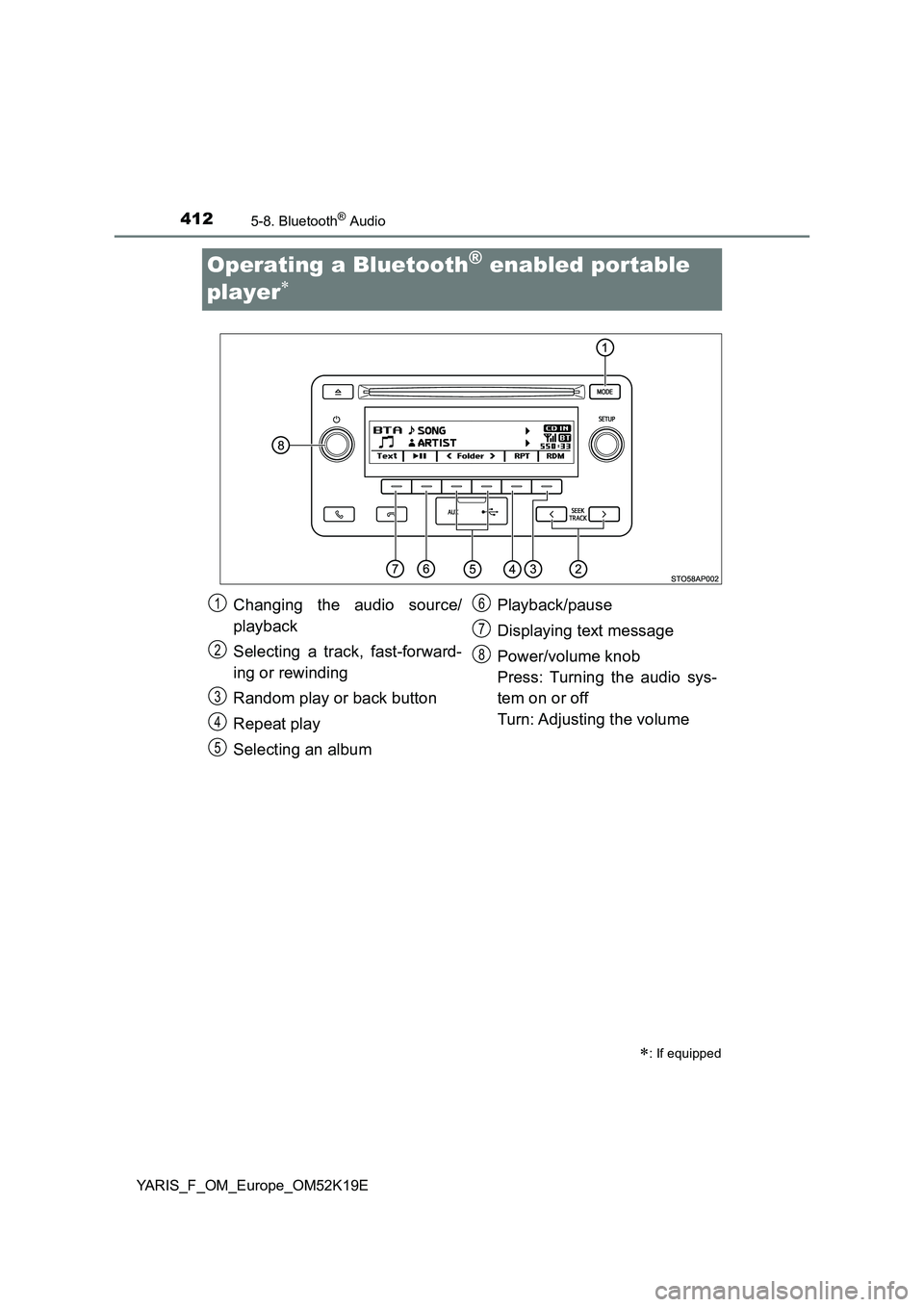
Changing the audio source/
playback
Selecting a track, fast-forward-
ing or rewinding
Random play or back button
Repeat play
Selecting an album
Playback/pause
Displaying text message
Power/volume knob
Press: Turning the audio sys-
tem on or off
Turn: Adjusting the volume
1
2
3
4
5
6
7
8
Page 413 of 700
4135-8. Bluetooth® Audio
5
Audio system
YARIS_F_OM_Europe_OM52K19E
Press (“”) to select the desired
album.
Press the “ ” or “” button of “SEEK TRACK” to select the desired
track.
Press and hold the “ ” or “” button of “SEEK TRACK”.
Pressing (“RDM”) changes modes in the following order:
Album random All track randomOff.
Pressing (“RPT”) changes modes in the following order:
Track repeat Album repeatOff.
Selecting an album
Selecting a tracks
Fast-forwarding and rewinding tracks
Random play
Repeat play
Page 414 of 700
4145-8. Bluetooth® Audio
YARIS_F_OM_Europe_OM52K19E
Press ( ).
Press (“Text”) to display or hide the album title.
If there are continuing texts, is displayed.
Press and hold the button to display the remaining texts.
■ Bluetooth® audio system functions
Depending on the portable player that is connected to the system, certain
functions may not be available.
■ Display
P. 373
Playing and pausing tracks
Switching the display
Page 415 of 700
4155-9. Bluetooth® Phone
5
Audio system
YARIS_F_OM_Europe_OM52K19E
Making a phone call
Select “Phonebook” using the tune/scroll knob.
Select the desired name using the knob and press the off-hook
switch.
By pressing (“Add S. Dial”) and one of the speed dial buttons
(from [1] to [5]) while the desired name is selected, it
can be registered as a speed dial.
Press (“A-Z”) to display the registered names in alphabetical
order of the initial.
Select “Speed Dials” using the tune/scroll knob.
Press the desired preset button (from [1] to [5]) and
press the off-hook switch.
To delete a registered speed dial, after selecting the desired preset
button (from [1] to [5]) press (“Delete”) and then
press (“Yes”).
: If equipped
To enter the “Phone” or “TEL” mode, press the off-hook switch.
Dialing by selecting a name
Speed dialing
1
2
1
2
Page 417 of 700
4175-9. Bluetooth® Phone
5
Audio system
YARIS_F_OM_Europe_OM52K19E
Receiving a phone call
Press the off-hook switch.
Press the on-hook switch.
Press the off-hook switch.
Pressing the off-hook switch again returns you to the previous call.
To decrease the volume: Turn the power/volume knob counterclock-
wise.
To increase the volume: Turn the power/volume knob clockwise.
: If equipped
Answering the phone
Refusing the call
Receiving a call when on another call
Adjusting the ring tone volume when receiving a call