Page 128 of 700
1282. Instrument cluster
YARIS_F_OM_Europe_OM52K19E
■Current idling stop time
Displays the current idling stop time (engine stop time due to the
Stop & Start system)
■Total idling stop time (after reset*/after start)
Displays the total idling stop time (engine stop time via the Stop &
Start system) after resetting and engine startup.
■Idling stop time fuel savings (after reset*/after start)
Displays the fuel savings (reference) during idling stop time after
resetting and engine startup.
■Reason of Stop & Start system operation cancel
Displays the reason for the Stop & Start system being canceled in
the meter display.
*: The function can be reset by pressing and holding the of the meter
control switches when the reset item is displayed.
Stop & Start system information (if equipped)
Page 131 of 700

1312. Instrument cluster
2
Instrument cluster
YARIS_F_OM_Europe_OM52K19E
The time can be adjusted through the for the multi-information dis-
play.
Adjust the clock mode (12 or 24
hour)
Adjust the hours
Adjust the minutes
■Time adjustment
Press “ ” or “” of the meter control switches (P. 126), select
“Clock” and press .
Press “ ” or “” on the meter control switches, select hours*, min-
utes*, 12/24-hour clock, “ ” or “” of the meter control switches to
adjust.
*: Press and hold the “ ” or “” button to scroll up or down.
When the adjustments are finished, press and check the time.
• When the button is pressed, the current displayed time is set.
• The clock display and adjustment is possible when the engine switch is
turned to “ON” position (vehicles without a smart entry & start system) or
IGNITION ON mode (vehicles with a smart entry & start system).
• Adjustments may be suspended when a pop-up display, etc., appears
during the adjustments.
The currently displayed time may be set.
Clock
1
2
3
1
2
3
Page 134 of 700
1342. Instrument cluster
YARIS_F_OM_Europe_OM52K19E
WARNING
■Caution for use while driving
● When operating the multi-information display while driving, pay extra
attention to the safety of the area around the vehicle.
● Do not look continuously at the multi-information display while driving as
you may fail to see pedestrians, objects on the road, etc., ahead of the
vehicle.
■ The information display at low temperatures
Allow the interior of the vehicle to warm up before using the liquid crystal
information display. At extremely low temperatures, the display monitor may
respond slowly, and display changes may be delayed.
For example, there is a lag between the driver’s shifting and the new gear
number appearing on the display. This lag could cause the driver to down-
shift again, causing rapid and exce ssive engine braking and possibly an
accident resulting in death or injury.
■ Cautions during setting up the display
As the engine needs to be running during setting up the display, ensure that
the vehicle is parked in a place with adequate ventilation. In a closed area
such as a garage, exhaust gases including harmful carbon monoxide (CO)
may collect and enter the vehicle. This may lead to death or a serious
health hazard.
NOTICE
■ While setting up the display
To prevent battery discharge, ensure that the engine is running while setting
up the display features.
Page 136 of 700
1362. Instrument cluster
YARIS_F_OM_Europe_OM52K19E
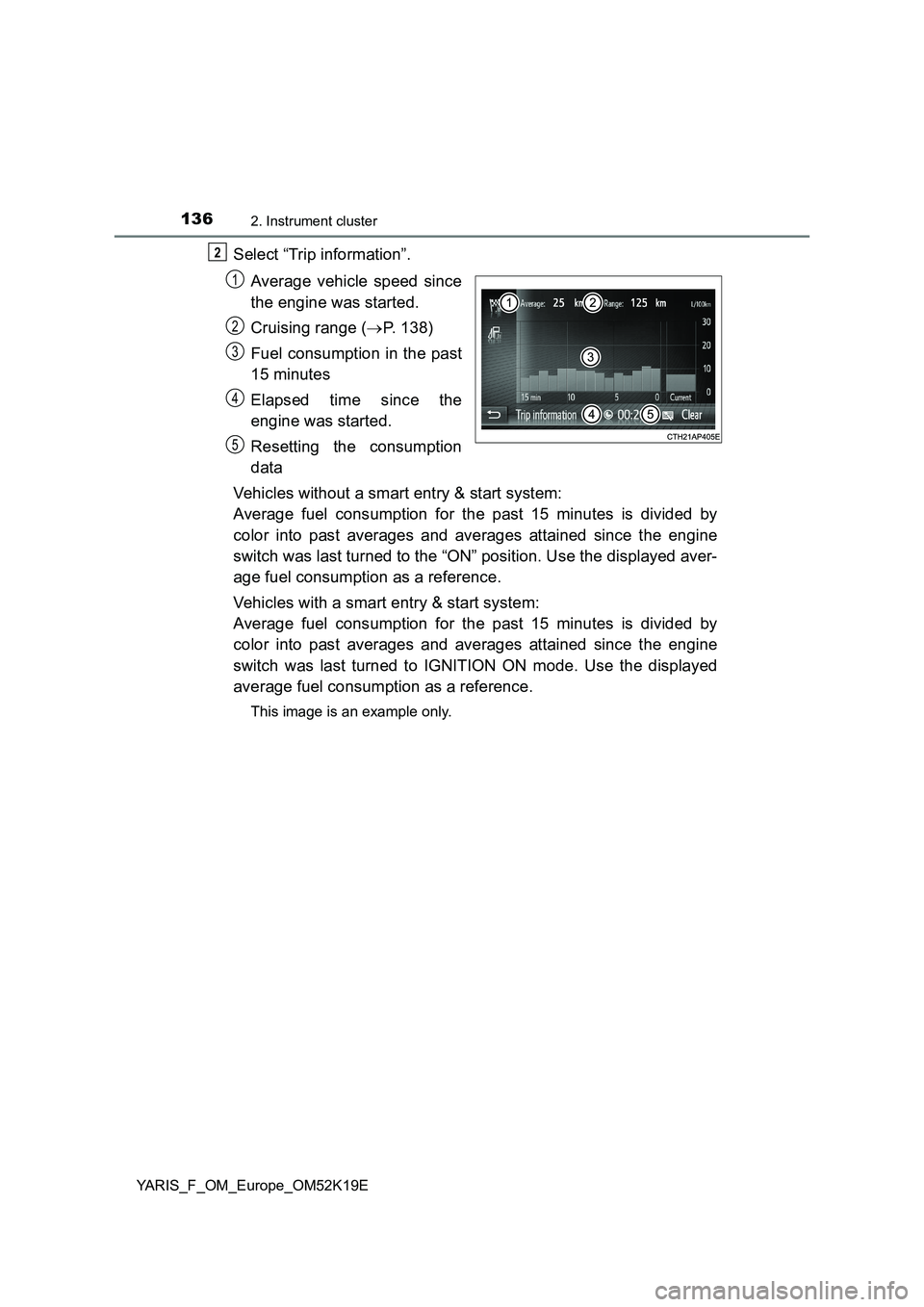
Select “Trip information”.
Average vehicle speed since
the engine was started.
Cruising range ( P. 138)
Fuel consumption in the past
15 minutes
Elapsed time since the
engine was started.
Resetting the consumption
data
Vehicles without a smart entry & start system:
Average fuel consumption for the past 15 minutes is divided by
color into past averages and averages attained since the engine
switch was last turned to the “ON” position. Use the displayed aver-
age fuel consumption as a reference.
Vehicles with a smart entry & start system:
Average fuel consumption for the past 15 minutes is divided by
color into past averages and averages attained since the engine
switch was last turned to IGNITION ON mode. Use the displayed
average fuel consumption as a reference.
This image is an example only.
2
1
2
3
4
5
Page 144 of 700
1443-1. Key information
YARIS_F_OM_Europe_OM52K19E
■ Key battery depletion
Vehicles without a smart entry & start system
If the wireless remote control function does not operate, the battery may be
depleted. Replace the battery when necessary. ( P. 532)
Vehicles with a smart entry & start system
● The standard battery life is 1 to 2 years.
● If the battery becomes low, an alarm will sound in the cabin when the engine
stops. ( P. 586)
● As the electronic key always receives radio waves, the battery will become
depleted even if the electronic key is not used. The following symptoms indi-
cate that the electronic key battery may be depleted. Replace the battery
when necessary. ( P. 532)
• The smart entry & start system or the wireless remote control does not
operate.
• The detection area becomes smaller.
• The LED indicator on the key surface does not turn on.
● To avoid serious deterioration, do not leave the electronic key within 1 m
(3 ft.) of the following electrical appliances that produce a magnetic field:
•TVs
• Personal computers
• Cellular phones, cordless phones and battery chargers
• Recharging cellular phones or cordless phones
• Induction cookers
• Table lamps
■ Replacing the battery
P. 532
■ Confirmation of the registered key number (vehicles with a smart entry &
start system)
The number of keys already registered to the vehicle can be confirmed. Ask
any authorized Toyota retailer or Toyota authorized repairer, or any reliable
repairer for details.
■ If a wrong key is used
On some models, the key cylinder rotates freely to isolate inside mechanism.
■ Customization
Settings (e.g. wireless remote control system) can be changed.
(Customizable features: P. 674)
Page 157 of 700
1573-2. Opening, closing and locking the doors
3
Operation of each component
YARIS_F_OM_Europe_OM52K19E
Move the inside door lock button to the lock position.
Close the door while pulling the door handle.
Vehicles without a smart entry & start system
The door cannot be locked if the key is in the engine switch.
Vehicles with a smart entry & start system
The door cannot be locked if the engine switch is in ACCESSORY or
IGNITION ON mode, or the electronic key is left inside the vehicle.
However, the key may not be detected correctly and the door may be
locked.
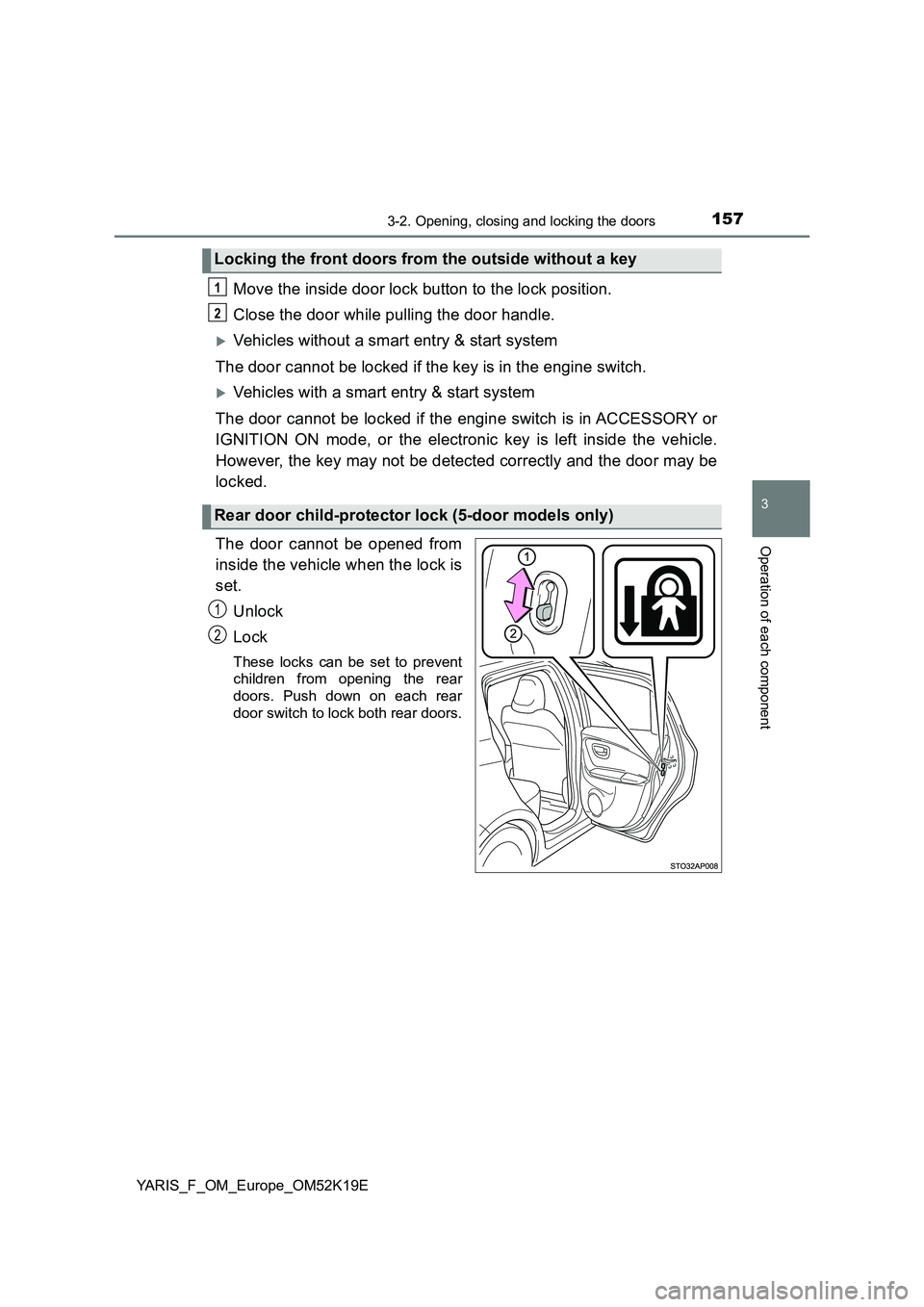
The door cannot be opened from
inside the vehicle when the lock is
set.
Unlock
Lock
These locks can be set to prevent
children from opening the rear
doors. Push down on each rear
door switch to lock both rear doors.
Locking the front doors from the outside without a key
Rear door child-protector lock (5-door models only)
1
2
1
2
Page 165 of 700
165
3
3-2. Opening, closing and locking the doors
Operation of each component
YARIS_F_OM_Europe_OM52K19E
Smart entry & start system
●Locks and unlocks the doors (P. 152)
● Locks and unlocks the back door (P. 159)
● Starts the engine (P. 246)
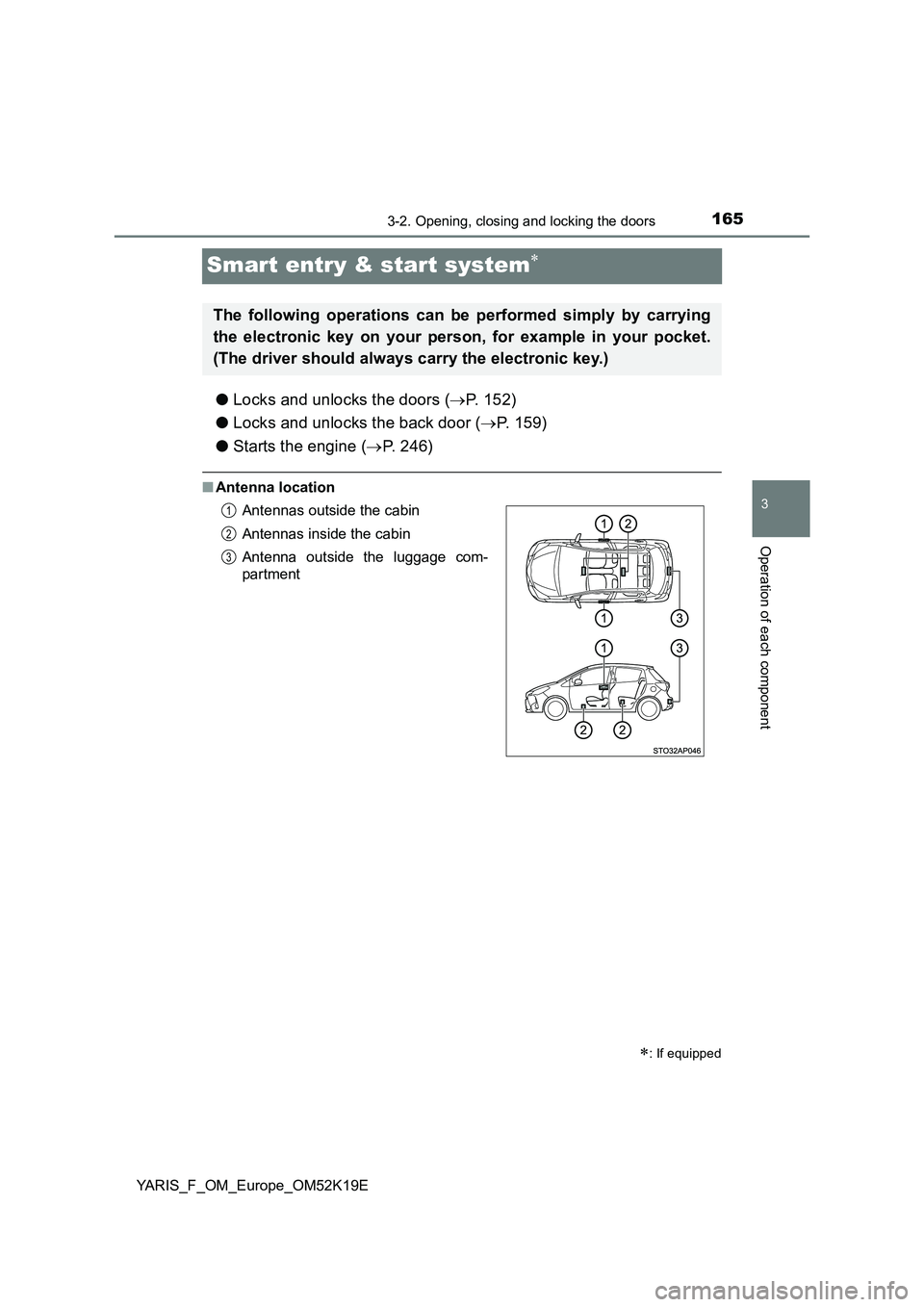
■Antenna location
: If equipped
The following operations can be performed simply by carrying
the electronic key on your person, for example in your pocket.
(The driver should always carry the electronic key.)
Antennas outside the cabin
Antennas inside the cabin
Antenna outside the luggage com-
partment
1
2
3
Page 166 of 700
1663-2. Opening, closing and locking the doors
YARIS_F_OM_Europe_OM52K19E
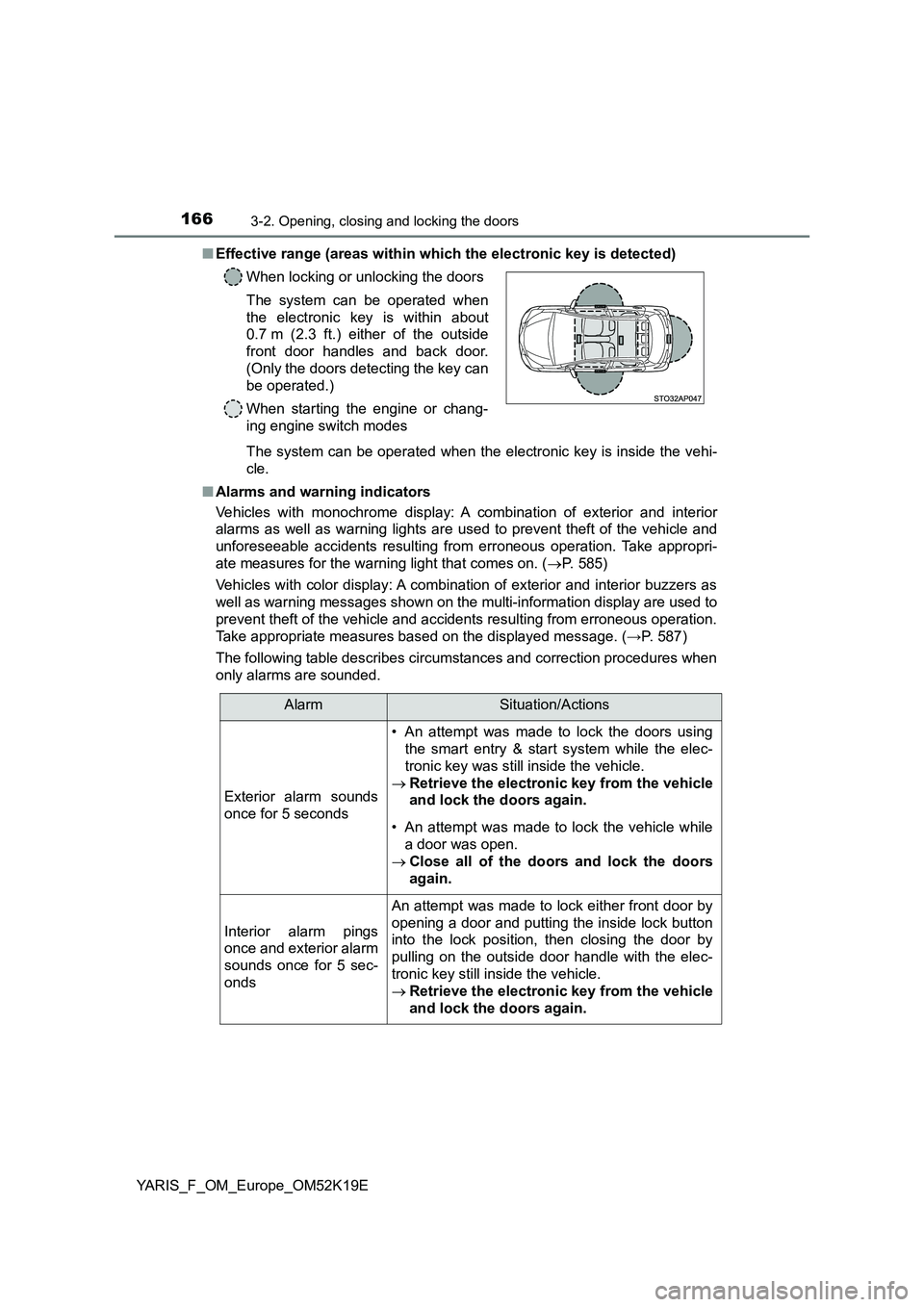
■ Effective range (areas within which the electronic key is detected)
The system can be operated when the electronic key is inside the vehi-
cle.
■ Alarms and warning indicators
Vehicles with monochrome display: A combination of exterior and interior
alarms as well as warning lights are used to prevent theft of the vehicle and
unforeseeable accidents resulting from erroneous operation. Take appropri-
ate measures for the warning light that comes on. ( P. 585)
Vehicles with color display: A combination of exterior and interior buzzers as
well as warning messages shown on the multi-information display are used to
prevent theft of the vehicle and accidents resulting from erroneous operation.
Take appropriate measures based on the displayed message. ( →P. 587)
The following table describes circumstances and correction procedures when
only alarms are sounded.
When locking or unlocking the doors
The system can be operated when
the electronic key is within about
0.7 m (2.3 ft.) either of the outside
front door handles and back door.
(Only the doors detecting the key can
be operated.)
When starting the engine or chang-
ing engine switch modes
AlarmSituation/Actions
Exterior alarm sounds
once for 5 seconds
• An attempt was made to lock the doors using
the smart entry & start system while the elec-
tronic key was still inside the vehicle.
Retrieve the electronic key from the vehicle
and lock the doors again.
• An attempt was made to lock the vehicle while
a door was open.
Close all of the doors and lock the doors
again.
Interior alarm pings
once and exterior alarm
sounds once for 5 sec-
onds
An attempt was made to lock either front door by
opening a door and putting the inside lock button
into the lock position, then closing the door by
pulling on the outside door handle with the elec-
tronic key still inside the vehicle.
Retrieve the electronic key from the vehicle
and lock the doors again.