Page 399 of 700
3995-6. Using Bluetooth® devices
5
Audio system
YARIS_F_OM_Europe_OM52K19E
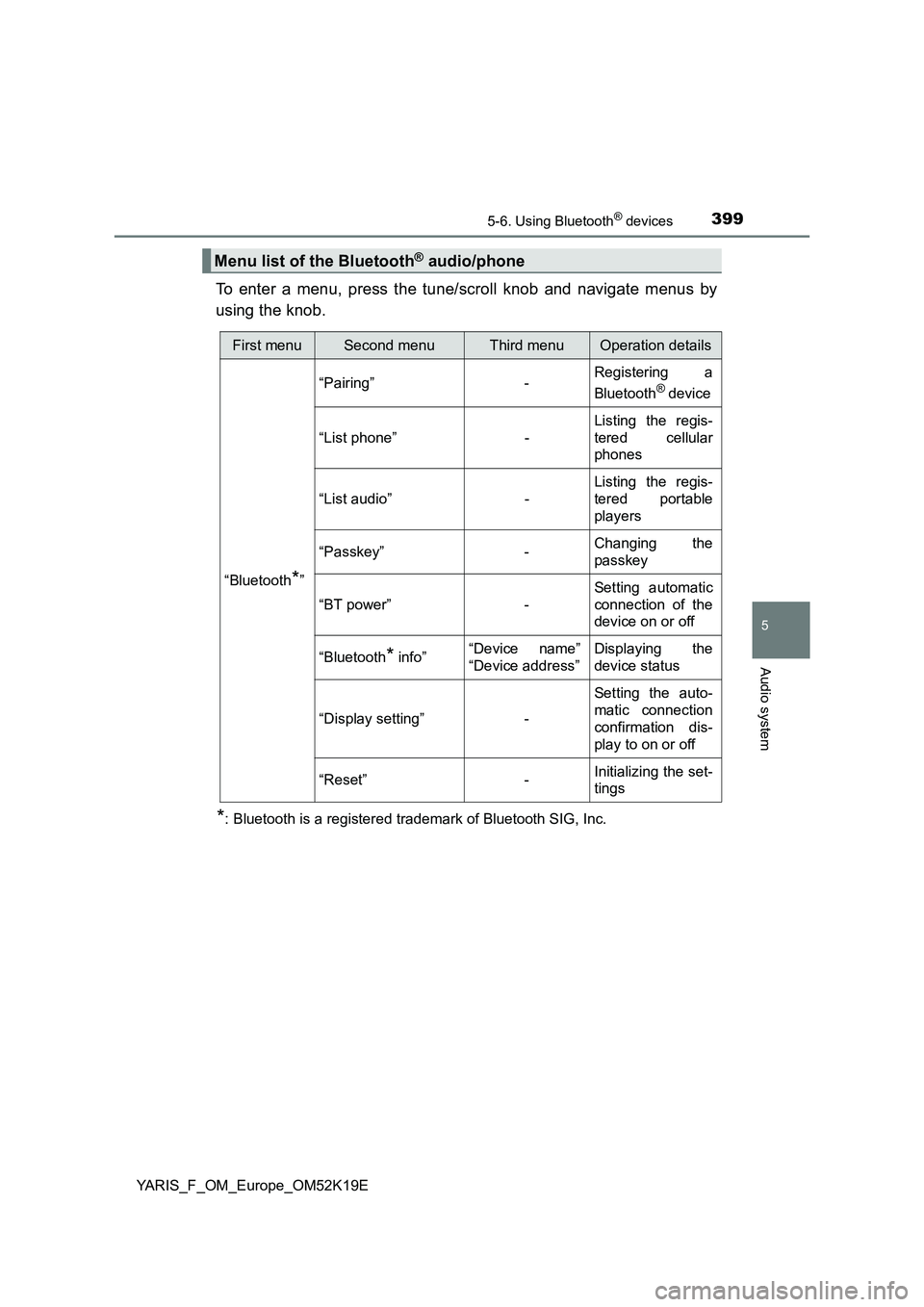
To enter a menu, press the tune/scroll knob and navigate menus by
using the knob.
*: Bluetooth is a registered trademark of Bluetooth SIG, Inc.
Menu list of the Bluetooth® audio/phone
First menuSecond menuThird menuOperation details
“Bluetooth*”
“Pairing” - Registering a
Bluetooth® device
“List phone” -
Listing the regis-
tered cellular
phones
“List audio” -
Listing the regis-
tered portable
players
“Passkey” - Changing the
passkey
“BT power” -
Setting automatic
connection of the
device on or off
“Bluetooth* info” “Device name”
“Device address”
Displaying the
device status
“Display setting” -
Setting the auto-
matic connection
confirmation dis-
play to on or off
“Reset” - Initializing the set-
tings
Page 407 of 700
4075-7. “SETUP” menu
5
Audio system
YARIS_F_OM_Europe_OM52K19E
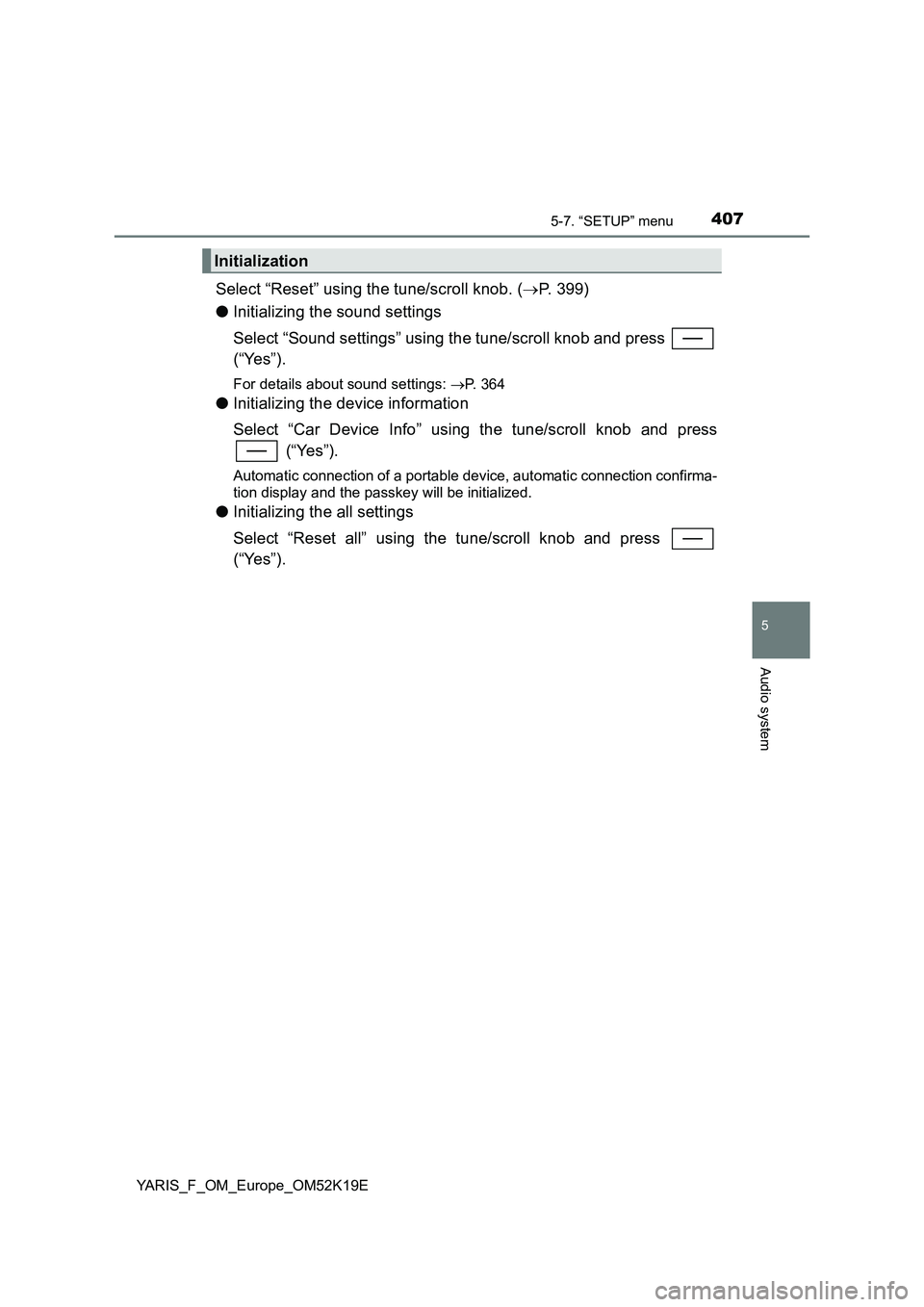
Select “Reset” using the tune/scroll knob. (P. 399)
● Initializing the sound settings
Select “Sound settings” using the tune/scroll knob and press
(“Yes”).
For details about sound settings: P. 364
●Initializing the device information
Select “Car Device Info” using the tune/scroll knob and press
(“Yes”).
Automatic connection of a portable device, automatic connection confirma-
tion display and the passkey will be initialized.
● Initializing the all settings
Select “Reset all” using the tune/scroll knob and press
(“Yes”).
Initialization
Page 408 of 700
4085-7. “SETUP” menu
YARIS_F_OM_Europe_OM52K19E
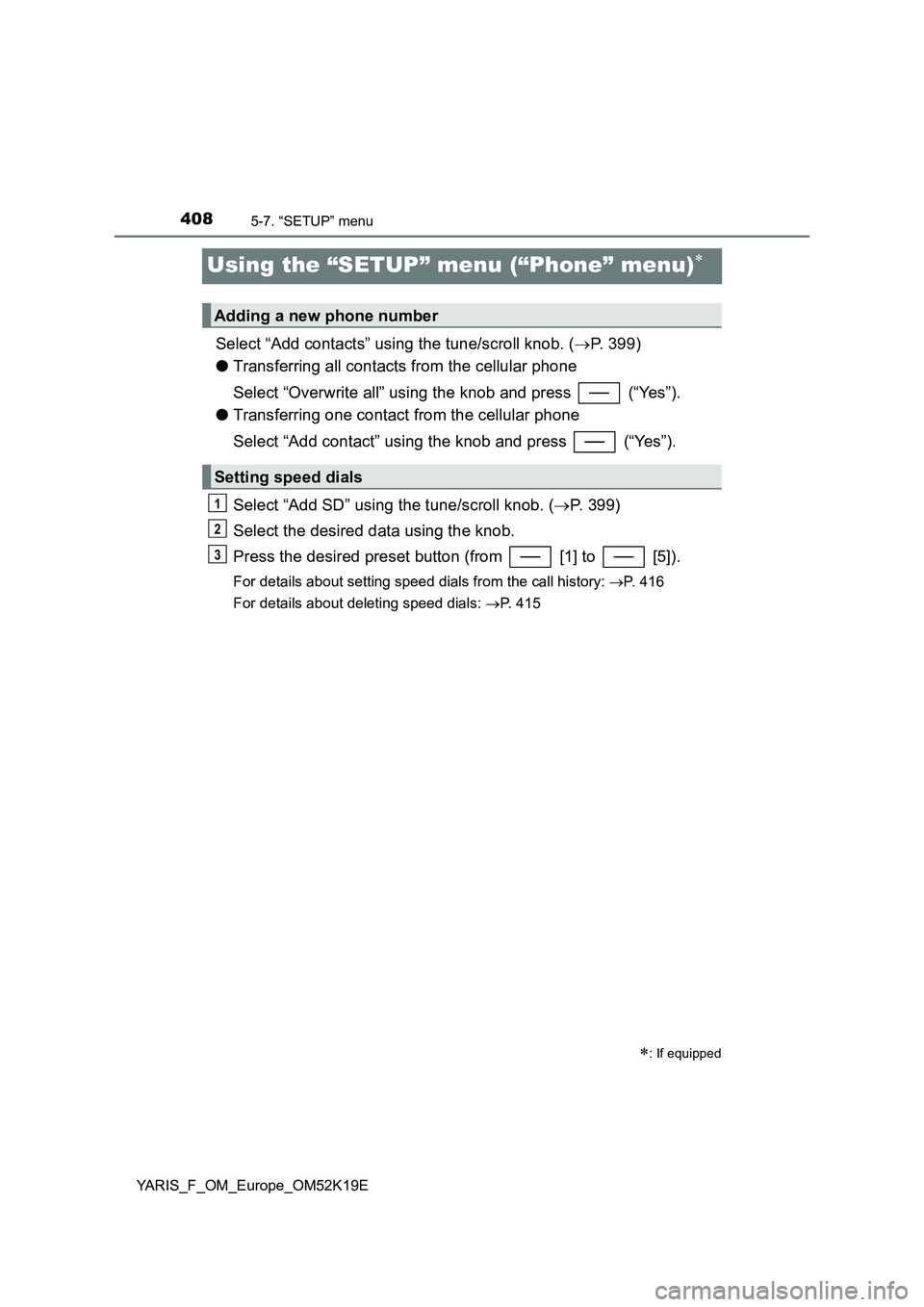
Using the “SETUP” menu (“Phone” menu)
Select “Add contacts” using the tune/scroll knob. (P. 399)
● Transferring all contacts from the cellular phone
Select “Overwrite all” using the knob and press (“Yes”).
● Transferring one contact from the cellular phone
Select “Add contact” using the knob and press (“Yes”).
Select “Add SD” using the tune/scroll knob. ( P. 399)
Select the desired data using the knob.
Press the desired preset button (from [1] to [5]).
For details about setting speed dials from the call history: P. 416
For details about deleting speed dials: P. 415
: If equipped
Adding a new phone number
Setting speed dials
1
2
3
Page 415 of 700
4155-9. Bluetooth® Phone
5
Audio system
YARIS_F_OM_Europe_OM52K19E
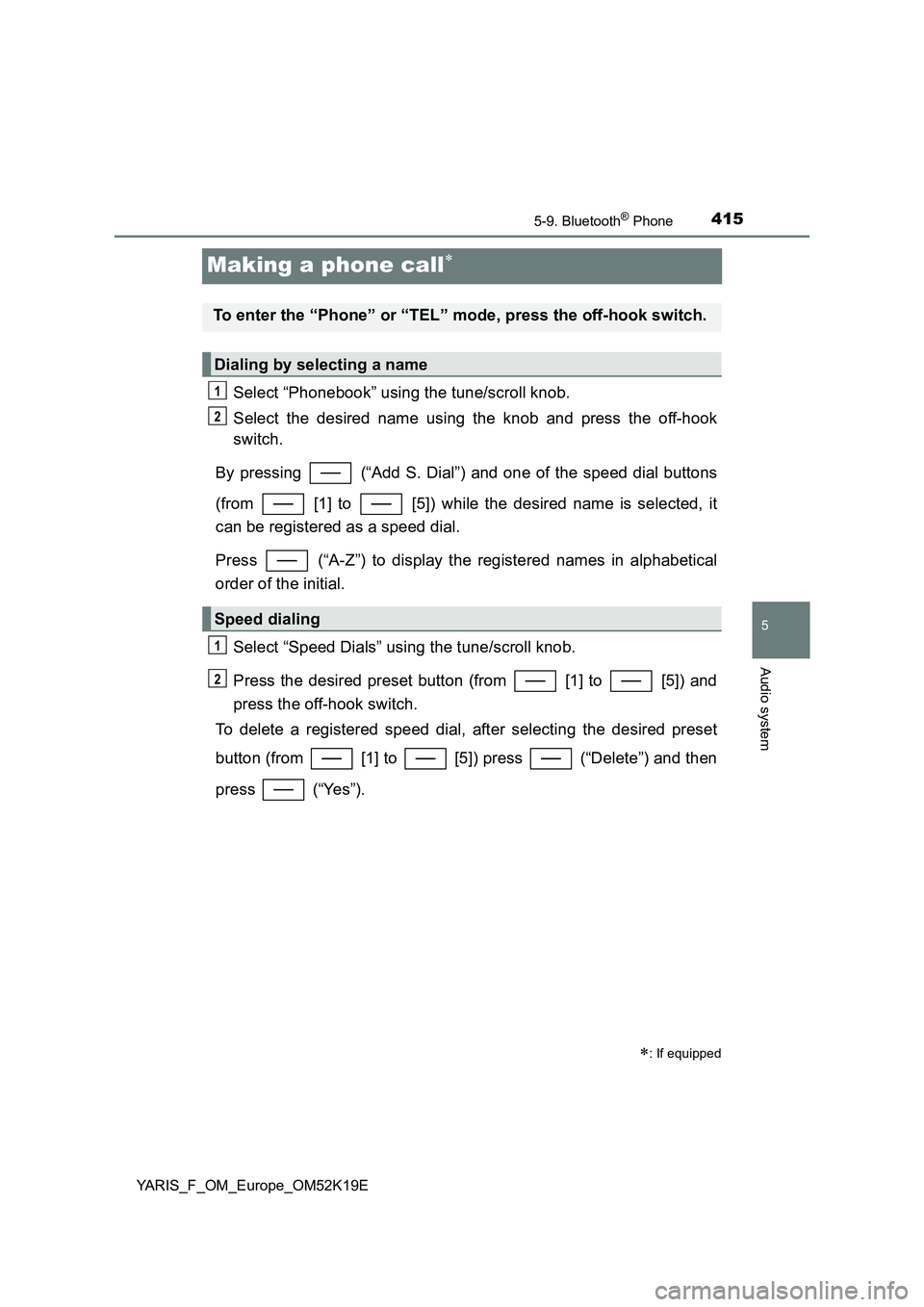
Making a phone call
Select “Phonebook” using the tune/scroll knob.
Select the desired name using the knob and press the off-hook
switch.
By pressing (“Add S. Dial”) and one of the speed dial buttons
(from [1] to [5]) while the desired name is selected, it
can be registered as a speed dial.
Press (“A-Z”) to display the registered names in alphabetical
order of the initial.
Select “Speed Dials” using the tune/scroll knob.
Press the desired preset button (from [1] to [5]) and
press the off-hook switch.
To delete a registered speed dial, after selecting the desired preset
button (from [1] to [5]) press (“Delete”) and then
press (“Yes”).
: If equipped
To enter the “Phone” or “TEL” mode, press the off-hook switch.
Dialing by selecting a name
Speed dialing
1
2
1
2
Page 416 of 700
4165-9. Bluetooth® Phone
YARIS_F_OM_Europe_OM52K19E
Select “Speed Dials” or “Dial by number” using the tune/scroll knob.
Enter the phone number and press the off-hook switch.
Select “All calls”, “Missed calls”, “Incoming calls” or “Outgoing calls”
using the tune/scroll knob.
Select a desired number using the knob and press the off-hook
switch.
The following operations can be performed:
● Registering a number as a speed dial
Press (“Add S. Dial”) and then press the desired preset but-
ton (from [1] to [5]).
● Deleting the selected number
Press (“Delete”) and press (“Yes”).
Dialing by entering the number
Dialing from call histories
1
2
1
2
Page 493 of 700
4937-3. Do-it-yourself maintenance
7
Maintenance and care
YARIS_F_OM_Europe_OM52K19E
■Engine oil consumption
A certain amount of engine oil will be consumed while driving. In the following
situations, oil consumption may increase, and engine oil may need to be
refilled in between oil maintenance intervals.
● When the engine is new, for example directly after purchasing the vehicle or
after replacing the engine
● If low quality oil or oil of an inappropriate viscosity is used
● When driving at high engine speeds or with a heavy load, when towing
(except for South Africa), or when driving while accelerating or decelerating
frequently
● When leaving the engine idling for a long time, or when driving frequently
through heavy traffic
■ After changing the engine oil (diesel engine only)
The engine oil maintenance data should be reset. Perform the following pro-
cedures:
Switch the display to the trip meter “A” when the engine is running.
( P. 121)
Turn the engine switch to the “LOCK” position (vehicles without a smart
entry & start system) or off (vehicles with a smart entry & start system).
Vehicles without a smart entry & start system:
While pressing the display change button ( P. 117, 121), turn the engine
switch to the “ON” position (do not start the engine because reset mode
will be canceled). Continue to press and hold the button until the trip
meter displays “000000”.
Vehicles with a smart entry & start system:
While pressing the display change button ( P. 117, 121), turn the engine
switch to the IGNITION ON mode (do not start the engine because other-
wise the reset mode will be canceled). Continue to press and hold the
button until the trip meter displays “000000”.
1
2
3
Page 506 of 700
5067-3. Do-it-yourself maintenance
YARIS_F_OM_Europe_OM52K19E
■How to initialize the tire pressure warning system
Park the vehicle in a safe place and turn the engine switch to the
“LOCK” position (vehicles without a smart entry & start system)
or off (vehicles with a smart entry & start system).
Initialization cannot be performed while the vehicle is moving.
Adjust the tire inflation pressure to the specified cold tire inflation
pressure level. ( P. 663)
Make sure to adjust the tire pressure to the specified cold tire inflation
pressure level. The tire pressure warning system will operate based on
this pressure level.
Turn the engine switch to the “ON” position (vehicles without a
smart entry & start system) or IGNITION ON mode (vehicles with
a smart entry & start system).
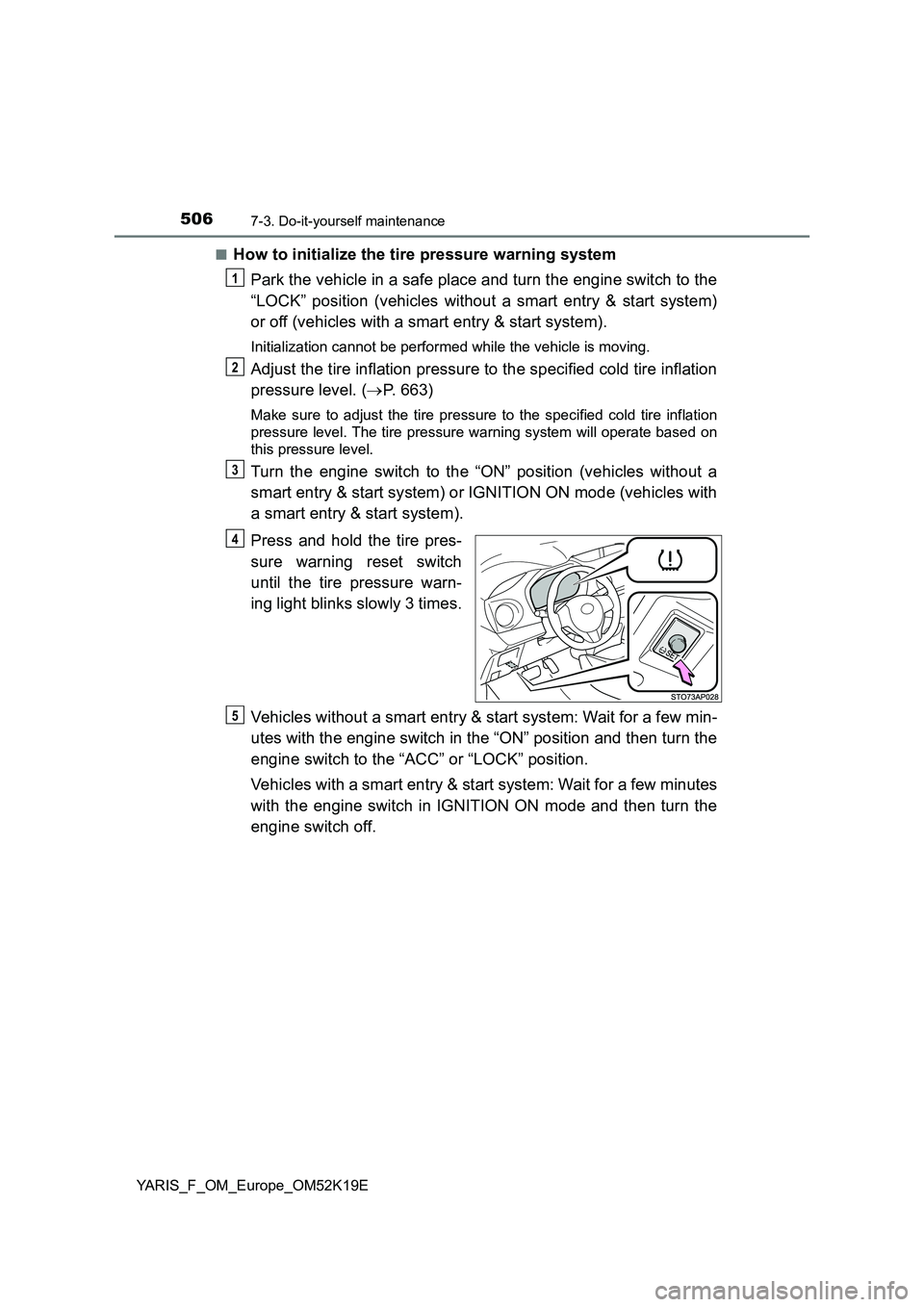
Press and hold the tire pres-
sure warning reset switch
until the tire pressure warn-
ing light blinks slowly 3 times.
Vehicles without a smart entry & start system: Wait for a few min-
utes with the engine switch in the “ON” position and then turn the
engine switch to the “ACC” or “LOCK” position.
Vehicles with a smart entry & start system: Wait for a few minutes
with the engine switch in IGNITION ON mode and then turn the
engine switch off.
1
2
3
4
5
Page 509 of 700
5097-3. Do-it-yourself maintenance
7
Maintenance and care
YARIS_F_OM_Europe_OM52K19E
■ When initialization of the tire pressure warning system has failed (vehi-
cles with a tire pressure warning system)
Initialization can be completed in a few minutes. However, in the following
cases, the settings have not been recorded and the system will not operate
properly. If repeated attempts to record tire inflation pressure settings are
unsuccessful, have the vehicle inspected by any authorized Toyota retailer or
Toyota authorized repairer, or any reliable repairer.
● When operating the tire pressure warning reset switch, the tire pressure
warning light does not blink 3 times.
● After driving for a certain period of time since the initialization has been
completed, the warning light comes on after blinking for 1 minute.
■ Registering ID codes
The ID codes of the tire pressure warning valve and transmitters for two sets
of wheels can be registered.
It is not necessary to register the ID codes when replacing normal tires with
snow tires, if the ID codes for the wheels of both normal tires and snow tires
are registered beforehand.
For information about changing ID codes, ask any authorized Toyota retailer
or Toyota authorized repairer, or any reliable repairer as soon as possible.