Page 291 of 700
2914-5. Toyota Safety Sense
4
Driving
YARIS_F_OM_Europe_OM52K19E
WARNING
●If there is a large difference in temperature between the inside and outside
of the vehicle, such as in winter, t he windshield is likely to fog up easily. If
the part of the windshield in front of the front sensor is fogged up or cov-
ered with condensation or ice, the PCS warning light may illuminate and
the system may be temporarily disabled. In this case, use the windshield
defogger to remove the fog, etc. ( P. 434, 444)
● If the area of the windshield in front of the front sensor is covered with
water droplets, use the windshield wipers to remove them.
If the water droplets are not sufficiently removed, the performance of the
front sensor may be reduced.
● If water droplets cannot be properly removed from the area of the wind-
shield in front of the front sensor by the windshield wipers, replace the
wiper insert or wiper blade.
If the wiper inserts or wiper blades need to be replaced, contact any autho-
rized Toyota retailer or Toyota authorized repairer, or any reliable repairer.
● Do not attach window tinting to the windshield.
● Replace the windshield if it is damaged or cracked.
If the windshield needs to be replaced, contact any authorized Toyota
retailer or Toyota authorized repairer, or any reliable repairer.
● Do not install an antenna in front of the sensor.
● Do not get the front sensor wet.
● Do not allow bright lights to shine into the front sensor.
● Do not dirty or damage the front sensor.
When cleaning the inside of the windshi eld, do not allow glass cleaner to
contact the lens. Also, do not touch the lens.
If the lens is dirty or damaged, contact any authorized Toyota retailer or
Toyota authorized repairer, or any reliable repairer.
Page 293 of 700
293
4
4-5. Toyota Safety Sense
Driving
YARIS_F_OM_Europe_OM52K19E
PCS (Pre-Crash Safety system)
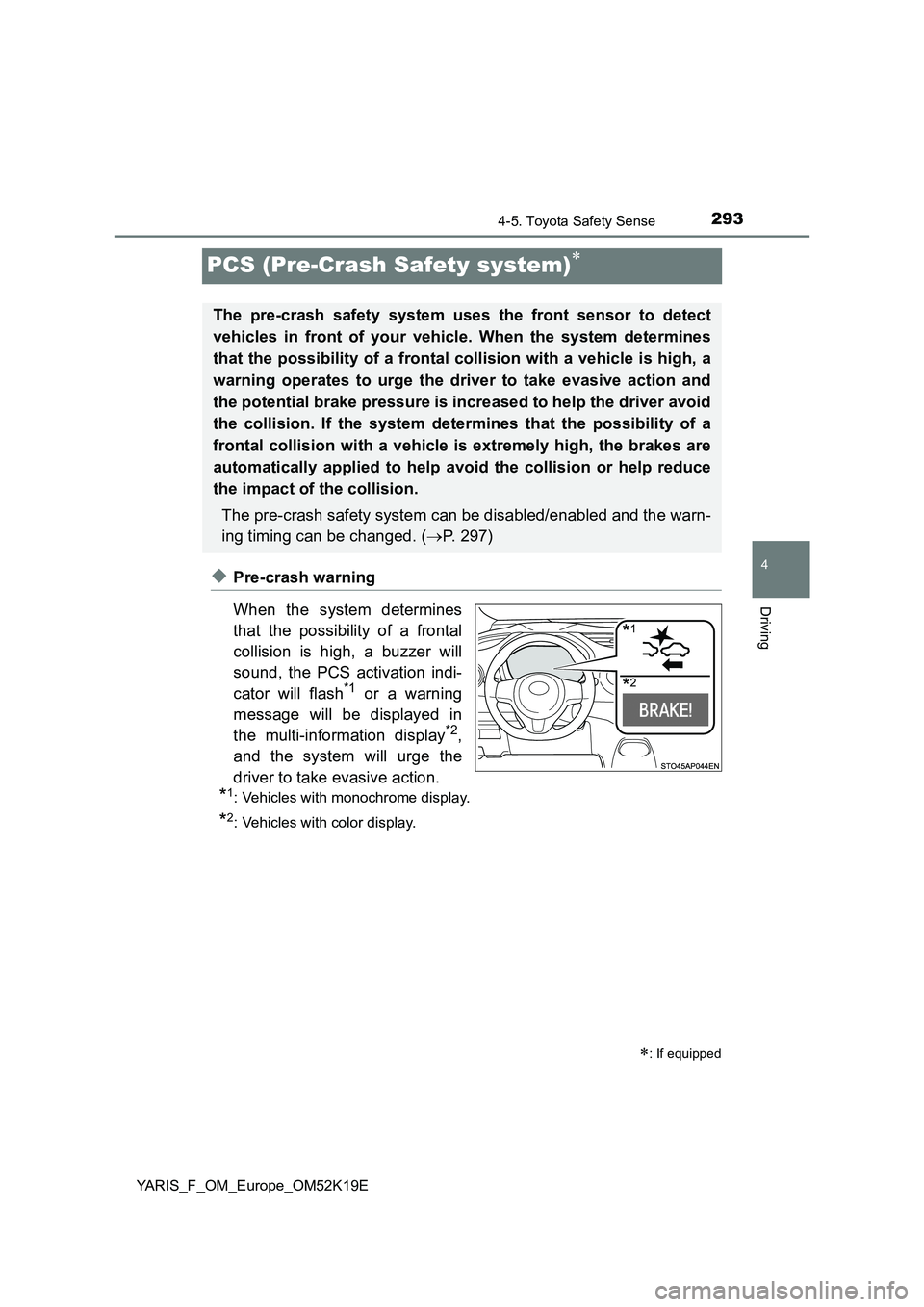
◆Pre-crash warning
When the system determines
that the possibility of a frontal
collision is high, a buzzer will
sound, the PCS activation indi-
cator will flash*1 or a warning
message will be displayed in
the multi-information display*2,
and the system will urge the
driver to take evasive action.
*1: Vehicles with monochrome display.
*2: Vehicles with color display.
: If equipped
The pre-crash safety system uses the front sensor to detect
vehicles in front of your vehicle. When the system determines
that the possibility of a frontal collision with a vehicle is high, a
warning operates to urge the driver to take evasive action and
the potential brake pressure is increased to help the driver avoid
the collision. If the system determines that the possibility of a
frontal collision with a vehicle is extremely high, the brakes are
automatically applied to help avoid the collision or help reduce
the impact of the collision.
The pre-crash safety system can be disabled/enabled and the warn-
ing timing can be changed. ( P. 297)
*1
*2
Page 297 of 700
2974-5. Toyota Safety Sense
4
Driving
YARIS_F_OM_Europe_OM52K19E
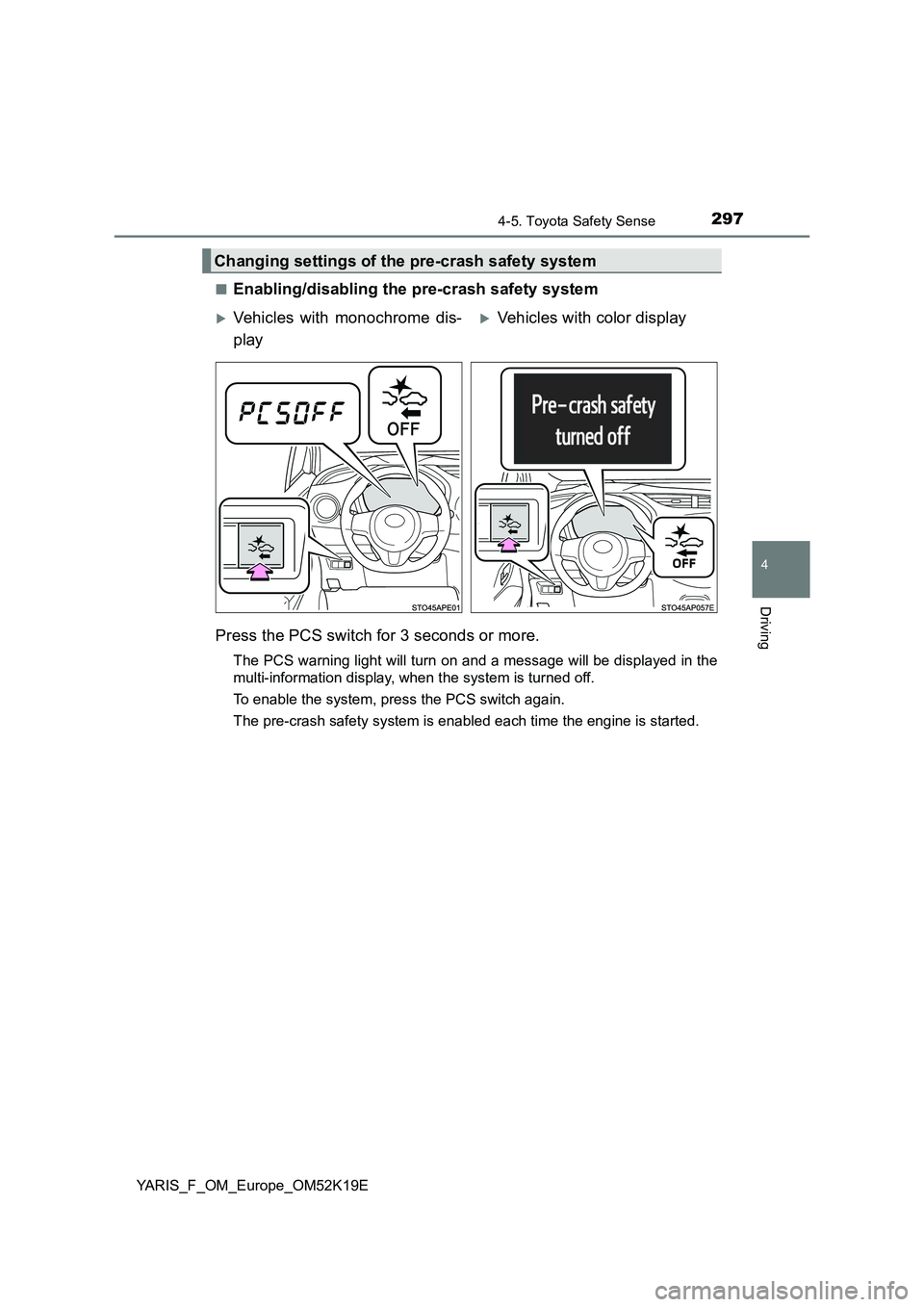
■Enabling/disabling the pre-crash safety system
Press the PCS switch for 3 seconds or more.
The PCS warning light will turn on and a message will be displayed in the
multi-information display, when the system is turned off.
To enable the system, press the PCS switch again.
The pre-crash safety system is enabled each time the engine is started.
Changing settings of the pre-crash safety system
Vehicles with monochrome dis-
play
Vehicles with color display
Page 298 of 700
2984-5. Toyota Safety Sense
YARIS_F_OM_Europe_OM52K19E
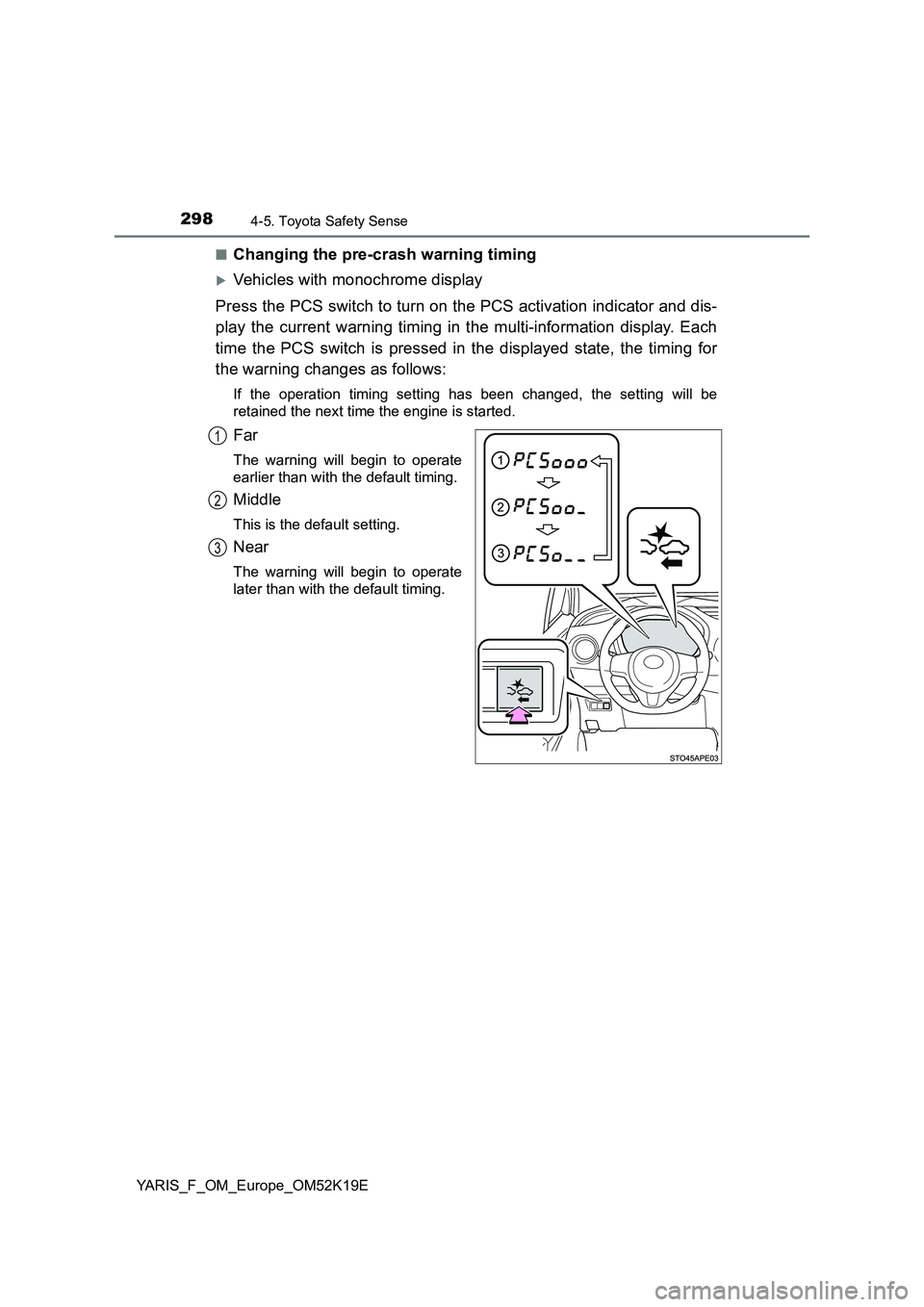
■Changing the pre-crash warning timing
Vehicles with monochrome display
Press the PCS switch to turn on the PCS activation indicator and dis-
play the current warning timing in the multi-information display. Each
time the PCS switch is pressed in the displayed state, the timing for
the warning changes as follows:
If the operation timing setting has been changed, the setting will be
retained the next time the engine is started.
Far
The warning will begin to operate
earlier than with the default timing.
Middle
This is the default setting.
Near
The warning will begin to operate
later than with the default timing.
1
2
3
Page 299 of 700
2994-5. Toyota Safety Sense
4
Driving
YARIS_F_OM_Europe_OM52K19E
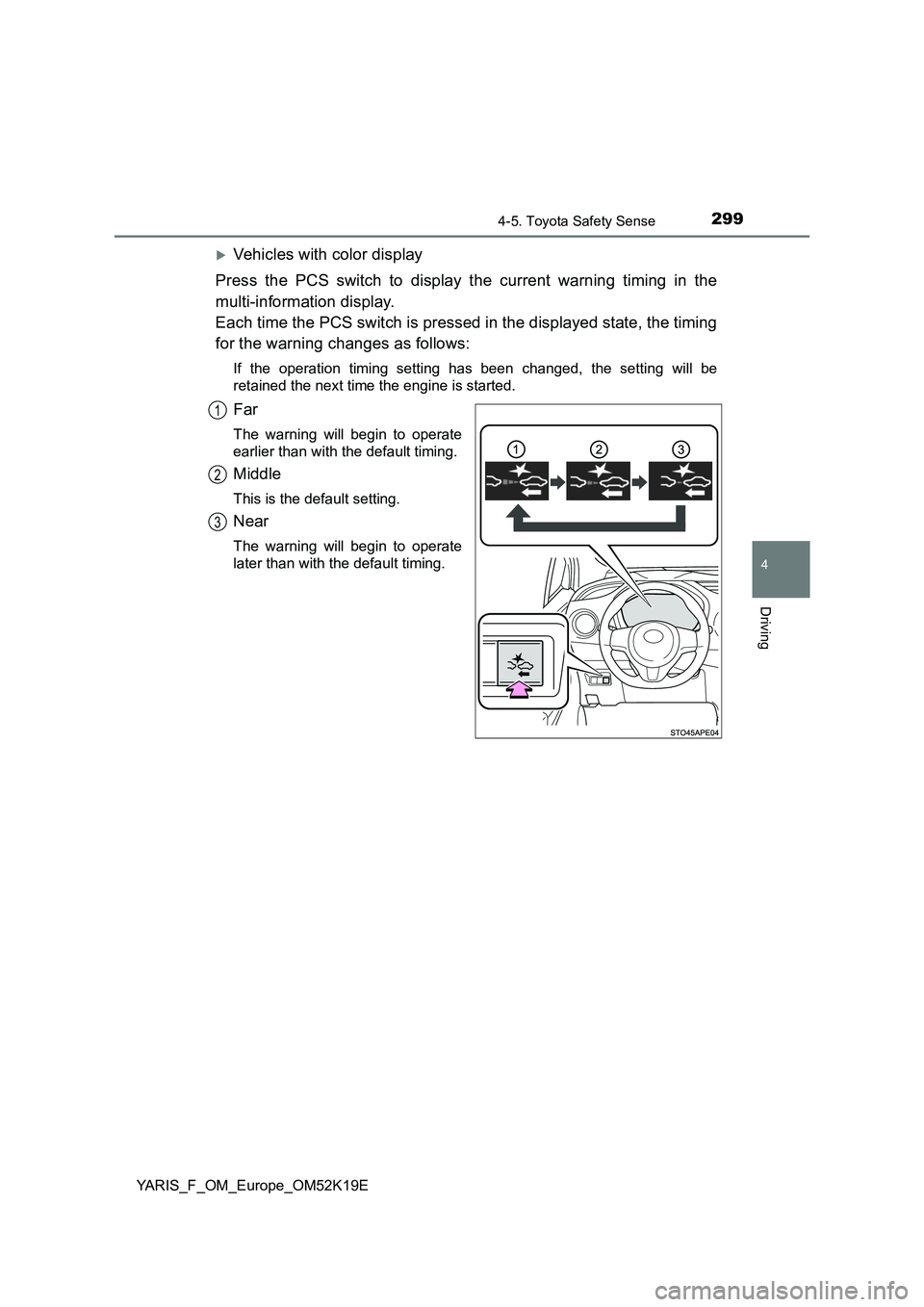
Vehicles with color display
Press the PCS switch to display the current warning timing in the
multi-information display.
Each time the PCS switch is pressed in the displayed state, the timing
for the warning changes as follows:
If the operation timing setting has been changed, the setting will be
retained the next time the engine is started.
Far
The warning will begin to operate
earlier than with the default timing.
Middle
This is the default setting.
Near
The warning will begin to operate
later than with the default timing.
1
2
3
Page 308 of 700
3084-5. Toyota Safety Sense
YARIS_F_OM_Europe_OM52K19E
■ If the PCS warning light flashes or illuminates (vehicles with mono-
chrome display)
The pre-crash safety system may be temporarily unavailable or there may be
a malfunction in the system.
● In the following situations, the warning light will be cleared and the system
will become operational when normal operating conditions return:
• When the area around the front sensor is hot, such as after the vehicle
has been parked in the sun
• When the windshield is fogged up or covered with condensation or ice
• When driving in conditions where the front sensor cannot detect an
object, such as in the dark (at night on a road without street lights or other
lights, etc.), when bright light is shining into the sensor, or in snow or fog.
• When the front sensor or the area around either sensor is cold, such as in
an extremely cold environment
• If the area in front of the front sens or is obstructed, such as when the
hood is open
● If the PCS warning light continues to flash or illuminate, the system may be
malfunctioning. Have the vehicle inspected by any authorized Toyota retailer
or Toyota authorized repairer, or any reliable repairer immediately.
■ If the PCS warning light flashes or illuminates and a warning message is
displayed on the multi-information di splay (vehicles with color display)
The pre-crash safety system may be temporarily unavailable or there may be
a malfunction in the system.
● In the following situations, the warning light will turn off, the message will
disappear and the system will beco me operational when normal operating
conditions return:
• When the area around the front sensor is hot, such as in the sun
• When the windshield is fogged up or covered with condensation or ice
( P. 434, 444)
• When driving in conditions where the front sensor cannot detect an
object, such as in the dark (at night on a road without street lights or other
lights, etc.), when bright light is shining into the sensor, or in snow or fog.
• When the front sensor or the area around either sensor is cold, such as in
an extremely cold environment
• If the area in front of the front sens or is obstructed, such as when the
hood is open
● If the PCS warning light continues to flash or illuminate or the warning mes-
sage does not disappear, the system may be malfunctioning. Have the vehi-
cle inspected by any authorized Toyota retailer or Toyota authorized
repairer, or any reliable repairer immediately.
Page 309 of 700
3094-5. Toyota Safety Sense
4
Driving
YARIS_F_OM_Europe_OM52K19E
■ If VSC is disabled
● If TRC and VSC are disabled (P. 350), the pre-crash brake assist and pre-
crash braking functions are also disabled. However, the pre-crash warning
function will still operate.
● Vehicles with monochrome display: The PCS warning light illuminates.
● Vehicles with color display: The PCS warning light illuminates and “VSC
turned off. Pre-crash brake system unav ailable.” is displayed on the multi-
information display.
Page 350 of 700
3504-6. Using the driving support systems
YARIS_F_OM_Europe_OM52K19E
■Turning off both TRC and VSC systems
Vehicles with monochrome display
To turn the TRC and VSC systems off, press and hold for more than 3
seconds while the vehicle is stopped.
The “TRC OFF” indicator light and the VSC OFF indicator light will come on.
Press again to turn the systems back on.
Vehicles with color display
To turn TRC and VSC systems off, press and hold for more than 3 sec-
onds while the vehicle is stopped.
The VSC OFF indicator light will come on and the “TRC off” will be shown on
the multi-information display.*
Press again to turn the systems back on.
*: On vehicles with pre-crash safety system, pre-crash brake assist and pre-
crash braking will also be disabled. The PCS warning light will come on.
( P. 309)
■ When the “TRC OFF” indicator light comes on even if has not been
pressed (vehicles with monochrome display)
TRC is temporary deactivated. If the indicator light continues to remain on,
contact any authorized Toyota retailer or Toyota authorized repairer, or any
reliable repairer.
■ When the message is displayed on the multi-information display show-
ing that TRC has been disabled even if has not been pressed (vehi-
cles with color display)
TRC is temporary deactivated. If the information continues to show, contact
any authorized Toyota retailer or Toyota authorized repairer, or any reliable
repairer.