2019 TOYOTA YARIS HATCHBACK ESP
[x] Cancel search: ESPPage 283 of 692
2834-5. Toyota Safety Sense
4
Driving
YARIS_F_OM_Europe_OM52A54E
The pre-crash safety system is equipped with a sophisticated com-
puter that will record certain data, such as:
• Accelerator status
• Brake status
• Vehicle speed
• Operation status of the pre-crash safety system functions
• Information (such as the distance and relative speed between your
vehicle and the vehicle ahead or other objects)
●Data usage
Toyota may use the data recorded in this computer to diagnose
malfunctions, conduct research and development, and improve
quality.
Toyota will not disclose the recorded data to a third party except:
• With the consent of the vehicle owner or with the consent of the
lessee if the vehicle is leased
• In response to an official request by the police, a court of law or a
government agency
• For use by Toyota in a lawsuit
• For research purposes where the data is not tied to a specific
vehicle or vehicle owner
Vehicle data recording
Page 292 of 692
2924-5. Toyota Safety Sense
YARIS_F_OM_Europe_OM52A54E
WARNING
■Limitations of the pre-crash safety system
● The driver is solely responsible for safe driving. Always drive safely, taking
care to observe your surroundings.
Do not use the pre-crash safety system instead of normal braking opera-
tions under any circumstances. This system will not prevent collisions or
lessen collision damage or injury in every situation. Do not overly rely on
this system. Failure to do so may lead to an accident, resulting in death or
serious injury.
● Although this system is designed to help avoid and reduce the impact of a
collision, its effectiveness may change according to various conditions,
therefore the system may not always be able to achieve the same level of
performance.
Read the following conditions carefully. Do not overly rely on this system
and always drive carefully.
• Conditions under which the system may operate even if there is no pos-
sibility of a collision: P. 298
• Conditions under which the system may not operate properly: P. 3 0 2
● Do not attempt to test the operation of the pre-crash safety system your-
self, as the system may not operate properly, possibly leading to an acci-
dent.
■ Pre-crash braking
● The pre-crash braking function may not operate if certain operations are
performed by the driver. If the accelerator pedal is being depressed
strongly or the steering wheel is bei ng turned, the system may determine
that the driver is taking evasive action and possibly prevent the pre-crash
braking function from operating.
● In some situations, while the pre-crash braking function is operating, oper-
ation of the function may be canceled if the accelerator pedal is depressed
strongly or the steering wheel is turned and the system determines that
the driver is taking evasive action.
● A large amount of braking force is applied while the pre-crash braking
function is operating. Additionally, as the operation of the pre-crash brak-
ing function will be canceled after the vehicle has been stopped for
approximately 2 seconds if it is stopped by the operation of the pre-crash
braking function, the driver should depress the brake pedal as necessary.
● If the brake pedal is being depressed, the system may determine that the
driver is taking evasive action and possibly delay the operation timing of
the pre-crash braking function.
Page 313 of 692
3134-5. Toyota Safety Sense
4
Driving
YARIS_F_OM_Europe_OM52A54E
■ If the LDA indicator comes on in yellow (vehicles with monochrome dis-
play)
It may indicate a malfunction in the system. Contact any authorized Toyota
retailer or Toyota authorized repairer, or any reliable repairer.
■ Warning messages for the LDA system (vehicles with color display)
Warning messages are used to indicate a system malfunction or to inform the
driver of the need for caution while driving.
■ Customization
P. 671
WARNING
■Before using the LDA system
Do not rely solely on the LDA system. The LDA system does not drive the
vehicle automatically, nor does it reduce the amount of care you need to
take. As such, the driver must always assume full responsibility for under-
standing his/her surroundings, for operati ng the steering wheel to correct
the driving line, and for driving safely.
Inappropriate or negligent driving could lead to an accident.
■ To avoid operating the LDA by mistake
Switch the LDA system off using the LDA switch when not in use.
NOTICE
■ To prevent damage to or incorrect operation of the LDA system
● Do not modify the headlights or attach stickers to the surface of the lights.
● Do not modify the suspension. If your suspension needs repairs, contact
any authorized Toyota retailer or Toyota authorized repairer, or any reliable
repairer.
● Do not install or place anything on the hood or the grille. Also, do not install
a grille guard (bull bars, kangaroo bar, etc.).
● If your windshield needs repairs, contact any authorized Toyota retailer or
Toyota authorized repairer, or any reliable repairer.
Page 346 of 692

3464-6. Using the driving support systems
YARIS_F_OM_Europe_OM52A54E■
If the Stop & Start cancel switch is pressed while the vehicle is
stopped
●When the engine is stopped by the Stop & Start system, pressing
the Stop & Start cancel switch will restart the engine.
From the next time the vehicle is stopped (after Stop & Start sys-
tem has been turned off), the engine will not be stopped.
●With the Stop & Start system disabled, pressing the Stop & Start
cancel switch will re-enable the system but not stop the engine.
From the next time the vehicle is stopped (after Stop & Start sys-
tem has been turned on), the engine will be stopped.
After the engine is stopped by the Stop & Start system when the vehi-
cle is on an incline, brake force is temporarily maintained to prevent
rolling backwards until the engine is restarted and drive force is gener-
ated.
When drive force is generated, the maintained brake force is automat-
ically canceled.
●This function operates on flat surfaces as well as steep inclines.
●Sound may be generated from the brakes, but this is not a malfunc-
tion.
●Brake pedal response may change and vibration may occur, but
these are not malfunctions.
Hill-start assist control (vehicles with a Multidrive)
Page 355 of 692
355
4
4-6. Using the driving support systems
Driving
YARIS_F_OM_Europe_OM52A54E
Driving assist systems
◆ABS (Anti-lock Brake System)
Helps to prevent wheel lock when the brakes are applied suddenly,
or if the brakes are applied while driving on a slippery road surface
◆Brake assist
Generates an increased level of braking force after the brake pedal
is depressed when the system detects a panic stop situation
◆VSC (Vehicle Stability Control) (if equipped)
Helps the driver to control skidding when swerving suddenly or
turning on slippery road surfaces
◆TRC (Traction Control) (if equipped)
Helps to maintain drive power and prevent the drive wheels from
spinning when starting the vehicle or accelerating on slippery roads
◆Hill-start assist control (if equipped)
Helps to reduce the backward movement of the vehicle when start-
ing on an uphill
◆EPS (Electric Power Steering)
Employs an electric motor to reduce the amount of effort needed to
turn the steering wheel
◆Emergency brake signal
When the brakes are applied suddenly, the emergency flashers
automatically flash to alert the vehicle behind.
To help enhance driving safety and performance, the following
systems operate automatically in response to various driving
situations. Be aware, however, that these systems are supple-
mentary and should not be relied upon too heavily when operat-
ing the vehicle.
Page 360 of 692
3604-6. Using the driving support systems
YARIS_F_OM_Europe_OM52A54E
WARNING
■The ABS does not operate effectively when
● The limits of tire gripping performance have been exceeded (such as
excessively worn tires on a snow covered road).
● The vehicle hydroplanes while driving at high speed on wet or slick roads.
■ Stopping distance when the ABS is operating may exceed that of nor-
mal conditions
The ABS is not designed to shorten t he vehicle’s stopping distance. Always
maintain a safe distance from the vehicle in front of you, especially in the
following situations:
● When driving on dirt, gravel or snow-covered roads
● When driving with tire chains
● When driving over bumps in the road
● When driving over roads with potholes or uneven surfaces
■ TRC/VSC may not operate effectively when
Directional control and power may not be achievable while driving on slip-
pery road surfaces, even if the TRC/VSC system is operating.
Drive the vehicle carefully in conditions where stability and power may be
lost.
■ Hill-start assist control does not operate effectively when
● Do not overly rely on hill-start assist control. Hill-start assist control may
not operate effectively on steep inclines and roads covered with ice.
● Unlike the parking brake, hill-start assist control is not intended to hold the
vehicle stationary for an extended period of time. Do not attempt to use
hill-start assist control to hold the vehicle on an incline, as doing so may
lead to an accident.
Page 361 of 692

3614-6. Using the driving support systems
4
Driving
YARIS_F_OM_Europe_OM52A54E
WARNING
■When the VSC is activated
The slip indicator light flashes. Always drive carefully. Reckless driving may
cause an accident. Exercise particular care when the indicator light flashes.
■ When the TRC/VSC systems are turned off
Be especially careful and drive at a speed appropriate to the road condi-
tions. As these are the systems to help ensure vehicle stability and driving
force, do not turn the TRC/VSC systems off unless necessary.
■ Replacing tires
Make sure that all tires are of the specified size, brand, tread pattern and
total load capacity. In addition, make sure that the tires are inflated to the
recommended tire inflation pressure level.
The ABS, TRC and VSC systems will not function correctly if different tires
are installed on the vehicle.
Contact any authorized Toyota retailer or Toyota authorized repairer, or any
reliable repairer for further information when replacing tires or wheels.
■ Handling of tires and the suspension
Using tires with any kind of problem or modifying the suspension will affect
the driving assist systems, and may cause a system to malfunction.
Page 373 of 692
3735-2. Using the audio system
5
Audio system
YARIS_F_OM_Europe_OM52A54E■
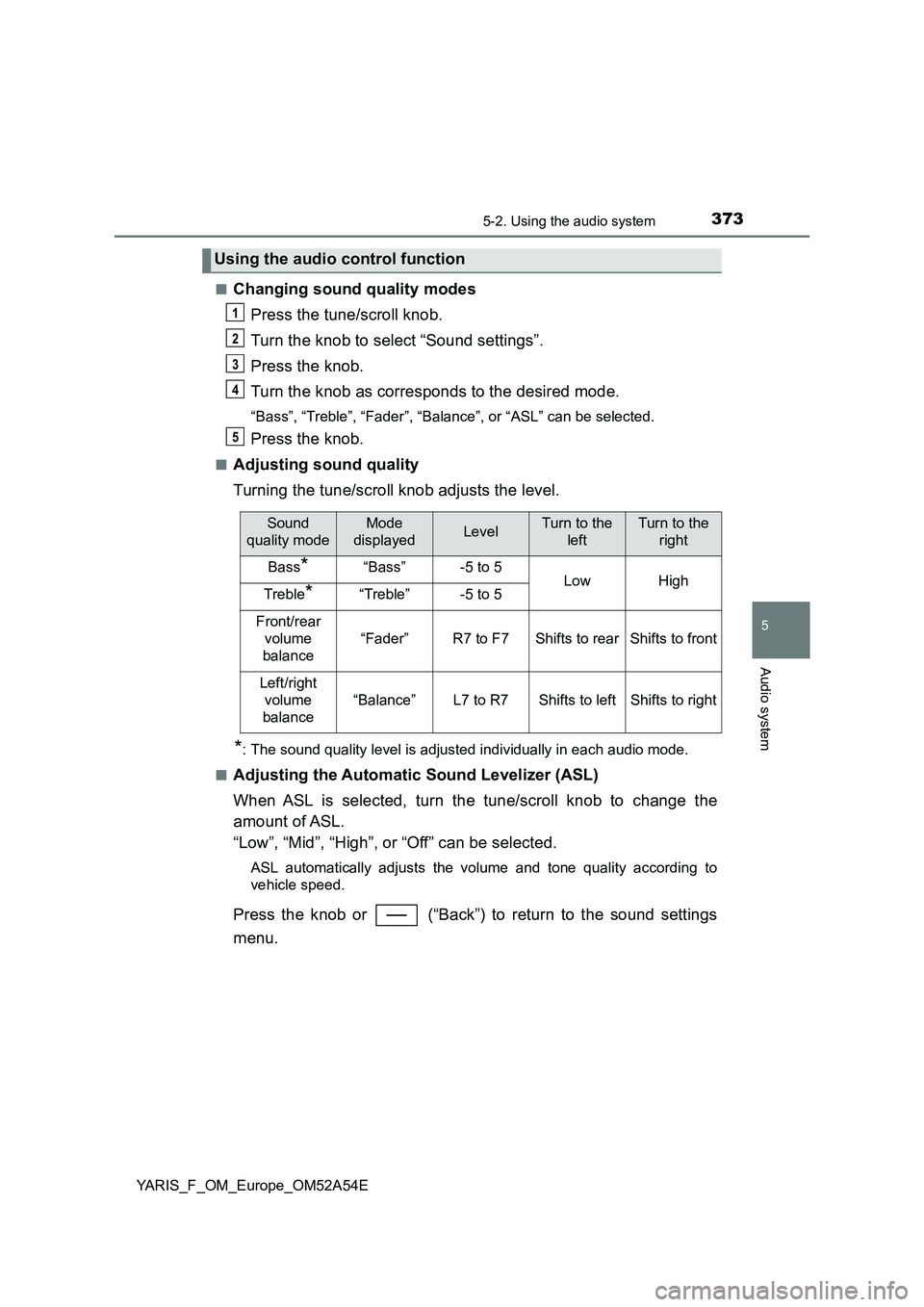
Changing sound quality modes
Press the tune/scroll knob.
Turn the knob to select “Sound settings”.
Press the knob.
Turn the knob as corresponds to the desired mode.
“Bass”, “Treble”, “Fader”, “Balance”, or “ASL” can be selected.
Press the knob.
■Adjusting sound quality
Turning the tune/scroll knob adjusts the level.
*: The sound quality level is adjusted individually in each audio mode.
■
Adjusting the Automatic Sound Levelizer (ASL)
When ASL is selected, turn the tune/scroll knob to change the
amount of ASL.
“Low”, “Mid”, “High”, or “Off” can be selected.
ASL automatically adjusts the volume and tone quality according to
vehicle speed.
Press the knob or (“Back”) to return to the sound settings
menu.
Using the audio control function
1
2
3
4
5
Sound
quality modeMode
displayedLevelTurn to the
leftTurn to the
right
Bass*“Bass”-5 to 5LowHighTreble*“Treble”-5 to 5
Front/rear
volume
balance
“Fader”R7 to F7Shifts to rearShifts to front
Left/right
volume
balance
“Balance”L7 to R7Shifts to leftShifts to right