Page 380 of 516
380
1
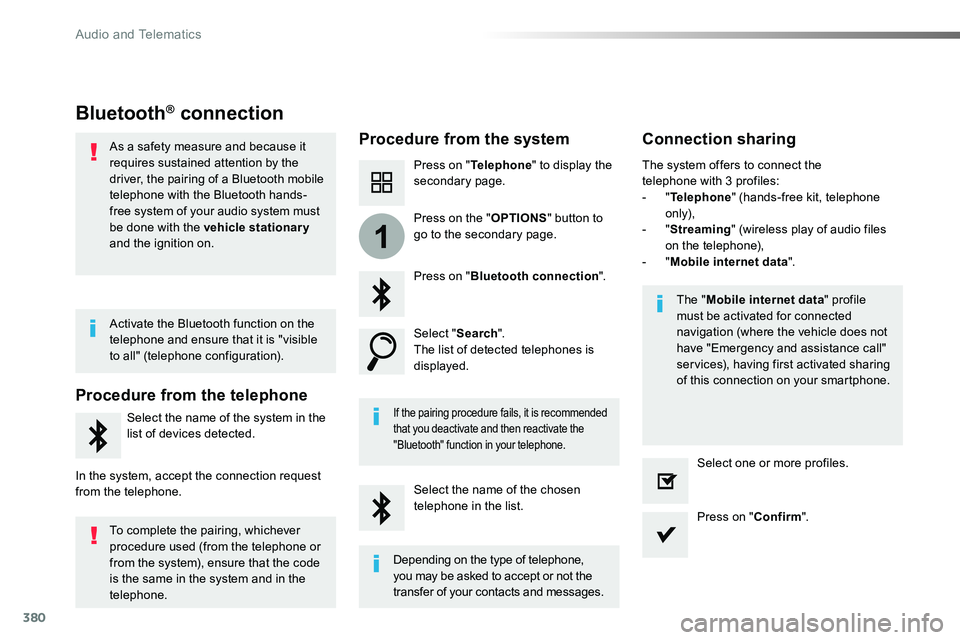
Bluetooth® connection
Procedure from the systemConnection sharing
Press on "Telephone" to display the secondary page.
Press on "Bluetooth connection".
Select "Search".The list of detected telephones is displayed.
If the pairing procedure fails, it is recommended that you deactivate and then reactivate the
"Bluetooth" function in your telephone.
The "Mobile internet data" profile must be activated for connected navigation (where the vehicle does not have "Emergency and assistance call" services), having first activated sharing of this connection on your smartphone.
The system offers to connect the telephone with 3 profiles:- "Telephone" (hands-free kit, telephone only),- "Streaming" (wireless play of audio files on the telephone),- "Mobile internet data".
Select the name of the chosen telephone in the list.Press on "Confirm".
Select one or more profiles.
Press on the "OPTIONS" button to go to the secondary page.
As a safety measure and because it requires sustained attention by the driver, the pairing of a Bluetooth mobile telephone with the Bluetooth hands-free system of your audio system must
be done with the vehicle stationary and the ignition on.
Procedure from the telephone
Select the name of the system in the
list of devices detected.
In the system, accept the connection request from the telephone.
Activate the Bluetooth function on the telephone and ensure that it is "visible to all" (telephone configuration).
To complete the pairing, whichever procedure used (from the telephone or from the system), ensure that the code is the same in the system and in the
telephone.
Depending on the type of telephone, you may be asked to accept or not the
transfer of your contacts and messages.
Audio and Telematics
Page 381 of 516

381
11
7
8
Wi-Fi connectionSharing the Wi-Fi connection
To protect from any piracy and provide maximum security for your systems, it is recommended that you use a security code or complex password.The Wi-Fi connection and the sharing
of the Wi-Fi connection are exclusive.
Press "Confirm".
Press "Confirm" to start the connection.
Press "Connectivity" to display the primary page.
Network connection by the smartphone Wi-Fi.Creation of a local Wi-Fi network by the system.
Press Connectivity to display the primary page.
Press the "OPTIONS" button to go to the secondary page.Press the "OPTIONS" button to go to the secondary page.
Select "Wi-Fi network connection".Select "Share Wi-Fi connection".
And / Or
Select the "Secured", "Not secured" or "Stored" tab.Select the "Activation" tab to activate or deactivate sharing of the Wi-Fi connection.
Select the "Settings" to change the name of the system network and the password.Using the virtual keypad, enter the "Key" for the Wi-Fi network and the "Password".
Select a network.
.
Audio and Telematics
Page 391 of 516
391
5
12
8
6
13
14
15
9
7
10
11
1
1
1
Level 1Level 2Comments
Radio Media
Secondary page
Audio settings
AmbienceSelect the sound ambience.
DistributionSound distribution by the Arkamys® system.
SoundAdjust the volume or activate volume linked to speed.
VoiceAdjust the voice volume.
RingtoneAdjust the ringtone volume.
ConfirmSave settings.
Radio Media
Secondary page
Radio settings
GeneralActivate or deactivate settings.Announcements
ConfirmSave settings.
Radio Media
Secondary page
Radio stations
FM
Display the list of radio stations for the band selected.DAB
AM
PresetsSelect a preset radio station.
FrequencyEnter a frequency manually.
Change the screen display mode.
Update the list according to reception.
.
Audio and Telematics
Page 395 of 516

395
1
110
1011
Press Radio Media to display the primary page.
Press Radio Media to display the primary page.
Press the "OPTIONS" button to go to
the secondary page.
Press the "OPTIONS" button to go to the secondary page.
Select "Radio settings".
Select "Radio settings".
Select "General".
Select "General".Select "Announcements".
Activate/deactivate "Station follow".
Activate / Deactivate "Display radio text".Activate / Deactivate "Tr a f f i c announcement".
Activate/ Deactivate RDS
RDS, if activated, allows you to continue listening to the same station by automatic retuning to alternative frequencies. However, in certain conditions, coverage of an RDS station may not be assured throughout the entire country as radio stations do not cover 100 % of the territory. This explains the loss
of reception of the station during a journey.
Press "Confirm".
Press "Confirm".Press "Confirm".
The "radiotext" function allows information transmitted by the radio station and related to the station or the song playing to be displayed.
Display text informationPlay TA messages
The TA (Traffic Announcement) function gives priority to TA alert messages. To operate, this function
needs good reception of a radio station that carries this type of message. While traffic information is being broadcast, the current media is automatically interrupted so that the TA message can be heard. Normal play of the media previously playing is resumed at the end of the message.
.
Audio and Telematics
Page 397 of 516

397
1
10
3
Select the audio source.
Press Radio Media to display the primary page.
Press "Band" to select the "DAB" waveband.
Press Radio Media to display the primary page.
Press the "OPTIONS" button to go to the secondary page.
DAB / FM auto trackingDigital radio
"DAB" does not cover 100% of the te r r i to r y.When the digital radio signal is poor, "DAB/FM auto tracking" allows you to continue listening to the same station,
by automatically switching to the corresponding "FM" analogue station (if there is one).
If "DAB / FM auto tracking" is activated, there is a difference of a few seconds when the system switches to "FM" analogue radio with sometimes a variation in volume.
Once the digital signal is restored, the system automatically changes back to " DA B ".
Digital radio provides higher quality reception.The different multiplexes offer a choice of radio stations arranged in alphabetical order.
If the "DAB" station being listened to is not available on "FM" ("DAB/FM" option greyed out), or "DAB/FM auto tracking" is not activated, the sound will cut out while the digital signal is too weak.Select "Radio settings".
Select "General".
Activate / Deactivate "Station follow".
Press "Confirm".
.
Audio and Telematics
Page 406 of 516

406
Pairing a Bluetooth® telephone
As a safety measure and because it requires sustained attention by the driver, the pairing of a Bluetooth mobile telephone with theBluetooth hands-free system of your audio system must be
done with the vehicle stationary and the ignition on.
Procedure from the telephone
Select the system name in the list of
devices detected.
In the system, accept the connection request from the telephone.
Procedure from the system
Press Telephone to display the primary page.
Press Connect telephone.
Select "Search".The list of telephones detected is displayed.
If the pairing procedure fails, it is recommended that you deactivate and then reactivate the "Bluetooth" function in your telephone.
The system offers to connect the telephone with 3 profiles:- Telephone (hands-free kit, telephone only),- Streaming (wireless play of audio files on the telephone),- Mobile internet data.
Depending on the type of telephone, you may be asked to accept or not the transfer of your contacts and messages.
Select the name of the chosen telephone in the list.
Press "Confirm".
Select one or more profiles.
O r.
Activate the Bluetooth function on the telephone and ensure that it is "visible to all" (telephone configuration).
To complete the pairing, whichever procedure used (from the telephone or from the system), ensure that the code is the same in the system and in the
telephone.
The "Mobile internet data" profile must be activated for connected navigation, having first activated sharing of this connection on your smartphone.
Connection sharing
Audio and Telematics
Page 415 of 516
415
1
8
9
1
1
13
14
15
16
11
10
12
Level 1Level 2Level 3Comments
Settings
Secondary page
Screen configuration
AnimationActivate or deactivate settings.
BrightnessAdjust the level of brightness.
ConfirmSave the settings.
Settings
Secondary page
System settings
Units
Distance and fuel consumptionSet the units used for distance, fuel consumption and temperature.Temperature
Factory settingsReinitializeReturn to the factory settings.
System infoViewView the versions of the different modules (system, mapping, risk areas) installed in the system as well as the updates available.
ConfirmSave the settings.
Settings
Secondary page
Languages
All
Select the language then confirm.
Europe
Asia
America
ConfirmHaving selected the language, save the setting.
.
Audio and Telematics
Page 417 of 516
417
1
17
18
1
20
19
21
22
Level 1Level 2Level 3Comments
Settings
Secondary page
Setting the time-date
Date
Date
Enter the date and select the date format.
Date format:
Time
TimeSet the time.
Time ZoneDefine the time zone.
Time format:Select the time format: 12h / 24h.
Synchronisation with G PS (UTC):Activate or deactivate synchronisation with GPS.
ConfirmSave the settings.
Settings
Secondary page
Setting of the profiles
Profile 1
Enter settings for the profiles.
Profile 2
Profile 3
Common profile
ConfirmSave the settings.
.
Audio and Telematics


