Page 219 of 568
2194-1. Before driving
4
Driving
PRIUS +_OM_OM47D30E_(EE)
WARNING
Observe the following precautions.
Failure to do so may result in death or serious injury.
■ When taking a nap in the vehicle
Always turn the hybrid system off. Otherwise, if you accidentally move the
shift lever or depress the accelerator pedal, this could cause an accident or
fire due to hybrid system overheating. Additionally, if the vehicle is parked in
a poorly ventilated area, exhaust gases may collect and enter the vehicle,
leading to death or a serious health hazard.
■ When braking
● When the brakes are wet, drive more cautiously.
Braking distance increases when the brakes are wet, and this may cause
one side of the vehicle to brake differently than the other side. Also, the
parking brake may not securely hold the vehicle.
● If the electronically controlled assist function does not operate, do not fol-
low other vehicles closely and avoid downhill or sharp turns that require
braking.
In this case, braking is still possible, but the brake pedal should be
depressed more firmly than usual. Also, the braking distance will increase.
Have your brakes fixed immediately.
● The brake system consists of 2 or more individual hydraulic systems; if
one of the systems fails, the other(s) will still operate. In this case, the
brake pedal should be depressed more firmly than usual and the braking
distance will increase. Have your brakes fixed immediately.
NOTICE
■When driving the vehicle
● Do not depress the accelerator and brake pedals at the same time during
driving, as this may restrain driving torque.
● Do not use the accelerator pedal or depress the accelerator and brake
pedals at the same time to hold the vehicle on a hill.
■ When parking the vehicle
Always set the parking brake, and shift the shift position to P. Failure to do
so may cause the vehicle to move or the vehicle may accelerate suddenly if
the accelerator pedal is accidentally depressed.
Page 220 of 568

2204-1. Before driving
PRIUS +_OM_OM47D30E_(EE)
NOTICE
■Avoiding damage to vehicle parts
● Do not turn the steering wheel fully in either direction and hold it there for
an extended period of time.
Doing so may damage the power steering motor.
● When driving over bumps in the road, drive as slowly as possible to avoid
damaging the wheels, underside of the vehicle, etc.
■ If you get a flat tire while driving
A flat or damaged tire may cause the following situations. Hold the steering
wheel firmly and gradually depress the brake pedal to slow down the vehi-
cle.
● It may be difficult to control your vehicle.
● The vehicle will make abnormal sounds or vibrations.
● The vehicle will lean abnormally.
Information on what to do in case of a flat tire: P. 478, 492
■ When encountering flooded roads
Do not drive on a road that has flooded after heavy rain etc. Doing so may
cause the following serious damage to the vehicle:
● Engine stalling
● Short in electrical components
● Engine damage caused by water immersion
In the event that you drive on a flooded road and the vehicle is flooded, be
sure to have any authorized Toyota retailer or Toyota authorized repairer, or
any reliable repairer check the following:
● Brake function
● Changes in quantity and quality of oil and fluid used for the engine, hybrid
transmission, etc.
● Lubricant condition for the bearings and suspension joints (where possi-
ble), and the function of all joints, bearings, etc.
If the shift control system is damaged by flooding, it may not be possible to
shift the shift position to P, or from P to other positions. When the shift posi-
tion cannot be changed from P to any other position, the front wheels will
lock, and you will be unable to tow the vehicle with the front wheels on the
ground, as the front wheels may be locked. In this case, transport the vehi-
cle with both front wheels or all four wheels lifted.
Page 224 of 568
2244-2. Driving procedures
PRIUS +_OM_OM47D30E_(EE)
Power (ignition) switch
Check that the parking brake is set.
Firmly depress the brake pedal.
Vehicles without multi-information display
The smart entry & start system indicator light (green) will turn on. If the
indicator light does not turn on, the hybrid system cannot be started.
Vehicles with multi-information display
will be displayed on the multi-information display.
If it is not displayed, the hybrid system cannot be started.
When the shift position is N, the hybrid system cannot start. Shift the shift
position to P when starting the hybrid system. (P. 234)
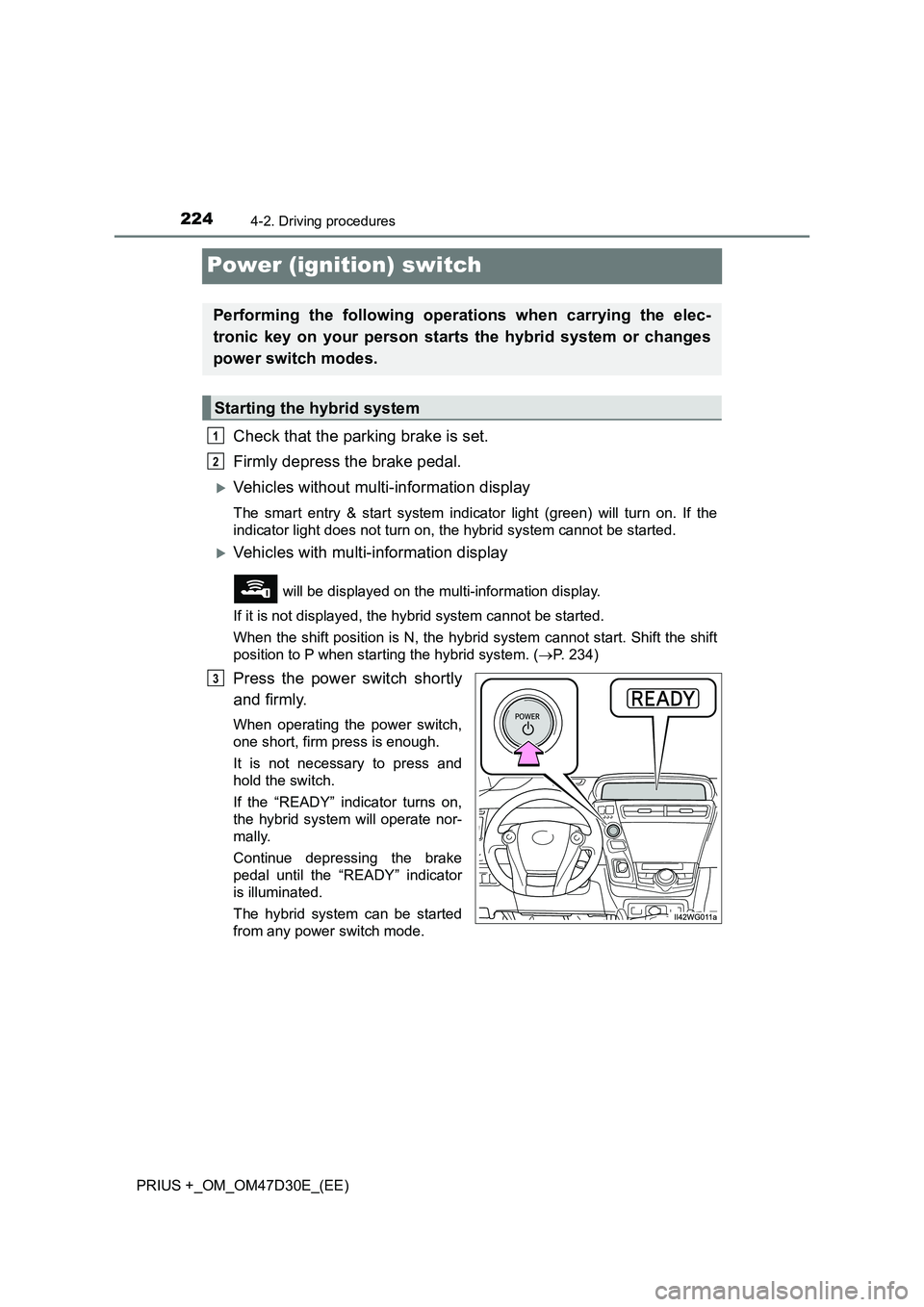
Press the power switch shortly
and firmly.
When operating the power switch,
one short, firm press is enough.
It is not necessary to press and
hold the switch.
If the “READY” indicator turns on,
the hybrid system will operate nor-
mally.
Continue depressing the brake
pedal until the “READY” indicator
is illuminated.
The hybrid system can be started
from any power switch mode.
Performing the following operations when carrying the elec-
tronic key on your person starts the hybrid system or changes
power switch modes.
Starting the hybrid system
1
2
3
Page 226 of 568
2264-2. Driving procedures
PRIUS +_OM_OM47D30E_(EE)
Stop the vehicle completely.
Set the parking brake. (P. 240)
Shift the shift position to P.
(P. 234)
Check that the shift position indica-
tor shows P. (P. 233)
Press the power switch.
The hybrid system will stop, and the meter display will be extinguished.
Release the brake pedal.
Vehicles without multi-information display
Check that the smart entry & start system indicator light (green) is off.
Vehicles with multi-information display
Check that “POWER ON” on the multi-information display is off.
Stopping the hybrid system
1
2
3
4
5
Page 227 of 568

2274-2. Driving procedures
4
Driving
PRIUS +_OM_OM47D30E_(EE)
Modes can be changed by pressing the power switch with the brake
pedal released. (The mode changes each time the switch is pressed.)
Vehicles without multi-information display
Off
The emergency flashers can be
used.
The smart entry & start system
indicator light (green) is off.
ACCESSORY mode
Some electrical components such
as the audio system can be used.
The smart entry & start system
indicator light (green) flashes
slowly.
ON mode
All electrical components can be
used.
The smart entry & start system indicator light (green) flashes slowly.
Vehicles with multi-information display
Off
The emergency flashers can be
used.
The multi-information display will
not be displayed.
ACCESSORY mode
Some electrical components such
as the audio system can be used.
“POWER ON” will be displayed on
the multi-information display.
ON mode
All electrical components can be
used.
“POWER ON” will be displayed on the multi-information display.
Changing power switch modes
Page 229 of 568

2294-2. Driving procedures
4
Driving
PRIUS +_OM_OM47D30E_(EE)■If the “READY” indicator does not come on
In the event that the “READY” indicator does not come on even after perform-
ing the proper procedures for starting the vehicle, contact any authorized
Toyota retailer or Toyota authorized repairer, or any reliable repairer immedi-
ately.
■If the hybrid system is malfunctioning
P. 460
■If the electronic key battery is depleted
P. 417
■Operation of the power switch
●If the switch is not pressed shortly and firmly, the power switch mode may
not change or the hybrid system may not start.
●If attempting to restart the hybrid system immediately after turning the power
switch off, the hybrid system may not start in some cases. After turning the
power switch off, please wait a few seconds before restarting the hybrid sys-
tem.
■Automatically P position selection function
P. 236
■When the shift control system malfunctions
The power switch will not be able to be turned off. In such a case, the switch
can be turned off after applying the parking brake.
Have the vehicle inspected by any authorized Toyota retailer or Toyota autho-
rized repairer, or any reliable repairer immediately.
■Meter display
When the power switch is turned off, each display will turn off as follows.
●The shift position indicator will turn off after approximately 2 seconds.
●EV driving ratio and average fuel consumption after hybrid system started,
turn off after approximately 6 seconds.
●The odometer, clock, etc. will turn off after approximately 30 seconds.
(Each display will also turn off immediately if a door is locked before 30 sec-
onds has elapsed.)
Page 233 of 568
233
4
4-2. Driving procedures
Driving
PRIUS +_OM_OM47D30E_(EE)
Hybrid transmission
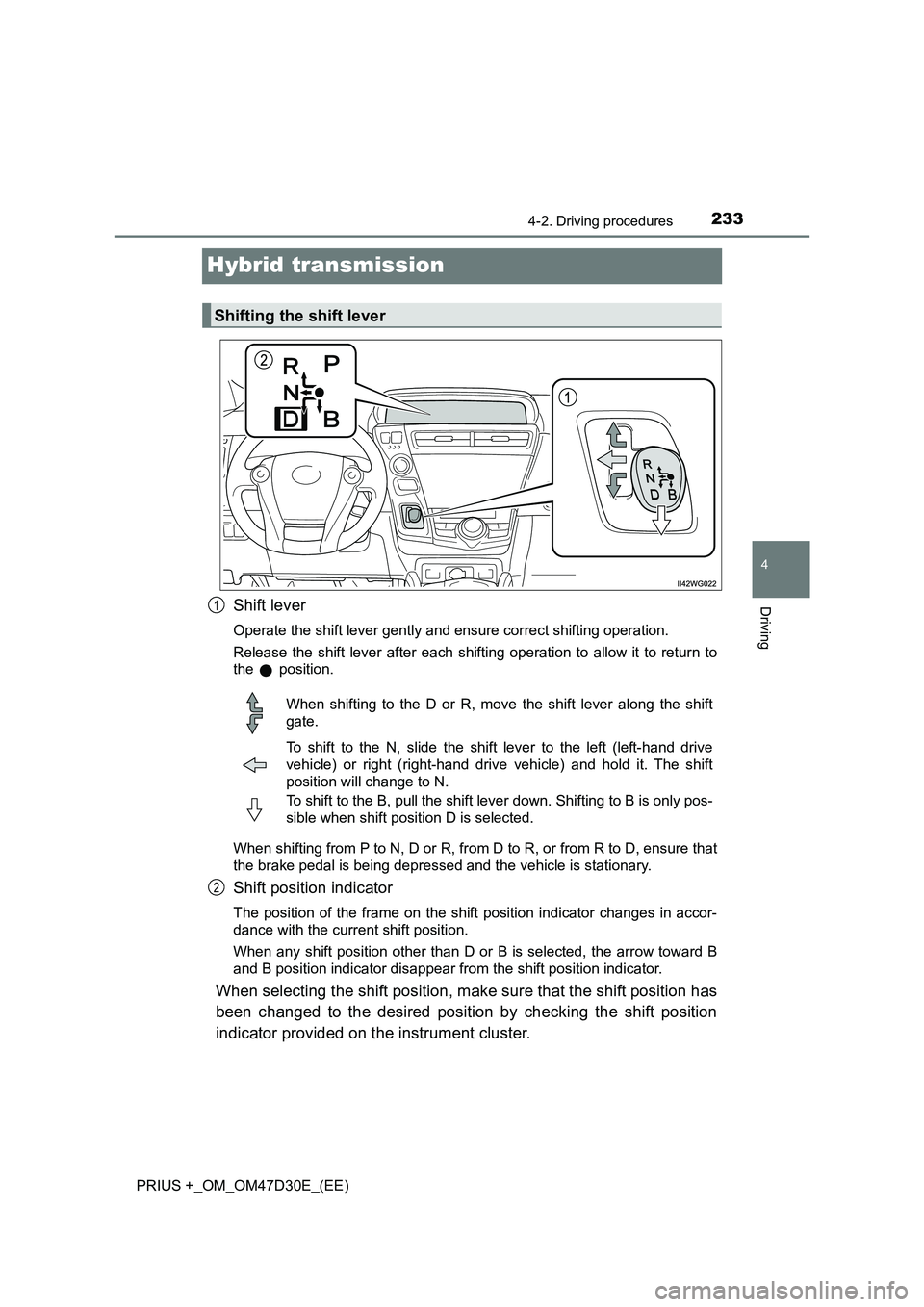
Shift lever
Operate the shift lever gently and ensure correct shifting operation.
Release the shift lever after each shifting operation to allow it to return to
the position.
When shifting from P to N, D or R, from D to R, or from R to D, ensure that
the brake pedal is being depressed and the vehicle is stationary.
Shift position indicator
The position of the frame on the shift position indicator changes in accor-
dance with the current shift position.
When any shift position other than D or B is selected, the arrow toward B
and B position indicator disappear from the shift position indicator.
When selecting the shift position, make sure that the shift position has
been changed to the desired position by checking the shift position
indicator provided on the instrument cluster.
Shifting the shift lever
1
When shifting to the D or R, move the shift lever along the shift
gate.
To shift to the N, slide the shift lever to the left (left-hand drive
vehicle) or right (right-hand drive vehicle) and hold it. The shift
position will change to N.
To shift to the B, pull the shift lever down. Shifting to B is only pos-
sible when shift position D is selected.
2
Page 234 of 568

2344-2. Driving procedures
PRIUS +_OM_OM47D30E_(EE)
*: For good fuel economy and noise reduction, the D position should usually
be used.
P. 3 1 7
■When shifting the shift position to P
Fully stop the vehicle and set
the parking brake, and then
press the P position switch.
When the shift position is
changed to P, the switch indica-
tor comes on.
Check that the P position is illu-
minated on the shift position
indicator.
■
Shifting the shift position from P to other positions
●While depressing the brake pedal firmly, operate the shift lever. If
the shift lever is operated without depressing the brake pedal, the
buzzer will sound and the shifting operation will be disabled.
●When selecting the shift position, make sure that the shift posi-
tion has been changed to the desired position by checking the
shift position indicator provided on the instrument cluster.
●The shift position cannot be changed from P to B directly.
Shift position purpose
Shift positionObjective or function
PParking the vehicle/starting the hybrid system
RReversing
NNeutral
(Condition in which the power is not transmitted)
DNormal driving*
B
Applying engine braking or strong braking when
the accelerator pedal has been released on steep
downward slopes etc.
Selecting a driving mode
P position switch
