2019 TOYOTA PRIUS PLUS ECO mode
[x] Cancel search: ECO modePage 290 of 568
2904-5. Using the driving support systems
PRIUS +_OM_OM47D30E_(EE)
■Operation conditions of each function
●Lane departure alert function
This function operates when all of the following conditions are met.
• LDA is turned on.
• Vehicle speed is approximately 50 km/h (32 mph) or more.
• System recognizes white (yellow) lines.
• Width of traffic lane is approximately 3 m (9.8 ft.) or more.
• Turn signal lever is not operated.
• Vehicle is driven on a straight road or around a gentle curve with a radius
of more than approximately 150 m (492 ft.).
• No system malfunctions are detected. (P. 293)
●Steering control function
This function operates when all of the following conditions are met in addi-
tion to the operation conditions for the lane departure alert function.
• Setting for “LDA STEERING ASSIST MODE” in the screen of the
multi-information display is set to “ON”. (P. 126)
• Vehicle is not accelerated or decelerated by a certain amount or more.
• Steering wheel is not operated with a steering force level suitable for
changing lanes.
• ABS, VSC, TRC and PCS are not operating.
• TRC or VSC is not turned off.
• Hands off steering wheel warning is not displayed. (P. 291)
●Vehicle sway warning function
This function operates when all of the following conditions are met.
• Setting for “LANE SWAY WARNING STATUS” in the screen of
the multi-information display is set to “ON”. (P. 126)
• Vehicle speed is approximately 50 km/h (32 mph) or more.
• Width of traffic lane is approximately 3 m (9.8 ft.) or more.
• No system malfunctions are detected. (P. 293)
Page 304 of 568
3044-5. Using the driving support systems
PRIUS +_OM_OM47D30E_(EE)
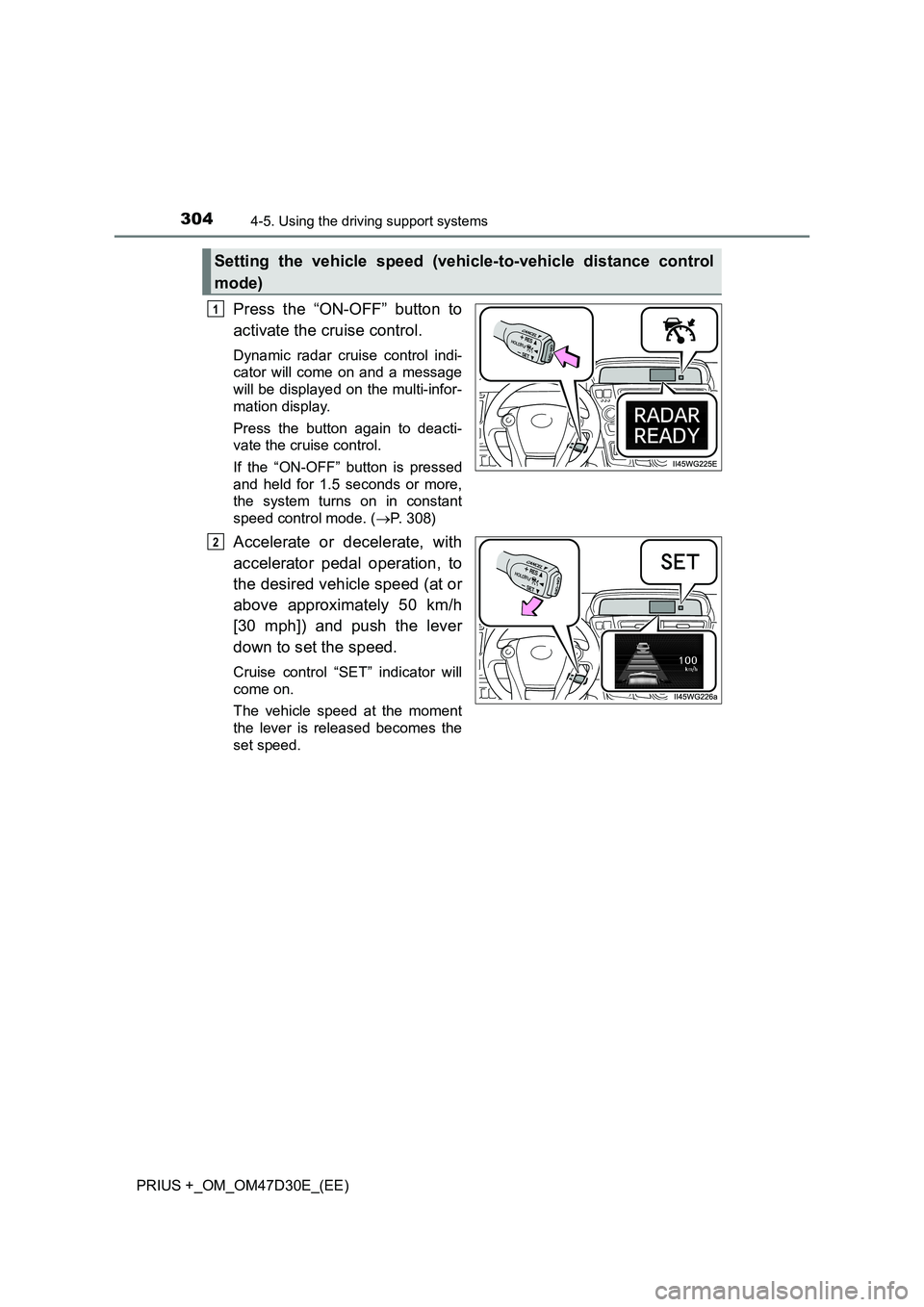
Press the “ON-OFF” button to
activate the cruise control.
Dynamic radar cruise control indi-
cator will come on and a message
will be displayed on the multi-infor-
mation display.
Press the button again to deacti-
vate the cruise control.
If the “ON-OFF” button is pressed
and held for 1.5 seconds or more,
the system turns on in constant
speed control mode. ( P. 308)
Accelerate or decelerate, with
accelerator pedal operation, to
the desired vehicle speed (at or
above approximately 50 km/h
[30 mph]) and push the lever
down to set the speed.
Cruise control “SET” indicator will
come on.
The vehicle speed at the moment
the lever is released becomes the
set speed.
Setting the vehicle speed (vehicle-to-vehicle distance control
mode)
1
2
Page 308 of 568

3084-5. Using the driving support systems
PRIUS +_OM_OM47D30E_(EE)
When constant speed control mode is selected, your vehicle will main-
tain a set speed without controlling the vehicle-to-vehicle distance.
Select this mode only when vehicle-to-vehicle distance control mode
does not function correctly due to a dirty radar sensor, etc.
With the cruise control off,
press and hold the “ON-OFF”
button for 1.5 seconds or more.
Immediately after the “ON-OFF”
button is pressed, the dynamic
radar cruise control indicator will
come on. Afterwards, it switches to
the cruise control indicator.
Switching to constant speed con-
trol mode is only possible when
operating the lever with the cruise
control off.
Accelerate or decelerate, with
accelerator pedal operation, to
the desired vehicle speed (at or
above approximately 40 km/h
[25 mph]) and push the lever
down to set the speed.
Cruise control “SET” indicator will
come on.
The vehicle speed at the moment
the lever is released becomes the
set speed.
Adjusting the speed setting: P. 305
Canceling and resuming the speed setting: P. 307
Selecting constant speed control mode
1
2
Page 317 of 568
317
4
4-5. Using the driving support systems
Driving
PRIUS +_OM_OM47D30E_(EE)
Driving mode select switch
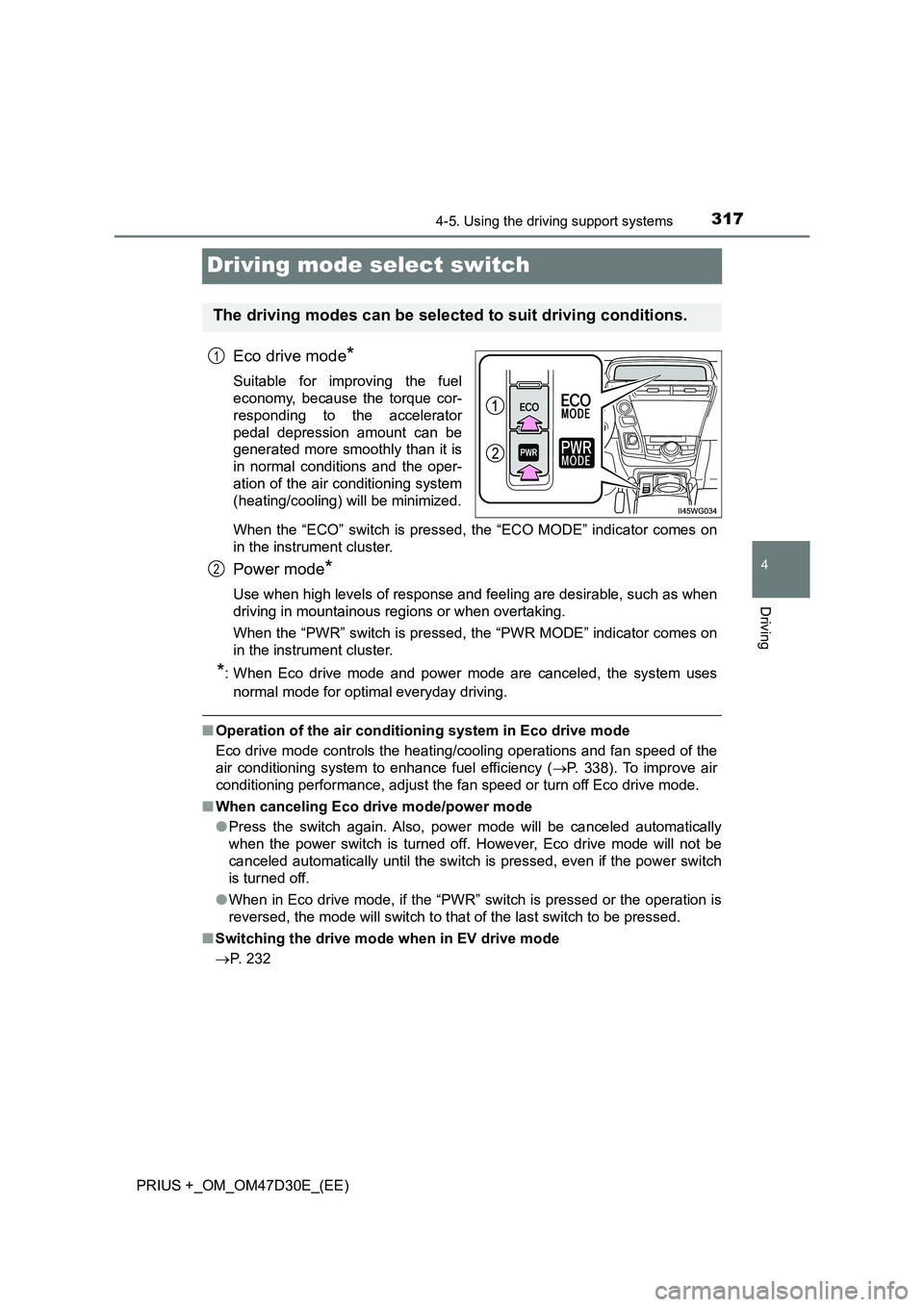
Eco drive mode*
Suitable for improving the fuel
economy, because the torque cor-
responding to the accelerator
pedal depression amount can be
generated more smoothly than it is
in normal conditions and the oper-
ation of the air conditioning system
(heating/cooling) will be minimized.
When the “ECO” switch is pressed, the “ECO MODE” indicator comes on
in the instrument cluster.
Power mode*
Use when high levels of response and feeling are desirable, such as when
driving in mountainous regions or when overtaking.
When the “PWR” switch is pressed, the “PWR MODE” indicator comes on
in the instrument cluster.
*: When Eco drive mode and power mode are canceled, the system uses
normal mode for optimal everyday driving.
■Operation of the air conditioning system in Eco drive mode
Eco drive mode controls the heating/cooling operations and fan speed of the
air conditioning system to enhance fuel efficiency (P. 338). To improve air
conditioning performance, adjust the fan speed or turn off Eco drive mode.
■When canceling Eco drive mode/power mode
●Press the switch again. Also, power mode will be canceled automatically
when the power switch is turned off. However, Eco drive mode will not be
canceled automatically until the switch is pressed, even if the power switch
is turned off.
●When in Eco drive mode, if the “PWR” switch is pressed or the operation is
reversed, the mode will switch to that of the last switch to be pressed.
■Switching the drive mode when in EV drive mode
P. 232
The driving modes can be selected to suit driving conditions.
1
2
Page 324 of 568
3244-6. Driving tips
PRIUS +_OM_OM47D30E_(EE)
Hybrid vehicle driving tips
◆Using Eco drive mode
When using Eco drive mode, the torque corresponding to the accel-
erator pedal depression amount can be generated more smoothly
than it is in normal conditions. In addition, the operation of the air
conditioning system (heating/cooling) will be minimized, improving
the fuel economy. (P. 317)
◆Use of Hybrid System Indicator
The Eco-friendly driving is possible by keeping the Hybrid System
Indicator within Eco area. (P. 124)
◆Shift position operation
Shift the shift position to D when stopped at a traffic light, or driving
in heavy traffic etc. Shift the shift position to P when parking. When
using the N, there is no positive effect on fuel consumption. In the
N, the gasoline engine operates but electricity cannot be gener-
ated. Also, when using the air conditioning system, etc., the hybrid
battery (traction battery) power is consumed.
◆Accelerator pedal/brake pedal operation
●Drive your vehicle smoothly. Avoid abrupt acceleration and
deceleration. Gradual acceleration and deceleration will make
more effective use of the electric motor (traction motor) without
having to use gasoline engine power.
●Avoid repeated acceleration. Repeated acceleration consumes
hybrid battery (traction battery) power, resulting in poor fuel con-
sumption. Battery power can be restored by driving with the
accelerator pedal slightly released.
For economical and ecological driving, pay attention to the fol-
lowing points:
Page 325 of 568

3254-6. Driving tips
4
Driving
PRIUS +_OM_OM47D30E_(EE)
◆When braking
Make sure to operate the brakes gently and in a timely manner. A
greater amount of electrical energy can be regenerated when slow-
ing down.
◆Delays
Repeated acceleration and deceleration, as well as long waits at
traffic lights, will lead to bad fuel economy. Check traffic reports
before leaving and avoid delays as much as possible. When driving
in a traffic jam, gently release the brake pedal to allow the vehicle to
move forward slightly while avoiding overuse of the accelerator
pedal. Doing so can help control excessive gasoline consumption.
◆Highway driving
Control and maintain the vehicle at a constant speed. Before stop-
ping at a toll booth or similar, allow plenty of time to release the
accelerator and gently apply the brakes. A greater amount of elec-
trical energy can be regenerated when slowing down.
◆Air conditioning
Use the air conditioning only when necessary. Doing so can help
reduce excessive gasoline consumption.
In summer: When the ambient temperature is high, use the recircu-
lated air mode. Doing so will help to reduce the burden on the air
conditioning system and reduce fuel consumption as well.
In winter: Because the gasoline engine will not automatically cut out
until it and the interior of the vehicle are warm, it will consume fuel.
Fuel consumption can be improved by avoiding overuse of the
heater.
Page 337 of 568
3375-1. Using the air conditioning system and defogger
PRIUS +_OM_OM47D30E_(EE)
5
Interior features
■Using automatic mode
Fan speed is adjusted automatically according to the temperature setting and
the ambient conditions.
Therefore, the fan may stop for a while until warm or cool air is ready to flow
immediately after is pressed.
■ After pressing
The selection frame will automatically move to the fan speed display.
■ Fogging up of the windows
● The windows will easily fog up when the humidity in the vehicle is high.
Pressing on will dehumidify the air from the outlets and defog the
windshield effectively.
● If you turn off, the windows may fog up more easily.
● The windows may fog up if the recirculated air mode is used.
■ When driving on dusty roads
Close all windows. If dust thrown up by the vehicle is still drawn into the vehi-
cle after closing the windows, it is recommended that the air intake mode be
set to outside air mode and the fan speed to any setting except off.
■ Outside/recirculated air mode
● Setting to the recirculated air mode temporarily is recommended in prevent-
ing dirty air from entering the vehicle interior and helping to cool the vehicle
when the outside air temperature is high.
● Outside/recirculated air mode may automatically switch depending on the
temperature setting or the inside temperature.
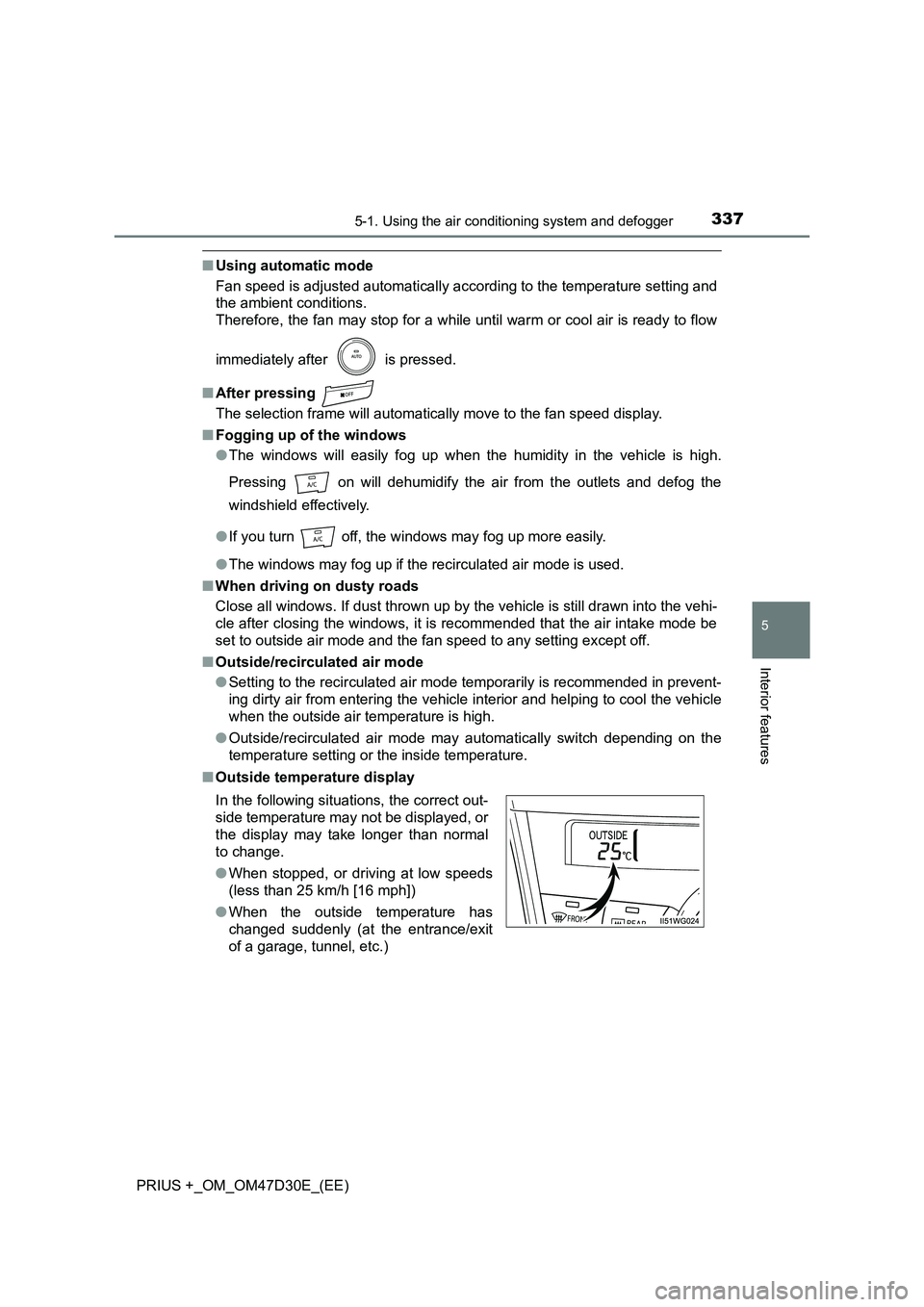
■ Outside temperature display
In the following situations, the correct out-
side temperature may not be displayed, or
the display may take longer than normal
to change.
● When stopped, or driving at low speeds
(less than 25 km/h [16 mph])
● When the outside temperature has
changed suddenly (at the entrance/exit
of a garage, tunnel, etc.)
Page 338 of 568
3385-1. Using the air conditioning system and defogger
PRIUS +_OM_OM47D30E_(EE)■When the outside temperature is low
The dehumidification function may not operate even when is pressed.
■Operation of the air conditioning system in Eco drive mode
●In the Eco drive mode, the air conditioning system is controlled as follows to
prioritize fuel efficiency
• Engine speed and compressor operation controlled to restrict heating/
cooling capacity
• Fan speed restricted when automatic mode is selected
●To improve air conditioning performance, perform the following operations
• Adjust the fan speed
• Turn off Eco drive mode
• Customize the air conditioning control of Eco drive mode. (P. 543)
■Ventilation and air conditioning odors
●To let fresh air in, set the air conditioning system to the outside air mode.
●During use, various odors from inside and outside the vehicle may enter into
and accumulate in the air conditioning system. This may then cause odor to
be emitted from the vents.
●To reduce potential odors from occurring:
• It is recommended that the air conditioning system be set to outside air
mode prior to turning the vehicle off.
• The start timing of the blower may be delayed for a short period of time
immediately after the air conditioning system is started in automatic
mode.
■Air conditioning filter
P. 413
■Customization
Settings (e.g. A/C auto switching operation) can be changed.
(Customizable features: P. 539)