2019 TOYOTA PRIUS PLUS change time
[x] Cancel search: change timePage 297 of 568

2974-5. Using the driving support systems
4
Driving
PRIUS +_OM_OM47D30E_(EE)
In the following situations, the RSA system alerts the driver using a
warning display.
●When the vehicle speed exceeds the speed warning threshold
applied to the speed limit of the sign displayed on the main display
or multi-information display, the sign color becomes inverted.
●If it is detected that your vehicle is overtaking when a no overtaking
sign is displayed on the multi-information display, the sign flashes.
Depending on the situation, traffic environment (traffic direction,
speed, unit) may be detected incorrectly and a warning display may
not operate properly.
■Automatic turn-off of RSA sign display
One or more signs automatically turn off in the following situations.
●A new sign is not recognized for a certain distance.
●The road changes due to a left or right turn, etc.
■Conditions in which the function may not operate or detect correctly
In the following situations, RSA does not operate normally and may not rec-
ognize signs, display the incorrect sign, etc. However, this does not indicate a
malfunction.
●The camera sensor is misaligned due to a strong impact being applied to
the sensor, etc.
●Dirt, snow, stickers, etc., are on the windshield near the camera sensor.
●In inclement weather such as heavy rain, fog, snow or sand storms
●Light from an oncoming vehicle, the sun, etc., enters the camera sensor.
●The sign is dirty, faded, tilted or bent, and if an electronic sign, the contrast
is poor.
●All or part of the sign is hidden by the leaves of a tree, a pole, etc.
●The sign is only visible to the camera sensor for a short amount of time.
●The driving scene (turning, lane change, etc.) is judged incorrectly.
●Even if it is a sign not appropriate for the currently traveled lane, such a sign
exists directly after a freeway branches, or in an adjacent lane just before
merging.
●Stickers are attached to the rear of the preceding vehicle.
●A sign resembling a system compatible sign is recognized.
●The vehicle is driven in a country with a different direction of traffic.
●Side road speed signs may be detected and displayed (if positioned in sight
of the camera sensor) while the vehicle is traveling on the main road.
Warning display
Page 303 of 568
3034-5. Using the driving support systems
4
Driving
PRIUS +_OM_OM47D30E_(EE)
Example of constant speed cruising
When there are no vehicles ahead
The vehicle travels at the speed set by the driver. The desired vehicle-to-
vehicle distance can also be set by operating the vehicle-to-vehicle dis-
tance switch.
Example of deceleration cruising and follow-up cruising
When a preceding vehicle driving slower than the set speed
appears
When a vehicle is detected running ahead of you, the system automatically
decelerates your vehicle. When a greater reduction in vehicle speed is
necessary, the system applies the brakes (the stop lights will come on at
this time). The system will respond to changes in the speed of the vehicle
ahead in order to maintain the vehicle-to-vehicle distance set by the driver.
Approach warning warns you when the system cannot decelerate suffi-
ciently to prevent your vehicle from closing in on the vehicle ahead.
Example of acceleration
When there are no longer any preceding vehicles driving slower
than the set speed
The system accelerates until the set speed is reached. The system then
returns to constant speed cruising.
1
2
3
Page 305 of 568
3054-5. Using the driving support systems
4
Driving
PRIUS +_OM_OM47D30E_(EE)
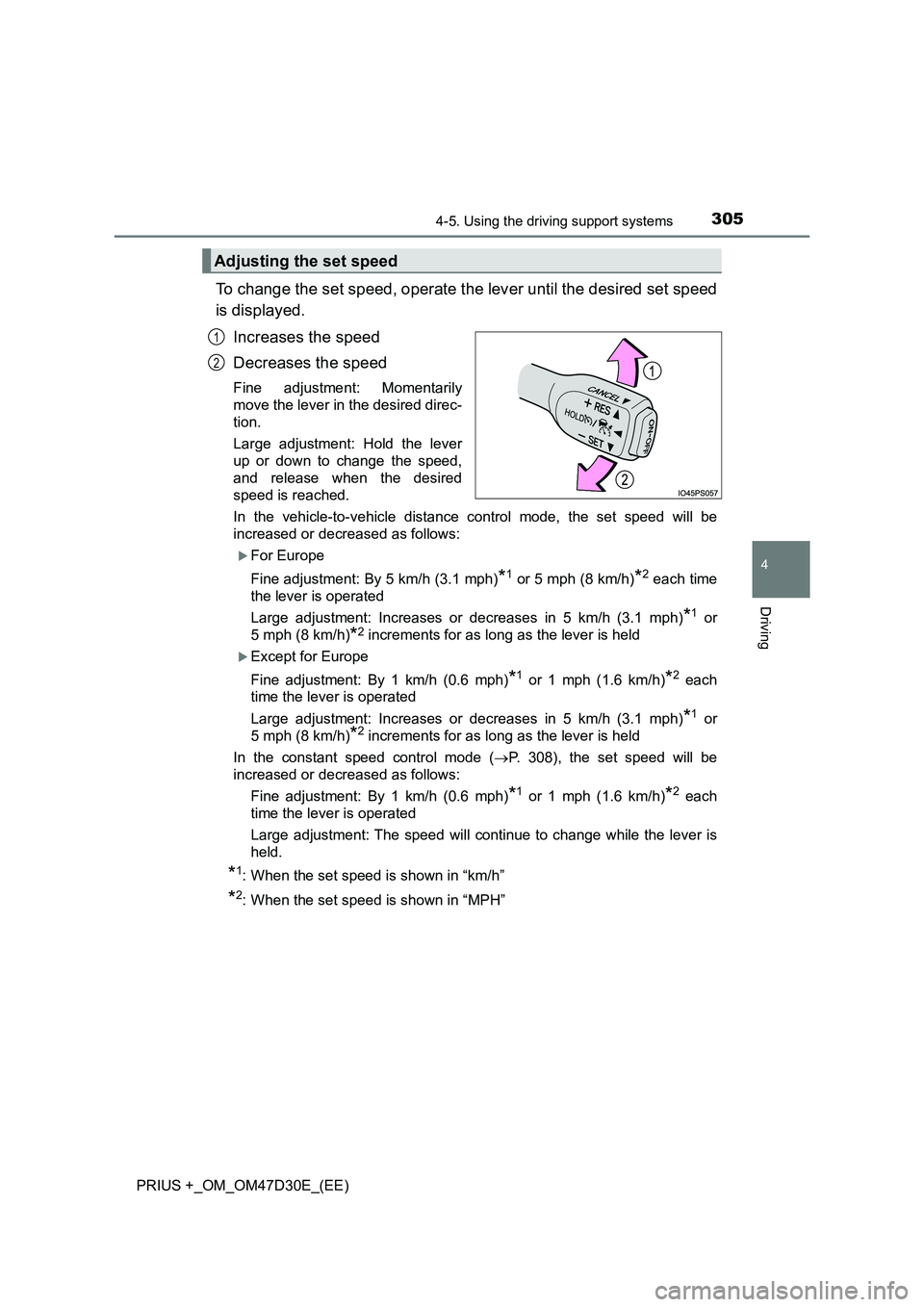
To change the set speed, operate the lever until the desired set speed
is displayed.
Increases the speed
Decreases the speed
Fine adjustment: Momentarily
move the lever in the desired direc-
tion.
Large adjustment: Hold the lever
up or down to change the speed,
and release when the desired
speed is reached.
In the vehicle-to-vehicle distance control mode, the set speed will be
increased or decreased as follows:
For Europe
Fine adjustment: By 5 km/h (3.1 mph)
*1 or 5 mph (8 km/h)*2 each time
the lever is operated
Large adjustment: Increases or decreases in 5 km/h (3.1 mph)
*1 or
5 mph (8 km/h)
*2 increments for as long as the lever is held
Except for Europe
Fine adjustment: By 1 km/h (0.6 mph)
*1 or 1 mph (1.6 km/h)*2 each
time the lever is operated
Large adjustment: Increases or decreases in 5 km/h (3.1 mph)
*1 or
5 mph (8 km/h)
*2 increments for as long as the lever is held
In the constant speed control mode (P. 308), the set speed will be
increased or decreased as follows:
Fine adjustment: By 1 km/h (0.6 mph)
*1 or 1 mph (1.6 km/h)*2 each
time the lever is operated
Large adjustment: The speed will continue to change while the lever is
held.
*1: When the set speed is shown in “km/h”
*2: When the set speed is shown in “MPH”
Adjusting the set speed
1
2
Page 314 of 568
3144-5. Using the driving support systems
PRIUS +_OM_OM47D30E_(EE)
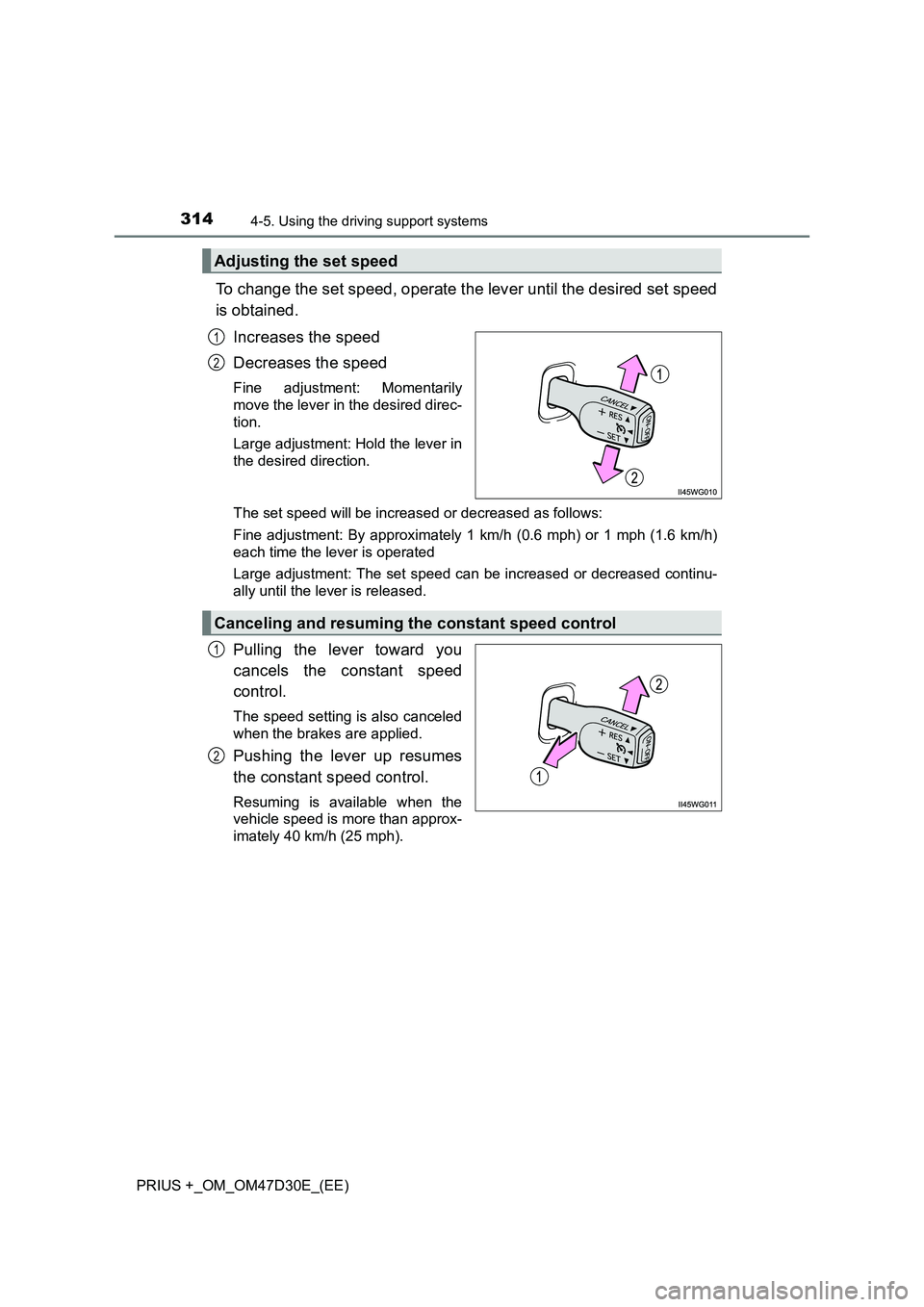
To change the set speed, operate the lever until the desired set speed
is obtained.
Increases the speed
Decreases the speed
Fine adjustment: Momentarily
move the lever in the desired direc-
tion.
Large adjustment: Hold the lever in
the desired direction.
The set speed will be increased or decreased as follows:
Fine adjustment: By approximately 1 km/h (0.6 mph) or 1 mph (1.6 km/h)
each time the lever is operated
Large adjustment: The set speed can be increased or decreased continu-
ally until the lever is released.
Pulling the lever toward you
cancels the constant speed
control.
The speed setting is also canceled
when the brakes are applied.
Pushing the lever up resumes
the constant speed control.
Resuming is available when the
vehicle speed is more than approx-
imately 40 km/h (25 mph).
Adjusting the set speed
1
2
Canceling and resuming the constant speed control
1
2
Page 338 of 568
3385-1. Using the air conditioning system and defogger
PRIUS +_OM_OM47D30E_(EE)■When the outside temperature is low
The dehumidification function may not operate even when is pressed.
■Operation of the air conditioning system in Eco drive mode
●In the Eco drive mode, the air conditioning system is controlled as follows to
prioritize fuel efficiency
• Engine speed and compressor operation controlled to restrict heating/
cooling capacity
• Fan speed restricted when automatic mode is selected
●To improve air conditioning performance, perform the following operations
• Adjust the fan speed
• Turn off Eco drive mode
• Customize the air conditioning control of Eco drive mode. (P. 543)
■Ventilation and air conditioning odors
●To let fresh air in, set the air conditioning system to the outside air mode.
●During use, various odors from inside and outside the vehicle may enter into
and accumulate in the air conditioning system. This may then cause odor to
be emitted from the vents.
●To reduce potential odors from occurring:
• It is recommended that the air conditioning system be set to outside air
mode prior to turning the vehicle off.
• The start timing of the blower may be delayed for a short period of time
immediately after the air conditioning system is started in automatic
mode.
■Air conditioning filter
P. 413
■Customization
Settings (e.g. A/C auto switching operation) can be changed.
(Customizable features: P. 539)
Page 340 of 568

3405-1. Using the air conditioning system and defogger
PRIUS +_OM_OM47D30E_(EE)
Using the steering wheel climate remote
control switches
Temperature control
Outside air or recirculated air
mode
Press “ ” on to increase the temperature and “” to decrease
the temperature.
Press .
The mode switches between outside air mode and recirculated air mode
each time the switch is pressed.
■ When changing the temperature setting using the steering switches
The temperature will change, however the position of the selection frame on
the air conditioning display will remain the same.
: If equipped
Some air conditioning features can be controlled using the
switches on the steering wheel.
1
2
Adjusting the temperature setting
Changing the outside air or recirculated air modes
WARNING
■ To reduce the risk of an accident
Exercise care when operating the air conditioning switches on the steering
wheel.
Page 344 of 568
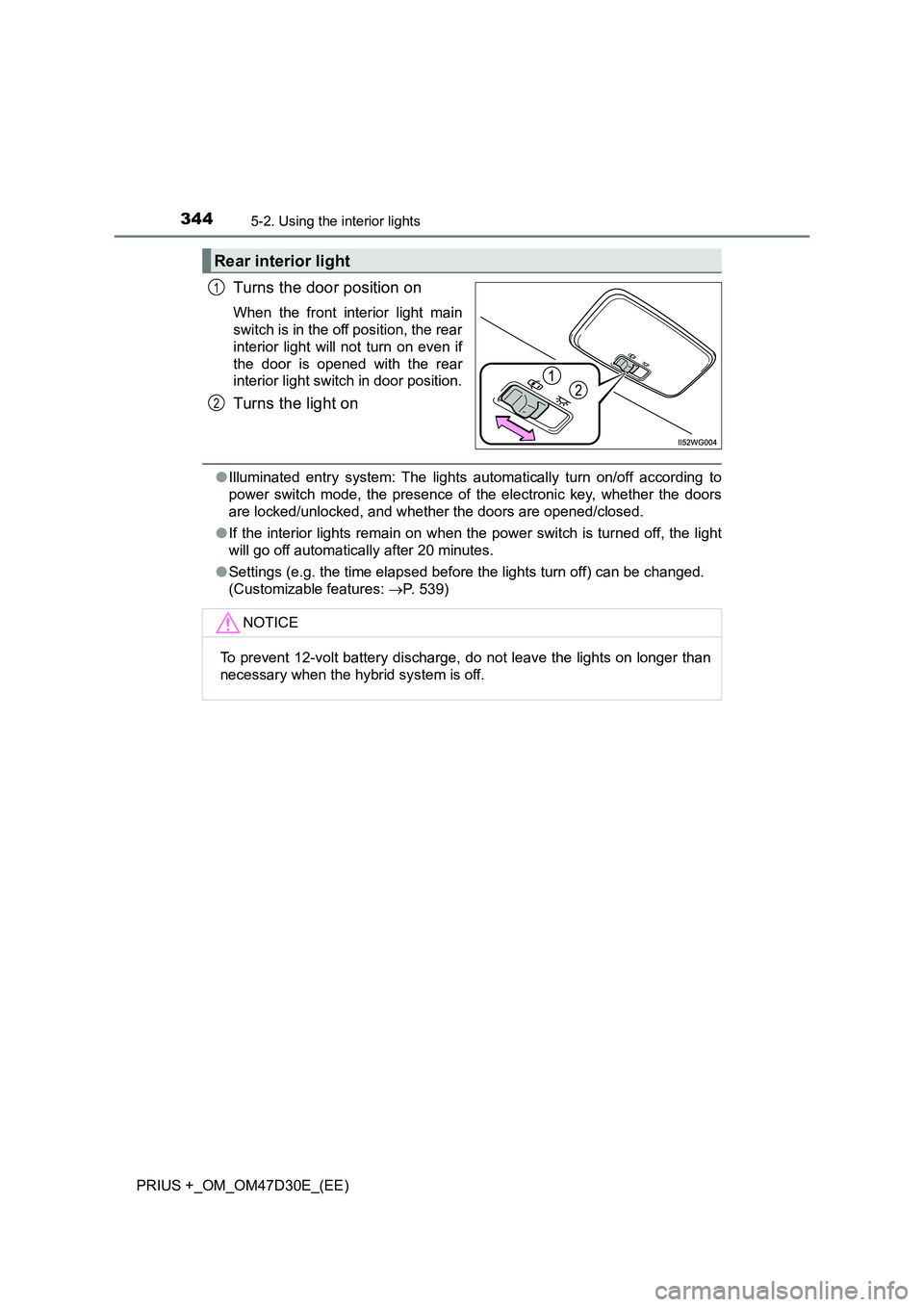
3445-2. Using the interior lights
PRIUS +_OM_OM47D30E_(EE)
Turns the door position on
When the front interior light main
switch is in the off position, the rear
interior light will not turn on even if
the door is opened with the rear
interior light switch in door position.
Turns the light on
●Illuminated entry system: The lights automatically turn on/off according to
power switch mode, the presence of the electronic key, whether the doors
are locked/unlocked, and whether the doors are opened/closed.
●If the interior lights remain on when the power switch is turned off, the light
will go off automatically after 20 minutes.
●Settings (e.g. the time elapsed before the lights turn off) can be changed.
(Customizable features: P. 539)
Rear interior light
1
2
NOTICE
To prevent 12-volt battery discharge, do not leave the lights on longer than
necessary when the hybrid system is off.
Page 398 of 568

3986-3. Do-it-yourself maintenance
PRIUS +_OM_OM47D30E_(EE)■The initialization operation
●Make sure to carry out initialization after adjusting the tire inflation pressure.
Also, make sure the tires are cold before carrying out initialization or tire
inflation pressure adjustment.
●If you have accidentally turned the power switch off during initialization, it is
not necessary to press the reset switch again as initialization will restart
automatically when the power switch has been turned to ON mode for the
next time.
●If you accidentally press the reset switch when initialization is not necessary,
adjust the tire inflation pressure to the specified level when the tires are
cold, and conduct initialization again.
■Warning performance of the tire pressure warning system
The warning of the tire pressure warning system will change in accordance
with the conditions under which it was initialized. For this reason, the system
may give a warning even if the tire pressure does not reach a low enough
level, or if the pressure is higher than the pressure that was adjusted to when
the system was initialized.
■When initialization of the tire pressure warning system has failed
Initialization can be completed in a few minutes. However, in the following
cases, the settings have not been recorded and the system will not operate
properly. If repeated attempts to record tire inflation pressure settings are
unsuccessful, have the vehicle inspected by any authorized Toyota retailer or
Toyota authorized repairer, or any reliable repairer.
●When operating the tire pressure warning reset switch, the tire pressure
warning light does not blink 3 times.
●After carrying out the initialization procedure, the tire pressure warning light
blinks for 1 minute then stays on after driving for 20 minutes.
■Registering ID codes
The ID codes of the tire pressure warning valve and transmitters for two sets
of wheels can be registered.
It is not necessary to register the ID codes when replacing normal tires with
snow tires, if the ID codes for the wheels of both normal tires and snow tires
are registered beforehand.
For information about changing ID codes, ask any authorized Toyota retailer
or Toyota authorized repairer, or any reliable repairer.