Page 15 of 56
13
OVERVIEW FEATURES & OPERATIONS TOYOTA SAFETY SENSE SAFETY & EMERGENCY FEATURES
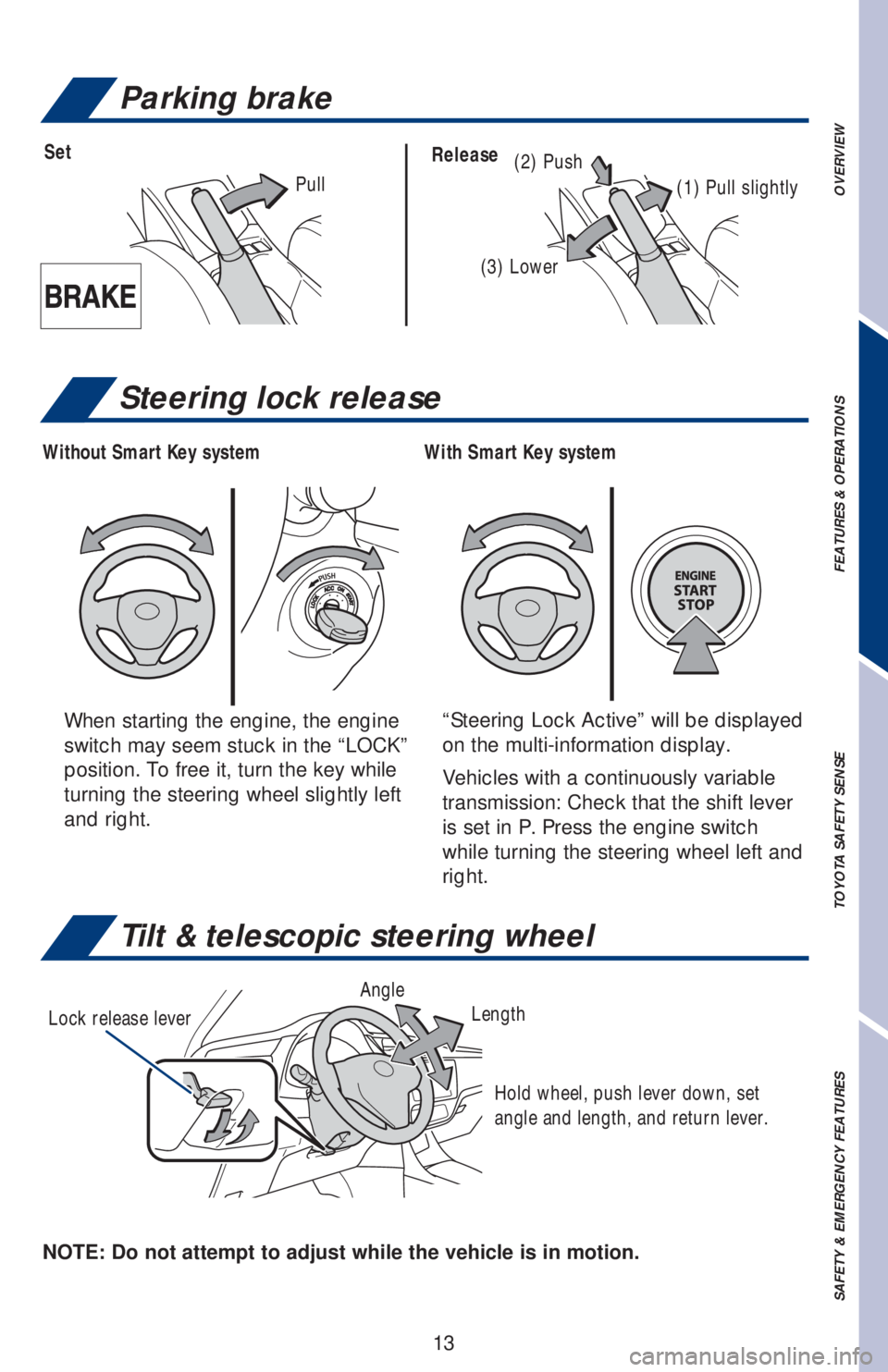
Tilt & telescopic steering wheel
NOTE: Do not attempt to adjust while the vehicle is in motion.Lock release leverAngle
Length
Hold wheel, push lever down, set
angle and length, and return lever.
Parking brake
(2) PushSetRelease
(1) Pull slightly
(3) Lower
Pull
When starting the engine, the engine
switch may seem stuck in the “LOCK”
position. To free it, turn the key while
turning the steering wheel slightly left
and right.“Steering Lock Active” will be displayed
on the multi-information display.
Vehicles with a continuously variable
transmission: Check that the shift lever
is set in P. Press the engine switch
while turning the steering wheel left and
right.
Steering lock release
With Smart Key system Without Smart Key system
Page 18 of 56
16
FEATURES & OPERATIONS
USB media port
By connecting a USB-compatible portable audio device or USB memory stick into
the USB media port, you can listen to music through the vehicle’s speaker system.
AUX port
By inserting an AUX cable into the AUX port, you can listen to music from a
portable audio device through the vehicle’s speaker system while in AUX mode.
The engine switch must be in the “ACC” or “ON” (without a Smart Key system),
ACCESSORY or IGNITION ON mode (with a Smart Key system) position for use.
Interval wipe Mist
Slow
Fast
Pull to wash and wipe
Windshield wipers & washers
* Intermittent windshield wiper frequency adjustment Rotate to increase/
decrease wipe frequency. (Available on select grades.)
Refer to the Owner’s Manual for more information.
Adjust frequency*
Pull to wash and wipe
Power outlet
USB media/AUX port
Page 21 of 56
19
OVERVIEW FEATURES & OPERATIONS TOYOTA SAFETY SENSE SAFETY & EMERGENCY FEATURES
Seat heaters (if equipped)
Driver seat Front passenger seat
The engine switch must be in the “ON” (without a Smart Key system) or “IGNITION
ON” (with a Smart Key system) mode.
WINDSHIELD WIPER DE-ICER (IF EQUIPPED)
Page 28 of 56
26
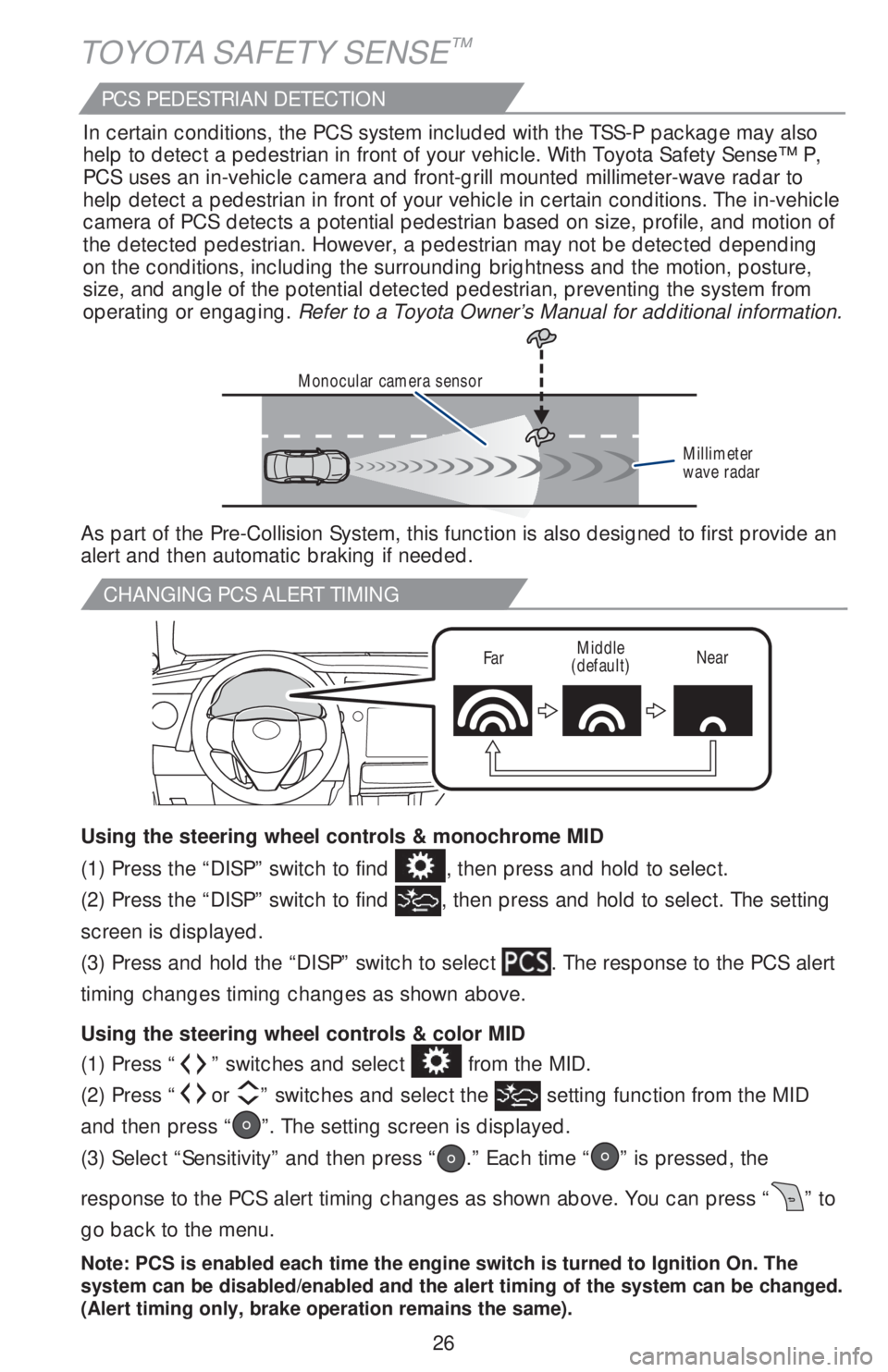
CHANGING PCS ALERT TIMING
FarMiddle
(default)Near
TOYOTA SAFETY SENSE™
(1) Press “” switches and select from the MID.
(2) Press “
or ” switches and select the setting function from the MID
and then press “
”. The setting screen is displayed.
(3) Select “Sensitivity” and then press “
.” Each time “” is pressed, the
response to the PCS alert timing changes as shown above. You can press “
” to
go back to the menu.
Note: PCS is enabled each time the engine switch is turned to Ignition On. The
system can be disabled/enabled and the alert timing of the system can be changed.
(Alert timing only, brake operation remains the same).
(1) Press the “DISP” switch to find , then press and hold to select.
(2) Press the “DISP” switch to find
, then press and hold to select. The setting
screen is displayed.
(3) Press and hold the “DISP” switch to select
. The response to the PCS alert
timing changes timing changes as shown above.
Using the steering wheel controls & color MID Using the steering wheel controls & monochrome MID
Monocular camera sensor
Millimeter
wave radar
As part of the Pre-Collision System, this function is also designed to first provide an
alert and then automatic braking if needed.In certain conditions, the PCS system included with the TSS-P package may also
help to detect a pedestrian in front of your vehicle. With Toyota Safety Sense™ P,
PCS uses an in-vehicle camera and front-grill mounted millimeter-wave radar to
help detect a pedestrian in front of your vehicle in certain conditions. The in-vehicle
camera of PCS detects a potential pedestrian based on size, profile, and motion of
the detected pedestrian. However, a pedestrian may not be detected depending
on the conditions, including the surrounding brightness and the motion, posture,
size, and angle of the potential detected pedestrian, preventing the system from
operating or engaging. Refer to a Toyota Owner’s Manual for additional information.
PCS PEDESTRIAN DETECTION
Page 30 of 56
28
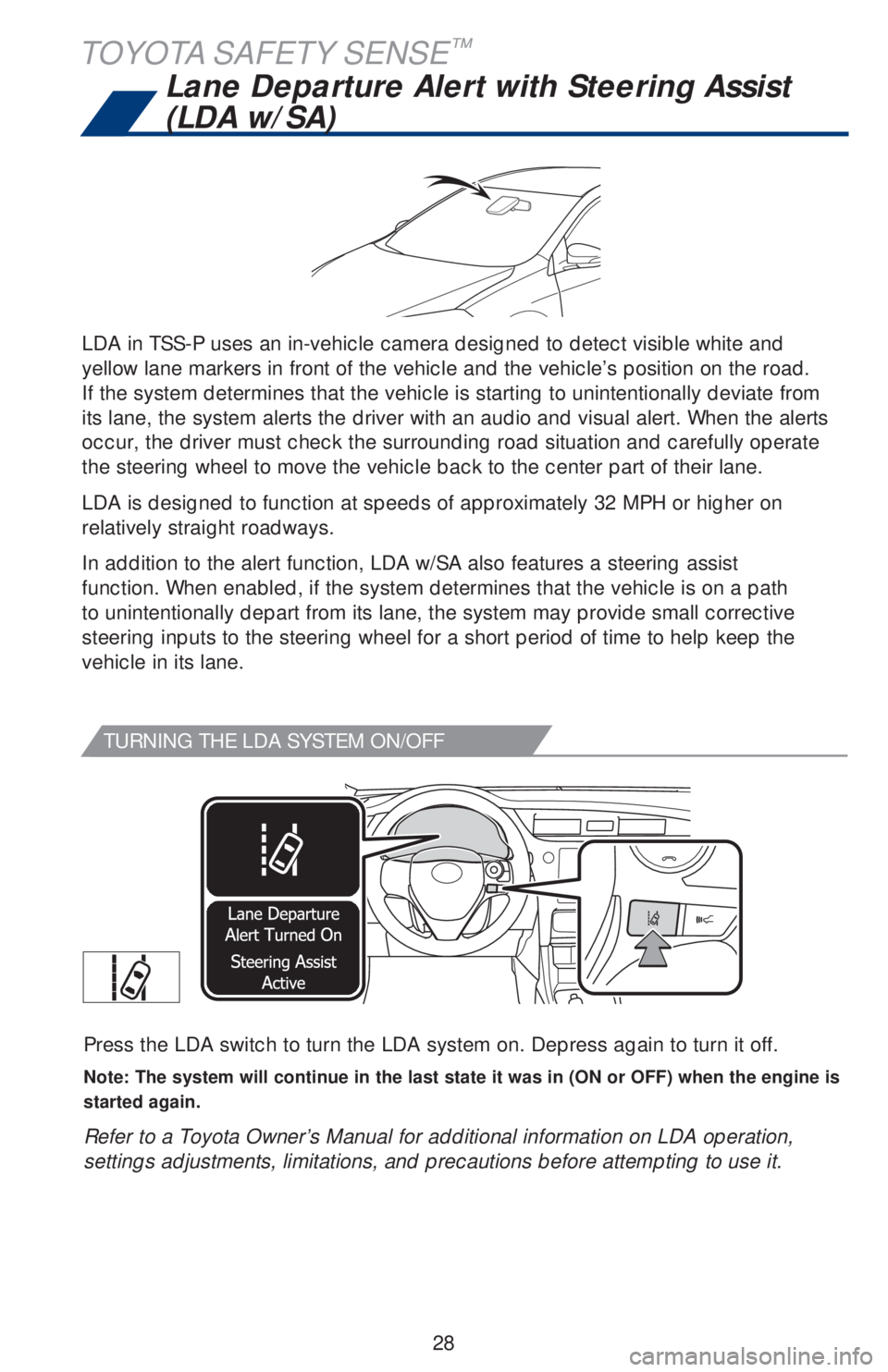
TURNING THE LDA SYSTEM ON/OFF
Press the LDA switch to turn the LDA system on. Depress again to turn it off.
Note: The system will continue in the last state it was in (ON or OFF) when the engine is
started again.
Refer to a Toyota Owner’s Manual for additional information on LDA operation,
settings adjustments, limitations, and precautions before attempting to use it.
LDA in TSS-P uses an in-vehicle camera designed to detect visible white and
yellow lane markers in front of the vehicle and the vehicle’s position on the road.
If the system determines that the vehicle is starting to unintentionally deviate from
its lane, the system alerts the driver with an audio and visual alert. When the alerts
occur, the driver must check the surrounding road situation and carefully operate
the steering wheel to move the vehicle back to the center part of their lane.
LDA is designed to function at speeds of approximately 32 MPH or higher on
relatively straight roadways.
In addition to the alert function, LDA w/SA also features a steering assist
function. When enabled, if the system determines that the vehicle is on a path
to unintentionally depart from its lane, the system may provide small corrective
steering inputs to the steering wheel for a short period of time to help keep the
vehicle in its lane.
Lane Departure Alert with Steering Assist
(LDA w/SA)
TOYOTA SAFETY SENSE™
Page 36 of 56
34
TOYOTA SAFETY SENSE™
SWITCHING TO CONSTANT SPEED (CRUISE) CONTROL MODE
If you are already using DRCC “”, push ON-OFF button to turn the system off
first, then push and hold ON-OFF button for at least 1.5 seconds to switch.
Note: When the engine is turned off, it will automatically default to DRCC.
1.5 seconds
SETTING CONSTANT SPEED (CRUISE) CONTROL
Refer to a Toyota Owner’s Manual for additional information on DRCC operation,
settings adjustments, limitations, and precautions before attempting to use it.
Set
To adjust speed or cancel, see steps (2) and (3) of ADJUSTING SET SPEED on
page 32.
Monochrome MID
Color MID
Page 37 of 56

35
OVERVIEW FEATURES & OPERATIONS TOYOTA SAFETY SENSE SAFETY & EMERGENCY FEATURES
Automatic High Beams (AHB)
(1) With the engine switch in IGNITION ON mode and turn the headlight switch to
“AUTO” position, push lever away from you.
The “
” indicator will come on when the headlights are turned on
automatically to indicate that the system is active.
(2) Pull the lever back toward you to turn the AHB system off.
The “
” will turn off and the “” turns on.
When all of these conditions are met, high beams will be automatically turned on
(after approximately 1 second):
• Vehicle speed is above approximately 21 mph (34 km/h).
• The area ahead of the vehicle is dark.
• There are no oncoming or preceding vehicles with headlights or tail lights
turned on.
• There are few street lights on the road ahead.
If any of these conditions occur, the system is designed to automatically turn off
high beams:
• Vehicle speed drops below approximately 17 mph (27 km/h).
• The area ahead of the vehicle is not dark.
• Oncoming or preceding vehicles have headlights or tail lights
turned on.
• There are many streetlights on the road ahead.
ACTIVATING THE AHB SYSTEM
CONDITIONS WHERE AHB WILL TURN ON/OFF AUTOMATICALLY
AHB is a safety system designed to help drivers see more of what’s ahead at
nighttime and reduce glare for oncoming drivers. When enabled, AHB uses an
in-vehicle camera to help detect the headlights of oncoming vehicles and tail lights
of preceding vehicles, then automatically switches between high and low beams
as appropriate to provide the most light possible and enhance forward visibility.
By using high beams more frequently, the system may allow earlier detection of
pedestrians and obstacles.
Refer to a Toyota Owner’s Manual for additional information on AHB operation,
settings adjustments, limitations, and precautions before attempting to use it.
Page 41 of 56
39
OVERVIEW FEATURES & OPERATIONS TOYOTA SAFETY SENSE SAFETY & EMERGENCY FEATURES
SMART STOP TECHNOLOGY (SST)
Smart Stop Technology automatically reduces engine power when the accelerator
and brake pedals are pressed simultaneously under certain conditions.
SST engages when the accelerator is depressed first and the brakes are applied
firmly for longer than one-half second at speeds greater than five miles per hour.
SST doesn’t engage if the brake pedal is depressed before the accelerator pedal,
allowing vehicles to start on a steep hill and safely accelerate without rolling
backward.
Star Safety System™
VEHICLE STABILITY CONTROL (VSC)
VSC helps prevent loss of traction during cornering by reducing engine power and
applying brake force to selected wheels.
Toyota’s VSC monitors steering angle and the direction your vehicle is traveling.
When it senses that the front or rear wheels begin to lose traction, VSC reduces
engine power and applies braking to selected wheels. This helps restore traction
and vehicle control.
ANTI-LOCK BRAKE SYSTEM (ABS)
Toyota’s ABS sensors detect which wheels are locking up and limits wheel lockup
by “pulsing” each wheel’s brakes independently. Pulsing releases brake pressure
repeatedly for fractions of a second. This helps the tires attain the traction that
current road conditions will allow, helping you to stay in directional control.
BRAKE ASSIST (BA)
Brake Assist is designed to detect sudden or “panic” braking, and then add braking
pressure to help decrease the vehicle’s stopping distance. When there’s only a split
second to react, Brake Assist can add additional brake pressure more quickly than
just the driver alone can.
ELECTRONIC BRAKE FORCE DISTRIBUTION (EBD)
Toyota’s ABS technology has Electronic Brake-force Distribution (EBD) to help
maintain control and balance when braking. Abrupt stops can cause a vehicle to tilt
forward, reducing the braking power of the rear wheels. EBD responds to sudden
stops by redistributing brake force to enhance the braking effectiveness of all four
wheels. Your vehicle comes standard with the Star Safety System
TM, which combines Anti-
lock Braking System (ABS), Brake Assist (BA), Electronic Brake-force Distribution
(EBD), Smart Stop Technology (SST), Traction Control (TRAC) and Vehicle Stability
Control (VSC).
5HIHU�WR�WKH�2ZQHU