Page 3 of 592
3
1
9 7 6
5
4
3
2
8
4-1. Before drivingDriving the vehicle ............. 196
Cargo and luggage............ 204
Vehicle load limits ............. 207
Trailer towing..................... 208
Dinghy towing.................... 209
4-2. Driving procedures Power (ignition) switch ...... 210
EV drive mode................... 216
Hybrid transmission........... 219
Turn signal lever................ 225
Parking brake .................... 226
Brake Hold ........................ 230
4-3. Operating the lights and wipers
Headlight switch ................ 233
Automatic High Beam ....... 236
Windshield wipers and washer ............................ 240
4-4. Refueling Opening the fuel tank cap .................................. 244 4-5. Using the driving
support systems
Toyota Safety Sense P ...... 248
PCS (Pre-Collision System)..... 255
LDA (Lane Departure Alert
with steering control) ....... 266
Dynamic radar cruise control with full-speed
range ............................... 276
Driving assist systems ....... 290
BSM (Blind Spot Monitor)......... 297
• BSM function ................. 300
• RCTA function ............... 303
Rear Camera Detection Function........................... 307
Intuitive parking assist ....... 311
Intelligent Clearance Sonar (ICS) ..................... 319
Driving mode select switches........................... 340
4-6. Driving tips Hybrid vehicle driving tips ................................... 342
Winter driving tips .............. 345
4Driving
Page 19 of 592
19Pictorial index
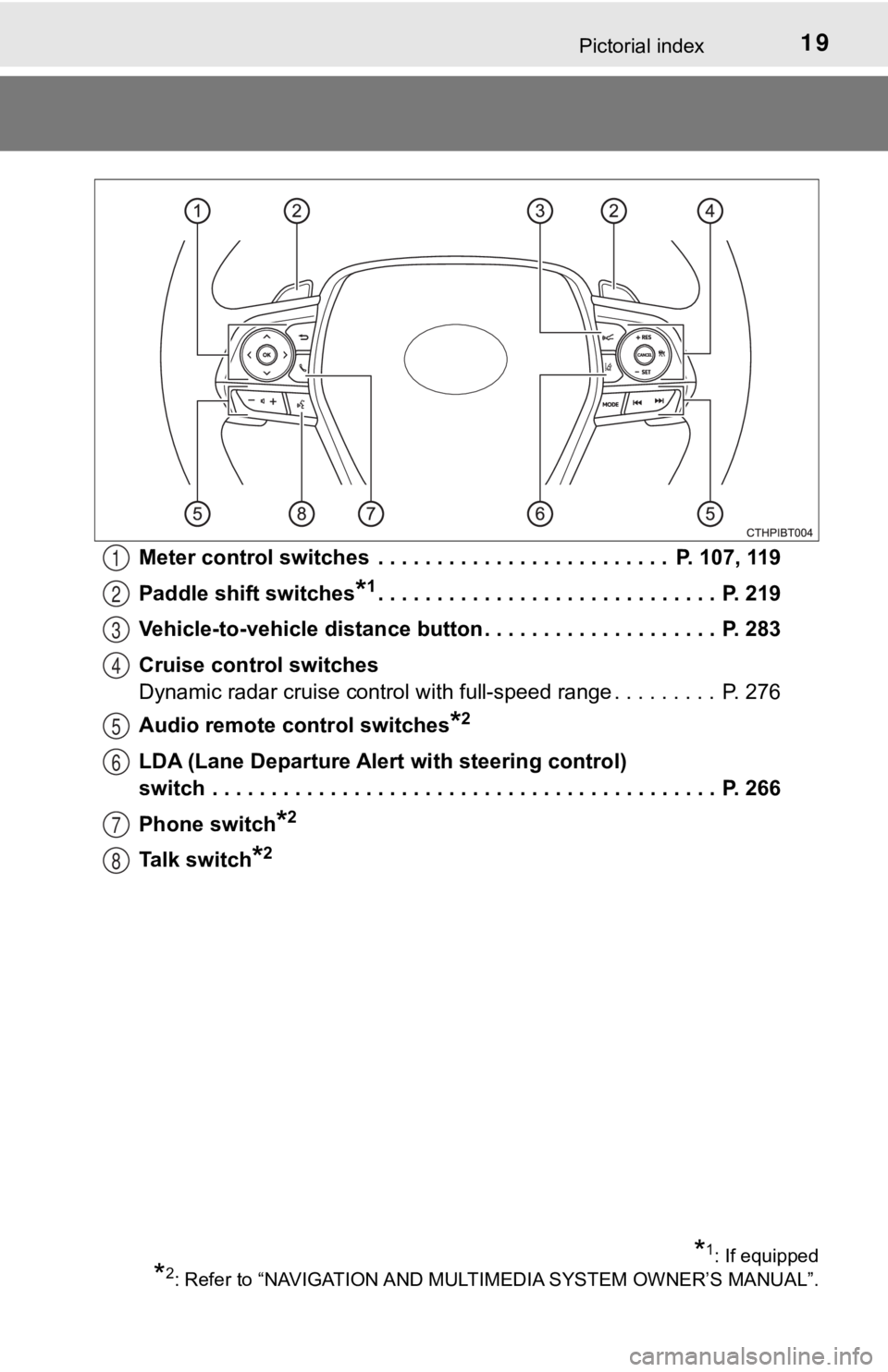
Meter control switches . . . . . . . . . . . . . . . . . . . . . . . . . P. 107, 119
Paddle shift switches
*1. . . . . . . . . . . . . . . . . . . . . . . . . . . . . P. 219
Vehicle-to-vehicle distance button . . . . . . . . . . . . . . . . . . . . P. 283
Cruise control switches
Dynamic radar cruise control with full-speed range . . . . . . . . . P. 276
Audio remote control switches
*2
LDA (Lane Departure Alert with steering control)
switch . . . . . . . . . . . . . . . . . . . . . . . . . . . . . . . . . . . . . . . . . . . P. 266
Phone switch
*2
Talk switch*2
1
2
3
4
5
6
7
8
*1: If equipped
*2: Refer to “NAVIGATION AND MULT IMEDIA SYSTEM OWNER’S MANUAL”.
Page 99 of 592
992. Instrument cluster
2
Instrument cluster
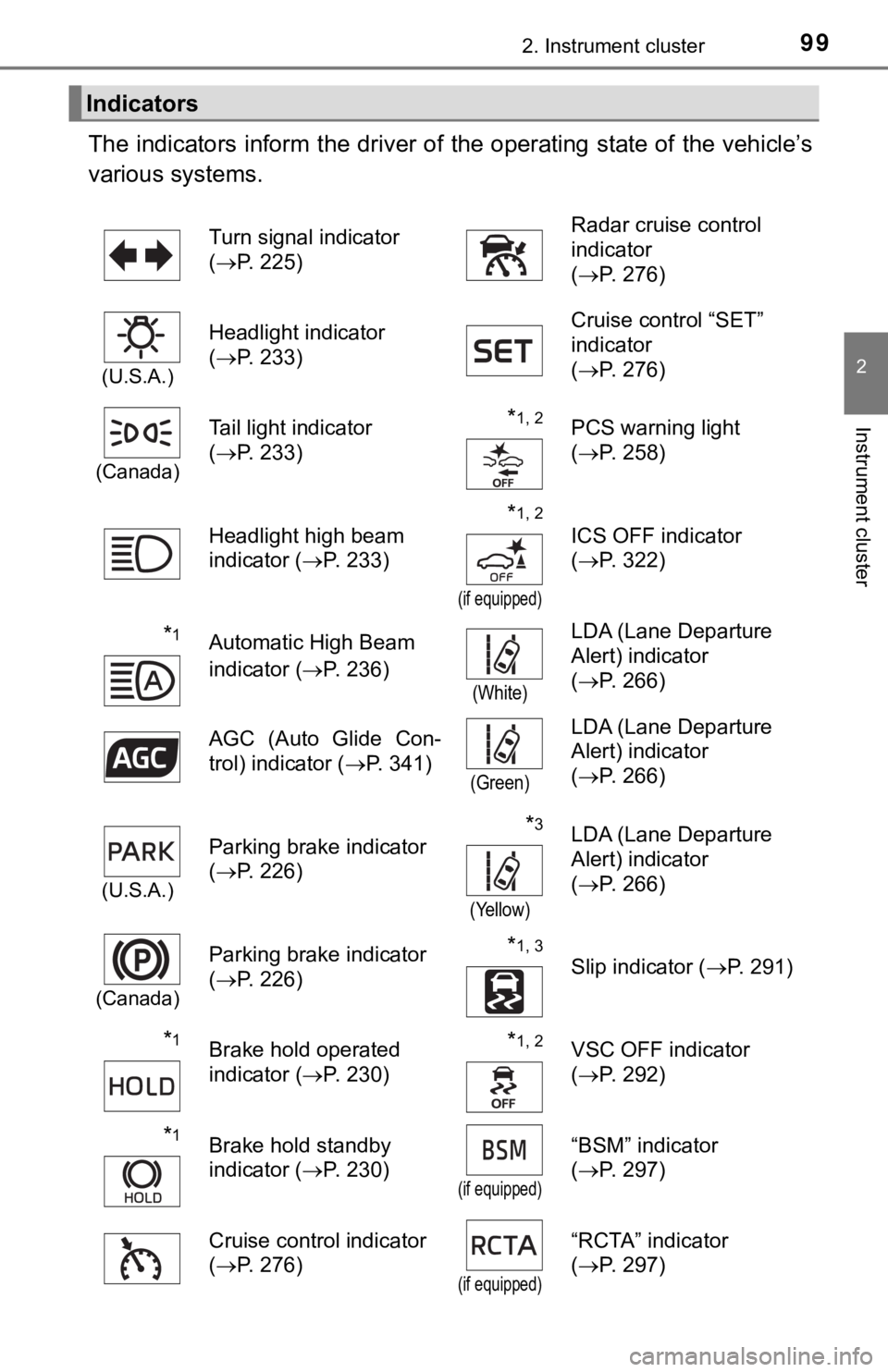
The indicators inform the driver of the operating state of the vehicle’s
various systems.
Indicators
Turn signal indicator
( P. 225) Radar cruise control
indicator
(
P. 276)
(U.S.A.)
Headlight indicator
(P. 233) Cruise control “SET”
indicator
(
P. 276)
(Canada)
Tail light indicator
(P. 233) *1, 2PCS warning light
(P. 258)
Headlight high beam
indicator ( P. 233)
*1, 2
(if equipped)
ICS OFF indicator
(P. 322)
*1Automatic High Beam
indicator ( P. 236)
(White)
LDA (Lane Departure
Alert) indicator
(P. 266)
AGC (Auto Glide Con-
trol) indicator ( P. 341)
(Green)
LDA (Lane Departure
Alert) indicator
(P. 266)
(U.S.A.)
Parking brake indicator
(P. 226)*3
(Yellow)
LDA (Lane Departure
Alert) indicator
(P. 266)
(Canada)
Parking brake indicator
(P. 226)*1, 3
Slip indicator ( P. 291)
*1Brake hold operated
indicator (P. 230)*1, 2VSC OFF indicator
(P. 292)
*1Brake hold standby
indicator ( P. 230)
(if equipped)
“BSM” indicator
(P. 297)
Cruise control indicator
( P. 276)
(if equipped)
“RCTA” indicator
(P. 297)
Page 108 of 592
1082. Instrument cluster
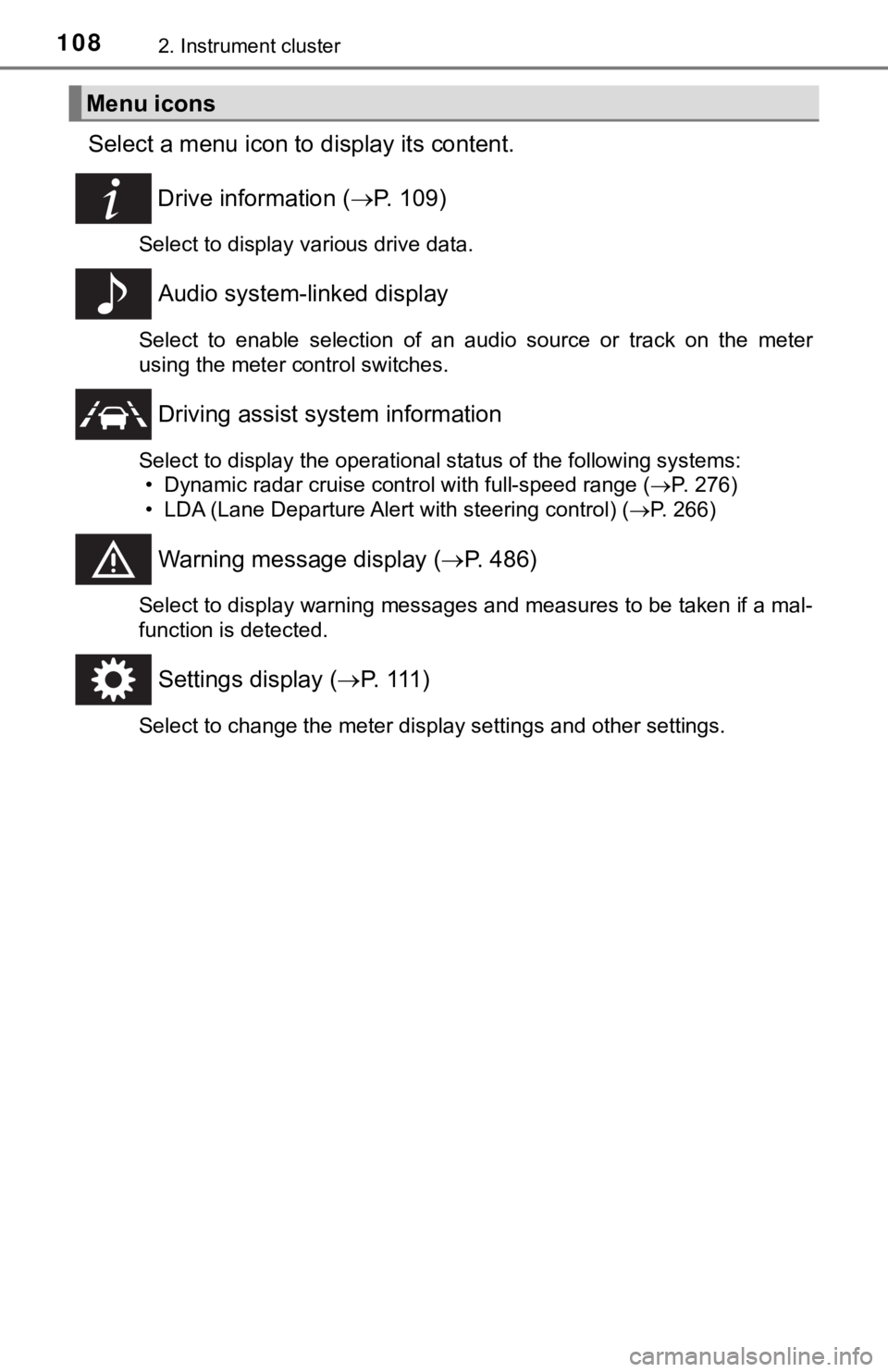
Select a menu icon to display its content.
Drive information ( P. 1 0 9 )
Select to display various drive data.
Audio system-linked display
Select to enable selection of an audio source or track on the m eter
using the meter control switches.
Driving assist sys tem information
Select to display the operational status of the following syste ms:
• Dynamic radar cruise control with full-speed range ( P. 276)
• LDA (Lane Departure Alert with steering control) ( P. 266)
Warning message display (P. 486)
Select to display warning messages and measures to be taken if a mal-
function is detected.
Settings display ( P. 1 1 1 )
Select to change the meter display settings and other settings.
Menu icons
Page 118 of 592
1182. Instrument cluster
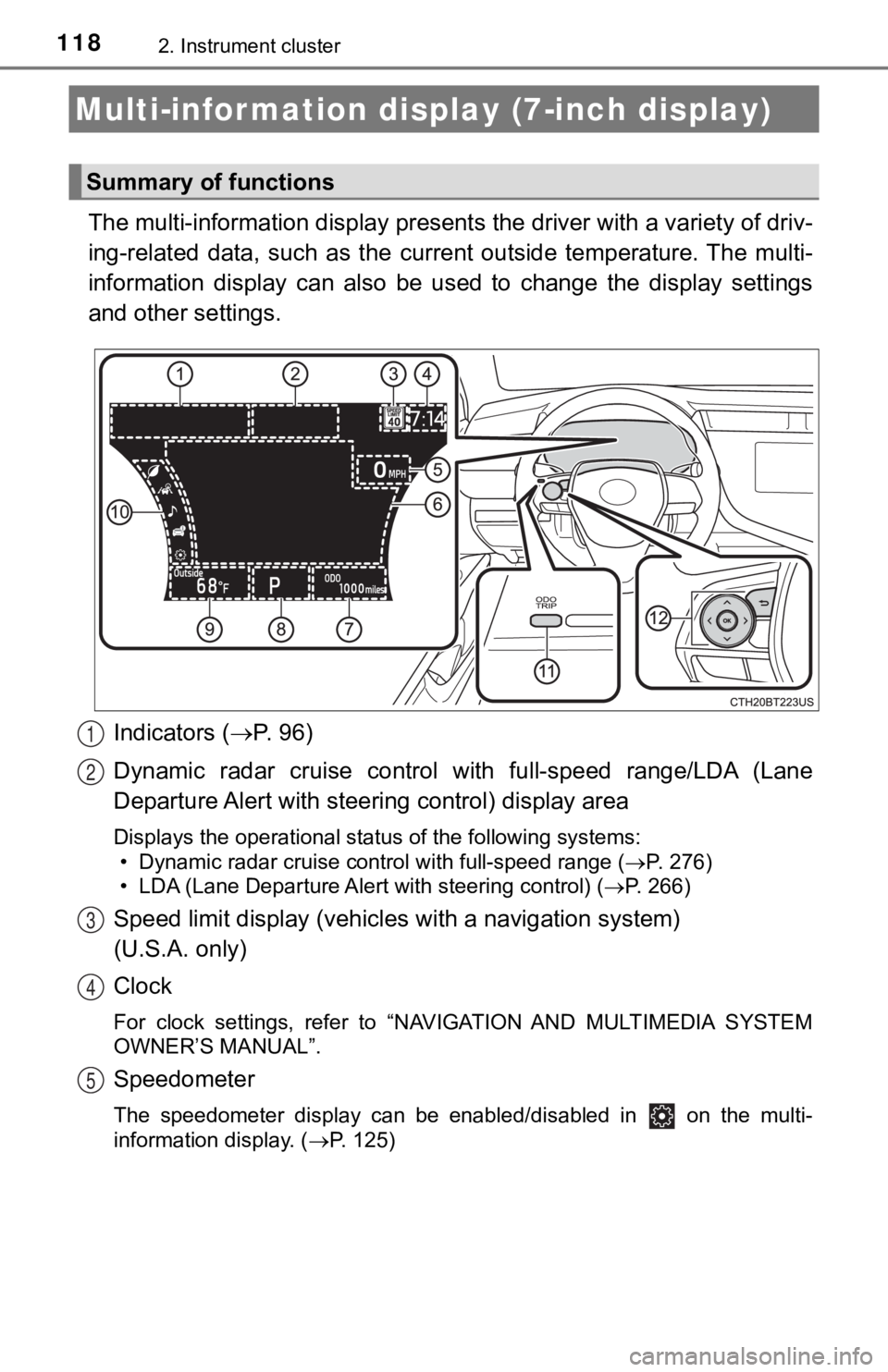
The multi-information display presents the driver with a variety of driv-
ing-related data, such as the cur rent outside temperature. The multi-
information display can also be used to change the display sett ings
and other settings.
Indicators ( P. 96)
Dynamic radar cruise control with full-speed range/LDA (Lane
Departure Alert with steeri ng control) display area
Displays the operational status of the following systems:
• Dynamic radar cruise control with full-speed range ( P. 276)
• LDA (Lane Departure Alert with steering control) ( P. 266)
Speed limit display (vehicles with a navigation system)
(U.S.A. only)
Clock
For clock settings, refer to “NAVIGATION AND MULTIMEDIA SYSTEM
OWNER’S MANUAL”.
Speedometer
The speedometer display can be enabled/disabled in on the mult i-
information display. ( P. 125)
Multi-infor mation disp lay (7-inch display)
Summary of functions
1
2
3
4
5
Page 120 of 592
1202. Instrument cluster
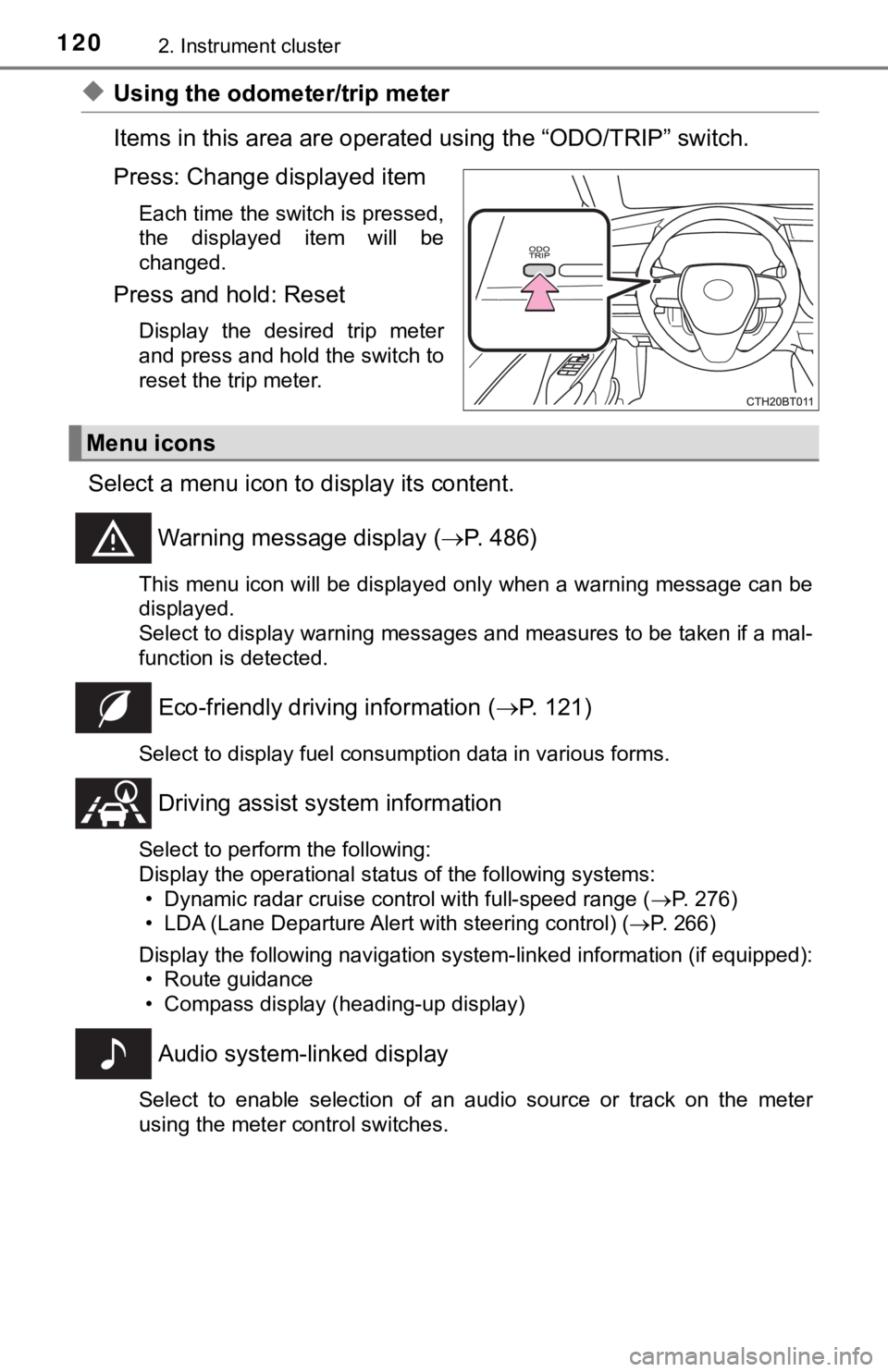
◆Using the odometer/trip meter
Items in this area are operated using the “ODO/TRIP” switch.
Press: Change displayed item
Each time the switch is pressed,
the displayed item will be
changed.
Press and hold: Reset
Display the desired trip meter
and press and hold the switch to
reset the trip meter.
Select a menu icon to display its content.
Warning message display ( P. 486)
This menu icon will be displayed only when a warning message ca n be
displayed.
Select to display warning messages and measures to be taken if a mal-
function is detected.
Eco-friendly drivin g information (P. 121)
Select to display fuel consumption data in various forms.
Driving assist sys tem information
Select to perform the following:
Display the operational status of the following systems:
• Dynamic radar cruise control with full-speed range ( P. 276)
• LDA (Lane Departure Alert with steering control) ( P. 266)
Display the following navigation system-linked information (if equipped):
• Route guidance
• Compass display (heading-up display)
Audio system-linked display
Select to enable selection of an audio source or track on the m eter
using the meter control switches.
Menu icons
Page 136 of 592
1362. Instrument cluster
◆Driving assist system status display
Displays the operational status of the following systems:
• Dynamic radar cruise control with full-speed range ( P. 276)
• LDA (Lane Departure Alert with steering control) ( P. 2 6 6 )
• Intuitive parking assist (if equipped) ( P. 311)
◆Navigation system-linked dis play area (if equipped)
Displays the following items, which are linked to the navigatio n sys-
tem:
■Street name
When the navigation system is performing route guidance, the
name of the next street will be displayed on the top of the dis play
area.
■Route guidance to destination
Displayed when the navigation s ystem is performing route guid-
ance. When approaching an intersection, an arrow will be displa yed
to indicate the suggeste d direction of travel.
■Compass
Displays the direction of travel.
Driving assist system status/navigation system-linked display
area (if equipped)
Page 138 of 592
1382. Instrument cluster
Displays the following items in the appropriate situation:
■Warning/Message
●Alert from the LDA (Lane Departure Alert with steering control)
● Dynamic radar cruise control with full-speed range
● message
Displayed when a suggestion/advice pop-up display is displayed on the
multi-information display. ( P. 131)
● message
Displayed when a warning message is displayed on the multi-info rma-
tion display. ( P. 486)
● Outside temperature
Displayed in the following situations:
• When the power switch is turned to ON mode
• When the low outside temperature indicator is flashing
Displayed content is the same as that displayed on the multi-in formation
display. For details, refer to the explanation of the outside t emperature
display on the multi-information display. ( P. 102)
■
Hands-free system status
Displayed when the hands-free system is operated.
■
Audio system operation status
Displayed when the audio system is operated.
Information display area