Page 259 of 592

2594-5. Using the driving support systems
4
Driving
■Operational conditions
The pre-collision system is enabled and the system determines that the pos-
sibility of a frontal collision with a vehicle or pedestrian is high.
Each function is operational at the following speeds:
● Pre-collision warning:
• Vehicle speed is between approximately 7 and 110 mph (10 and 1 80
km/h). (For detecting a pedestrian, vehicle speed is between ap proxi-
mately 7 and 50 mph [10 and 80 km/h].)
• The relative speed between your vehicle and the vehicle or ped estrian
ahead is approximately 7 mph (10 km/h) or more.
● Pre-collision brake assist:
• Vehicle speed is between approximately 20 and 110 mph (30 and 180
km/h). (For detecting a pedestrian, vehicle speed is between ap proxi-
mately 20 and 50 mph [30 and 80 km/h].)
• The relative speed between your vehicle and the vehicle or ped estrian
ahead is approximately 20 mph (30 km/h) or more.
● Pre-collision braking:
• Vehicle speed is between approximately 7 and 110 mph (10 and 1 80
km/h). (For detecting a pedestrian, vehicle speed is between ap proxi-
mately 7 and 50 mph [10 and 80 km/h].)
• The relative speed between your vehicle and the vehicle or ped estrian
ahead is approximately 7 mph (10 km/h) or more.
The system may not operate in the following situations:
● If a 12-volt battery terminal has been disconnected and reconnected and
then the vehicle has not been driven for a certain amount of ti me
● If the shift lever is in R
● If VSC is disabled (only the pre-collision warning function wil l be opera-
tional)
■ Pedestrian detection function
■ Cancelation of the pre-collision braking
If either of the following occur while the pre-collision brakin g function is oper-
ating, it will be canceled:
● The accelerator pedal is depressed strongly.
● The steering wheel is turned sharply or abruptly.
The pre-collision system detects pedestri-
ans based on the size, profile, and motion
of a detected object. However, a pedes-
trian may not be detected depending on
the surrounding brightness and the
motion, posture, and angle of the
detected object, preventing the system
from operating properly. (
P. 264)
Page 330 of 592

3304-5. Using the driving support systems
●Other ultrasonic waves sources
• When vehicle horns, vehicle detectors, motorcycle engines, air brakes of
large vehicles, the clearance sonar of other vehicles or other devices
which produce ultrasonic waves are near the vehicle
• If a sticker or an electronic component, such as a backlit license plate
(especially fluorescent type), fog lights, a fender pole or wir eless antenna
is installed near a sensor
● Changes in the vehicle posture
• If the vehicle is significantly tilted
• If the front of the vehicle is raised or lowered due to the ca rried load
• If the orientation of a sensor has been changed due to a collision or other impact
■ If a 12-volt battery terminal has been disconnected and reconne cted
The system needs to be initialized.
To initialize the system, drive the vehicle straight ahead for 5 seconds or more
at a speed of approximately 22 mph (35 km/h) or more.
■ If “ICS Unavailable” is displayed on the multi-information display and
the ICS OFF indicator is flashing
● A sensor may be covered with ice, snow, dirt, etc. Remove the ice, snow,
dirt, etc., from the sensor to return the system to normal.
Also, due to ice forming on a sensor at low temperatures, a war ning mes-
sage may be displayed or the sensor may not be able to detect an object.
Once the ice melts, the system will return to normal.
● If this message continues to be displayed even after cleaning the sensor, or
is displayed even though the sensor is clean, have the vehicle inspected by
your Toyota dealer.
● Initialization may not have been performed after a 12-volt batt ery terminal
was disconnected and reconnected. Initialize the system. (P. 330)
Page 342 of 592

3424-6. Driving tips
◆Using Eco drive mode
When using Eco drive mode, the torque corresponding to the accel-
erator pedal depression amount can be generated more smoothly
than it is in normal conditions. In addition, the operation of the air
conditioning system (heating/coo ling) will be minimized, improving
the fuel economy. ( P. 340)
◆Use of Hybrid System Indicator
The Eco-friendly driving is possible by keeping the needle of H ybrid
System Indicator within Eco area. ( P. 104)
◆Shift lever operation
Shift the shift lever to D when stopped at a traffic light, or driving in
heavy traffic etc. Shift the shift lever to P when parking. When using
the N, there is no positive effe ct on fuel consumption. In the N, the
gasoline engine operates but e lectricity cannot be generated. A lso,
when using the air conditioning s ystem, etc., the hybrid battery
(traction battery) power is consumed.
◆Accelerator pedal/brake pedal operation
● Drive your vehicle smoothly. Avoid abrupt acceleration and
deceleration. Gradual accelerat ion and deceleration will make
more effective use of the electric motor (traction motor) witho ut
having to use gaso line engine power.
● Avoid repeated acceleration. Repeated acceleration consumes
hybrid battery (tracti on battery) power, resulting in poor fuel con-
sumption. Battery power can be restored by driving with the
accelerator pedal slightly released.
Hybrid vehicle driving tips
For economical and ecological dri ving, pay attention to the fol-
lowing points:
Page 359 of 592
3595-1. Using the air conditioning system and defogger
5
Interior features
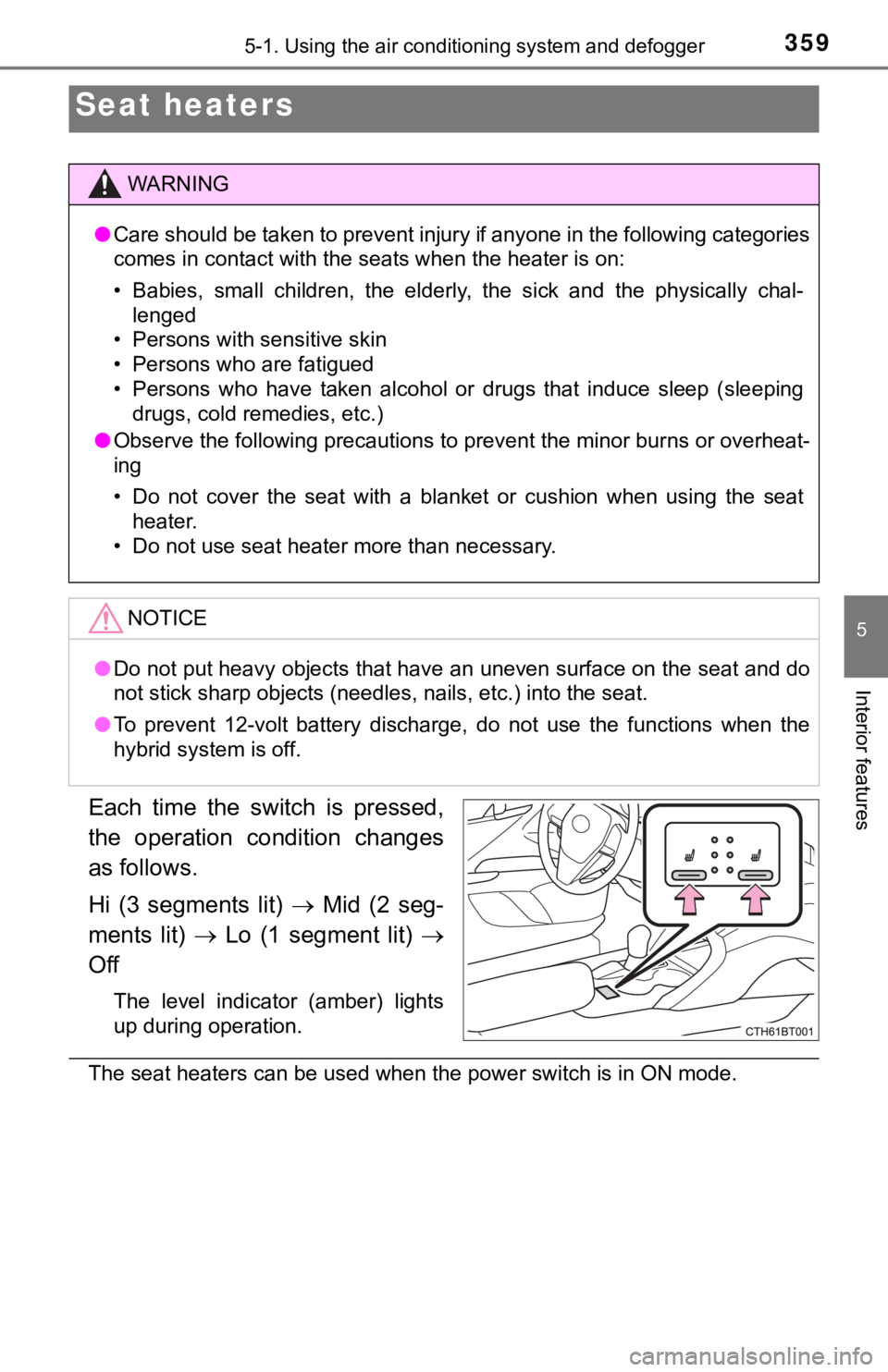
Each time the switch is pressed,
the operation condition changes
as follows.
Hi (3 segments lit) Mid (2 seg-
ments lit) Lo (1 segment lit)
Off
The level indicator (amber) lights
up during operation.
The seat heaters can be used when the power switch is in ON mod e.
Seat heaters
WARNING
●Care should be taken to prevent injury if anyone in the followi ng categories
comes in contact with the seats when the heater is on:
• Babies, small children, the elderly, the sick and the physical ly chal-
lenged
• Persons with sensitive skin
• Persons who are fatigued
• Persons who have taken alcohol or drugs that induce sleep (sle eping
drugs, cold remedies, etc.)
● Observe the following precautions to prevent the minor burns or overheat-
ing
• Do not cover the seat with a blanket or cushion when using the seat
heater.
• Do not use seat heater more than necessary.
NOTICE
● Do not put heavy objects that have an uneven surface on the sea t and do
not stick sharp objects (needles, nails, etc.) into the seat.
● To prevent 12-volt battery discharge, do not use the functions when the
hybrid system is off.
Page 371 of 592
3715-4. Other interior features
5
Interior features
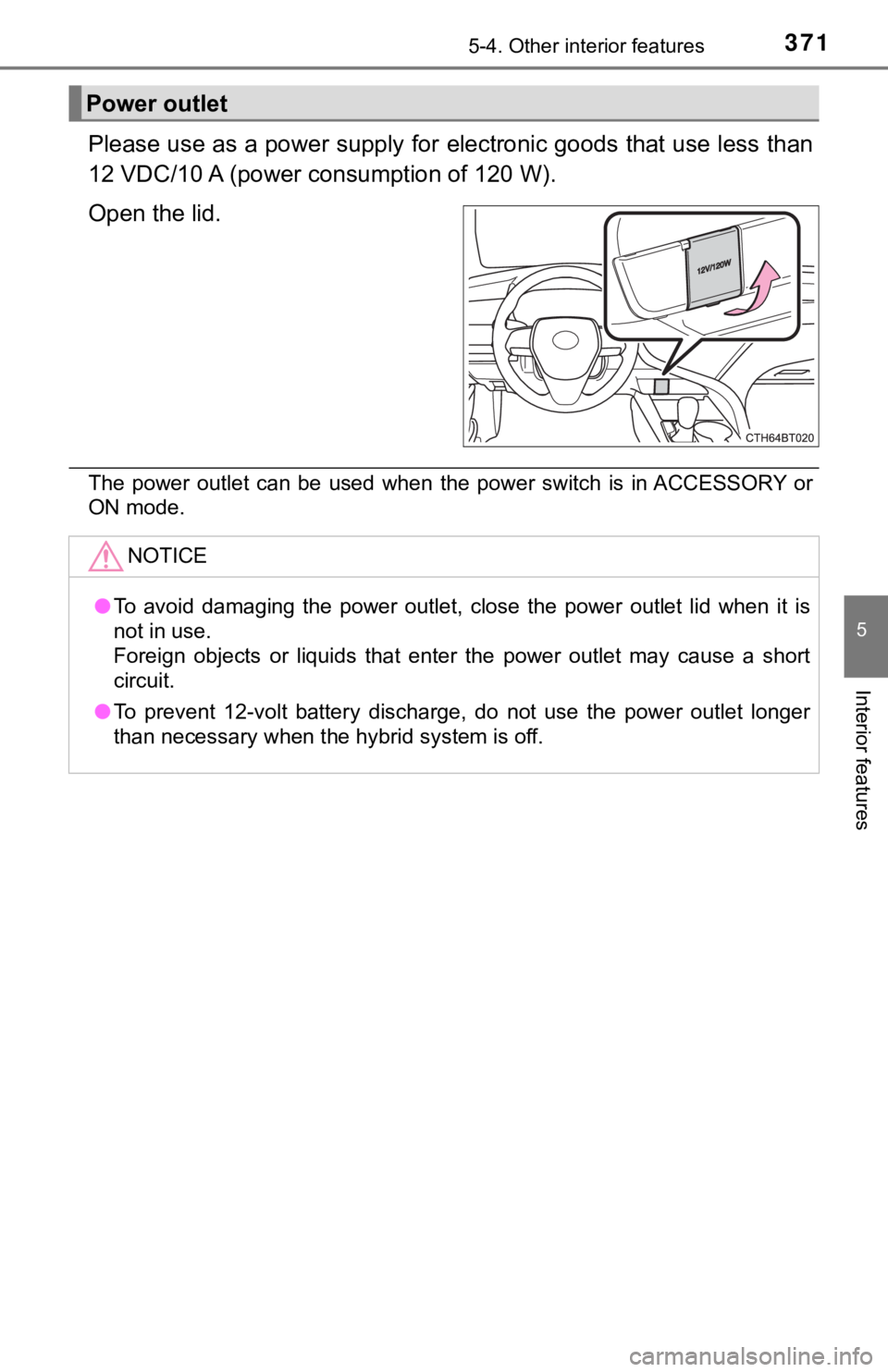
Please use as a power supply for electronic goods that use less than
12 VDC/10 A (power c onsumption of 120 W).
Open the lid.
The power outlet can be used when the power switch is in ACCESS ORY or
ON mode.
Power outlet
NOTICE
● To avoid damaging the power outlet, close the power outlet lid when it is
not in use.
Foreign objects or liquids that enter the power outlet may cause a short
circuit.
● To prevent 12-volt battery discharge, do not use the power outl et longer
than necessary when the hybrid system is off.
Page 374 of 592
3745-4. Other interior features
A portable device, such as a smartphone or mobile battery, can be
charged by just placing it on th e charging area, provided the d evice is
compatible with the Qi wireless charging standard created by th e
Wireless Power Consortium.
The wireless charger cannot be used with a portable device that is
larger than the charging area. Additionally, depending on the p ortable
device, the wireless charger may not operate properly. Refer to the
operation manual of the portable device.
■The “Qi” symbol
The “Qi” symbol is a trademark of the Wireless Power Consortium .
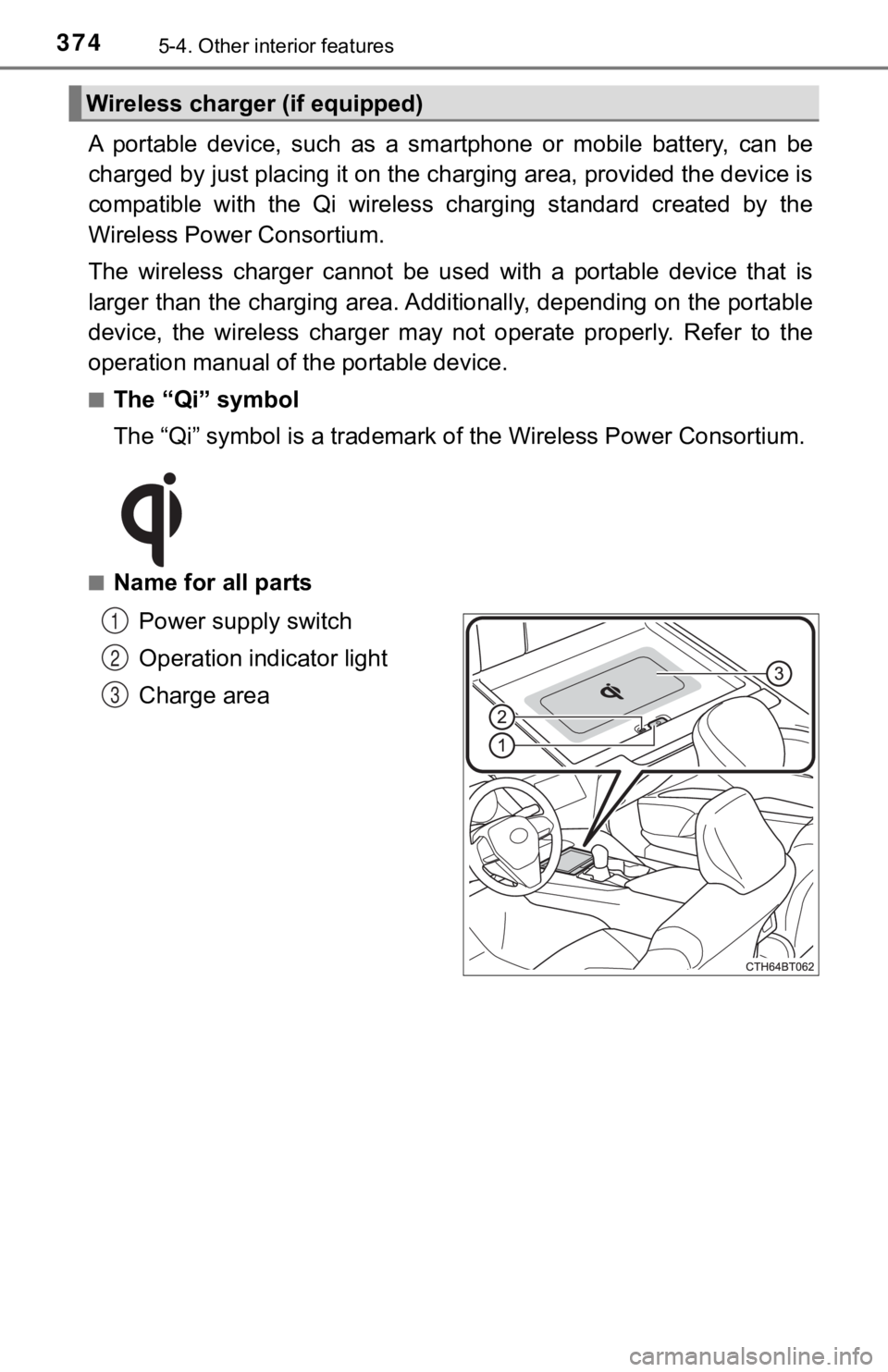
■Name for all parts
Power supply switch
Operation indicator light
Charge area
Wireless charger (if equipped)
1
2
3
Page 385 of 592
3855-4. Other interior features
5
Interior features
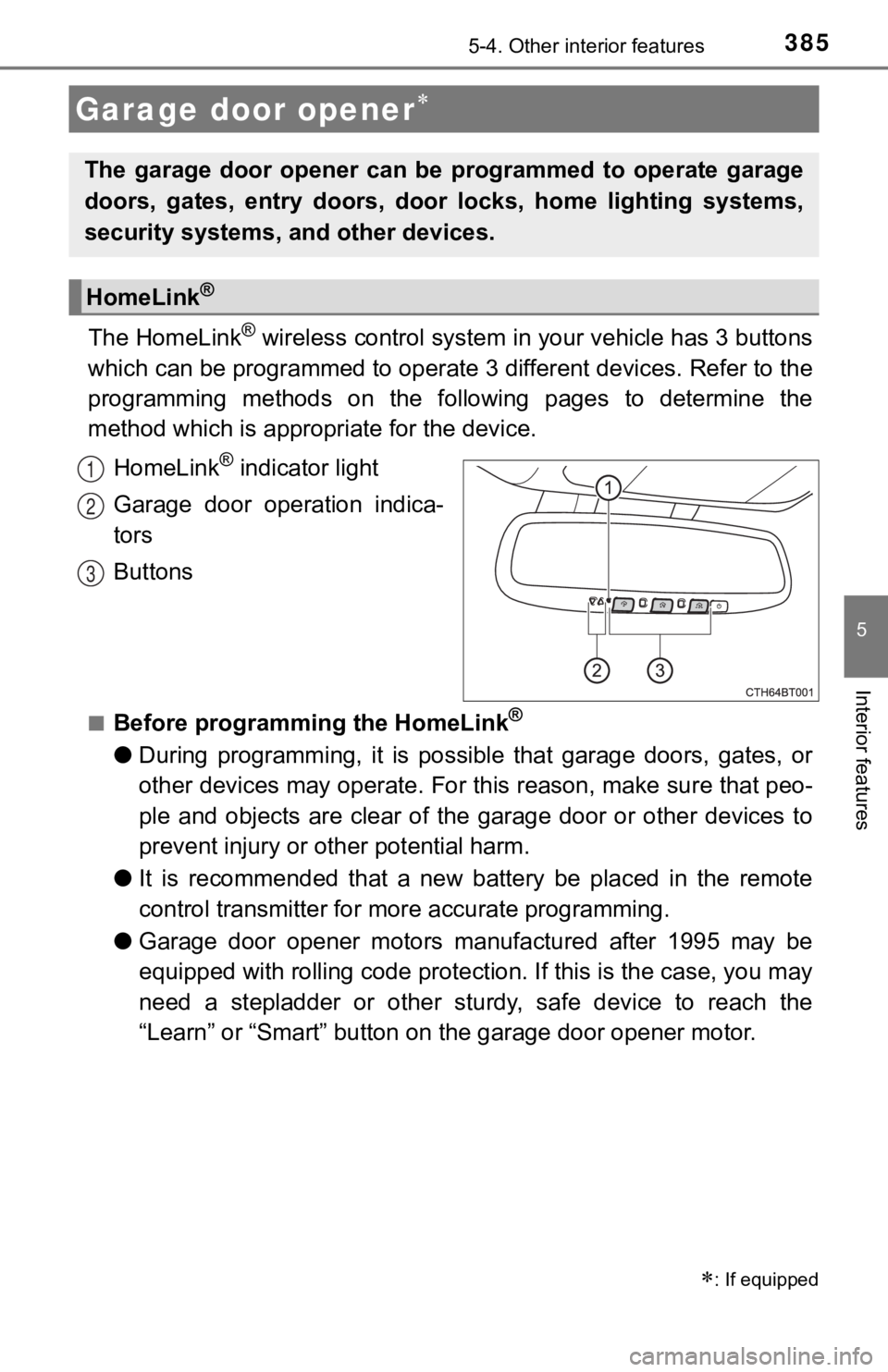
The HomeLink® wireless control system in your vehicle has 3 buttons
which can be programmed to operate 3 different devices. Refer to the
programming methods on the following pages to determine the
method which is approp riate for the device.
HomeLink
® indicator light
Garage door operation indica-
tors
Buttons
■Before programming the HomeLink®
● During programming, it is possible that garage doors, gates, or
other devices may operate. For this reason, make sure that peo-
ple and objects are clear of the garage door or other devices t o
prevent injury or other potential harm.
● It is recommended that a new battery be placed in the remote
control transmitter for mo re accurate programming.
● Garage door opener motors manufactured after 1995 may be
equipped with rolling code pro tection. If this is the case, you may
need a stepladder or other sturdy, safe device to reach the
“Learn” or “Smart” button on the garage door opener motor.
Garage door opener
: If equipped
The garage door opener can be programmed to operate garage
doors, gates, entry doors, door locks, home lighting systems,
security systems, and other devices.
HomeLink®
1
2
3
Page 390 of 592
3905-4. Other interior features
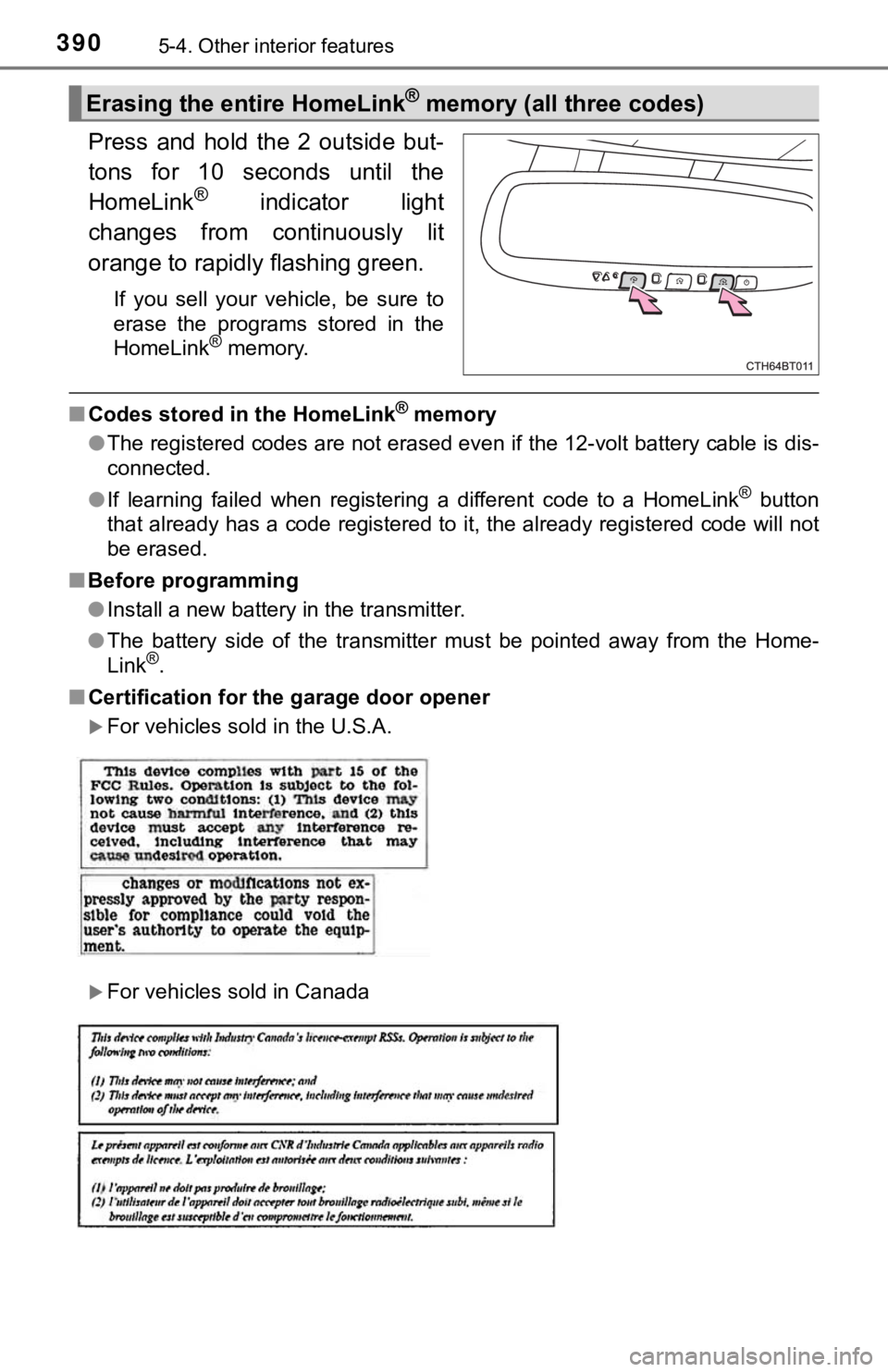
Press and hold the 2 outside but-
tons for 10 seconds until the
HomeLink
® indicator light
changes from continuously lit
orange to rapidly flashing green.
If you sell your vehicle, be sure to
erase the programs stored in the
HomeLink
® memory.
■ Codes stored in the HomeLink® memory
● The registered codes are not erased even if the 12-volt battery cable is dis-
connected.
● If learning failed when registering a different code to a HomeL ink
® button
that already has a code registered to it, the already registere d code will not
be erased.
■ Before programming
●Install a new battery in the transmitter.
● The battery side of the transmitter must be pointed away from the Home-
Link
®.
■ Certification for the garage door opener
For vehicles sold in the U.S.A.
For vehicles sold in Canada
Erasing the entire HomeLink® memory (all three codes)