Page 16 of 504

16Pictorial index
AYGO_OM_Europe_OM99R19E
■Interior (Left-hand drive vehicles)
SRS airbags . . . . . . . . . . . . . . . . . . . . . . . . . . . . . . . . . . . . . . . P. 34
Floor mats . . . . . . . . . . . . . . . . . . . . . . . . . . . . . . . . . . . . . . . . P. 26
Front seats . . . . . . . . . . . . . . . . . . . . . . . . . . . . . . . . . . . . . . . P. 152
Seat heaters*2 . . . . . . . . . . . . . . . . . . . . . . . . . . . . . . . . . . . . P. 332
Rear seats . . . . . . . . . . . . . . . . . . . . . . . . . . . . . . . . . . . . . . . P. 154
Head restraints . . . . . . . . . . . . . . . . . . . . . . . . . . . . . . . . . . . P. 156
Seat belts . . . . . . . . . . . . . . . . . . . . . . . . . . . . . . . . . . . . . . . . . P. 30
Inside lock buttons . . . . . . . . . . . . . . . . . . . . . . . . . . . . . . . . P. 120
Cup holders . . . . . . . . . . . . . . . . . . . . . . . . . . . . . . . . . . . . . . P. 336
Bottle holders . . . . . . . . . . . . . . . . . . . . . . . . . . . . . . . . . . . . P. 337
1
2
3
4
5
6
7
8
9
Page 22 of 504
22Pictorial index
AYGO_OM_Europe_OM99R19E
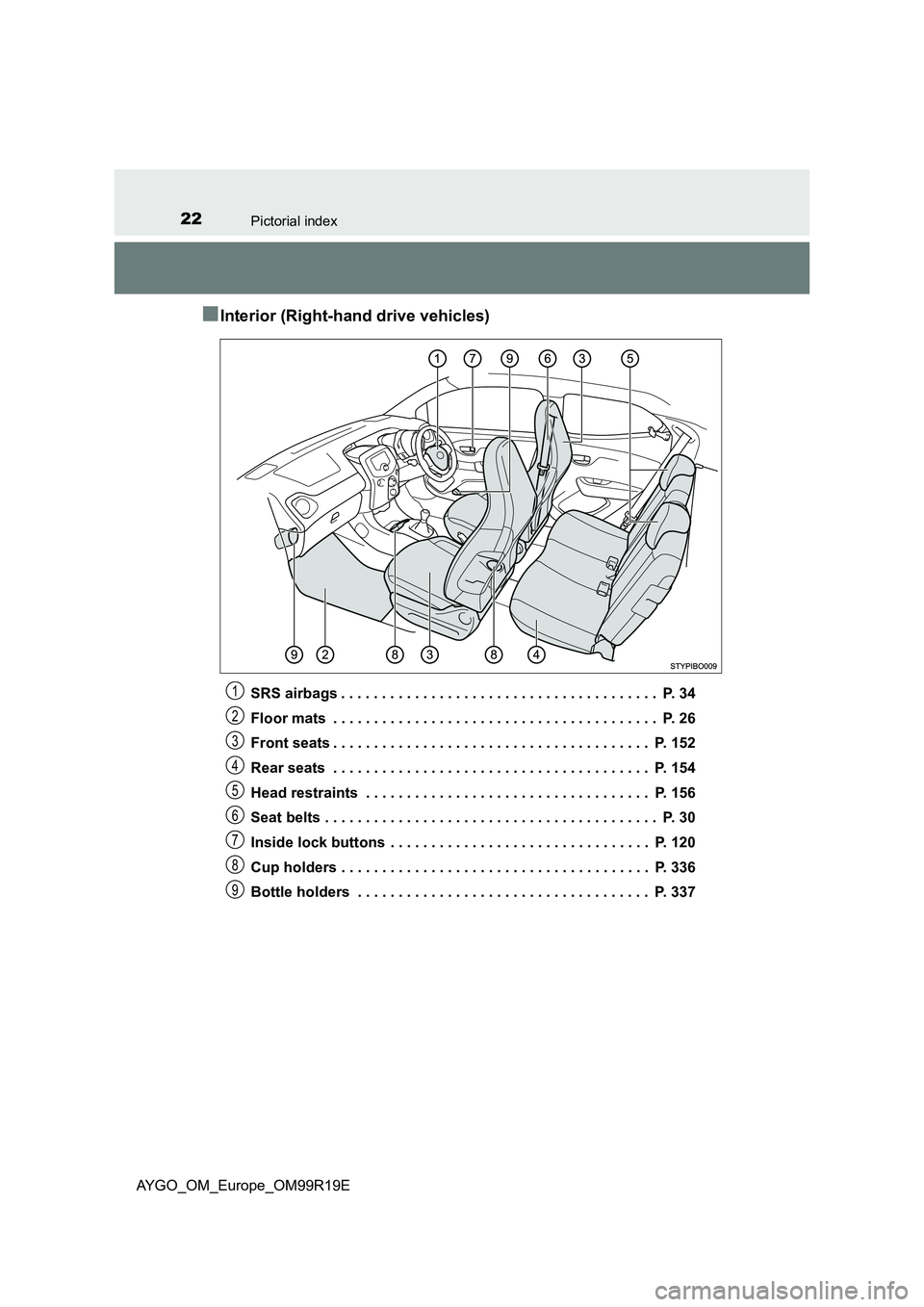
■Interior (Right-hand drive vehicles)
SRS airbags . . . . . . . . . . . . . . . . . . . . . . . . . . . . . . . . . . . . . . . P. 34
Floor mats . . . . . . . . . . . . . . . . . . . . . . . . . . . . . . . . . . . . . . . . P. 26
Front seats . . . . . . . . . . . . . . . . . . . . . . . . . . . . . . . . . . . . . . . P. 152
Rear seats . . . . . . . . . . . . . . . . . . . . . . . . . . . . . . . . . . . . . . . P. 154
Head restraints . . . . . . . . . . . . . . . . . . . . . . . . . . . . . . . . . . . P. 156
Seat belts . . . . . . . . . . . . . . . . . . . . . . . . . . . . . . . . . . . . . . . . . P. 30
Inside lock buttons . . . . . . . . . . . . . . . . . . . . . . . . . . . . . . . . P. 120
Cup holders . . . . . . . . . . . . . . . . . . . . . . . . . . . . . . . . . . . . . . P. 336
Bottle holders . . . . . . . . . . . . . . . . . . . . . . . . . . . . . . . . . . . . P. 337
1
2
3
4
5
6
7
8
9
Page 67 of 504

671-2. Child safety
1
For safety and security
AYGO_OM_Europe_OM99R19E
■ISOFIX rigid anchors (ISOFIX child restraint system)
Lower anchors are provided for
the each rear seat. (Buttons
displaying the location of the
anchors are attached to the
seats.)
■Confirming the Mass group and Size class for ECE R44 ISOFIX
corresponding child restraint systems
Confirm the corresponding [Mass group] from the weight of the
child ( P. 54)
(Ex. 1) When the weight is 12 kg, [Mass group 0+]
(Ex. 2) When the weight is 15 kg, [Mass group I]
Confirming Size class
Select the Size class corresponding to [Mass group] confirmed in
step from the [Child restraint systems fastened with ISOFIX
(ECE R44) - Compatibility and Recommended child restraint sys-
tems table] ( P. 68)*.
(Ex. 1) When [Mass group 0+], the corresponding size class is
[C], [D], [E].
(Ex. 2) When [Mass group I], the corresponding size class is [A],
[B], [B1], [C], [D].
*: However, listings that are marked with [X] cannot be selected, despite
having the corresponding size class in the suitability table of the [Seat-
ing position]. Also, select the product designated by [Recommended
Child Restraint Systems] ( P. 69), if the listing is marked with [IL].
Child restraint system fixed with an ISOFIX rigid anchor
Page 101 of 504
101
2
2. Instrument cluster
Instrument cluster
AYGO_OM_Europe_OM99R19E
Gauges and meters
Vehicles without a tachometer
The units used on the speedometer may differ depending on the target
region.
Speedometer
Displays the vehicle speed
Fuel gauge
Displays the quantity of fuel remaining in the tank
“DISP” buttons
P. 103
Drive monitor display
Presents the driver with a variety of driving-related data (P. 103)
1
2
3
4
Page 102 of 504
1022. Instrument cluster
AYGO_OM_Europe_OM99R19E
Vehicles with a tachometer
The units used on the speedometer may differ depending on the target
region.
Tachometer
Displays the engine speed in revolutions per minute
Speedometer
Displays the vehicle speed
Fuel gauge
Displays the quantity of fuel remaining in the tank
“DISP” buttons
P. 103
Drive monitor display
Presents the driver with a variety of driving-related data (P. 103)
NOTICE
■To prevent damage to the engine and its components
Do not let the indicator level of the tachometer enter the red zone, which
indicates the maximum engine speed.
1
2
3
4
5
Page 103 of 504
103
2
2. Instrument cluster
Instrument cluster
AYGO_OM_Europe_OM99R19E
Drive monitor display
The drive monitor display presents the driver with a variety of driving-
related data including the current outside air temperature.
● Outside temperature display
( P. 343)
● Trip information (P. 103)
Displays driving range, fuel con-
sumption and other cruising related
information
● Instrument cluster light control
( P. 106)
● Shift position (vehicles with a multi-mode manual transmission)
Displays the selected shift position (P. 190)
●Speed limiter display (if equipped) (P. 237)
■Switching the display
Items displayed can be
switched by pushing one of the
“DISP” buttons.
Forward
Backward
■Odometer
Displays the total distance the vehicle has been driven.
Display contents
Trip information
1
2
Page 104 of 504

1042. Instrument cluster
AYGO_OM_Europe_OM99R19E
■Trip meters “A” and “B”
Displays the distance the vehicle has been driven since the meter
was last reset. Trip meters “A” and “B” can be used to record and
display different distances independently.
Push and holding one of the “DISP” buttons will reset the trip meter that
is currently displayed.
■Stop & Start system operation time (if equipped)
● Displays the amount of time the engine was stopped due to oper-
ation of the Stop & Start system during the current trip.
Vehicles without a smart entry & start system: From the engine switch in
the “ON” position to the engine switch in the “LOCK” position.
Vehicles with a smart entry & start system: From the engine switch in
IGNITION ON mode to the engine switch off.
● When the Stop & Start system is operating, the presently dis-
played screen is interrupted and the Stop & Start system opera-
tion time automatically displayed.
• Push one of the “DISP” buttons to return to the previous screen.
• The automatically displayed function of the Stop & Start system oper-
ation time activated or deactivated switch over method. ( P. 106)
■Stop & Start system total operation time (if equipped)
Displays the total amount of time that the engine has been stopped
due to operation of the Stop & Start system since the system was
last reset.
Push and hold one of the “DISP” buttons to reset.
■Outside temperature (vehicles with a multi-mode manual
transmission)
Displays the outside temperature. (P. 343)
■Current fuel consumption
Displays the current rate of fuel consumption.
Page 105 of 504

1052. Instrument cluster
2
Instrument cluster
AYGO_OM_Europe_OM99R19E
■Average fuel consumption
Displays the average fuel consumption since the function was
reset.
• The function can be reset by pushing one of the “DISP” buttons for lon-
ger than 1 second when the average fuel consumption is displayed.
• Use the displayed average fuel consumption as a reference.
■Driving range
Displays the estimated approximate distance that can be driven
with the quantity of fuel remaining.
• This distance is computed based on your average fuel consumption. As
a result, the actual distance that can be driven may differ from that dis-
played.
• When only a small amount of fuel is added to the tank, the display may
not be updated.
When refueling, turn the engine switch to the “LOCK” position (vehicles
without a smart entry & start system) or off (vehicles with a smart entry
& start system). If the vehicle is refueled without turning the engine
switch to the “LOCK” position or off, the display may not be updated.
• The display shows “LoFUEL” when the remaining is very low.
■Average vehicle speed
Displays the average vehicle speed since the function was reset.
The function can be reset by pushing one of the “DISP” button for longer
than 1 second when the average vehicle speed is displayed.
■Instrument cluster light control
Displays the instrument cluster light control display.
• This screen is only displayed when the tail lights are on.
• The brightness of the instrument cluster light can be adjusted.
( P. 106)