Page 6 of 52
4
For details, refer to “Instrument cluster,” Section 2, 2019 Owner’s Manual.
Brake system warning1
Downhill Assist Control indicator1,5
Charging system warning1
Crawl Control indicator1,5
Center differential lock indicator3,5
Cruise control2/Cruise control SET indicator
Eco Driving Indicator Light1
Air bag SRS warning1
AIR BAG ON/OFF indicator1
Arrow direction indicates fuel tank door position
Anti-lock Brake System (ABS)
warning1
Active traction control indicator5
AUTO Limited Slip Differential indicator1,5
Automatic running boards indicator1,2,5
Driver’s and/or front passenger’s seat belt reminder (alarm will sound if speed is over 12 mph)
Engine coolant temperature gauge
Shift position and shift range
Tachometer
Multi-Information Display (MID)
Speedometer
Fuel gauge
Odometer/trip meter/display change button
Service indicators and reminders
OVERVIEW
Instrument cluster
Indicator symbols
114558_MY19_4Runner_QRG_V3_ML_0712_R1.indd 47/13/18 8:21 PM
Page 7 of 52

5
OVERVIEW
FEATURES & OPERATIONS
SAFETY & EMERGENCY FEATURES
Front fog light indicator
Four-wheel drive indicator3,5
Low engine oil pressure warning1
Low fuel level warning
Low Tire Pressure Warning1
Low speed four-wheel drive indicator3,5
Malfunction/Check Engine indicator1
Master warning1,2
Multi-terrain select indicator2,5
Open door warning
Rear differential lock indicator3,5
Power steering system warning1
Unengaged Park warning light5
Slip indicator1,4
Smart Key system warning5
Turn signal indicator
Traction Control OFF indicator1
Kinetic Dynamic Suspension System (KDSS) indicator1,5
Security indicator
Headlight low/ high beam indicator
Vehicle Stability Control (VSC) OFF indicator1
1 If the indicator does not turn off within a few seconds of starting the engine, there may be a malfunction. Have the vehicle inspected by your Toyota dealer.2 If the indicator flashes, there may be a malfunction. Refer to the Owner’s Manual.3 If the indicator flashes rapidly, there may be a malfunction. Refer to the Owner’s Manual.4 If the indicator flashes, it indicates that the system is operating.5 If equipped.
114558_MY19_4Runner_QRG_V3_ML_0712_R1.indd 57/13/18 8:21 PM
Page 8 of 52
6
NOTE: Carry remote to unlock/lock/open. Power back door will not open if
glass hatch is open.
* Driver door unlocking function can be programmed to unlock driver door only, or
all doors. Grasping front passenger door handle will unlock all doors.
Please refer to the Owner’s Manual for more details on how to program the doors.
Grasp
Carry remoteSmart Key
Front door unlock*
Carry remoteSmart Key
Carry remoteSmart Key
All-door lock
Touch
NOTE: If a door is not opened within 60 seconds of unlocking, all doors will
relock for safety.
Smart Key
Smart Key
Smart Key
Push
Push
Push ONCE: Driver door TWICE: All doors
Push and hold
Push
Unlock
Push
LockOpen
Push
LOCKING OPERATION
UNLOCKING OPERATION
PANIC BUTTON
BACK DOOR LOCK/UNLOCK/OPEN (IF EQUIPPED)
Keyless entry
OVERVIEW
114558_MY19_4Runner_QRG_V3_ML_0712_R1.indd 67/13/18 8:21 PM
Page 11 of 52

9
OVERVIEW
FEATURES & OPERATIONS
SAFETY & EMERGENCY FEATURES
* The ignition/“ENGINE START STOP” switch must be “ON” and the brake pedal
depressed to shift from Park.
Shift the shift lever to “S” position from “D” position.
+: Upshift (push and release)
--: Downshift (pull and release)
Downshifting increases power going uphill, or provides engine braking downhill. For
best fuel economy during normal driving conditions, always drive with the shift lever
in the “D” position.
Park*
Reverse
Neutral
Drive
P
R
N
D
“S” mode
Set: Depress Release: Depress again
Automatic door locks can be programmed to operate in different modes, or turned
OFF.
Shift position linked door locking/unlocking function
-Doors lock when shifting from Park.
-Doors unlock when shifting into Park.
Speed linked door locking function
-Doors lock when the vehicle speed goes above approximately 12 mph.
Driver’s door linked door unlocking function
-(Without a Smart Key system) Doors unlock when the engine switch is set from
“ON” to “ACC” or “LOCK” within 10 seconds of opening the driver’s door.
-(With a Smart Key system) Doors unlock when the engine switch is set to OFF
within 10 seconds of opening the driver’s door.
Refer to the Owner’s Manual for more details.
Auto lock/unlock
Automatic transmission
Parking brake
“S” (SEQUENTIAL) MODE
FEATURES & OPERATIONS
114558_MY19_4Runner_QRG_V3_ML_0712_R1.indd 97/13/18 8:21 PM
Page 14 of 52
12
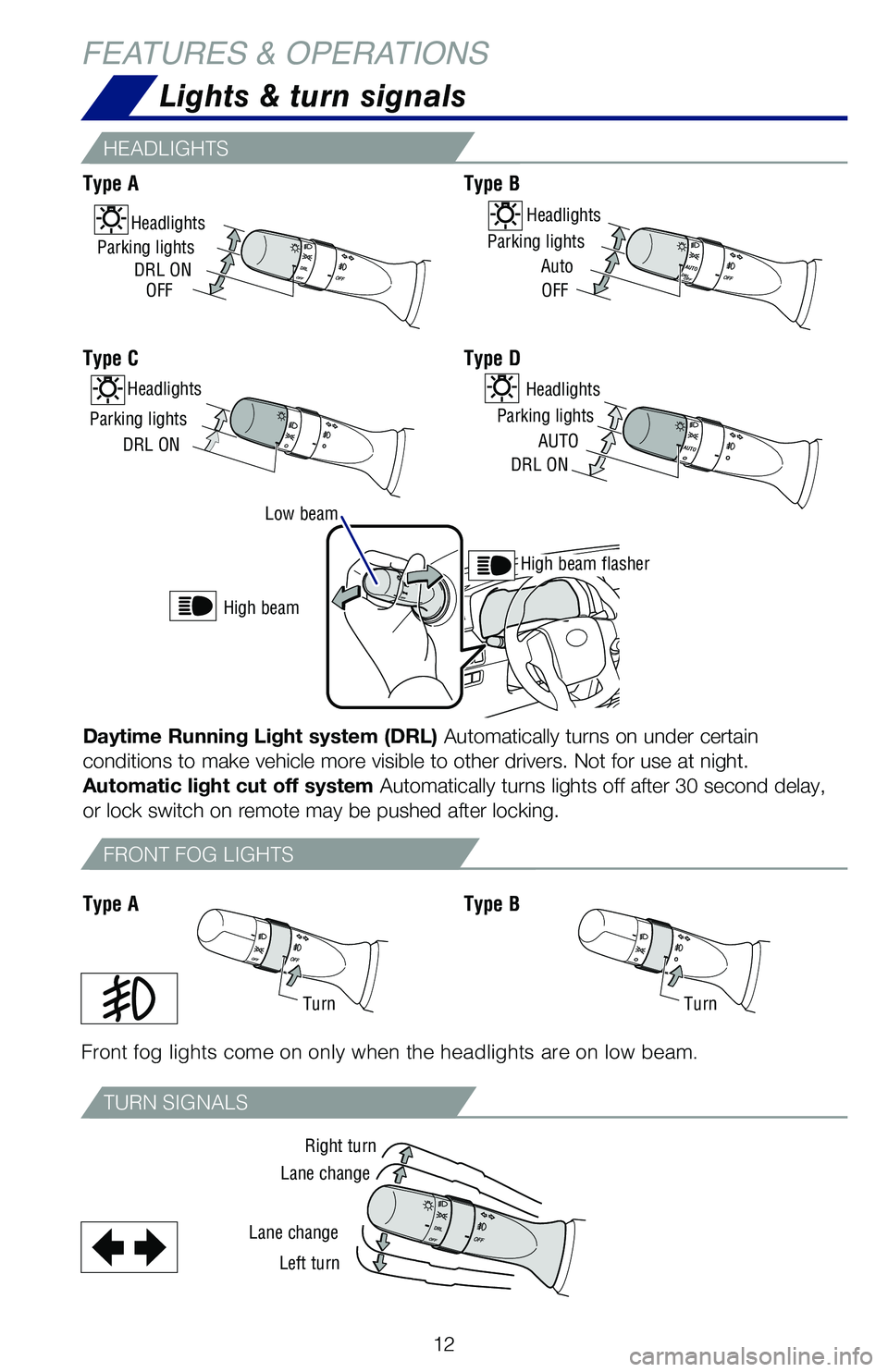
Low beam
High beam flasher
High beam
Lights & turn signals
HEADLIGHTS
TURN SIGNALS
FRONT FOG LIGHTS
Front fog lights come on only when the headlights are on low beam.
Right turn
TurnTurn
Lane change
Lane change
Left turn
Type AType B
Type C
Type AType B
Type D
Parking lights
Auto
OFF
HeadlightsHeadlights
Parking lights
DRL ONOFF
Headlights
Parking lights
DRL ON
Headlights
Parking lights
AUTO
DRL ON
Daytime Running Light system (DRL) Automatically turns on under certain
conditions to make vehicle more visible to other drivers. Not for use at night.
Automatic light cut off system Automatically turns lights off after 30 second delay,
or lock switch on remote may be pushed after locking.
FEATURES & OPERATIONS
114558_MY19_4Runner_QRG_V3_ML_0712_R1.indd 127/13/18 8:21 PM
Page 17 of 52
15
OVERVIEW
FEATURES
& OPERATIONS
SAFETY
& EMERGENCY
FEATURES
Refer to the Owner’s Manual for more details.
Cruise control
SLIDING OPERATIONTILTING OPERATION
Push once to open partway; again to open completely. Push once to open completely.
Recommended open position to minimize wind noise.
TURN SYSTEM ON/OFF
FUNCTIONS
1 The set speed may also be cancelled by depressing the brake pedal.2 The set speed may be resumed once vehicle speed exceeds 25 mph.
Increase speed
Decrease speed
Cancel1
Resume2
Set
Lightly press either side of the moonroof switch while opening/tilting is in progress,
the moonroof stops partway.
System ON/OFF
Open
CloseClose
Tilt
Moonroof (if equipped)
114558_MY19_4Runner_QRG_V3_ML_0712_R1.indd 157/13/18 8:21 PM
Page 22 of 52

20
Steering wheel switches
& telephone controls (Bluetooth®)
FEATURES & OPERATIONS
Bluetooth® technology allows dialing or receipt of calls without removing your hands
from the steering wheel or using a cable to connect the compatible telephone and
the system.
* Push and hold to access Mobile Assistant. When a compatible smartphone is
Bluetooth® connected push and hold the off hook switch 2-3 seconds to access
Siri® Eyes Free.
Refer to the “Navigation and Multimedia System Owner’s Manual” for more details.
Refer to the “Bluetooth® Device Pairing Section” in this guide for more information
about phone connections and compatibility.
NOTE: Concentrating on the road should always be your first priority while
driving. Do not use the hands-free phone system if it will distract you.
Audio switches
Telephone switches
Microphone
Volume control
Return to previous screen
Voice command switch
End call
Start call/ Mobile assistant access*
“MODE/HOLD” Push to change an audio mode. Push and hold to mute or pause the audio.
“” and “” Use to search within the selected audio medium (radio, CD, etc.).
114558_MY19_4Runner_QRG_V3_ML_0712_R1.indd 207/13/18 8:21 PM
Page 23 of 52
21
OVERVIEW
FEATURES & OPERATIONS
SAFETY & EMERGENCY FEATURES
NOTE: The 120V AC power outlet can only be used when engine is running.
ON/OFF Main switch
Push
Luggage compartment
Multi-Information Display (MID)
Refer to the Owner’s Manual for more settings and customizable features.
Eco Driving Indicator Zone
Outside temperatureMulti-terrain Select display*Ice indicatorTrip information
Driving monitor/ Warning messages/ Multi-terrain Select messages*
Compass*
The multi-information display presents the driver with a variety of driving-related
data. Items displayed can be switched by pressing the “DISP” switch.
* If equippedDisplay
“DISP” switch
Power outlets-120V AC (if equipped)
114558_MY19_4Runner_QRG_V3_ML_0712_R1.indd 217/13/18 8:21 PM