Page 232 of 421

DRIVING TIPS
Catalytic converter
78RB04003
The purpose of the catalytic converter is to minimize the amount of harmful pollutants in your vehicle's exhaust. Use of lead".d fuel in vehicles equipped with catalytic converters is prohibited, because lead deactivates the pollutant-reducing components of the catalyst system.
The converter is designed to last the life of the vehicle under normal usage and when unleaded fuel is used. No special maintenance is required on the converter. However, it is very important to keep the engine properly tuned. Engine misfiring, which can result from an improperly tuned engine, may cause overheating of the catalytic converter. This may result in permanent
4-9
heat damage to the catalytic converter and other vehicle components.
NOTICE
To mm,m,ze the possibility of catalytic converter or other vehicle damage: • Maintain the engine in the proper operating condition. In the event of an engine malfunction, particularly one involving engine misfire or other apparent loss of performance, have the vehicle serviced promptly. • Do not turn off the engine or inter
rupt the ignition when the t(ans~i~sion is in gear and the vehicle 1s m motion. Do not try to start the engine by pushing or towing the vehicle, or coasting down a hill. Do not idle the engine with any spark plug wires disconnected or removed, such as during diagnostic testing. • Do not idle the vehicle for prolonged periods if idling seems rough or there are other malfunctions. Do not allow the fuel tank to get near the empty level.
A. WARNING
Be careful where you park and drive; the catalytic converter and other exhaust components can get very hot. As with any vehicle, do not park or operate this vehicle in areas where combustible materials such as dry grass or leaves can come in contact with a hot exhaust system.
Page 233 of 421
Improving fuel economy
The following instructions will help you improve fuel economy.
Avoid excessive idling If you park your vehicle for more than one minute, stop the engine and start it again later. When warming up a cold engine, do not allow the engine to idle or apply full throttle until the engine has reached operating temperature. Allow the engine to warm up by driving.
Avoid fast starts F~st starts away from lights or stop signs will consume fuel unnecessarily and shorten engine life. Start off slowly.
Avoid unnecessary stops Avoid unnecessary deceleration and stopping. Try to maintain a moderate, steady speed whenever possible. Slowing down and then accelerating again uses more fuel.
Keep a steady cruising speed Drive at a constant speed that road and traffic conditions will permit.
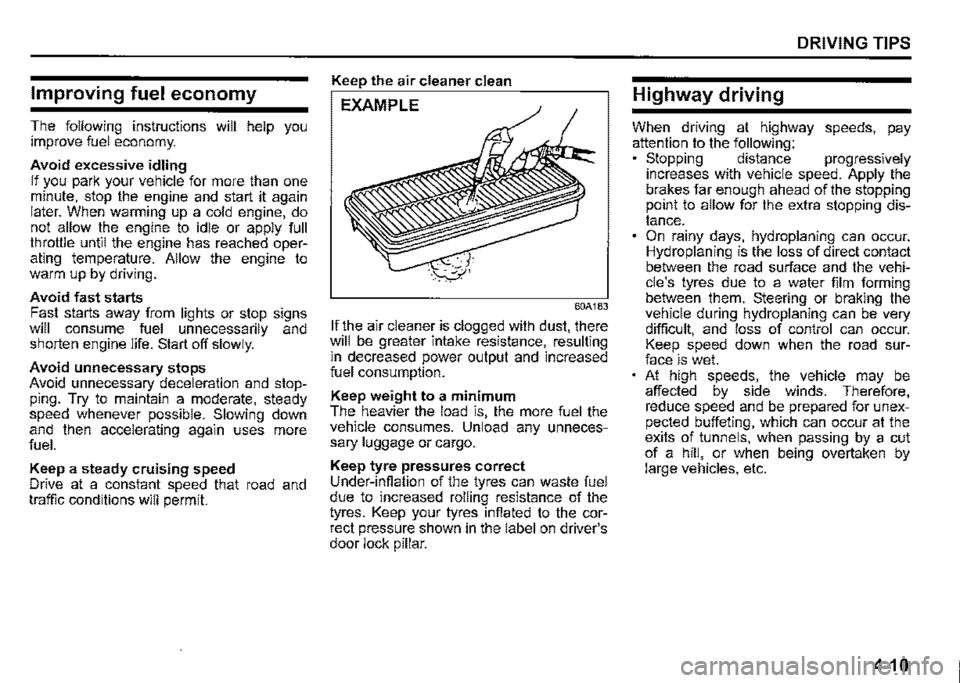
Keep the air cleaner clean
EXAMPLE
60A183
If the air cleaner is clogged with dust, there will be greater intake resistance, resulting m decreased power output and increased fuel consumption.
Keep weight to a minimum The heavier the load is, the more fuel the vehicle consumes. Unload any unnecessary luggage or cargo.
Keep tyre pressures correct Under-infiation of the tyres can waste fuel due to increased rolling resistance of the tyres. Keep your tyres infiated to the correct pressure shown in the label on driver's door lock pillar.
DRIVING TIPS
Highway driving
When driving at highway speeds, pay attention to the following: • Stopping distance progressively increases with vehicle speed. Apply the brakes far enough ahead of the stopping prnnt to allow for the extra stopping distance. On rainy days, hydroplaning can occur. Hydroplaning is the loss of direct contact between the road surface and the vehicle's tyres due to a water film forming between them. Steering or braking the vehicle during hydroplaning can be very difficult, and loss of control can occur. Keep speed down when the road surface is wet. At high speeds, the vehicle may be affected by side winds. Therefore, reduce speed and be prepared for unexpected buffeting, which can occur at the exits of tunnels, when passing by a cut of a hill, or when being overtaken by large vehicles, etc.
4-10
Page 236 of 421
OTHER CONTROLS AND EQUIPMENT
Fuel filler cap
78RB05001
5-1
A fuel filler cap is located on the right rear side of the vehicle. The fuel filler door can be unlocked by pulling up the opener lever located on the outboard lower side of the driver's seat and locked by simply closing the door.
Open
EXAMPLE
57L51093
To remove the fuel filler cap: 1) Stop the engine and close all the doors and windows while refueling. 2) Open the fuel filler door. 3) Remove the cap by turning it counterclockwise.
A CAUTION
Remove the fuel filler cap slowly. The fuel may be under pressure and may spray out, causing injury.
78RB05003
NOTE: The cap holder (1) holds the fuel filler cap (2) by hooking the groove (3) when refuel
ing.
To reinstall the fuel filler cap: 1) Turn the cap clockwise until you hear several clicks. 2) Close the fuel filler door.
A WARNING
Fuel is extremely flammable. Do not smoke when refueling, and check that there are no open flames or sparks in the area.
Page 237 of 421
A WARNING
If you need to replace the fuel cap, use a genuine SUZUKI cap. Use of an improper cap can result in a malfunction of the fuel system or emission control system. It may also result in fuel leakage while driving and in the event of an accident.
OTHER CONTROLS AND EQUIPMENT
Engine hood
78RB05004
To open the engine hood: 1) Pull the hood release handle located under the driver's side instrument panel in the outboard position. This will disengage the engine hood lock halfway.
78RB05005
2) Push the under-hood release lever sideways with your finger, as shown in the illustration. While pushing the lever, lift up the engine hood.
A CAUTION
The release lever and its peripheral, or engine food can be hot enough to burn your finger right after driving. Touch after those becomes cool enough.
NOTICE
Check that the wiper arms are not raised before you lift up the engine hood to avoid damaging the wiper arms and the engine hood.
5-2
Page 244 of 421
OTHER CONTROLS AND EQUIPMENT
Glove box
0 0
78RB05015
To open the glove box, pull the latch lever. To close it, push the lid until it latches securely.
A WARNING
Never drive with the glove box lid open. It could cause injury if an accident occurs.
A WARNING
Do not leave cigarette lighters or spray cans in the glove box. If a cigarette lighter or spray can is in a place such as the glove box, it may light accidentally when luggage is loaded, causing a fire.
5-9
Page 250 of 421
OTHER CONTROLS AND EQUIPMENT
Rear
78RB05024
NOTICE
When you use the frame hook (2), avoid the driving that gives significant physical shock on hook. Such operation can damage the hook, the vehicle body or the drive system. • Do not sudden accelerate. Do not tow the vehicle heavier than your vehicle.
5-15
Page 267 of 421

Safety information
,A WARNING
If you pay too much attention to operating the audio system or viewing the audio system display while driving, an accident can occur. If you set the sound volume too loud, it could prevent you from being aware of road and traffic conditions. • Keep your eyes on the road and your mind on the drive. Avoid paying too much attention to operating the audio system or viewing the audio system display. Familiarize yourself with the audio system controls and operation of the audio system before driving. • Preset your favorite radio stations before driving so that you can quickly tune to them using the presets. Set the sound volume to a level that will allow you to continue to be aware of road and traffic conditions while driving.
OTHER CONTROLS AND EQUIPMENT
Notes on discs
Precautions
When the inside of the vehicle is very
cold and the player is used soon after
switching on the heater, condensation
may form on the disc or the optical
parts of the player and proper playback
may not be possible. If condensation
forms on the disc, wipe it off with a soft
cloth. If condensation forms on the opti
cal parts of the player, do not use the
player for about one hour. This will
allow the condensation to disappear
normally.
Driving on extremely bumpy roads
which cause severe vibrations may
cause sound to skip.
This unit uses a precision mechanism.
Even in the event that trouble arises,
never open the case, disassemble the
unit, or lubricate the rotating parts.
Bring the unit to a SUZUKI dealer.
Cautions on handling
[rr]oiL DIGITAL AUDIO (A)
52D274
This unit has been designed specifically for
playback of compact discs bearing mark
(A) shown above.
No other discs can be played.
5-32
Page 314 of 421

OTHER CONTROLS AND EQUIPMENT
Problem Possible cause Possible solution
MP3/WMA/AAC
No playback The disc contains unsupported formatted Check the file format. data.
Sound skips or noise produced Sound skipping may occur when playing It is not recommended to play VBR files. VBR (Variable Bit Rate) files.
USB
There is no supported format file to play Check the file format. Playback does not start when the USB on this unit.
device is connected The current consumption of the USB Use a USB device with a current con-
device exceeds 1.0 A. sumption lower than 1.0 A.
Bluetooth®
The distance between this unit and the
Bluetooth® ready device is too far, or a Change the location of the Bluetooth®
metallic object may be located between ready device.
Pairing failed the Bluetooth® ready device and this unit.
Refer to the manual of the Bluetooth®
The Bluetooth® function of the Bluetooth® ready device. (Some devices have the
ready device is off. power saving function that automatically
activates after a certain time.)
Unable to receive a call Your current location may be out of ser-Drive your vehicle to the service area of
vice area. the phone.
The voice quality of hands-free is low Another wireless device may be located Switch off the wireless device or keep it
(Distortion, noise etc.) near the unit. away from the unit.
5-79


