2019 SUZUKI IGNIS Back light
[x] Cancel search: Back lightPage 259 of 505
5-4
OTHER CONTROLS AND EQUIPMENT
75RM4-01E
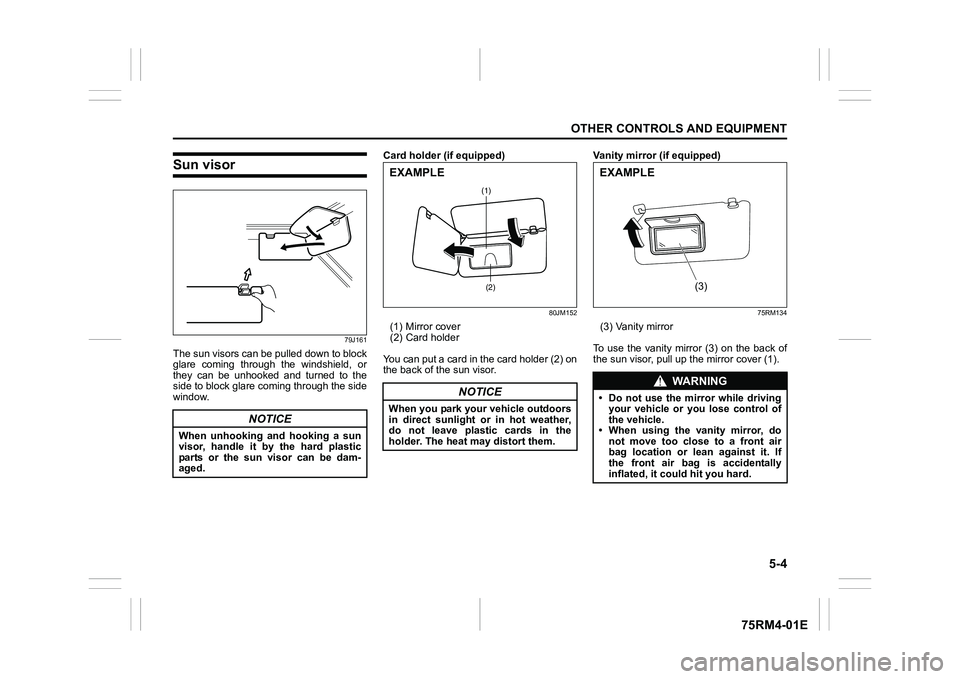
Sun visor
79J161
The sun visors can be pulled down to block
glare coming through the windshield, or
they can be unhooked and turned to the
side to block glare coming through the side
window.Card holder (if equipped)
80JM152
(1) Mirror cover
(2) Card holder
You can put a card in the card holder (2) on
the back of the sun visor. Vanity mirror (if equipped)
75RM134
(3) Vanity mirror
To use the vanity mirror (3) on the back of
the sun visor, pull up the mirror cover (1).
NOTICE
When unhooking and hooking a sun
visor, handle it by the hard plastic
parts or the sun visor can be dam-
aged.
NOTICE
When you park your vehicle outdoors
in direct sunlight or in hot weather,
do not leave plastic cards in the
holder. The heat may distort them.
(1)
(2)
EXAMPLE
WA R N I N G
• Do not use the mirror while driving your vehicle or you lose control of
the vehicle.
• When using the vanity mirror, do not move too close to a front air
bag location or lean against it. If
the front air bag is accidentally
inflated, it could hit you hard.
(3)
EXAMPLE
Page 264 of 505

5-9OTHER CONTROLS AND EQUIPMENT
75RM4-01E
Center console tray (1)
Front cup holders (2) / Rear cup holder (5)Use the rear cup holder to put a cup with a
lid or a bottle with a cap. Also, you can put
small articles in the rear cup holder.
Front bottle holder (3) / Rear bottle holder (6)You should only place a bottle with a cap in
the holder.Front seat back pocket (4) (if equipped)
75RM011
This pocket is provided for holding light
and soft things such as gloves, newspa-
pers or magazines.
WA R N I N G
Do not place any objects which may
fall out from the pocket when the
vehicle is moving.
Failure to take the precaution may
result in an object interfering with the
pedals and causing a loss of vehicle
control or an accident.
WA R N I N G
Failure to take the precautions listed
below could cause personal injury or
vehicle damage.
• Be careful when you are using the
cup holders to hold a cup contain-
ing liquid. Spilling out hot liquid
can cause burn injury. Spilling liq-
uids on the lithium-ion battery in
models equipped with ENG A-
STOP system or SHVS may cause a
fire or electric shock or damage to
the battery.
• Do not use the cup holders to hold sharp-edged, hard or breakable
objects. Objects in the cup holders
may be thrown about during a sud-
den stop or impact, and could
cause personal injury.
• Be careful not to spill liquid or insert any foreign materials into the
moving part of the gearshift lever,
or any electrical components. Liq-
uid or foreign materials may dam-
age these parts.
• If you spill, or drop liquid acciden- tally, have your vehicle inspected
by an authorized SUZUKI dealer.
CAUTION
Do not put hard or breakable objects
in the pocket. If an accident occurs,
objects such as bottles, cans, etc.
can injure the occupants in the rear
seat.EXAMPLE
Page 307 of 505

5-52
OTHER CONTROLS AND EQUIPMENT
75RM4-01E
Random playback
Press “RDM” button (7).
Each time the button is pressed, the mode
will change as follows:
• TRACK RANDOMThe random indicato r “RDM” will light.
The tracks in the loaded disc will be
played in random order.
Repeat playback
Press “RPT” button (6).
Each time the button is pressed, the mode
will change as follows:
• TRACK REPEAT The repeat indicator “RPT” will light.
The track currently being played will be
played repeatedly. Display change
Press “DISP” button (8).
Each time the button is pressed, display
will change as follows:
NOTE:
• “NO TITLE” will be displayed when there
is no text information in the disc currently
being played.
• If text data contains more than 16 char- acters, “>” mark will appear at the right
end. Holding down “DISP” button (8) for
1 second or longer can display the next
page.
OFF TRACK RANDOMOFF TRACK REPEAT
Play time
Disc title
Track title
Page 309 of 505

5-54
OTHER CONTROLS AND EQUIPMENT
75RM4-01E
Selecting a folder
Turn “TUNE/FLD PUSH SOUND” knob (1)
to select a folder.
Selecting a track
• Press UP button (2) to listen to the nexttrack.
• Press DOWN button (3) twice to listen to the previous track.
When DOWN button (3) is pressed
once, the track currently being played
will start from the beginning again.
Fast forwarding/rewinding a track
• Hold down UP button (2) to fast forward the track.
• Hold down DOWN button (3) to fast
rewind the track. Random playback
Press “RDM” button (5).
Each time the button is pressed, the mode
will change as follows:
• FOLDER RANDOM
The random indicator “F.RDM” will light.
The tracks in the cu rrent folder will be
played in random order.
•ALL RANDOM The random indicato r “RDM” will light.
The tracks in the loaded disc will be
played in random order. Repeat playback
Press “RPT” button (4).
Each time the button is pressed, the mode
will change as follows:
• FILE REPEAT
The repeat indicator “RPT” will light.
The track currently being played will be
played repeatedly.
• FOLDER REPEAT The repeat indicator “F.RPT” will light.
All tracks in the currently selected folder
will be played repeatedly.
OFF FOLDER RANDOM ALL RANDOM
OFF FILE REPEAT FOLDER REPEAT
Page 313 of 505

5-58
OTHER CONTROLS AND EQUIPMENT
75RM4-01E
Selecting a USB device mode
Press “MEDIA” button (1).
Each time the button is pressed, the mode
will change as follows:
Selecting a folder
Turn “TUNE/FLD PUSH SOUND” knob (2)
to select the desired folder.
Selecting a track
• Press UP button (3) to listen to the next track.
• Press DOWN button (4) twice to listen to the previous track.
When DOWN button (4) is pressed
once, the track currently being played
will start from the beginning again.
Fast forwarding/rewinding a track
• Hold down UP button (3) to fast forward the track.
• Hold down DOWN button (4) to fast rewind the track. Random playback
Press “RDM” button (6).
Each time the button is pressed, the mode
will change as follows:
• FOLDER RANDOM
The random indicator “F.RDM” will light.
The tracks in the currently selected
folder will be played in random order.
•ALL RANDOM The random indicato r “RDM” will light.
The tracks in the connected USB device
will be played in random order.
Repeat playback
Press “RPT” button (5).
Each time the button is pressed, the mode
will change as follows:
• FILE REPEAT The repeat indicator “RPT” will light.
The track currently being played will be
played repeatedly. • FOLDER REPEAT
The repeat indicator “F.RPT” will light.
All the tracks in t he folder currently
selected will be played repeatedly.
Display change
Press “DISP” button (7).
Each time the button is pressed, display
will change as follows:
NOTE:
• “NO TITLE” will be displayed when there is no text information in the file currently
being played.
• If text data contains more than 16 char- acters, “>” mark will appear at the right
end. Holding down “DISP” button (7) for
1 second or longer can display the next
page.
USB (iPod
®) (if equipped)
Bluetooth® audio (if equipped)
AUX (if equipped)
OFF FOLDER RANDOM ALL RANDOMOFF FILE REPEAT FOLDER REPEAT
Play time
Folder name
File name
Album name (MP3, AAC only)
Track title
Artist name
Page 316 of 505

5-61OTHER CONTROLS AND EQUIPMENT
75RM4-01E
Selecting an iPod
® mode
Press “MEDIA” button (1).
Each time the button is pressed, the mode
will change as follows:
Selecting a track
• Press UP button (3) to listen to the next track.
• Press DOWN button (4) twice to listen to
the previous track.
When DOWN button (4) is pressed
once, the track currently being played
will start from the beginning again.
Fast forwarding/rewinding a track
• Hold down UP button (3) to fast forward the track.
• Hold down DOWN button (4) to fast
rewind the track. Random playback
Press “RDM” button (6).
Each time the button is pressed, the mode
will change as follows:
• SONG RANDOM
The random indicato r “RDM” will light.
The tracks in the iPod
® will be played in
random order.
• ALBUM RANDOM The random indicator “F.RDM” will light.
The albums in the iPod® will be played in
random order.
Repeat playback
Press “RPT” button (5).
Each time the button is pressed, the mode
will change as follows:
• SONG REPEAT The repeat indicator “RPT” will light.
The track currently being played will be
played repeatedly. Display change
Press “DISP” button (7).
Each time the button is pressed, display
will change as follows:
NOTE:
If text data contains more than 16 charac-
ters, “>” mark will appear at the right end.
Holding down “DISP” button (7) for 1 sec-
ond or longer can display the next page.
USB (iPod
®) (if equipped)
Bluetooth® audio (if equipped)
AUX (if equipped)
OFF SONG RANDOM ALBUM RANDOM
OFF SONG REPEAT
Playlist name /
Track title (Playlist mode only)
Artist name /
Track title
Album name /
Track title
Track title /
Play time
Page 395 of 505

7-46
INSPECTION AND MAINTENANCE
75RM4-01E
*1: Models with ENG A-STOP
*2: CVT models with ENG A-STOP
*3: Auto Gear Shift models
*4: Models with Auto-on headlight system
*5: Models with front fog light The main fuse, primary fuses and some of
the individual fuses are located in the
engine compartment. If the main fuse
blows, no electrical component will func-
tion. If a primary fuse blows, no electrical
component in the corresponding load
group will function. When replacing the
main fuse, a primary fuse or an individual
fuse, use a genuine S
UZUKI replacement.
To remove a fuse, use the fuse puller pro-
vided in the fuse box. The amperage of
each fuse is shown in the back of the fuse
box cover.
60G111
MAIN FUSE / PRIMARY FUSE
(1) 120 A FL1
(2) 100 A FL2
(3) 80 A FL3
(4) 100 A FL4
(5) 50 A FL5
(6) 150 A FL6
*1
(7) 40 A Power steering
(8) – Blank
(9) 10 A A/C compressor
(10) 25 A Headlight high
*4
(11) 15 A Headlight (Left)
(12) 15 A Headlight (Right)
(13) 30 A Starter motor
(14) 30 A Radiator fan
(15) 30 A Starter motor 2
*2
(16) 40 A Ignition switch 2
(17) – Blank
(18) 30 A T/M pump
*3
(19) 30 A Back-up
(20) – Blank
(21) 15 A Front fog light
*5
(22) 30 A Sub battery
*1
(23) 30 A Blower fan
(24) – Blank
(25) 5 A Starting signal
(26) – Blank
(27) 15 A Headlight high (Left)
*4
(28) 15 A Headlight high (Right)
*4
(29) 15 A T/M
*2
(30) 15 A T/M pump 2
*2
(31) 15 A FI
(32) 40 A ABS motor
(33) 25 A ABS solenoid
(34) – Blank
(35) 10 A T/M 2
*3
(36) 5 A T/M 3
*3
(37) 40 A Ignition switch
EXAMPLE
BLOWN OK
Page 397 of 505

7-48
INSPECTION AND MAINTENANCE
75RM4-01E
81A283
Headlight aimingSince special procedures are required, ask
your authorized SUZUKI dealer for this job.
(21) 20 A Power window timer
(22) 5 A Key
(23) 15 A Horn
(24) 5 A Tail light (Left)
(25) 10 A Tail light
(26) 10 A Air bag
(27) 10 A Ignition-1 signal
(28) 10 A Back-up light
(29) 5 A ACC-3
(30) 20 A Rear defogger
(31) 10 A Heated mirror
(32) 15 A ACC-2
(33) 5 A ACC
(34) 10 A Rear wiper
(35) 5 A Ignition-2 signal
(36) 15 A Washer
(37) 25 A Front wiper
(38) 10 A Stop light
WA R N I N G
Always replace a blown fuse with a
fuse of the correct amperage. Never
use a substitute such as aluminum
foil or wire to replace a blown fuse. If
you replace a fuse and the new one
blows in a short period of time, you
may have a major electrical problem.
Have your vehicle inspected immedi-
ately by your SUZUKI dealer.
BLOWN
OK