Page 236 of 424
Infotainment System
affect the audio quality of a telephone con-
versation in the vehicle.
Note
�
Page 237 of 424
Operating modes
Pairing and connecting a mobile
t el
ephone t o the Inf
otainment sys-
t em In order to manage a mobile telephone via
the Infotainment system, it is necessary to
pair both devices
once
.
For your safety, pairing should be done when
the vehicle is stationary. In some countries it is
not possible to perform the pairing with the
vehicle running.
Conditions �
Page 238 of 424
Infotainment System
mobile telephone, the system will try to con-
nect t o the ne
xt mobile t
elephone on the list
of pair ed de
vices.
The maximum range of the connection is ap-
prox. 10 metres. The connection will be inter-
rupted if this distance is exceeded. The con-
nection is automatically re-established as
soon as the device is once again within Blue-
tooth
Page 239 of 424
Operating modes
Function button: function
CALLS To open call lists of the connected
mobile telephone
Page 240 of 424
Infotainment System
hung up or excluded from the conference call
but k ept on a separ
ate call. WARNING
Remember that the driver should not oper-
ate the mobile phone while driving. Note
Multi-call and conference call functionali-
ties are subject to the services associated
with the user
Page 241 of 424
Operating modes
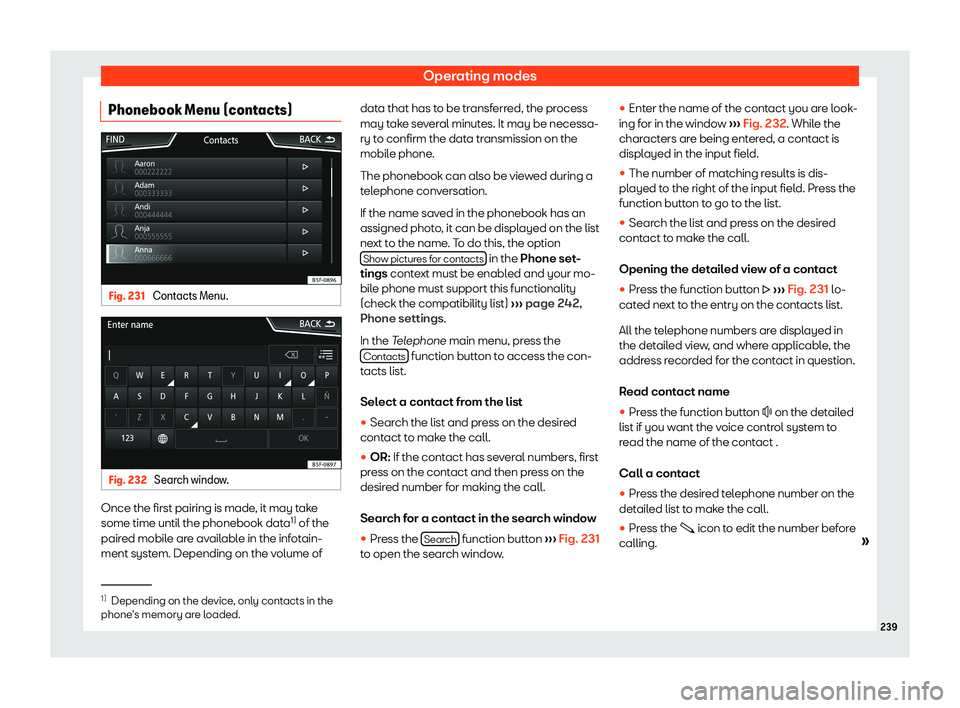
Phonebook Menu (contacts) Fig. 231
Contacts Menu. Fig. 232
Search window. Once the first pairing is made, it may take
some time until the phonebook dat
a1)
of the
pair ed mobil
e are av
ailabl
e in the infotain-
ment system. Depending on the volume of data that has to be transferred, the process
may take several minutes. It may be necessa-
ry t
o confirm the data transmission on the
mobile phone.
The phonebook can also be viewed during a
telephone conversation.
If the name saved in the phonebook has an
assigned photo, it can be displayed on the list
next to the name. To do this, the option Show pictures for contacts in the Phone set
-
tings conte
xt must be enabl ed and your mo-
bil e phone must support this functionalit
y
(check the compatibility list)
Page 243 of 424
Operating modes
Function button: function
FORWARD To forward an SMS.
REPLY To reply to an incoming SMS.
Enter number To enter a telephone number or
to select a recipient from the
contact list.
Pr
ess the R
ecipients function
button to select multiple recipi-
ents.
R ecipients T
o select multiple recipients
from the contact list.
Delete To delet
e an SMS. Calls Menu (call lists)
Fig. 234
Call lists menu. �
Page 245 of 424
Operating modes
Function button: function
Manage favourites : Edit the speed dial keys.
Occupied speed dial key: Press to delete the
stored number
.
Free speed dial key: Press to save a phone
book number on the speed dial key.
Mailbox number : To enter or change the voice mailbox
number.
Sort by : To set the order of appearance of the phone
book entries (Forname and Surname or vice versa).
Import contacts : Press to import the phone book of the
connected telephone or to update the import ed
phone book
.
Reminder: remember your mobile phone : If a Bluetooth