Page 107 of 232
Air conditioning
Air conditioning
Heating, v entil
ation and
cooling
Introduction The Climatr
onic
cools and dehumidifies the
air. Its optimum performance is achieved with
the windows closed.
To switch a specific function on, press the ap-
propriate button. Press the button again to
switch off the function.
The LED on each control lights up to indicate
that the respective function of a control has
been switched on.
Dust and pollen filter
The dust and pollen filter with its activated
charcoal cartridge serves as a barrier
against impurities in the air taken into the ve-
hicle interior.
The dust and pollen filter must be changed
regularly so that air conditioner performance
is not adversely affected.
If the filter loses efficiency prematurely due to
use in areas with very high levels of air pollu-
tion, the filter must be changed more fre-
quently than stated in the Service Schedule. WARNING
Reduced visibility through the windows in-
cr eases the risk of serious accidents.
�
Page 123 of 232
Operating modes
RDS is not available in all places or on all ra-
dio st ations.
Depending on the country and the equip-
ment, RDS and s
witching to alternative fre-
quencies (AF) can be deactivated in the sys-
tem settings ››› page 117.
TP function (traffic information sta-
tion) Fig. 113
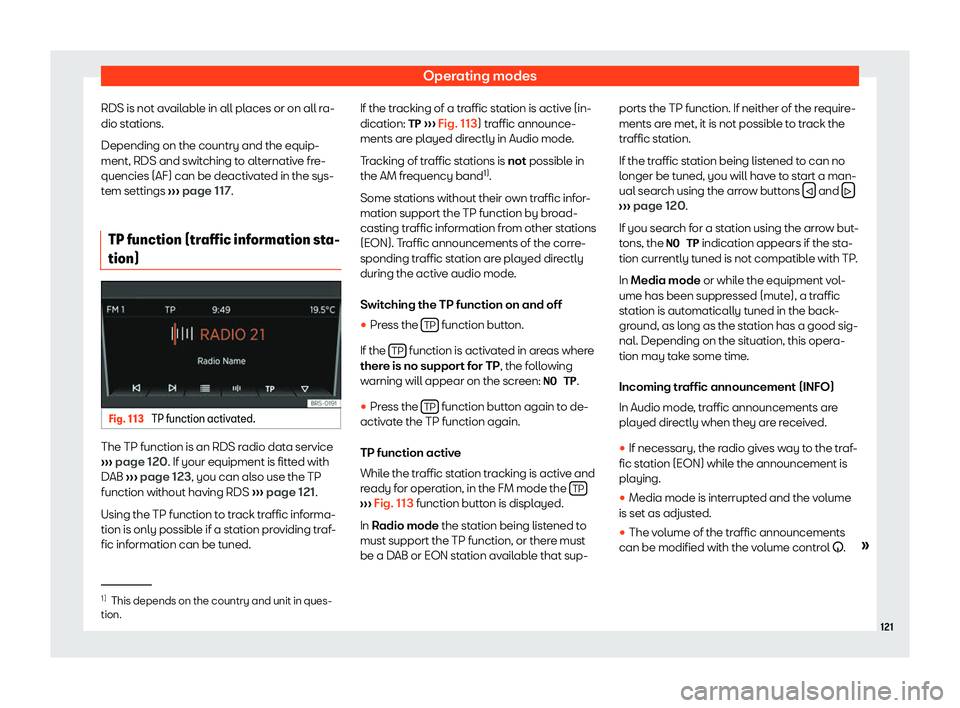
TP function activated. The TP function is an RDS radio data service
› ›
› page 120. If your equipment is fitted with
DAB ››› page 123, you can also use the TP
function without having RDS ››› page 121.
Using the TP function to track traffic informa-
tion is only possible if a station providing traf-
fic information can be tuned. If the tracking of a traffic station is active (in-
dication: TP
››
› Fig. 113) traffic announce-
ments are played directly in Audio mode.
Tracking of traffic stations is not possible in
the AM frequency band 1)
.
Some stations without their own traffic infor-
mation support the TP function by broad-
casting traffic information from other stations
(EON). Traffic announcements of the corre-
sponding traffic station are played directly
during the active audio mode.
Switching the TP function on and off �
Page 139 of 232
Connectivity
law. On the SEAT website you can consult the
curr ent dat
a confidentiality statement.
Deactivate SEAT CONNECT serv-
ices Fig. 134
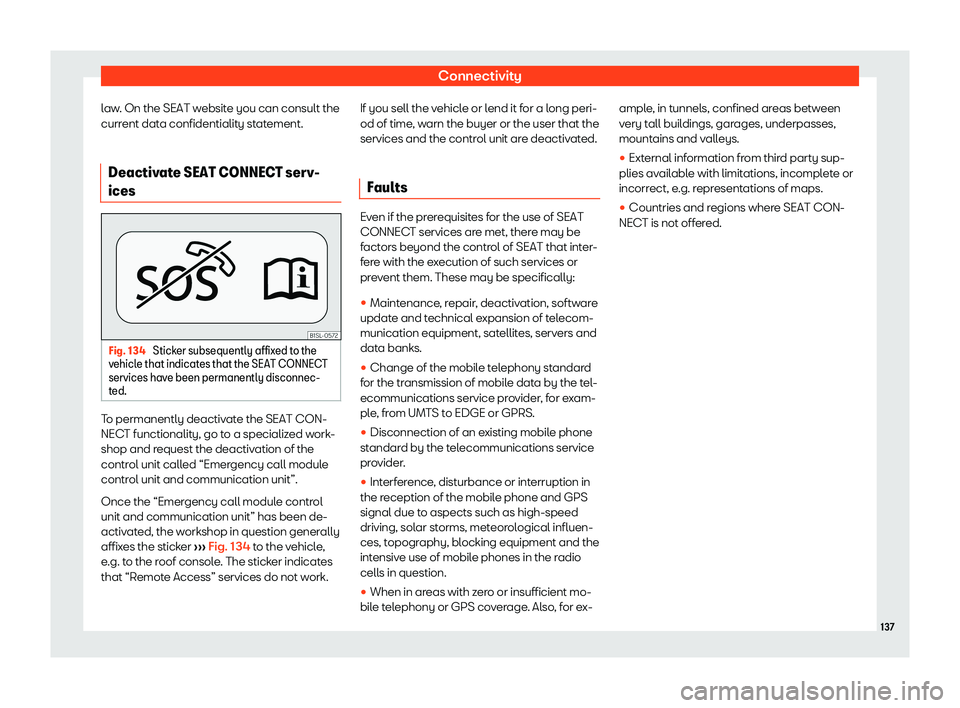
Sticker subsequently affixed to the
v ehicl
e that indicates that the SEAT CONNECT
services have been permanently disconnec-
ted. To permanently deactivate the SEAT CON-
NEC
T functionalit
y, go to a specialized work-
shop and request the deactivation of the
control unit called “Emergency call module
control unit and communication unit”.
Once the “Emergency call module control
unit and communication unit” has been de-
activated, the workshop in question generally
affixes the sticker ››› Fig. 134 to the vehicle,
e.g. to the roof console. The sticker indicates
that “Remote Access” services do not work. If you sell the vehicle or lend it for a long peri-
od of time, w
arn the buyer or the user that the
services and the control unit are deactivated.
Faults Even if the prerequisites for the use of SEAT
CONNEC
T services ar
e met, there may be
factors beyond the control of SEAT that inter-
fere with the execution of such services or
prevent them. These may be specifically:
�
Page 153 of 232
Driver assistance systems
Trips abroad In some countries, certain safety regulations
can be in f
or
ce that differ from the vehicle's
technical characteristics. Before travelling
abroad, SEAT recommends you consult a
technical service about the legal require-
ments and the following points:
�
Page 175 of 232
High-voltage battery
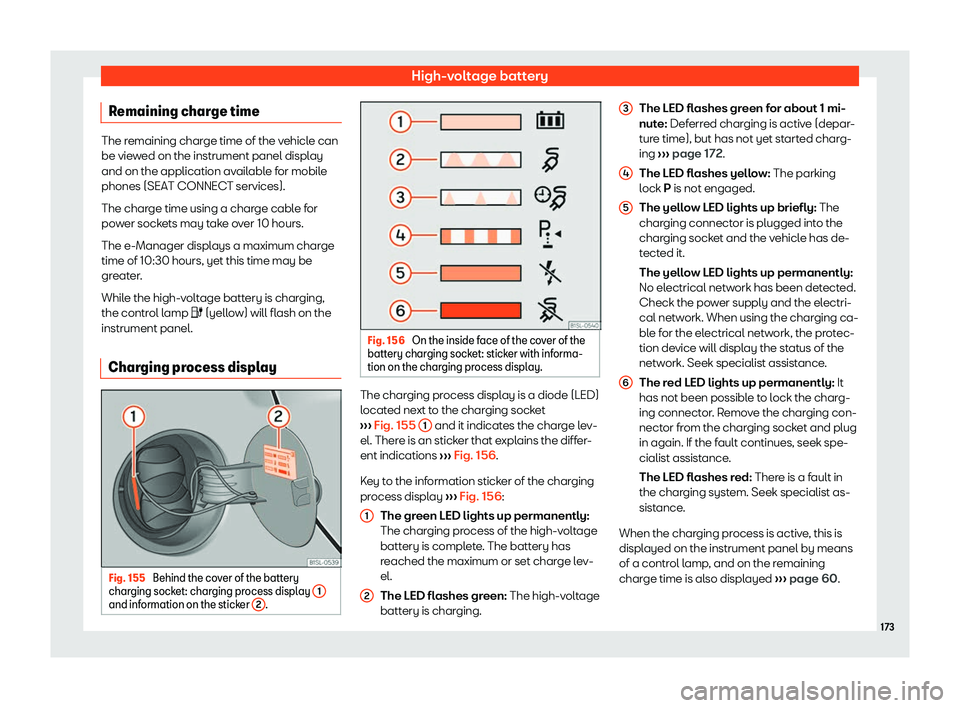
Charging process display Fig. 155
Behind the cover of the battery
char ging sock et: charging process display 1and information on the sticker
2 . Fig. 156
On the inside face of the cover of the
batt ery char ging sock
et: sticker with informa-
tion on the charging process display. The charging process display is a diode (LED)
l
ocat
ed ne
xt to the charging socket
››› Fig. 155
1 and it indicates the charge lev-
el. Ther e is an stick
er that e
xplains the differ-
ent indications ››› Fig. 156.
Key to the information sticker of the charging
process display ››› Fig. 156:
The green LED lights up permanently:
The charging process of the high-voltage
battery is complete. The battery has
reached the maximum or set charge lev-
el.
The LED flashes green: The high-voltage
battery is charging.
1
2 The LED flashes green for about 1 mi-
nut
e:
Def
erred charging is active (depar-
ture time), but has not yet started charg-
ing ››› page 172.
The LED flashes yellow: The parking
lock P is not engaged.
The yellow LED lights up briefly: The
charging connector is plugged into the
charging socket and the vehicle has de-
tected it.
The yellow LED lights up permanently:
No electrical network has been detected.
Check the power supply and the electri-
cal network. When using the charging ca-
ble for the electrical network, the protec-
tion device will display the status of the
network. Seek specialist assistance.
The red LED lights up permanently: It
has not been possible to lock the charg-
ing connector. Remove the charging con-
nector from the charging socket and plug
in again. If the fault continues, seek spe-
cialist assistance.
The LED flashes red: There is a fault in
the charging system. Seek specialist as-
sistance.
When the charging process is active, this is
displayed on the instrument panel by means
of a control lamp, and on the remaining
charge time is also displayed ››› page 60.
3 4
5
6
173Remaining charge time
The remaining charge time of the vehicle can
be viewed on the instrument panel display
and on the application available for mobile
phones (SEAT CONNECT services).
The charge time using a charge cable for
power sockets may take over 10 hours.
The e-Manager displays a maximum charge
time of 10:30 hours, yet this time may be
greater.
While the high-voltage battery is charging,
the control lamp
Page 194 of 232
Practical tips
Driving style
F ast cornering, heavy accel
eration and hard
braking (squealing tyres) all increase tyre
wear.
Wheel balance
The wheels on new vehicles are balanced.
However, certain circumstances may lead to
imbalance (run-out), which is detected as vi-
brations in the steering wheel.
Unbalanced wheels should be rebalanced,
as they otherwise cause excessive wear on
steering, suspension and tyres. A wheel must
also be rebalanced when a new tyre is fitted
or if a tyre is repaired.
Incorrect wheel alignment
Incorrect running gear alignment causes ex-
cessive tyre wear, impairing the safety of the
vehicle. If you notice excessive tyre wear, you
should check wheel alignment at a SEAT Of-
ficial Service. WARNING
Unsuitable handling of the wheels and
t yr
es may lead to sudden tyre pressure los-
ses, to tread separation or even to a blow-
out.
�
Page 196 of 232
Practical tips
design of summer tyres (width, rubber com-
pound, tr ead patt
ern) gives less grip on ice
and snow. This applies particularly to vehicles
equipped with wide section tyres or with
high speed tyres (code letters H, V or Y on
the sidewall).
Only use winter tyres of the correct type ap-
proved for your vehicle. The sizes of these
tyres are specified in the vehicle's documents
(e.g. EC Certificate of Conformity or COC 1)
).
The vehicle documentation varies depending
on the country of residence.
Winter tyres lose a great deal of their proper-
ties when the tread is worn down to a depth
of 4 mm.
The performance of winter tyres is also se-
verely impaired by ageing, even if the tread is
still much deeper than 4 mm.
A code letter indicating the speed limit is
stamped on all winter tyres ››› page 189.
Vehicles capable of exceeding these speeds
must have an appropriate sticker attached
so that it is visible to the driver. Suitable stick-
ers are available from the SEAT Official Serv-
ice and specialised workshop. Please note
the regulations to this effect in your country.
“All-weather” tyres can also be used instead
of winter tyres. Using winter tyres with V-rating
Please not
e that the generally applicable
240 km/h (149 mph) speed for winter tyres
with the letter V is subject to technical re-
strictions; the maximum permissible speed
for your vehicle may be significantly lower.
The maximum speed limit for these tyres de-
pends directly on the maximum axle weights
for your car and on the listed weight rating of
the tyres being used.
It is best to contact a SEAT Official Service to
check the maximum speed which is permissi-
ble for the V-rated tyres fitted on your car on
the basis of this information. WARNING
Exceeding the maximum speed permitted
f or the wint
er tyres fitted on your car can
cause tyre failure, resulting in a loss of con-
trol of the vehicle – risk of accident. For the sake of the environment
When winter is over, change back to sum-
mer t yr
es at an appropriate moment. In
temperatures above +7°C (+45°F), perform-
ance will be improved if summer tyres are
used. Rolling noise, wear and energy con-
sumption will all be reduced. Snow chains
Snow chains should only be used on the
fr
ont wheel
s.
�
Page 199 of 232
SEAT Maintenance Programme
Maintenance
SEAT Maint enance Pr
o-
gramme
Service intervals
Service works and Digital Mainte-
nance Plan Log of services performed (“Digital Main-
t
enance Pl
an”)
The SEAT dealership or a specialised work-
shop records Service receipts in a central
system. Thanks to this comprehensive docu-
mentation of the service history, it is possible
to reproduce the services performed any
time. SEAT recommends requesting a Service
receipt after every service carried out con-
taining all the services carried out on the sys-
tem.
Whenever there is a new service the receipt is
replaced with a current one.
The Digital Maintenance Plan is not avail-
able in some markets. In this case, your
SEAT dealer will inform you about the cur-
rent documentation of the work. Service works
In the Digital Maint
enance Plan, your SEAT
authorised service or specialised workshop
documents the following information:
�