Page 173 of 348

If it’s necessary to keep the ball mount and hitch ball
assembly mounted for a long period, it is possible to filter
out the ball mount and hitch ball assembly presence in
sensor field of view. The filtering operation must be
performed only by an authorized dealer.
PARKVIEW REAR BACK UP CAMERA
Your vehicle is equipped with the ParkView Rear Back Up
Camera that allows you to see an on-screen image of the rear
surroundings of your vehicle whenever the gear selector is
put into REVERSE. The image will be displayed on the
touchscreen display along with a caution note to “check
entire surroundings” across the top of the screen. After five
seconds this note will disappear. The ParkView camera is
located on the rear of the vehicle above the rear license plate.
The Rear Back Up Camera can also be activated when the
vehicle is not in REVERSE through the Uconnect System.
Refer to “Uconnect Settings” in “Multimedia” for further
information.
NOTE:If one of the rear cargo doors is not completely
closed, the Back Up Camera cannot provide an accurate
image of the area behind the vehicle. A dedicated message
will appear on the Uconnect display indicating the camera
is not in the correct position. The Camera Delay setting can be set to on/off in the rear
camera settings menu. When the vehicle is shifted out of
REVERSE and the Camera Delay is turned off, the rear
camera mode is exited and the navigation or audio screen
appears on display again.
When the transmission is shifted out of REVERSE, and
Camera Delay is activated in the menu screen, the camera
image will continue to be displayed for up to 10 seconds,
unless the speed of the vehicle is greater than 8 mph
(13 km/h), the transmission is in PARK, or the ignition key
is in the OFF position.
When displayed, static grid lines will illustrate the width of
the vehicle and will show separate zones that will help
indicate the distance to the rear of the vehicle. The follow-
ing table shows the approximate distances for each zone:
Zone
Distance To The Rear Of The
Vehicle
Red 0 - 1 ft (0 - 30 cm)
Yellow 1 ft - 3 ft (30 cm - 1 m)
Green 3 ft or greater (1 m or greater)
6
STARTING AND OPERATING 171
Page 191 of 348
IN CASE OF EMERGENCY
CONTENTS
�HAZARD WARNING FLASHERS ............191
� BULB REPLACEMENT ....................191
▫ Replacement Bulbs .....................191
▫ Replacing Exterior Bulbs ..................192
▫ Replacing Interior Bulbs ..................194
� FUSES ............................... .197
▫ Underhood Fuses ...................... .197
▫ Interior Fuses ......................... .200
▫ Central Unit Fuse Panel ..................203
� JACKING AND TIRE CHANGING ...........204
▫ Jack Location ......................... .204
▫ Removing The Spare Tire .................205
▫ Preparations For Jacking .................208
▫ Jacking Instructions .....................209 ▫
Vehicles With Alloy Wheels ................214
▫ Vehicles Equipped With Wheel Covers ........216
� TIRE SERVICE KIT — IF EQUIPPED ..........217
▫ Tire Service Kit Storage ...................217
▫ Tire Service Kit Usage ....................217
� JUMP STARTING ....................... .220
▫ Preparations For Jump Starting .............220
▫ Jump Starting Procedure ..................222
� IF YOUR ENGINE OVERHEATS .............223
� IGNITION KEY REMOVAL OVERRIDE ........224
� GEAR SELECTOR OVERRIDE ..............225
� FREEING A STUCK VEHICLE ..............226
� T
OWING A DISABLED VEHICLE ............228
7
Page 201 of 348
CavityMaxi Fuse Mini Fuse Description
F20 – 30 Amp Green Rear Defroster (If Equipped)
F21 – 5 Amp TanKey Unlock
F22 – 10 Amp Red Primary ECM Loads
F23 – 20 Amp Yellow BSM System
F24 – 5 Amp TanBSM System, Positive Key and Steering Angle
Sensor
F30 – 15 Amp Blue 2nd Instrument Panel Power Outlet
F83 20 Amp Yellow –Fuel Pump
F84 – 15 Amp Blue AT Module
F85 – 15 Amp Blue Rear Power Outlet 12V
F87 – 5 Amp TanIBS
F88 – 7.5 Amp Brown External Mirror Defrost (If Equipped)
7
IN CASE OF EMERGENCY 199
Page 226 of 348
CAUTION!
Driving with a hot cooling system could damage your
vehicle. If the temperature gauge reads HOT (H), pull
over and stop the vehicle. Idle the vehicle with the air
conditioner turned off until the pointer drops back
into the normal range. If the pointer remains on HOT
(H), and you hear continuous chimes, turn the engine
off immediately and call for service.
IGNITION KEY REMOVAL OVERRIDE
This vehicle is equipped with a Key Ignition Park Interlock
which requires the transmission to be in PARK before the
ignition switch can be turned to the LOCK/OFF (key
removal) position. To remove the key manually, proceed as
follows:
1. Firmly apply the parking brake.
2. Remove the Allen Key located in the rear cargo area, inthe tool bag (if equipped) or on the left side in the cargo
box.
3. Unlock the steering column, pull the tilt/telescoping control handle down. 4. Pull the steering wheel outward until it is in the end of
the travel position, then lock the steering column in
position, push the control handle up until fully engaged.
5. Using the Allen Key, undo the lower steering column cover screws, and remove the lower cover.
6. Pull the release tab downwards using one hand and with the other one remove the key, sliding it outwards.
Lower Steering Column Screw Locations
224 IN CASE OF EMERGENCY
Page 227 of 348
7. Once the key is removed, reinstall the steering columncover.
CAUTION!
It is advisable to contact an authorized dealer to have
the reinstall procedure carried out. If you would like to
proceed in performing the reinstall procedure special
attention must be paid to the correct coupling of the
clips. Otherwise damage to the cover or noise might be
heard due to incorrect fastening of the lower cover.
GEAR SELECTOR OVERRIDE
If a malfunction occurs and the gear selector cannot be
moved out of the PARK position, you can use the following
procedure to temporarily move the gear selector:
1. Turn the engine OFF.
2. Firmly apply the parking brake.
3. Using a screwdriver or similar tool, carefully separatethe gear selector boot from the center console.
4. Press and maintain firm pressure on the brake pedal.
Release Tab Location
Gear Selector Boot Location
7
IN CASE OF EMERGENCY 225
Page 230 of 348
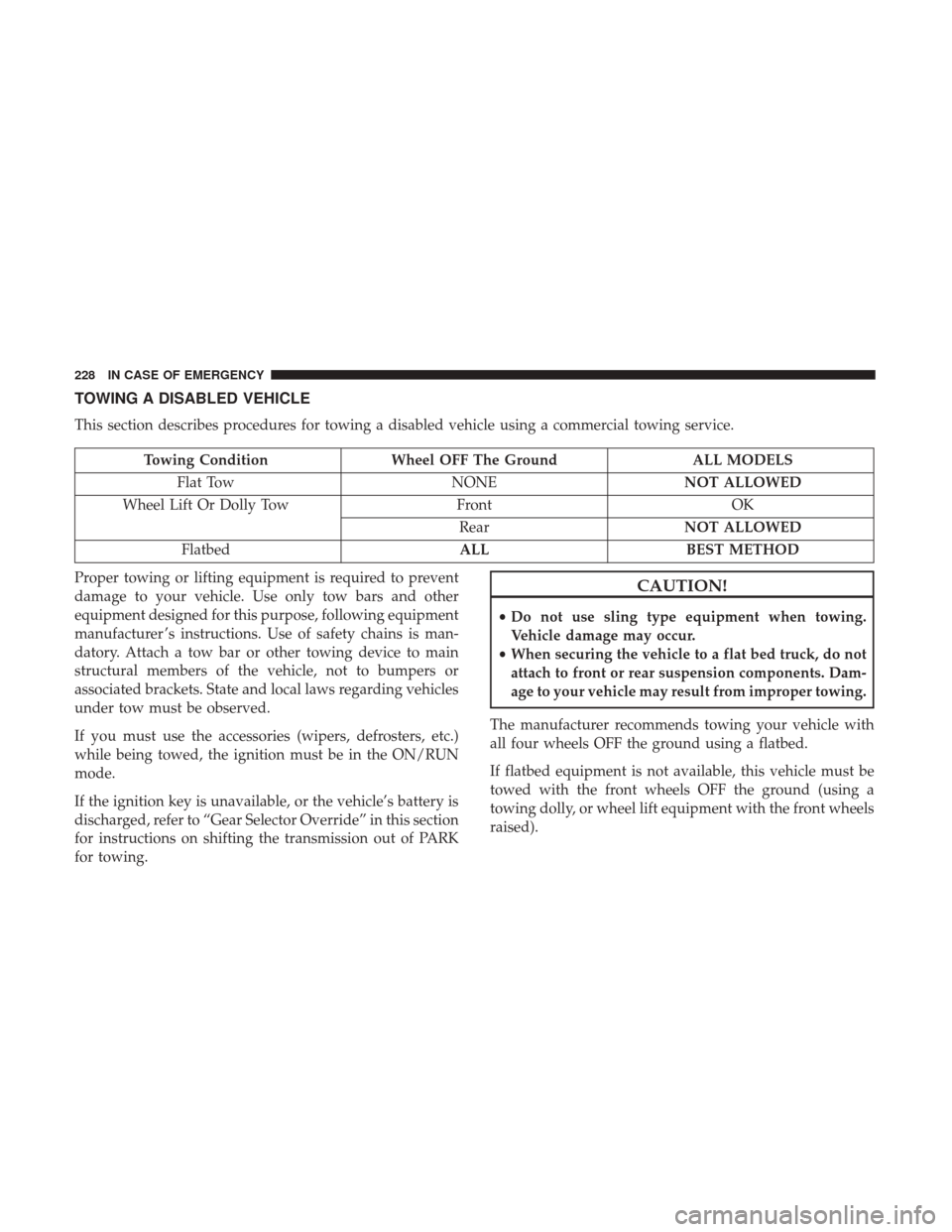
TOWING A DISABLED VEHICLE
This section describes procedures for towing a disabled vehicle using a commercial towing service.
Towing ConditionWheel OFF The Ground ALL MODELS
Flat Tow NONENOT ALLOWED
Wheel Lift Or Dolly Tow FrontOK
Rear NOT ALLOWED
Flatbed ALLBEST METHOD
Proper towing or lifting equipment is required to prevent
damage to your vehicle. Use only tow bars and other
equipment designed for this purpose, following equipment
manufacturer ’s instructions. Use of safety chains is man-
datory. Attach a tow bar or other towing device to main
structural members of the vehicle, not to bumpers or
associated brackets. State and local laws regarding vehicles
under tow must be observed.
If you must use the accessories (wipers, defrosters, etc.)
while being towed, the ignition must be in the ON/RUN
mode.
If the ignition key is unavailable, or the vehicle’s battery is
discharged, refer to “Gear Selector Override” in this section
for instructions on shifting the transmission out of PARK
for towing.
CAUTION!
• Do not use sling type equipment when towing.
Vehicle damage may occur.
• When securing the vehicle to a flat bed truck, do not
attach to front or rear suspension components. Dam-
age to your vehicle may result from improper towing.
The manufacturer recommends towing your vehicle with
all four wheels OFF the ground using a flatbed.
If flatbed equipment is not available, this vehicle must be
towed with the front wheels OFF the ground (using a
towing dolly, or wheel lift equipment with the front wheels
raised).
228 IN CASE OF EMERGENCY
Page 257 of 348
PINFunction
8
Courtesy Lights Negative Control (Dimmed)
9 Not Connected
10 Not Connected
11 Not Connected
12 Not Connected
13 Power Supply At Key On (+Ignition)
14 Not Connected
15 Not Connected This connector is supplied to the upfitter when the vehicle
is ordered with the applicable package.
2 Way Vehicle Connector Functions and View
PIN
Function
A Power Supply
B GND
Upfitter Connector
Connector Pins
8
SERVICING AND MAINTENANCE 255
Page 313 of 348
NOTE:
•This equipment has been tested and found to comply
with the limits for a Class B digital device, pursuant to
Part 15 of the FCC Rules. These limits are designed to
provide reasonable protection against harmful interfer-
ence in a residential installation. This equipment gener-
ates, uses and can radiate radio frequency energy and, if
not installed and used in accordance with the instruc-
tions, may cause harmful interference to radio commu-
nications. However, there is no guarantee that interfer-
ence will not occur in a particular installation.
• If this equipment does cause harmful interference to
radio or television reception, which can be determined
by turning the equipment off and on, the user is encour-
aged to try to correct the interference by one or more of
the following measures:
1. Increase the separation between the equipment and receiver.
2. Consult an authorized dealer or an experienced radio technician for help.UCONNECT VOICE RECOGNITION
Introducing Uconnect
Start using Uconnect Voice Recognition with these helpful
quick tips. It provides the key Voice Commands and tips
you need to know to control your Uconnect system.
Get Started
1. Visit UconnectPhone.com to check mobile device andfeature compatibility and to find phone pairing instruc-
tions.
2. Reduce background noise. Wind and passenger conver- sations are examples of noise that may impact recogni-
tion.
3. Speak clearly at a normal pace and volume while facing straight ahead. The microphone is positioned in the
dome lamp and aimed at the driver.
4. Each time you give a Voice Command, you must first push the VR button, wait until afterthe beep, then say
your Voice Command.
5. You can interrupt the help message or system prompts by pushing the VR button and saying a Voice Command
from current category.
10
MULTIMEDIA 311