2019 Ram ProMaster City light
[x] Cancel search: lightPage 27 of 348
Unlocking The Rear Cargo Area From Inside The
Vehicle
Pull up on the lock/unlock lever located on the drivers
door panel to the 1st detent to unlock all doors from inside
the vehicle.
Auto Unlock Doors
This feature unlocks all front doors when one of the front
door is opened.
NOTE:If the rear or side door is open, only the rear or side
door is unlocked.
Sliding Side Door
On Cargo versions, the sliding side door is fitted with a
spring-loaded latch that stops the door from opening any
further. To lock it, simply push the door as far as it will go;
to unlock it, pull forward firmly.
Opening And Closing From Outside The Vehicle
Opening/Unlocking With A Key Fob In the Passenger
Vehicle and US Cargo Vehicle (If Equipped)
Push and release the unlock button on the key fob to
unlock all doors. Push and release the cargo unlock button
on the key fob to unlock the sliding side doors. To open one of the sliding side doors, pull the handle out from the
bottom, then slide the door towards the rear of the vehicle
until it locks into place and cannot go any further. The turn
signal lights will flash to acknowledge the unlock signal.
Opening/Unlocking With A Key Fob In the Canadian
Cargo Vehicle (If Equipped)
Push and release the unlock button on the key fob to
unlock the front two doors. Push and release the cargo
unlock button on the key fob once to unlock the
passenger/cargo area (side lateral sliding doors and rear
doors). The turn signal lights will flash to acknowledge the
unlock signal.
Unlocking With The Key Blade In Passenger Vehicle
Push the key blade release button to expose the key blade,
insert the key blade into the driver door exterior lock
cylinder and turn the key counterclockwise to unlock all
doors.
Unlocking With The Key Blade In Cargo Vehicle
Push the key blade release button to expose the key blade,
insert the key blade into the driver door exterior lock
cylinder and turn the key counterclockwise to unlock the
front doors. Push the key blade release button to expose the
3
GETTING TO KNOW YOUR VEHICLE 25
Page 28 of 348
key blade, insert the key blade into the rear door exterior
lock cylinder and turn the key counterclockwise to unlock
the rear doors.
Closing/Locking With A Key Fob
Push and release the lock button on the key fob to lock all
doors, including the cargo area (side lateral sliding doors
and rear doors). The turn signal lights will flash to ac-
knowledge the lock signal.
Horn activation settings after an RF lock command can be
adjusted manually. For further information, refer to
“Uconnect Settings” in “Multimedia”.
Locking With The Key Blade In Passenger Vehicle
Push the key blade release button to expose the key blade,
insert the key blade into the driver door exterior lock
cylinder and turn the key clockwise to lock all doors.
Locking With The Key Blade In Cargo Vehicle
Push the key blade release button to expose the key blade,
insert the key blade into the driver door exterior lock
cylinder and turn the key clockwise to lock the front doors.
Push the key blade release button to expose the key blade,
insert the key blade into the rear door exterior lock cylinder
and turn the key clockwise to lock the rear doors.Closing And Locking From Outside
Grab the side door handle and push towards the front of
the vehicle. Once the side door is secured in the full closed
position, use one of the locking methods above to lock the
sliding side doors.
Opening And Closing From The Inside
Opening:
Pull the interior door handle switch to unlock the door,
then pull the handle and slide the door towards the rear of
the vehicle until it can go no further.
Closing:
Pull the interior door handle switch to release the door and
then push it towards the front of the vehicle.
Key Emergency Lock (KEL) Device
The sliding side doors are provided with a device for
locking all the doors using the lock in case of a power fault.
The device can be engaged with the sliding side doors
open as follows:
1. Key Emergency Lock Device not engaged (doors re-
leased)
26 GETTING TO KNOW YOUR VEHICLE
Page 40 of 348
WARNING!
Do not adjust the steering column while driving.
Adjusting the steering column while driving or driv-
ing with the steering column unlocked, could cause the
driver to lose control of the vehicle. Failure to follow
this warning may result in serious injury or death.
MIRRORS
Inside Day/Night Mirror — If Equipped
A single ball joint mirror is provided in the vehicle. It is a
twist on mirror that has a fixed position at the windshield.
The mirror head can be adjusted up, down, left, and right
for various drivers. The mirror should be adjusted to center
on the view through the rear window.
Headlight glare from vehicles behind you can be reduced
by moving the small control under the mirror to the night
position (toward the rear of the vehicle). The mirror should
be adjusted while the small control under the mirror is set
in the day position (toward the windshield).
Outside Mirrors
To receive maximum benefit, adjust the outside mirror(s) to
center on the adjacent lane of traffic with a slight overlap of
the view obtained on the inside mirror.
WARNING!
Vehicles and other objects seen in an outside convex
mirror will look smaller and farther away than they
really are. Relying too much on side convex mirrors
(Continued)
Adjusting Rearview Mirror
38 GETTING TO KNOW YOUR VEHICLE
Page 43 of 348
EXTERIOR LIGHTS
Multifunction Lever
The multifunction lever controls the operation of the
headlights, parking lights, turn signals, headlight beam
selection and the passing lights. The multifunction lever is
located on the left side of the steering column.
Headlights
To turn on the headlights, turn the end of the multifunction
lever to the headlight position. When the headlight switch
is on, the parking lights, taillights, license plate light, theclearance lights and instrument panel lights are also turned
on. To turn off the headlights, turn the end of the multi-
function lever back to the O (Off) position.
Daytime Running Lights — If Equipped
NOTE:
When the headlights are turned on, the Daytime
Running Lights will be deactivated.
To activate the Daytime Running Lights (DRL), rotate the
end of the multifunction lever to the O (Off) position.
NOTE:
• The low beams and side/taillights will not be on with
DRL.
• In certain markets, the DRL function may be optional
and can be programmed to be on or off through the
Uconnect system screen. Refer to “Uconnect Settings” in
“Multimedia” for further information.
The Daytime Running Lights will come on whenever the
ignition is ON, the headlight switch is off, the parking
brake is off, and the turn signal is off.
High Beams
With the low beams activated, pull the multifunction lever
towards the steering wheel to turn on the high beams. A
Multifunction Lever
3
GETTING TO KNOW YOUR VEHICLE 41
Page 44 of 348
high beam symbol will illuminate in the cluster to indicate
the high beams are on. Pull the multifunction lever a
second time to switch the headlights back to low beam.
NOTE:If the vehicle’s ignition is turned OFF, both high
and low beam headlights will also turn off.
Flash-To-Pass
You can signal another vehicle with your headlights by
partially pulling the multifunction lever toward the steer-
ing wheel. This will cause the high beam headlights to turn
on until the lever is released.
Parking Lights
These lights can only be turned on with ignition key in the
STOP position or removed, by moving the end of the
multifunction lever to O (off) position and then to the
headlight position.
The warning light telltale in the instrument panel comes
on. The lights stay on until the next ignition cycle is
performed.
Follow Me Home/Headlight Delay
When this feature is selected, the driver can choose to have
the headlights remain on for a preset period of time after
the engine is turned OFF. Activation
Remove the key or turn the ignition to the STOP (OFF/
LOCK) position, and pull the multifunction lever toward
the steering wheel within two minutes. Each time the lever
is pulled, the activation of the lights will be extended by 30
seconds. The activation of the lights can be extended to a
maximum of 210 seconds.
Deactivation
Pull the multifunction lever toward the steering wheel and
hold it for more than two seconds.
Fog Lights — If Equipped
The fog light switch is located on the center stack of the
instrument panel, just below the climate controls. Push the
switch once to turn the fog lights on. Push the switch a
second time to turn the fog lights off.
NOTE:
If the vehicle’s ignition is turned OFF, the fog lights
will also turn off.
Turn Signals
Move the multifunction lever up or down and the arrows
on each side of the instrument cluster flash to show proper
operation of the front and rear turn signal lights.
42 GETTING TO KNOW YOUR VEHICLE
Page 45 of 348
NOTE:If either light remains on and does not flash, or
there is a very fast flash rate, check for a defective outside
light bulb. If an indicator fails to light when the lever is
moved, it would suggest that the indicator bulb is defec-
tive.
Lane Change Assist
Tap the lever up or down once, without moving beyond
the detent, and the turn signal (right or left) will flash five
times then automatically turn off.
INTERIOR LIGHTS
Courtesy/Interior Lights
These lights are mounted between the sun visors on the
overhead console. Each light is turned on by pushing the
corresponding switch.
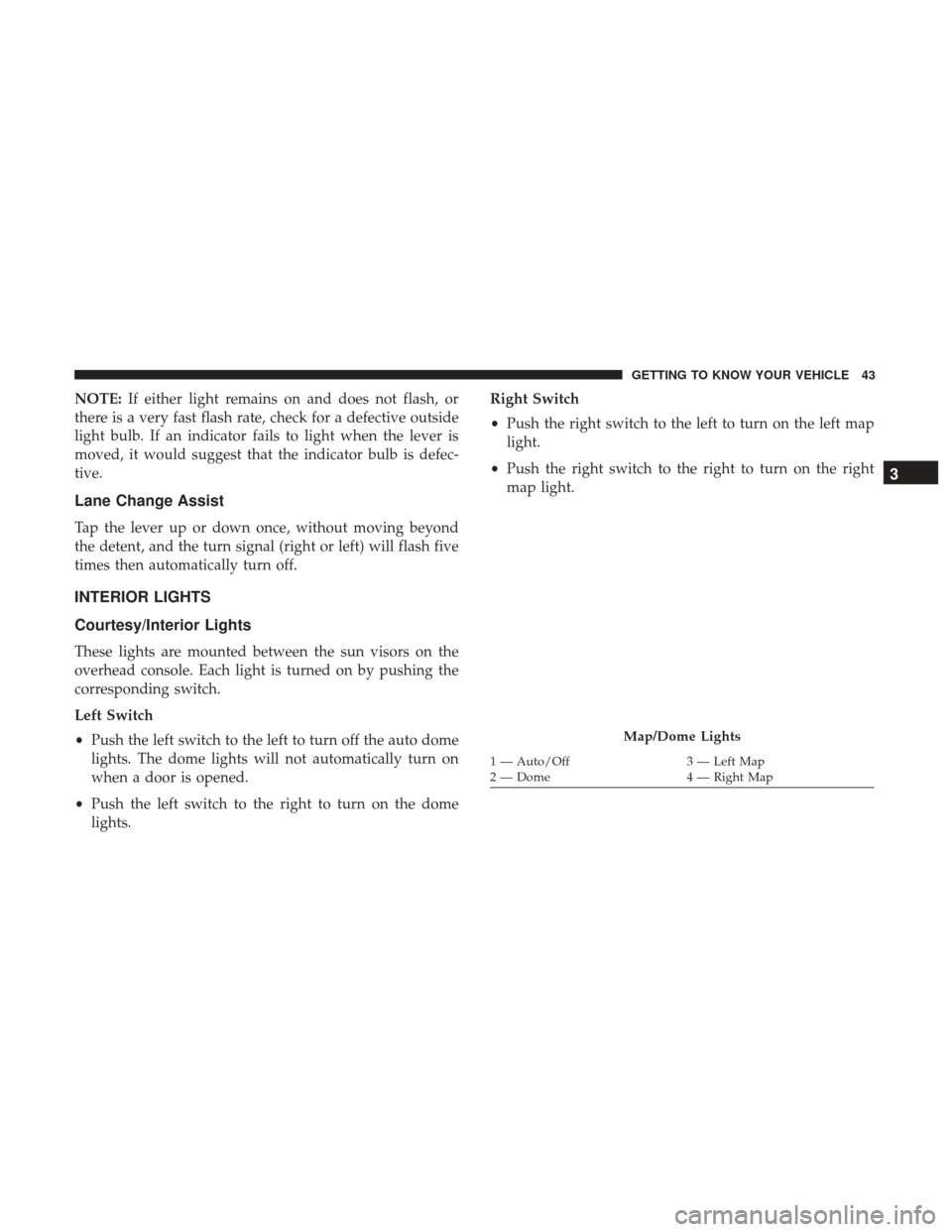
Left Switch
• Push the left switch to the left to turn off the auto dome
lights. The dome lights will not automatically turn on
when a door is opened.
• Push the left switch to the right to turn on the dome
lights. Right Switch
•
Push the right switch to the left to turn on the left map
light.
• Push the right switch to the right to turn on the right
map light.
Map/Dome Lights
1 — Auto/Off 3 — Left Map
2 — Dome 4 — Right Map
3
GETTING TO KNOW YOUR VEHICLE 43
Page 46 of 348
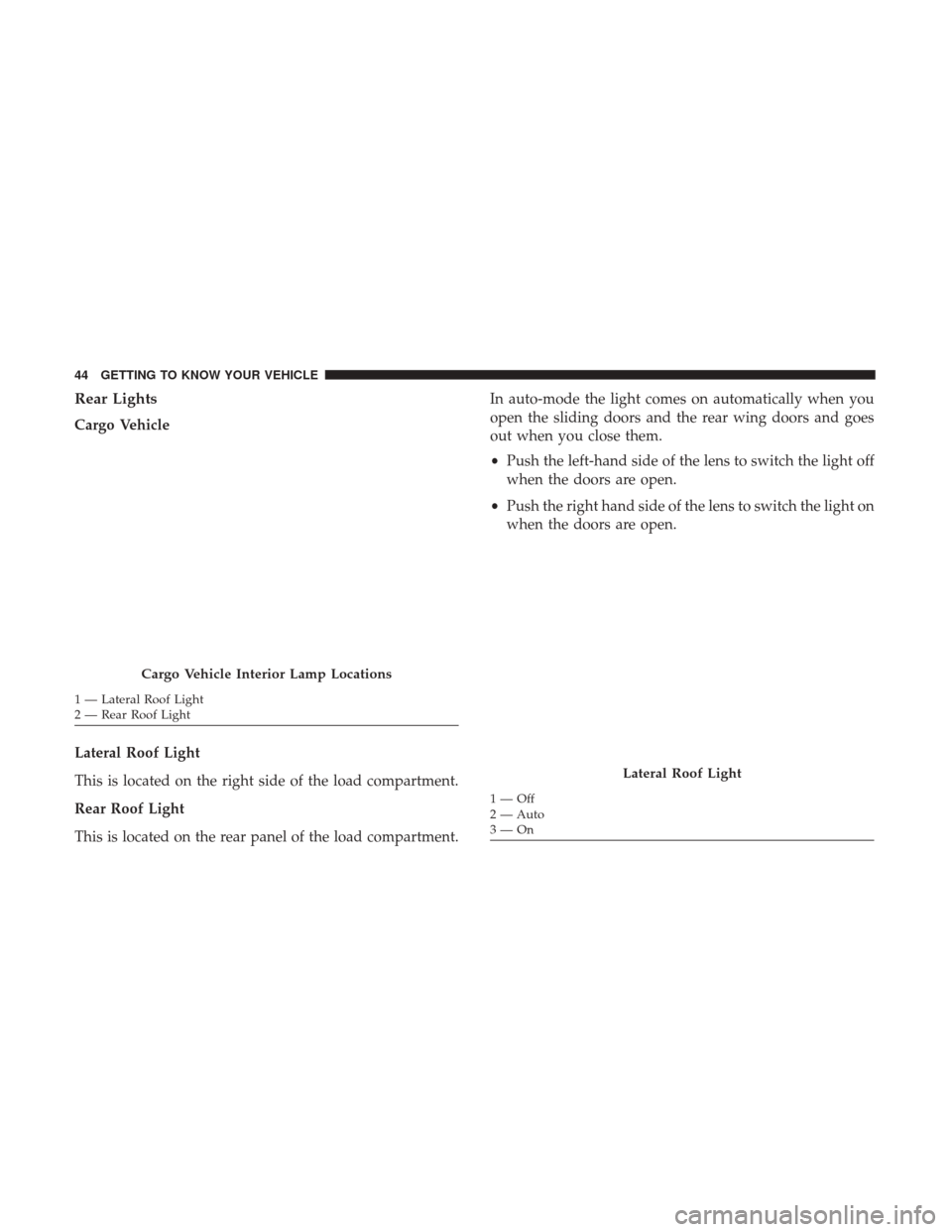
Rear Lights
Cargo Vehicle
Lateral Roof Light
This is located on the right side of the load compartment.
Rear Roof Light
This is located on the rear panel of the load compartment.In auto-mode the light comes on automatically when you
open the sliding doors and the rear wing doors and goes
out when you close them.
•
Push the left-hand side of the lens to switch the light off
when the doors are open.
• Push the right hand side of the lens to switch the light on
when the doors are open.
Cargo Vehicle Interior Lamp Locations
1 — Lateral Roof Light
2 — Rear Roof Light
Lateral Roof Light
1—Off
2 — Auto
3—On
44 GETTING TO KNOW YOUR VEHICLE
Page 47 of 348
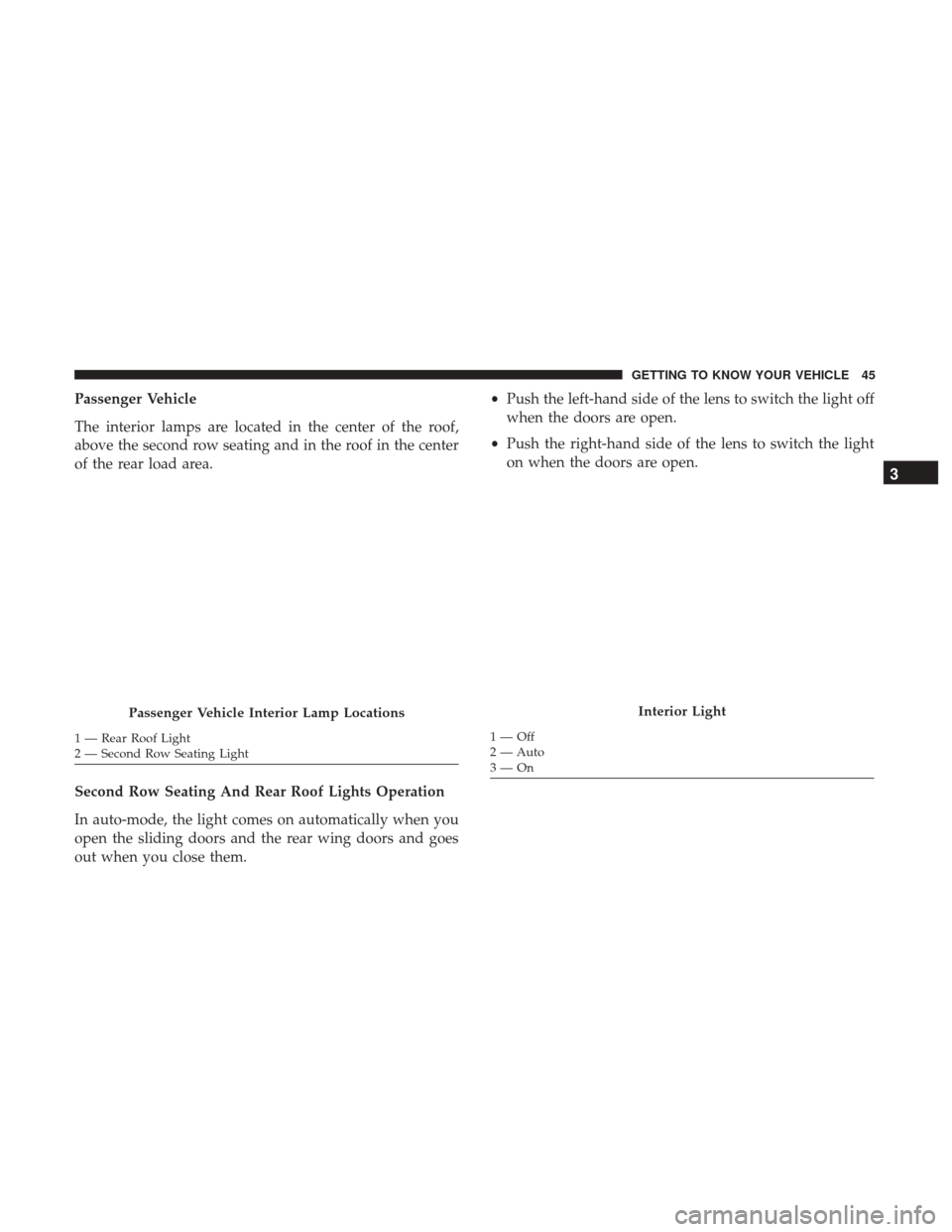
Passenger Vehicle
The interior lamps are located in the center of the roof,
above the second row seating and in the roof in the center
of the rear load area.
Second Row Seating And Rear Roof Lights Operation
In auto-mode, the light comes on automatically when you
open the sliding doors and the rear wing doors and goes
out when you close them.•
Push the left-hand side of the lens to switch the light off
when the doors are open.
• Push the right-hand side of the lens to switch the light
on when the doors are open.
Passenger Vehicle Interior Lamp Locations
1 — Rear Roof Light
2 — Second Row Seating Light
Interior Light
1—Off
2 — Auto
3—On
3
GETTING TO KNOW YOUR VEHICLE 45