Page 298 of 348

UCONNECT SYSTEMS
For detailed information about your Uconnect system,
refer to your Uconnect Owner ’s Manual Supplement.
NOTE:Uconnect screen images are for illustration pur-
poses only and may not reflect exact software for your
vehicle.
CYBERSECURITY
Your vehicle may be a connected vehicle and may be
equipped with both wired and wireless networks. These
networks allow your vehicle to send and receive informa-
tion. This information allows systems and features in your
vehicle to function properly.
Your vehicle may be equipped with certain security fea-
tures to reduce the risk of unauthorized and unlawful
access to vehicle systems and wireless communications.
Vehicle software technology continues to evolve over time
and FCA US LLC, working with its suppliers, evaluates
and takes appropriate steps as needed. Similar to a com-
puter or other devices, your vehicle may require software
updates to improve the usability and performance of your
systems or to reduce the potential risk of unauthorized and
unlawful access to your vehicle systems. The risk of unauthorized and unlawful access to your
vehicle systems may still exist, even if the most recent
version of vehicle software (such as Uconnect software) is
installed.
WARNING!
•
It is not possible to know or to predict all of the
possible outcomes if your vehicle’s systems are
breached. It may be possible that vehicle systems,
including safety related systems, could be impaired
or a loss of vehicle control could occur that may
result in an accident involving serious injury or
death.
• ONLY insert media (e.g., USB, SD card, or CD) into
your vehicle if it came from a trusted source. Media
of unknown origin could possibly contain malicious
software, and if installed in your vehicle, it may
increase the possibility for vehicle systems to be
breached.
• As always, if you experience unusual vehicle behav-
ior, take your vehicle to your nearest authorized
dealer immediately.
296 MULTIMEDIA
Page 299 of 348

NOTE:
•FCA US LLC or your dealer may contact you directly
regarding software updates.
• To help further improve vehicle security and minimize
the potential risk of a security breach, vehicle owners
should:
• Routinely check www.driveuconnect.com/
support/software-update.html (U.S. Residents) or
www.driveuconnect.ca (Canadian Residents) to learn
about available Uconnect software updates.
• Only connect and use trusted media devices (e.g.
personal mobile phones, USBs, CDs).
Privacy of any wireless and wired communications cannot
be assured. Third parties may unlawfully intercept infor-
mation and private communications without your consent.
For further information, refer to “Onboard Diagnostic
System (OBD II) Cybersecurity” in “Getting To Know Your
Instrument Panel”.
UCONNECT SETTINGS
The Uconnect system uses a combination of buttons on the
touchscreen and buttons on the faceplate located on the
center of the instrument panel that allows you to access and change the customer programmable features. Many
features can vary by vehicle.
CAUTION!
Do NOT attach any object to the touchscreen, doing so
can result in damage to the touchscreen.
Uconnect 3/3 NAV With 5-inch Display Buttons On The
Touchscreen And Buttons On The Faceplate
1 — Uconnect Buttons On The Touchscreen
2 — Uconnect Buttons On The Faceplate
10
MULTIMEDIA 297
Page 303 of 348
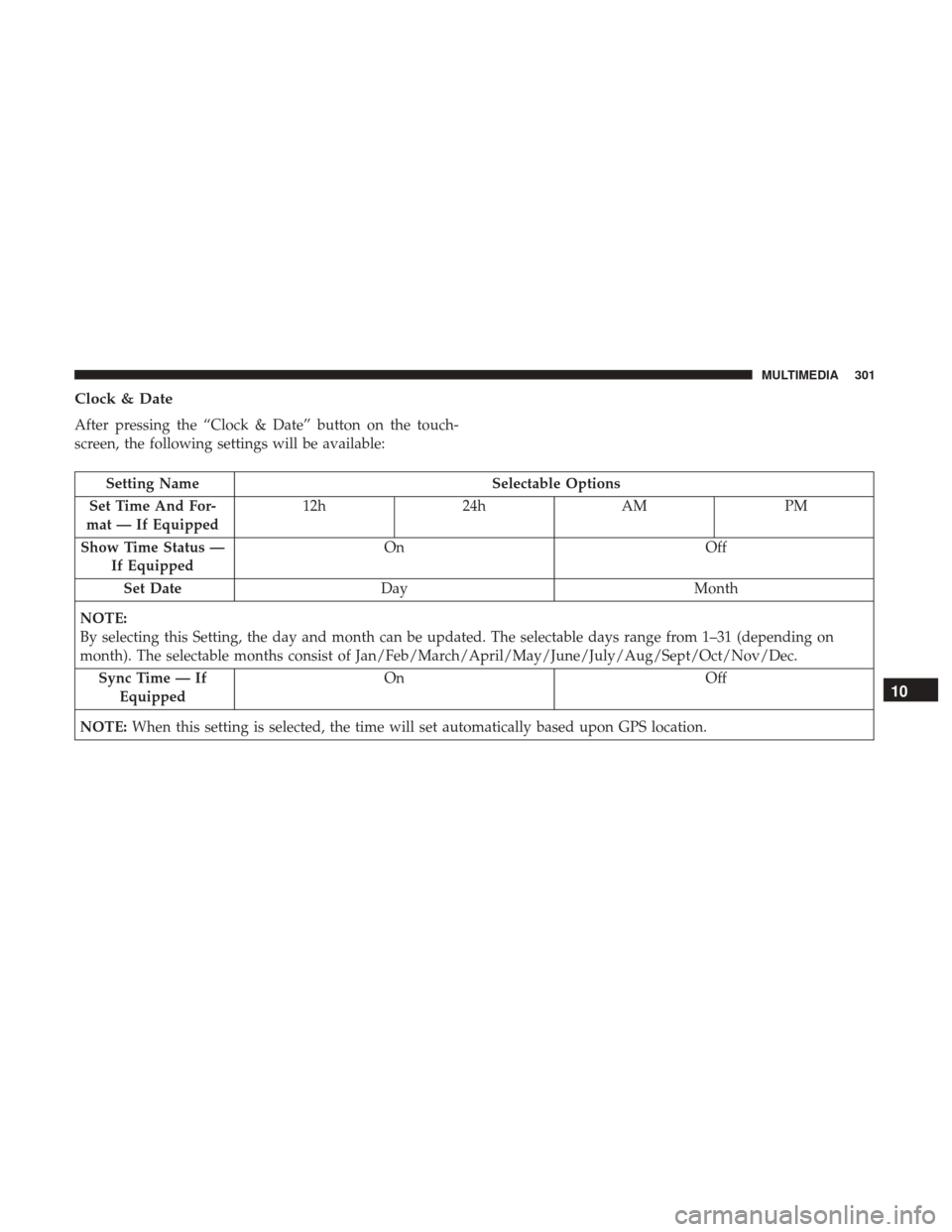
Clock & Date
After pressing the “Clock & Date” button on the touch-
screen, the following settings will be available:
Setting NameSelectable Options
Set Time And For-
mat — If Equipped 12h
24hAM PM
Show Time Status — If Equipped On
Off
Set Date Day Month
NOTE:
By selecting this Setting, the day and month can be updated. The selectable days range from 1–31 (depending on
month). The selectable months consist of Jan/Feb/March/April/May/June/July/Aug/Sept/Oct/Nov/Dec. Sync Time — If Equipped On
Off
NOTE: When this setting is selected, the time will set automatically based upon GPS location.
10
MULTIMEDIA 301
Page 311 of 348

The button located in the center of the right hand control to
select the source (AM, FM, SiriusXM, USB, AUX).
The left hand control is a rocker type switch with a
push-button in the center. The function of the left hand
control is different depending on which mode you are in.
The following describes the left hand control operation in
each mode.
Radio Operation
Pushing the top of the switch will “Seek” up for the next
listenable station and pushing the bottom of the switch will
“Seek” down for the next listenable station.
The button located in the center of the left-hand control
will tune to the next preset station that you have pro-
grammed in the radio preset button.
Media Mode
Pushing the top of the switch once goes to the next track on
the selected media (AUX/USB/Bluetooth). Pushing the
bottom of the switch once goes to the beginning of the
current track, or to the beginning of the previous track if it
is within eight seconds after the current track begins to
play.
IPOD/USB/MP3 CONTROL — IF EQUIPPED
The USB Input and Auxiliary Jack is located on the
instrument panel below the Climate Controls. This feature
allows an iPod or external USB device to be plugged into
the USB port.
iPod control supports Mini, 4G, Photo, Nano, 5G iPod and
iPhone devices. Some iPod software versions may not fully
support the iPod control features. Please visit Apple’s
website for software updates.
For further information, refer to the Uconnect Owner ’s
Manual Supplement.
USB Input And AUX Jack
10
MULTIMEDIA 309
Page 323 of 348
Any communication to the manufacturer’s customer center
should include the following information:
•Owner’s name and address
• Owner’s telephone number (home and office)
• Authorized dealer name
• Vehicle Identification Number (VIN)
• Vehicle delivery date and mileage
FCA US LLC Customer Center
P.O. Box 21–8004
Auburn Hills, MI 48321–8004
Phone: (866) 726-4636
FCA Canada Inc. Customer Center
P.O. Box 1621
Windsor, Ontario N9A 4H6
Phone: (800) 465-2001 English / (800) 387-9983 French
In Mexico Contact
Av. Prolongacion Paseo de la Reforma, 1240
Sante Fe C.P. 05109
Mexico, D. F.
In Mexico City: 800-505-1300
Outside Mexico City: +(52)55 50817568
Puerto Rico And U.S. Virgin Islands
FCA Caribbean LLC
P.O. Box 191857
San Juan 00919-1857
Phone: (866) 726-4636
Fax: (787) 782-3345
11
CUSTOMER ASSISTANCE 321
Page 324 of 348

Customer Assistance For The Hearing Or Speech
Impaired (TDD/TTY)
To assist customers who have hearing difficulties, the
manufacturer has installed special TDD (Telecommunica-
tion Devices for the Deaf) equipment at its customer center.
Any hearing or speech impaired customer, who has access
to a TDD or a conventional teletypewriter (TTY) in the
United States, can communicate with the manufacturer by
dialing 1-800-380-CHRY.
Canadian residents with hearing difficulties that require
assistance can use the special needs relay service offered by
Bell Canada. For TTY teletypewriter users, dial 711 and for
Voice callers, dial 1-800-855-0511 to connect with a Bell
Relay Service operator.
Service Contract
You may have purchased a service contract for a vehicle to
help protect you from the high cost of unexpected repairs
after the manufacturer’s New Vehicle Limited Warranty
expires. The manufacturer stands behind only the manu-
facturer’s service contracts. If you purchased a manufac-
turer’s service contract, you will receive Plan Provisions
and an Owner Identification Card in the mail within three
weeks of the vehicle delivery date. If you have anyquestions about the service contract, call the manufactur-
er’s Service Contract National Customer Hotline at 1-800-
521-9922 (Canadian residents, call (800) 465-2001 English /
(800) 387-9983 French).
The manufacturer will not stand behind any service con-
tract that is not the manufacturer’s service contract. It is not
responsible for any service contract other than the manu-
facturer’s service contract. If you purchased a service
contract that is not a manufacturer’s service contract, and
you require service after the manufacturer’s New Vehicle
Limited Warranty expires, please refer to the contract
documents, and contact the person listed in those docu-
ments.
We appreciate that you have made a major investment
when you purchased the vehicle. An authorized dealer has
also made a major investment in facilities, tools, and
training to assure that you are absolutely delighted with
the ownership experience. You will be pleased with their
sincere efforts to resolve any warranty issues or related
concerns.
322 CUSTOMER ASSISTANCE