2019 RAM CHASSIS CAB suspension
[x] Cancel search: suspensionPage 409 of 607

IN CASE OF EMERGENCY 407
Proper towing or lifting equipment is required to prevent
damage to your vehicle. Use only tow bars and other equip -
ment designed for this purpose, following equipment manu -
facturer’s instructions. Use of safety chains is mandatory.
Attach a tow bar or other towing device to main structural
members of the vehicle, not to bumpers or associated
brackets. State and local laws regarding vehicles under tow
must be observed.
If you must use the accessories (wipers, defrosters, etc.)
while being towed, the ignition must be in the ON/RUN
mode, not the ACC mode.
If the key fob is unavailable or the vehicle's battery is
discharged, refer to “Manual Park Release” or “Gear Selector
Override” in this section for instructions on shifting the auto -
matic transmission out of PARK for towing. Two-Wheel Drive Models
The manufacturer recommends towing your vehicle with all
four wheels OFF the ground using a flatbed.
If flatbed equipment is not available, and the transmission is
operable, the vehicle may be towed (with the rear wheels on
the ground) under the following conditions:
• The transmission must be in NEUTRAL. Refer to “Manual
Park Release” in this section for instructions on shifting the
8–speed transmission to NEUTRAL when the engine is off.
• The towing speed must not exceed 30 mph (48 km/h).
• The towing distance must not exceed 15 miles (24 km) for
6–speed transmission, or 30 miles (48 km) for 8–speed
transmission.
If the transmission is not operable, or the vehicle must be
towed faster than 30 mph (48 km/h) or farther than 15 miles
(24 km) for 6–speed transmission, or 30 miles (48 km) for
8–speed transmission, tow with the rear wheels OFF the
ground. Acceptable methods are to tow the vehicle on a
flatbed, or with the front wheels raised and the rear wheels
on a towing dolly, or (when using a suitable steering wheel
stabilizer to hold the front wheels in the straight position)
with rear wheels raised and the front wheels on the ground.CAUTION!
• Do not use sling type equipment when towing. Vehicle
damage may occur.
• When securing the vehicle to a flat bed truck, do not
attach to front or rear suspension components. Damage
to your vehicle may result from improper towing. 6
Page 414 of 607

412 SERVICING AND MAINTENANCE
Mileage or time passed
(whichever comes first)
20,000
30,000
40,000
50,000
60,000
70,000
80,000
90,000
100,000
110,000
120,000
130,000
140,000
150,000Or Years: 2 3 4 5 6 7 8 9 10 11 12 13 14 15
Or Kilometers:
32,000
48,000
64,000
80,000
96,000
112,000
128,000
144,000
160,000
176,000
192,000
208,000
224,000
240,000Additional Inspections
Inspect the CV/Universal joints. X X X X X
Inspect front suspension, tie rod
ends, and replace if necessary. X
X X X X X X
Inspect the front and rear axle
surfaces. If gear oil leakage is
suspected, check the fluid level.
If using your vehicle for police,
taxi, fleet, off-road or frequent
trailer towing, change axle fluid. X X X X X X X
Inspect the brake linings,
parking brake function. X X X X X X X
Additional Maintenance
Replace engine air filter. X X X X X
Replace spark plugs. 1
X
Page 461 of 607

SERVICING AND MAINTENANCE 459
(Continued)NOTE:
Wheel Valve Stem must be replaced as well when installing
new tires due to wear and tear in existing tires.
Keep dismounted tires in a cool, dry place with as little expo -
sure to light as possible. Protect tires from contact with oil,
grease, and gasoline.
Replacement Tires
The tires on your new vehicle provide a balance of many
characteristics. They should be inspected regularly for wear
and correct cold tire inflation pressures. The manufacturer
strongly recommends that you use tires equivalent to the
originals in size, quality and performance when replacement
is needed. Refer to the paragraph on “Tread Wear Indica -
tors” in this section. Refer to the Tire and Loading Informa -
tion placard or the Vehicle Certification Label for the size
designation of your tire. The Load Index and Speed Symbol
for your tire will be found on the original equipment tire
sidewall.
See the Tire Sizing Chart example found in the “Tire Safety
Information” section of this manual for more information
relating to the Load Index and Speed Symbol of a tire. It is recommended to replace the two front tires or two rear
tires as a pair. Replacing just one tire can seriously affect
your vehicle’s handling. If you ever replace a wheel, make
sure that the wheel’s specifications match those of the orig -
inal wheels.
It is recommended you contact an authorized tire dealer or
original equipment dealer with any questions you may have
on tire specifications or capability. Failure to use equivalent
replacement tires may adversely affect the safety, handling,
and ride of your vehicle.
WARNING!
• Do not use a tire, wheel size, load rating, or speed rating
other than that specified for your vehicle. Some combi -
nations of unapproved tires and wheels may change
suspension dimensions and performance characteris -
tics, resulting in changes to steering, handling, and
braking of your vehicle. This can cause unpredictable
handling and stress to steering and suspension compo -
nents. You could lose control and have a collision
resulting in serious injury or death. Use only the tire
and wheel sizes with load ratings approved for your
vehicle. 7
Page 468 of 607

466 SERVICING AND MAINTENANCE
(Continued)Tire Rotation Recommendations
Tires on the front and rear axles of vehicles operate at
different loads and perform different steering, driving, and
braking functions. For these reasons, they wear at unequal
rates.
These effects can be reduced by timely rotation of tires. The
benefits of rotation are especially worthwhile with aggres -
sive tread designs such as those on On/Off Road type tires.
Rotation will increase tread life, help to maintain mud, snow,
and wet traction levels, and contribute to a smooth, quiet
ride.WARNING!
Using tires of different size and type (M+S, Snow)
between front and rear axles can cause unpredictable
handling. You could lose control and have a collision.
CAUTION!
To avoid damage to your vehicle or tires, observe the
following precautions:
• Because of restricted traction device clearance between
tires and other suspension components, it is important
that only traction devices in good condition are used.
Broken devices can cause serious damage. Stop the
vehicle immediately if noise occurs that could indicate
device breakage. Remove the damaged parts of the
device before further use.
• Install device as tightly as possible and then retighten
after driving about ½ mile (0.8 km).
• Do not exceed 30 mph (48 km/h).
• Drive cautiously and avoid severe turns and large
bumps, especially with a loaded vehicle.
• Do not drive for a prolonged period on dry pavement. • Observe the traction device manufacturer’s instruc -
tions on the method of installation, operating speed,
and conditions for use. Always use the suggested oper -
ating speed of the device manufacturer’s if it is less
than 30 mph (48 km/h).
• Do not use traction devices on a compact spare tire. CAUTION! (Continued)
Page 492 of 607
490 MULTIMEDIA
UCONNECT SETTINGS
The Uconnect system uses a combination of buttons on the
touchscreen and buttons on the faceplate located on the
center of the instrument panel that allows you to access and
change the customer programmable features. Many features
can vary by vehicle.
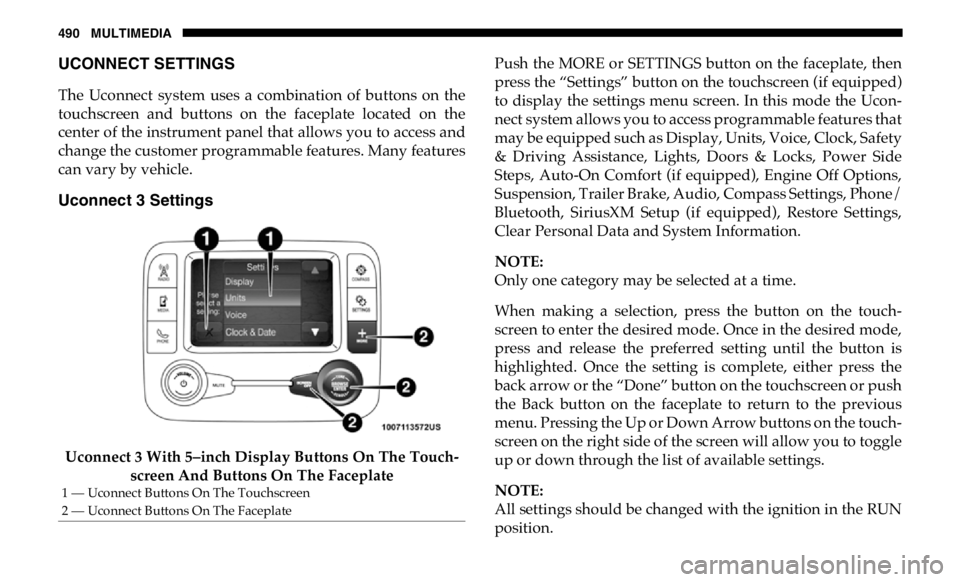
Uconnect 3 Settings
Uconnect 3 With 5–inch Display Buttons On The Touch -
screen And Buttons On The Faceplate Push the MORE or SETTINGS button on the faceplate, then
press the “Settings” button on the touchscreen (if equipped)
to display the settings menu screen. In this mode the Ucon -
nect system allows you to access programmable features that
may be equipped such as Display, Units, Voice, Clock, Safety
& Driving Assistance, Lights, Doors & Locks, Power Side
Steps, Auto-On Comfort (if equipped), Engine Off Options,
Suspension, Trailer Brake, Audio, Compass Settings, Phone/
Bluetooth, SiriusXM Setup (if equipped), Restore Settings,
Clear Personal Data and System Information.
NOTE:
Only one category may be selected at a time.
When making a selection, press the button on the touch -
screen to enter the desired mode. Once in the desired mode,
press and release the preferred setting until the button is
highlighted. Once the setting is complete, either press the
back arrow or the “Done” button on the touchscreen or push
the Back button on the faceplate to return to the previous
menu. Pressing the Up or Down Arrow buttons on the touch -
screen on the right side of the screen will allow you to toggle
up or down through the list of available settings.
NOTE:
All settings should be changed with the ignition in the RUN
position.1 — Uconnect Buttons On The Touchscreen
2 — Uconnect Buttons On The Faceplate
Page 503 of 607

MULTIMEDIA 501
Suspension — If Equipped
After pressing the “Suspension” button on the touchscreen, the following settings will be available:
Setting Name Selectable Options
Auto Entry/Exit Suspension On Off
NOTE:
When the “Auto Entry/Exit Suspension” feature is selected, the vehicle automatically lowers from ride height position when
vehicle shifted to park for easy entry/exit.
Display Suspension Messages All Warning Only
Tire Jack Mode On Off
NOTE:
When this feature is selected the air suspension system is disabled to prevent auto leveling of the suspension, while the
vehicle is on a jack changing a tire.
Transport Mode On Off
NOTE:
When the “Transport Mode” feature is selected, the air suspension system is disabled to assist with flat bed towing.
Wheel Alignment Mode On Off
NOTE:
The “Wheel Alignment Mode” feature prevents auto leveling of the air suspension while performing a wheel alignment
service. Before performing a wheel alignment, this mode must be enabled. Refer to an authorized dealer for further informa -
tion. 9
Page 511 of 607
MULTIMEDIA 509
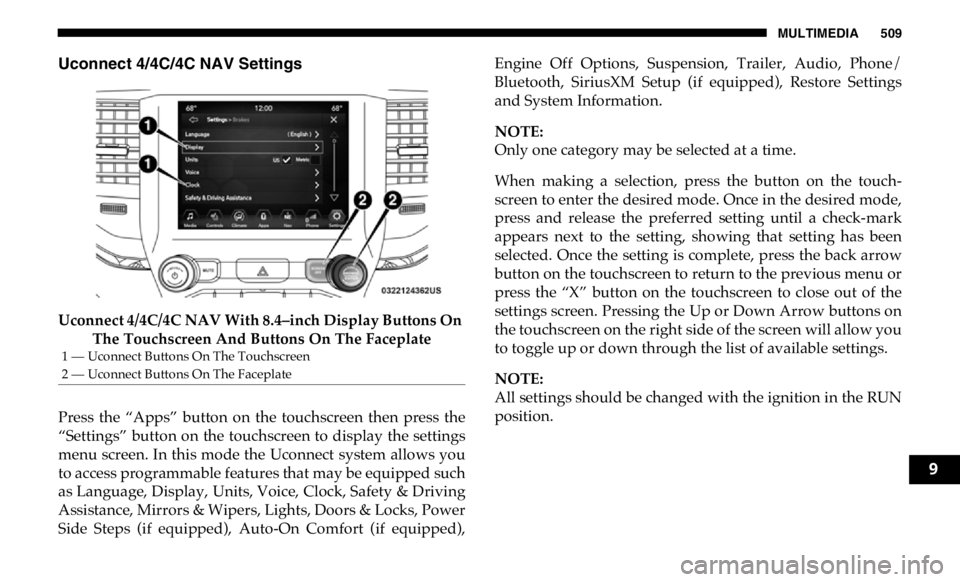
Uconnect 4/4C/4C NAV Settings
Uconnect 4/4C/4C NAV With 8.4–inch Display Buttons On
The Touchscreen And Buttons On The Faceplate
Press the “Apps” button on the touchscreen then press the
“Settings” button on the touchscreen to display the settings
menu screen. In this mode the Uconnect system allows you
to access programmable features that may be equipped such
as Language, Display, Units, Voice, Clock, Safety & Driving
Assistance, Mirrors & Wipers, Lights, Doors & Locks, Power
Side Steps (if equipped), Auto-On Comfort (if equipped), Engine Off Options, Suspension, Trailer, Audio, Phone/
Bluetooth, SiriusXM Setup (if equipped), Restore Settings
and System Information.
NOTE:
Only one category may be selected at a time.
When making a selection, press the button on the touch -
screen to enter the desired mode. Once in the desired mode,
press and release the preferred setting until a check-mark
appears next to the setting, showing that setting has been
selected. Once the setting is complete, press the back arrow
button on the touchscreen to return to the previous menu or
press the “X” button on the touchscreen to close out of the
settings screen. Pressing the Up or Down Arrow buttons on
the touchscreen on the right side of the screen will allow you
to toggle up or down through the list of available settings.
NOTE:
All settings should be changed with the ignition in the RUN
position.1 — Uconnect Buttons On The Touchscreen
2 — Uconnect Buttons On The Faceplate
9
Page 525 of 607

MULTIMEDIA 523
Air Suspension — If Equipped
After pressing the “Suspension” button on the touchscreen, the following settings will be available: Headlight Off Delay – +
NOTE:
When the “Headlight Off Delay” feature is selected, the driver can choose to have the headlights remain on for 0, 30, 60, or
90 seconds when exiting the vehicle. Setting Name Selectable Options
Setting Name Selectable Options
Display Suspension
Messages All Warnings Only
Tire Jack Mode On Off
NOTE:
When the “Tire Jack Mode” feature is selected, the air suspension system is disabled to assist with changing a spare tire.
Transport Mode On Off
NOTE:
When the “Transport Mode” feature is selected, the air suspension system lowers and then disables to assist with flat bed
towing.
Wheel Alignment Mode On Off
9