2019 Peugeot Partner range
[x] Cancel search: rangePage 113 of 312
111
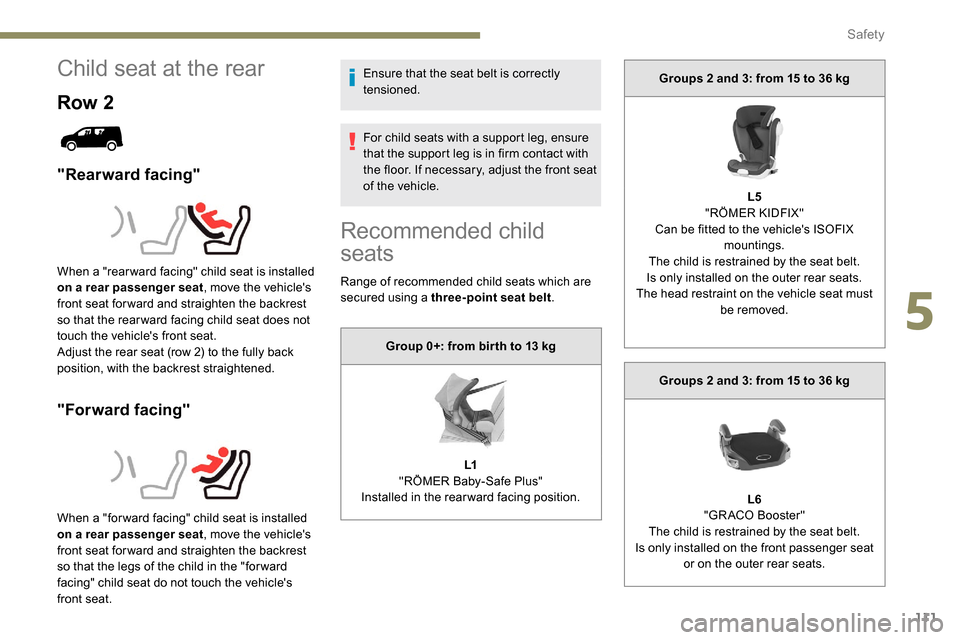
Child seat at the rear
Row 2
"Rearward facing"
"Forward facing"
Ensure that the seat belt is correctly
tensioned.
For child seats with a support leg, ensure
that the support leg is in firm contact with
the floor. If necessary, adjust the front seat
of the vehicle.
When a "rear ward facing" child seat is installed
on a rear passenger seat , move the vehicle's
front seat for ward and straighten the backrest
so that the rear ward facing child seat does not
touch the vehicle's front seat.
Adjust the rear seat (row 2) to the fully back
position, with the backrest straightened.
When a "for ward facing" child seat is installed
on a rear passenger seat , move the vehicle's
front seat for ward and straighten the backrest
so that the legs of the child in the "for ward
facing" child seat do not touch the vehicle's
front seat.
Recommended child
seats
Range of recommended child seats which are
secured using a three-point seat belt .
Group 0+: from bir th to 13
kg
L1
"RÖMER Baby-Safe Plus"
Installed in the rearward facing position. Groups 2 and 3: from 15 to 36
kg
L5
"RÖMER KIDFIX"
Can be fitted to the vehicle's ISOFIX mountings.
The child is restrained by the seat belt.
Is only installed on the outer rear seats.
The head restraint on the vehicle seat must be removed.
Groups 2 and 3: from 15 to 36
kg
L6
"GRACO Booster"
The child is restrained by the seat belt.
Is only installed on the front passenger seat or on the outer rear seats.
5
Safety
Page 149 of 312

147
70
70
Indicator lampDisplay Associated messageComments
(green) +
(orange) "Take back control of the vehicle" The driver must take back control of the vehicle
by accelerating or braking, depending on the
circumstances.
(green) +
(red) "Take back control of the vehicle"
The system cannot manage the critical situation
alone (emergency braking of the target vehicle, rapid
insertion of another vehicle between the two vehicles).
The driver must immediately take back control of
the vehicle.
or
(grey) "Activation not possible, conditions
unsuitable"
The system refuses to activate the cruise control.
For more information, refer to Operating Limits
.
With automatic gearbox Indicator lamp Display Associated messageComments
or
(grey)/(green) according to the inter-vehicle
distance selected and the actual distance from the target vehicle "Cruise control paused"
(for a few seconds) The system has brought the vehicle to a complete
stop and is holding it immobilised.
The driver must accelerate to move off again.
The cruise control remains paused until the driver
reactivates it.
6
Driving
Page 151 of 312

149
The system is not intended for the
following situations:
-
i
f the front end of the vehicle has
been modified (addition of long-range
headlamps, painting of the front
bumper),
-
d
riving on a racing circuit,
-
r
unning on a rolling road,
-
u
se of snow chains, non-slip covers or
studded tyres.
The use of mats not approved by
PEUGEOT may inter fere with the
operation of the cruise control.
To avoid any risk of jamming the pedals:
-
e
nsure that the mat is secured
c o r r e c t l y,
-
d
o not place one mat on top of another.
The following situations may interfere with
the operation of the system or prevent it
from working:
-
d
riving on a winding road,
-
p
oor visibility (inadequate street
lighting, falling snow, heavy rain, dense
fog, etc.),
-
d
azzle (headlamps of an oncoming
vehicle, low sun, reflections on a damp
road, leaving a tunnel, alternating
shade and light, etc.),
-
c
amera obstructed (mud, frost, snow,
condensation, etc.).
In these situations, detection performance
may be reduced.Malfunction
If the cruise control
malfunctions, dashes are
displayed instead of the
cruise control speed setting.
If this warning lamp comes
on, accompanied by an alert
message and an audible
signal, this confirms a
malfunction.
The adaptive cruise control deactivates
automatically if the use of a "space-saver"
type spare wheel is detected or if there is
a malfunction on the lateral brake lamps or
trailer brake lamps (for approved trailers).
The cruise control operates by day and
night, in fog or moderate rainfall.
However, it is strongly recommended that
you always keep a safe distance from
vehicles ahead, according to the driving
conditions, the weather and the road
sur face.
Use the cruise control only where the
driving conditions allow running at a
constant speed and keeping an adequate
safety distance.
Do not activate the cruise control in urban
areas where pedestrians are likely to
cross the road, in heavy traffic (except for
versions with EAT8 gearbox), on winding
or steep roads, on slippery or flooded
roads, when there is snowfall, if the
windscreen is damaged or when the brake
lamps have failed.
In certain circumstances, it may not
be possible for the speed setting to be
maintained or even attained: loaded
vehicle, ascending a steep hill, etc.
Have the system checked by a PEUGEOT
dealer or a qualified workshop.
Memorising speeds
Linked to the speed limiter and programmable
cruise control, this function allows speed limits
to be registered which will then be suggested
as settings for these two systems.
You can memorise several speed settings for
each system.
6
Driving
Page 153 of 312

151
Operating conditions and
limits
The ESC system must not be faulty.
The DSC/ASR systems must not be
deactivated.
All passenger seat belts must be fastened.
Driving at a steady speed on roads with few
bends is required.The system is automatically deactivated
after the use of certain "space-saver"
type spare wheels is detected (smaller
diameter).
The system is automatically deactivated
after detection of a fault with the brake
pedal switch or with at least two brake
lamps. After an impact, the function automatically
stops operating. Contact a PEUGEOT
dealer or a qualified workshop to have the
system checked.
Distance Alert
It warns the driver if his vehicle is at risk of
collision with the vehicle in front or a pedestrian
present in his traffic lane.
In the following cases, deactivating the system
via the vehicle's configuration menu is advised:
-
t
owing a trailer,
-
c
arrying long objects on roof bars or roof
rack,
-
w
ith snow chains fitted,
-
b
efore using an automatic car wash, with
the engine running,
-
b
efore placing the vehicle on a rolling road
in a workshop,
-
t
owed vehicle, engine running,
-
f
ollowing an impact to the windscreen close
to the detection camera. It is possible that warnings are not given,
are given too late or seem unjustified.
Consequently, always stay in control of
your vehicle and be prepared to react at
any time to avoid an accident.
The current threshold can
be modified via the vehicle
configuration menu.
You can select one of three pre-defined
thresholds:
- "
Distant ",
- "
Normal ",
- "
Close ".
The last threshold selected is memorised when
the ignition is switched off.
Operation
Depending on the degree of risk of collision
detected by the system and the alert threshold
chosen by the driver, different levels of
alert can be triggered and displayed in the
instrument panel.
They take account of the vehicle dynamics, the
speed of your vehicle and the one in front, the
environmental conditions, the operation of the
vehicle (cornering, actions on the pedals, etc.)
to trigger the alert at the best moment.
Modifying the alert trigger
threshold
This threshold determines how you wish to be
warned of the presence of a vehicle moving
or stationary in front of you, or a pedestrian
present in your traffic lane. Level 1 (orange)
: visual alert only,
signalling to you that the vehicle in
front is very close.
The message " Vehicle close" is
displayed.
6
Driving
Page 157 of 312
155
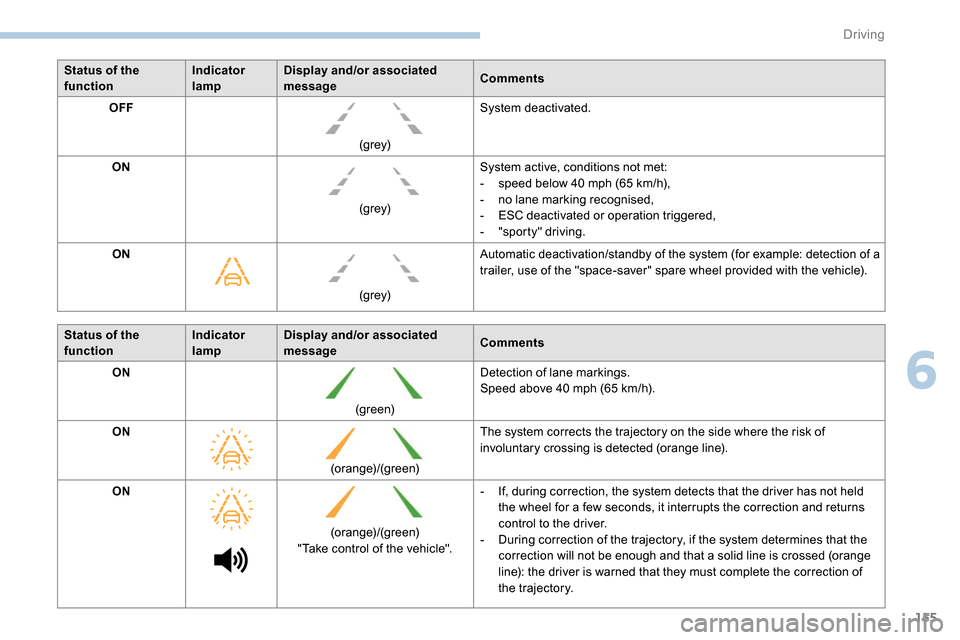
Status of the
functionIndicator
lampDisplay and/or associated
message
Comments
OFF
(grey)System deactivated.
ON (grey)System active, conditions not met:
-
s
peed below 40 mph (65 km/h),
-
n
o lane marking recognised,
-
E
SC deactivated or operation triggered,
-
"
sporty" driving.
ON
(grey)Automatic deactivation/standby of the system (for example: detection of a
trailer, use of the "space-saver" spare wheel provided with the vehicle).
Status of the
function Indicator
lampDisplay and/or associated
message
Comments
ON
(green)Detection of lane markings.
Speed above 40
mph (65 km/h).
ON (orange)/(green)The system corrects the trajectory on the side where the risk of
involuntary crossing is detected (orange line).
ON (orange)/(green)
"Take control of the vehicle". -
I
f, during correction, the system detects that the driver has not held
the wheel for a few seconds, it interrupts the correction and returns
control to the driver.
-
D
uring correction of the trajectory, if the system determines that the
correction will not be enough and that a solid line is crossed (orange
line): the driver is warned that they must complete the correction of
the trajectory.
6
Driving
Page 163 of 312

161
Adjusting the audible signalOn versions equipped with
PEUGEOT Connect Radio,
pressing this button opens the
audible signal volume adjustment
window.
Visual assistance
It supplements the audible assistance, without
taking account of the vehicle's trajectory, by
displaying bars on the screen that represent the
distance between the obstacle and the vehicle
(white: more distant obstacles, orange: close
obstacles, red: very close obstacles).
When the obstacle is very close, the "Danger"
symbol is displayed on the screen.
Front parking sensors
The sound emitted by the speaker (front or
rear) locates the obstacle in relation to the
vehicle – in the vehicle trajectory, in front
or behind.
In addition to the rear parking sensors, the
front parking sensors are triggered when an
obstacle is detected in front and the speed of
the vehicle is still below 6
mph (10
km/h).
The front parking sensors are interrupted if
the vehicle stops for more than three seconds
in for ward gear, if an obstacle is no longer
detected or when the speed of the vehicle
exceeds 6
mph (10
km/h).
Side parking sensors
Using four additional sensors located on the
sides of the front and rear bumpers, the system
records the position of fixed obstacles during
the manoeuvre and signals them when they are
located by the sides of the vehicle.
The proximity information is given by an intermittent
audible signal, the frequency of which increases as
the vehicle approaches the obstacle.
When the distance between the vehicle and
the obstacle becomes less than about thirty
centimetres, the audible signal becomes
continuous.
The sound emitted by the speaker (right or left)
allows you to identify the side on which the obstacle
is located.
Only fixed obstacles are signalled
correctly. Moving obstacles detected
at the beginning of the manoeuvre may
be signalled mistakenly, while moving
obstacles which appear at the sides of
the vehicle and which were not previously
recorded will not be signalled.
Depending on version, in the example shown,
only the obstacles present in the shaded area
will be signalled by the audible assistance.
6
Driving
Page 166 of 312
164
Maintenance
recommendations
In bad or wintry weather, ensure that the
camera is not covered by mud, frost or snow.
Check the cleanliness of the camera lens
regularly.
If necessary, clean the camera with a soft, dry
cloth.
When washing the vehicle using a high-
pressure jet, keep the spray directed at least
30 cm away from the camera.
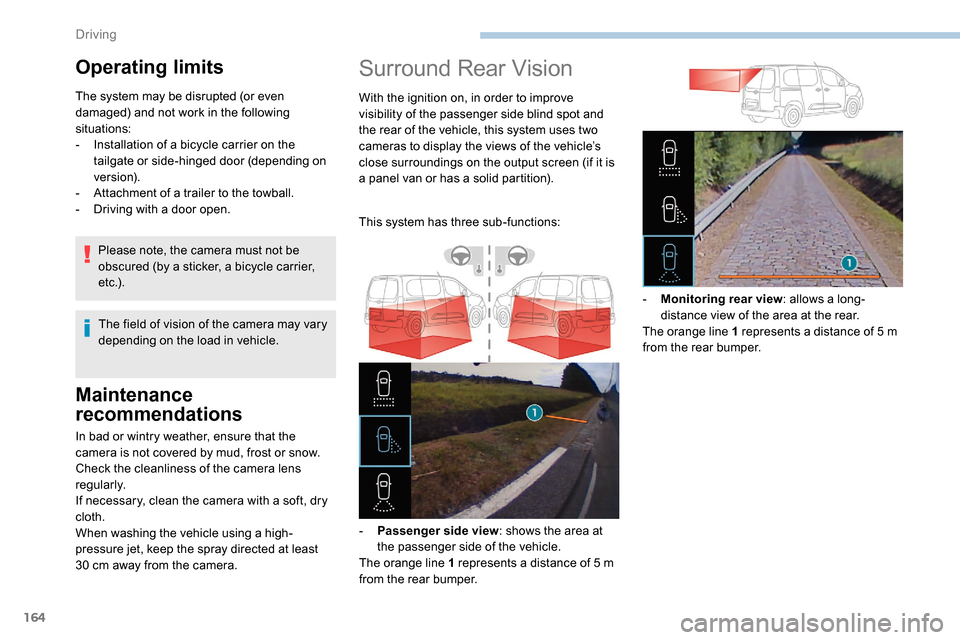
Surround Rear Vision
With the ignition on, in order to improve
visibility of the passenger side blind spot and
the rear of the vehicle, this system uses two
cameras to display the views of the vehicle’s
close surroundings on the output screen (if it is
a panel van or has a solid partition).
This system has three sub-functions:
-
P
assenger side view : shows the area at
the passenger side of the vehicle.
The orange line 1 represents a distance of 5
m
from the rear bumper. -
M
onitoring rear view: allows a long-
distance view of the area at the rear.
The orange line 1 represents a distance of 5
m
from the rear bumper.
Operating limits
The system may be disrupted (or even
damaged) and not work in the following
situations:
-
I
nstallation of a bicycle carrier on the
tailgate or side-hinged door (depending on
ve r s i o n).
-
A
ttachment of a trailer to the towball.
-
D
riving with a door open.
The field of vision of the camera may vary
depending on the load in vehicle.
Please note, the camera must not be
obscured (by a sticker, a bicycle carrier,
e t c .) .
Driving
Page 167 of 312

165
The blue dimension lines 1 represent the width
of your vehicle with the mirrors unfolded.
The red line 2 represents a distance of 30 cm
from the rear bumper; the two green lines 3 and
4 represent 1
m and 2 m, respectively.
The blue cur ves 5 appear successively; they
are based on the position of the steering wheel
and represent the turning circle radius of your
vehicle.
The orange dashes 6 represent the opening
radii of the rear doors. - The
visual reversing aid : allows a view of
the area close to the rear of the vehicle. Some items may not be seen by the rear
camera.
Certain vehicles may be difficult to see
(dark colours, headlamps off) when the
brightness of the screen is reduced by the
vehicle’s lighting dimmer.
The image quality may be affected by the
environment, the exterior conditions (rain,
dirt, dust), the driving mode, the lighting
conditions (night, low sun).
In the presence of areas in shade, or in
conditions of bright sunlight or inadequate
lighting, the image may be darkened and
with lower contrast.Obstacles may appear further away than
they actually are in reality.
During parking manoeuvres and lane
changes, it is important to check the sides
of the vehicle using the mirrors.
The rear parking sensors also provide
information on the vehicle's surroundings.
Activation/Deactivation
The system starts when the ignition is switched
on.
This system is a driving aid which cannot,
in any circumstances, replace the need for
vigilance on the part of the driver.
Please routinely check your exterior
mirrors while driving and during
manoeuvres.
F
W
ith the ignition on, press the
corresponding button below the screen to
switch the output screen on/off.
A message appears.
6
Driving