Page 69 of 263
Storage67The armrest can also be folded down
from the rear by pulling the loop.
Suitable for loading long, narrow
objects.
Ensure that the armrest engages
after folding up.
Load compartment cover Do not place any objects on the cover.
Removing cover
Unhook retaining straps from tailgate.
Lift cover, slightly angle and turn it.
Remove the cover.
Stowing
The load compartment cover can be
stored behind the rear seat backrests.
Unhook retaining straps and lift the
cover backwards until it unlatches.
Then slide it down in the guides
behind the seat backrests.
Fitting cover Engage cover in side guides and fold downwards. Attach the retainingstraps to the tailgate.
Rear floor storage cover
The rear floor cover can be removed.
Raise cover at the recess and
remove.
Page 70 of 263
68StorageThe cover can also be stored behind
the rear seats.
Double load floor
The double load floor can be inserted
in the load compartment in two
positions:
● lower position above the spare wheel well cover
● upper position interlocked with the grab handle into back panel
trim
To remove, press the handle to
unlock the load floor and lift it up while
using the handle.
If mounted in the upper position, the
space between the load floor and the spare wheel well cover can be used
as a storage compartment.
In this position, if the rear seat
backrests are folded forwards, an
almost completely flat load bay is
created.
In the upper position, the double load
floor is able to withstand a maximum
load of 100 kg. In the lower position,
the double load floor is able to
withstand the maximum permissible
load.
Lashing eyes
The lashing eyes are designed to
secure items against slippage, e.g.
using lashing straps or luggage net.
Page 72 of 263
70StorageRoof rack systemRoof rackFor safety reasons and to avoid
damage to the roof, the vehicle-
approved roof rack system is
recommended.
Follow the installation instructions and remove the roof rack when not in
use.
Mounting roof rack
Open all doors.
Mounting points are located in each
door frame of the vehicle body.
Detach the cover from each mounting
point and fasten the roof rack with the attached screws.Loading information
● Heavy objects in the load compartment should be placed
against the seat backrests. Make
sure that the backrests are
securely engaged, i.e. no longer
showing the red marks on the side near the release lever or on
the loop. If objects can be
stacked, heavier objects should
be placed at the bottom.
● Prevent sliding of loose objects by securing them with straps
attached to the lashing eyes
3 68.
Page 74 of 263

72Instruments and controlsInstruments and
controlsControls ....................................... 73
Steering wheel adjustment ........73
Steering wheel controls .............73
Heated steering wheel ...............73
Horn ........................................... 74
Windscreen wiper and washer ..74
Rear window wiper and washer ...................................... 76
Outside temperature ..................76
Clock ......................................... 77
Power outlets ............................. 77
Inductive charging .....................78
Cigarette lighter ......................... 79
Ashtrays .................................... 79
Warning lights, gauges and indi‐ cators ........................................... 80
Instrument cluster ......................80
Speedometer ............................. 84
Odometer .................................. 84
Trip odometer ............................ 84
Tachometer ............................... 84
Fuel gauge ................................ 85
Fuel selector .............................. 85Engine coolant temperature
gauge ....................................... 86
Engine oil level monitor .............87
Service display .......................... 87
Control indicators ......................88
Turn lights .................................. 88
Seat belt reminder .....................89
Airbag and belt tensioners .........89
Airbag deactivation ....................89
Charging system .......................90
Malfunction indicator light ..........90
Service vehicle soon .................90
Stop engine ............................... 90
System check ............................ 90
Brake and clutch system ...........91
Parking brake ............................ 91
Antilock brake system (ABS) .....91
Gear shifting .............................. 91
Lane departure warning ............91
Electronic Stability Control and Traction Control system ...........92
Electronic Stability Control and Traction Control system off ......92
Engine coolant temperature ......92
Preheating ................................. 92
Exhaust filter .............................. 92
AdBlue ....................................... 92
Deflation detection system ........93
Engine oil pressure ....................93
Low fuel ..................................... 93Autostop.................................... 93
Exterior light .............................. 93
Low beam .................................. 94
High beam ................................. 94
High beam assist .......................94
Front fog lights ........................... 94
Rear fog light ............................. 94
Rain sensor ............................... 94
Cruise control ............................ 94
Side blind spot alert ...................94
Active emergency braking .........94
Speed limiter ............................. 94
Door open .................................. 94
Displays ....................................... 95
Driver Information Centre ..........95
Info Display ................................ 97
Head-up display ........................99
Vehicle messages ......................101
Warning chimes .......................101
Battery voltage ........................ 101
Vehicle personalisation ..............102
Telematics service .....................105
OnStar ..................................... 105
Page 79 of 263

Instruments and controls779Warning
The road surface may already be
icy even though the display
indicates a few degrees above
0 °C.
Clock
Date and time are shown in the
Info Display 3 97.
Setting date and time, see
Infotainment manual.
Power outlets
A 12 V power outlet is located in the
centre console.
Another power outlet is located in the console between the front seats.
Do not exceed the maximum power
consumption of 120 W.
With ignition off, the power outlet is deactivated. Additionally, the poweroutlet is deactivated in the event of
low vehicle battery voltage.
Electrical accessories that are
connected must comply with the
electromagnetic compatibility
requirements laid down in
DIN VDE 40 839.
Do not connect any current-delivering
accessories, e.g. electrical charging
devices or batteries.
Do not damage the outlets by using
unsuitable plugs.
Stop-start system 3 137.
USB charging port
One or two USB ports are located in
the centre console. Both USB ports
are prepared for charging devices.
When two USB ports are available,
the upper USB port can be used to
connect a phone for phone projection.
Page 85 of 263
Instruments and controls83OverviewOTurn lights 3 88XSeat belt reminder 3 89vAirbag and belt tensioners
3 89VAirbag deactivation 3 89pCharging system 3 90ZMalfunction indicator light
3 90HService vehicle soon 3 90STOPStop engine 3 90JSystem check 3 90RBrake and clutch system
3 91mParking brake 3 91uAntilock brake system (ABS)
3 91RGear shifting 3 91)Lane departure warning
3 91bElectronic Stability Control
and Traction Control system
3 92aElectronic Stability Control
and Traction Control system
off 3 92W oEngine coolant temperature
high 3 92!Preheating 3 92%Exhaust filter 3 92YAdBlue 3 92wDeflation detection system
3 93IEngine oil pressure 3 93
Engine oil level monitor
3 87Y oLow fuel 3 93DAutostop 3 938Exterior light 3 939Low beam 3 94CHigh beam 3 94fHigh beam assist 3 94>Front fog lights 3 94øRear fog light 3 94
3 94ßSpeed limiter 3 94hDoor open 3 94
Page 91 of 263

Instruments and controls89Seat belt reminder
Seat belt reminder on all seats
X illuminates or flashes red in the
instrument cluster together with the
indication in the roof console for each
seat belt.
● When the ignition is switched on,
X in the instrument cluster and
the symbol for the respective
seat in the roof console comes
on, if the seat belt of any
occupied seat has not been
fastened.
● After driving off, X in the
instrument cluster and the
symbol for the respective seat in
the roof console flashes for a
certain time together with a
chime. After a certain time of
driving X illuminates constantly
until the seat belt of the
respective seat has been
fastened or if any passenger has
unfastened the seat belt.
Seat belts 3 48.
Airbag and belt tensioners v illuminates red.
When the ignition is switched on, the
control indicator illuminates for
approx. 4 seconds. If it does not
illuminate, does not go out after
4 seconds or illuminates whilst
driving, there is a fault in the airbag
system. Seek the assistance of a
workshop. The airbags and belt
pretensioners may fail to trigger in the
event of an accident.Deployment of the belt pretensioners
or airbags is indicated by continuous
illumination of v.9 Warning
Have the cause of the fault
remedied immediately by a
workshop.
Belt pretensioners 3 48.
Airbag system 3 51.
Airbag deactivation
Ó ON illuminates yellow.
Page 102 of 263
100Instruments and controls
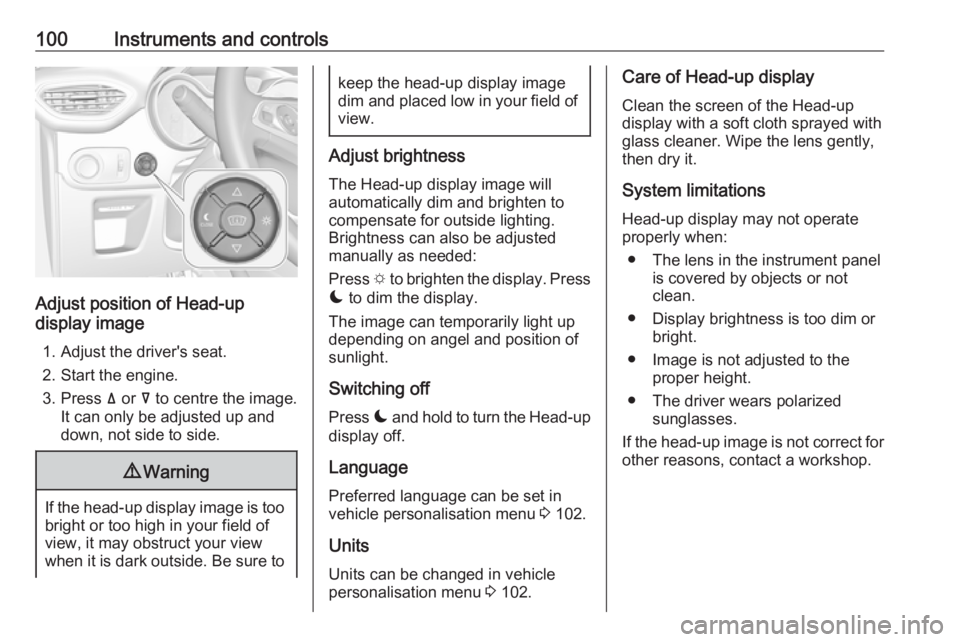
Adjust position of Head-up
display image
1. Adjust the driver's seat.
2. Start the engine.
3. Press ä or å to centre the image.
It can only be adjusted up and
down, not side to side.
9 Warning
If the head-up display image is too
bright or too high in your field of
view, it may obstruct your view
when it is dark outside. Be sure to
keep the head-up display image dim and placed low in your field of
view.
Adjust brightness
The Head-up display image will
automatically dim and brighten to
compensate for outside lighting.
Brightness can also be adjusted
manually as needed:
Press e to brighten the display. Press
æ to dim the display.
The image can temporarily light up
depending on angel and position of
sunlight.
Switching off
Press æ and hold to turn the Head-up
display off.
Language Preferred language can be set in
vehicle personalisation menu 3 102.
Units
Units can be changed in vehicle
personalisation menu 3 102.
Care of Head-up display
Clean the screen of the Head-up
display with a soft cloth sprayed with
glass cleaner. Wipe the lens gently, then dry it.
System limitations Head-up display may not operate
properly when:
● The lens in the instrument panel is covered by objects or not
clean.
● Display brightness is too dim or bright.
● Image is not adjusted to the proper height.
● The driver wears polarized sunglasses.
If the head-up image is not correct for
other reasons, contact a workshop.


