2019 OPEL CROSSLAND X brake light
[x] Cancel search: brake lightPage 103 of 263
Instruments and controls101Vehicle messages
Messages are indicated in the Driver
Information Centre, in some cases
together with a warning chime.
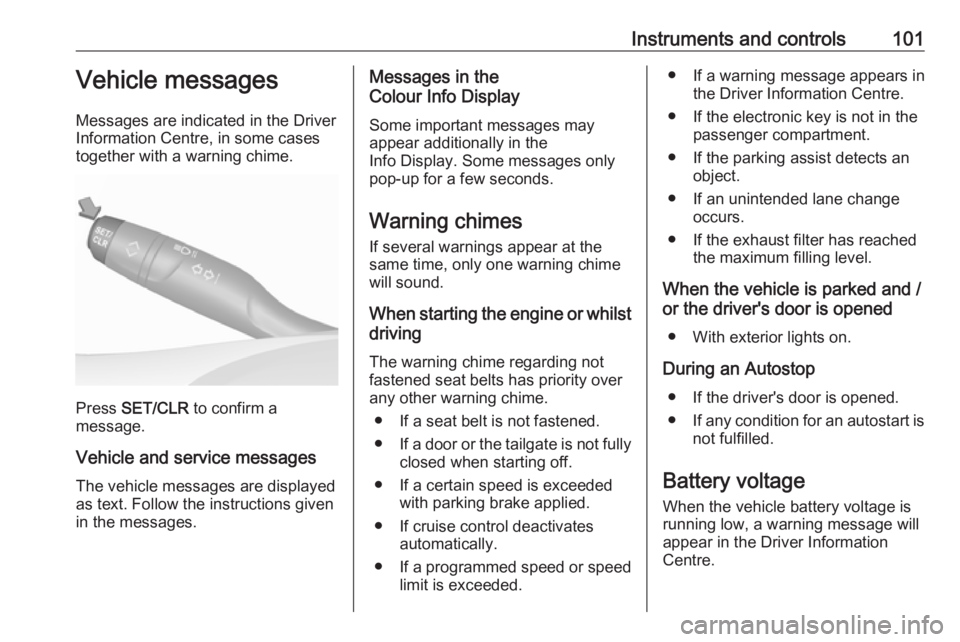
Press SET/CLR to confirm a
message.
Vehicle and service messages The vehicle messages are displayed
as text. Follow the instructions given
in the messages.
Messages in the
Colour Info Display
Some important messages may
appear additionally in the
Info Display. Some messages only
pop-up for a few seconds.
Warning chimes
If several warnings appear at the same time, only one warning chime
will sound.
When starting the engine or whilst driving
The warning chime regarding not
fastened seat belts has priority over
any other warning chime.
● If a seat belt is not fastened.
● If a door or the tailgate is not fully
closed when starting off.
● If a certain speed is exceeded with parking brake applied.
● If cruise control deactivates automatically.
● If a programmed speed or speed
limit is exceeded.● If a warning message appears in the Driver Information Centre.
● If the electronic key is not in the passenger compartment.
● If the parking assist detects an object.
● If an unintended lane change occurs.
● If the exhaust filter has reached the maximum filling level.
When the vehicle is parked and / or the driver's door is opened
● With exterior lights on.
During an Autostop ● If the driver's door is opened.● If any condition for an autostart is
not fulfilled.
Battery voltage
When the vehicle battery voltage is
running low, a warning message will
appear in the Driver Information
Centre.
Page 136 of 263

134Driving and operating9Warning
If the vehicle battery is discharged,
the vehicle must not be towed,
tow-started or jump-started as the
steering wheel lock cannot be
disengaged.
Operation on vehicles with
electronic key system in case of
failure
If either the electronic key fails or the
battery of the electronic key is weak,
the Driver Information Centre may
display No Remote Detected or
Replace Battery in Remote Key when
you try to start the vehicle.
Hold the electronic key with buttons outside at the marking on the steering column cover as shown in the
illustration.
Operate the clutch pedal (manual
transmission), the brake pedal and
press Start/Stop . Release the button
after starting procedure begins.
This option is intended for
emergencies only. Replace the
electronic key battery as soon as
possible 3 23.
For unlocking or locking the doors,
see fault in radio remote control unit
or electronic key system 3 24.
Power saving mode
This mode deactivates electrical
consumers to avoid excessive
discharging of the vehicle battery.
These consumers, such as the
Infotainment system, windscreen
wipers, low beam headlights,
courtesy light, etc. can be used for a
total maximum time of about
40 minutes after ignition is switched
off.
Changing into power saving
mode
When power saving mode is
activated, a message appears in the Driver Information Centre indicating
Power saving mode .
An active telephone call using the
hands-free option will be maintained
for around 10 minutes longer.
Page 137 of 263

Driving and operating135Deactivating power saving modePower saving mode is deactivated
automatically when the engine is restarted. Run the engine for a
sufficient charge:
● for less than 10 minutes to use the consumers for approx.
5 minutes
● for more than 10 minutes to use the consumers for up to approx.
30 minutes
Starting the engine
Vehicles with ignition switch● Turn key to position 1.
● Move the steering wheel slightly to release the steering wheel
lock.
● Manual transmission: operate clutch and brake pedal.
● Automatic transmission: operate brake pedal and move selector
lever to P or N.
● Do not operate accelerator pedal.
● Diesel engines: wait until control indicator ! extinguishes.
● Turn key to position 2 and
release after the engine has been started.
Manual transmission: during an
Autostop, the engine can be started
by depressing the clutch pedal
3 137.
Automatic transmission: during an
Autostop, the engine can be started
by releasing the brake pedal 3 137.Vehicles with power button
● Manual transmission: operate
clutch and brake pedal.
● Automatic transmission: operate brake pedal and move selector
lever to P or N.
● Do not operate accelerator pedal.
● Press Start/Stop button.
Page 138 of 263

136Driving and operating● Release button after startingprocedure begins. Diesel engine
starts after control indicator ! for
preheating extinguishes.
● Before restarting or to switch off the engine when vehicle is
stationary, press Start/Stop once
more briefly.
To start the engine during an
Autostop:
● Manual transmission: during an Autostop, the engine can be
started by depressing the clutch
pedal 3 137.
● Automatic transmission: during an Autostop, the engine can be
started by releasing the brake
pedal 3 137.
Emergency shut off during driving If the engine needs to be switched offduring driving in case of emergency,
press Start/Stop for 5 seconds.9Danger
Switching off the engine during
driving may cause loss of power
support for brake and steering
systems. Assistance systems and
airbag systems are disabled.
Lighting and brake lights will
extinguish. Therefore power down the engine and ignition while
driving only when required in case of emergency.
Starting the vehicle at low
temperatures
Starting the engine without additional
heaters is possible down to -25 °С for diesel engines and -30 °C for petrol
engines. Required is an engine oil
with the correct viscosity, the correct fuel, performed services and a
sufficiently charged vehicle battery.
With temperatures below -30 °C the
automatic transmission requires a
warming phase of approx. 5 minutes.
The selector lever must be in position P .
Heating functionalities
Note
Individual heating functionalities,
such as heated seats or heated
steering wheel, may be temporarily
unavailable in the event of electrical
loading constraints. Functions will
be resumed after some minutes.
Turbo engine warm-up
Upon start-up, engine available
torque may be limited for a short time,
especially when the engine
temperature is cold. The limitation is
to allow the lubrication system to fully protect the engine.
Overrun cut-off
The fuel supply is automatically cut off
during overrun, i.e. when the vehicle
is driven with a gear engaged but
accelerator pedal is released.
Depending on driving conditions, the
overrun cut-off may be deactivated.
Page 139 of 263

Driving and operating137Stop-start systemThe stop-start system helps to save
fuel and to reduce the exhaust
emissions. When conditions allow, it
switches off the engine as soon as the
vehicle is at a low speed or at a
standstill, e.g. at a traffic light or in a
traffic jam.
Activation
The stop-start system is available as
soon as the engine is started, the
vehicle starts-off and the conditions
as stated below in this section are
fulfilled.
DeactivationDeactivate the stop-start system
manually by pressing Ò. The
deactivation is indicated when the
LED in the button illuminates.
AutostopVehicles with manual transmission
An Autostop can be activated at a
standstill.
Activate an Autostop as follows: ● Depress the clutch pedal.
● Set the lever to neutral.
● Release the clutch pedal.
The engine will be switched off while
the ignition stays on.Vehicles with automatic transmission If the vehicle is at a standstill with
depressed brake pedal, Autostop is
activated automatically.
The engine will be switched off while the ignition stays on.
The stop-start system will be disabled
on inclines of 12% or more.Indication
An Autostop is indicated by control
indicator D.
During an Autostop, the heating and
brake performance will be
maintained.
Conditions for an Autostop
The stop-start system checks if each
of the following conditions is fulfilled.
● The stop-start system is not manually deactivated.
● The driver's door is closed or the driver's seat belt is fastened.
● The vehicle battery is sufficiently charged and in good condition.
● The engine is warmed up.
● The engine coolant temperature is not too high.
Page 151 of 263

Driving and operating149Manual parking brake9Warning
Always apply parking brake firmly
without operating the release
button, and apply as firmly as
possible on a downhill or uphill
slope.
To release the parking brake, pull
the lever up slightly, press the
release button and fully lower the
lever.
To reduce the operating forces of
the parking brake, depress the
foot brake at the same time.
Control indicator R 3 91.
Brake assist
If brake pedal is depressed quickly
and forcefully, maximum brake force
is automatically applied.
Operation of brake assist might
become apparent by a pulse in the
brake pedal and a greater resistance when depressing the brake pedal.
Maintain steady pressure on the
brake pedal as long as full braking is
required. Maximum brake force is
automatically reduced when brake
pedal is released.
Hill start assist The system helps prevent unintendedmovement when driving away on
inclines.
When releasing the brake pedal after
stopping on an incline, brakes remain on for further 2 seconds. The brakes
release automatically as soon as the
vehicle begins to accelerate.Ride control systems
Electronic Stability Control and Traction Control system
Electronic Stability Control (ESC)
improves driving stability when
necessary, regardless of the type of
road surface or tyre grip.
As soon as the vehicle starts to
swerve (understeer / oversteer),
engine output is reduced and the
wheels are braked individually.
ESC operates in combination with the Traction Control system (TC). It
prevents the driven wheels from
spinning.
The TC is a component of the ESC.
TC improves driving stability when
necessary, regardless of the type of
road surface or tyre grip, by
preventing the driven wheels from
spinning.
As soon as the driven wheels starts to spin, engine output is reduced and
the wheel spinning the most is braked
Page 159 of 263

Driving and operating157approaching a vehicle ahead too
rapidly, it may not provide you
enough time to avoid a collision.
The driver accepts full
responsibility for the appropriate
following distance based on traffic,
weather and visibility conditions.
The complete attention of the
driver is always required while
driving. The driver must always be ready to take action and apply the
brakes.Caution
The colour lighting of this control
indicator does not correspond to
local traffic laws on following
distance. The driver bears full
responsibility for maintaining safe
following distance according to
applicable traffic rules, weather
and road conditions etc. at all
times.
Selecting the alert sensitivity
The alert sensitivity has to be set to
close, normal or distant in the vehicle personalisation menu 3 102.
The chosen setting will remain until it
is changed. The alert timing will vary
based on vehicle speed. The faster
the vehicle speed, the farther away
the alert will occur. Consider traffic
and weather conditions when
selecting the alert timing.
Deactivation The system can only be deactivated
by deactivating the active emergency
braking in the vehicle personalisation
3 102.
System limitations
Forward collision alert is designed to
warn on vehicles only, but may react
also to other objects.In the following cases, forward
collision alert may not detect a vehicle ahead or sensor performance is
limited:
● driving on winding or hilly roads
● driving during nighttime
● weather limits visibility, such as fog, rain, or snow
● the sensor in the windscreen is blocked by snow, ice, slush, mud,dirt etc.
● the windscreen is damaged or affected by foreign objects, e.g.
stickers
Active emergency braking
Active emergency braking can help to reduce the damage and injury from
crashes with vehicles, pedestrians
and obstacles directly ahead, when a
collision can no longer be avoided
either by manual braking or by
steering. Before the active
emergency braking applies, the driver is warned by the forward collision
alert 3 156 or the front pedestrian
protection alert 3 160.
Page 177 of 263

Driving and operating175● The camera lenses are blockedby snow, ice, slush, mud, dirt.
Clean the lense, rinse with water, and wipe with a soft cloth.
● The tailgate will be opened.
● The vehicle is towing an electrically connected trailer.
● The vehicle had a rear end accident.
● There are extreme temperature changes.
Lane departure warning The lane departure warning systemobserves the lane markings between
which the vehicle is driving via a front
camera. The system detects lane
changes and warns the driver in the
event of an unintended lane change
via visual and acoustic signals.
Criteria for the detection of an
unintended lane change are:
● No operation of turn lights.
● No brake pedal operation.
● No active accelerator operation or speeding-up.If the driver is active, no warning will
be issued.
Activation
The lane departure warning system isactivated by pressing ½. The system
is switched on when the LED in the
button is not illuminated.
The system is only operable at
vehicle speeds above 60 km/h and if
lane markings are available.
When the system recognises an
unintended lane change, the control
indicator ) flashes yellow.
Simultaneously a chime sound is
activated.
Deactivation
The system is deactivated by
pressing ½, the LED in the button
illuminates.
At speeds below 60 km/h the system
is inoperable.
Fault
In the event of a fault, R appears in
the instrument panel, accompanied
by a display message. Contact a dealer or a qualified workshop to have
the system checked.
The lane departure warning system
may not operate properly when:
● The windscreen is not clean.● There are adverse environmental
conditions like heavy rain, snow,
direct sunlight or shadows.
The system cannot operate when no
lane marking is detected.