Page 18 of 372
Indicatorlight Name Page
Overdrive OFF
indicator light (if
so equipped) 2-20
Security indicator
light (if so
equipped) 2-22
Side light and
headlight indica-
tor light (green) (if
so equipped)2-20
Slip indicator light 2-20
Turn signal/
hazard indicator
lights
2-20
Vehicle Dynamic
Control (VDC) OFF
indicator light2-20
0-10Illustrated table of contents
Page 83 of 372
17. Ignition switch (if so equipped)(P. 5-9)
Push-button ignition switch
(if so equipped) (P. 5-11)
18. Cruise control switches
(if so equipped) (P. 5-24)
19. Tilt steering (P. 3-32)
20. Audio control switches (P. 4-42) Bluetooth® Hands-Free Phone
System switches (P. 4-46)
21. Vehicle Dynamic Control (VDC) OFF
switch (P. 2-28)
22. Fuel-filler door release lever
(P. 3-30)
Hood release lever (P. 3-27)
23. Electronic outside rearview mirror
control switch (P. 3-34)
Refer to the page number indicated in
parentheses for operating details.
1. Tachometer
2. Speedometer
3. Fuel gauge
4. OdometerTwin trip odometer
Trip computer 5. Continuously Variable Transmission
(CVT) position indicator
6. Instrument brightness control
knob
7. Change/reset button
Type A (if so equipped)
LIC3131
METERS AND GAUGES
Instruments and controls2-3
Page 156 of 372
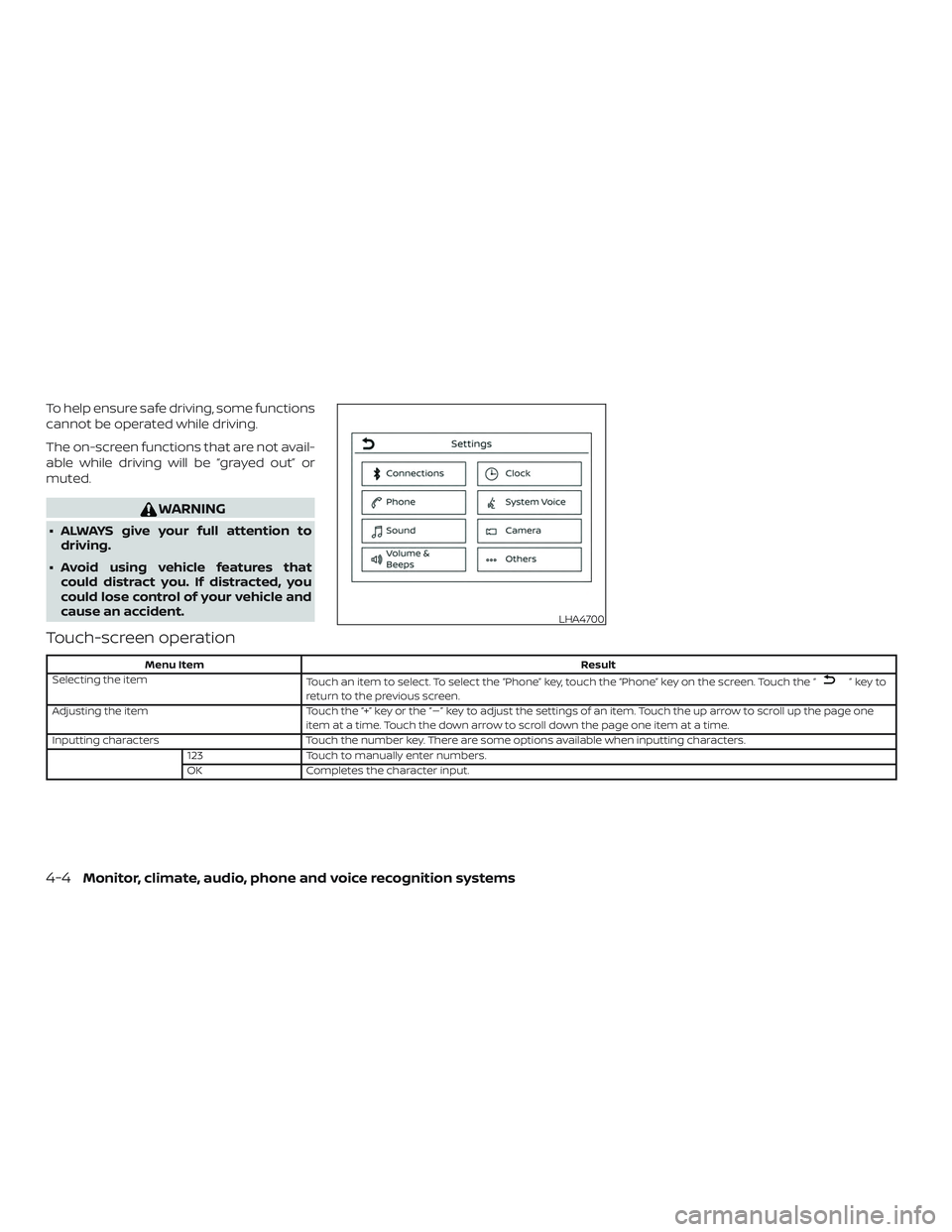
To help ensure safe driving, some functions
cannot be operated while driving.
The on-screen functions that are not avail-
able while driving will be “grayed out” or
muted.
WARNING
∙ ALWAYS give your full attention todriving.
∙ Avoid using vehicle features that could distract you. If distracted, you
could lose control of your vehicle and
cause an accident.
Touch-screen operation
Menu Item Result
Selecting the item Touch an item to select. To select the “Phone” key, touch the “Phone” key on the screen. Touch the “
”keyto
return to the previous screen.
Adjusting the item Touch the “+” key or the “�” key to adjust the settings of an item. Touch the up arrow to scroll up the page one
item at a time. Touch the down arrow to scroll down the page one item at a time.
Inputting characters Touch the number key. There are some options available when inputting characters.
123 Touch to manually enter numbers.
OK Completes the character input.
LHA4700
4-4Monitor, climate, audio, phone and voice recognition systems
Page 233 of 372
CAUTION
∙ To avoid possible damage to your ve-hicle, when stopping the vehicle on an
uphill grade, do not hold the vehicle by
depressing the accelerator pedal. The
foot brake should be used for this
purpose.
∙ Except in an emergency, do not shif t to the N (Neutral) position while driv-
ing. Coasting with the transmission in
the N (Neutral) position may cause se-
rious damage to the transmission.
The CVT in your vehicle is electronically
controlled to produce maximum power
and smooth operation.
The recommended operating procedures
for this transmission are shown on the fol-
lowing pages. Follow these procedures for
maximum vehicle performance and driv-
ing enjoyment.
NOTE:
Engine power may be automatically re-
duced to protect the CVT if the engine
speed increases quickly when driving on
slippery roads or while being tested on
some dynamometers.
Starting the vehicle
WARNING
∙ Do not depress the accelerator pedal while shif ting from P (Park) or N (Neu-
tral) to R (Reverse), D (Drive) or L (Low).
Always depress the brake pedal until
shif ting is completed. Failure to do so
could cause you to lose control and
have an accident.
∙ Cold engine idle speed is high, so use caution when shif ting into a forward
or reverse gear before the engine has
warmed up.
∙ Do not downshif t abruptly on slippery roads. This may cause a loss of
control.
∙ Never shif t to either the P (Park) or R (Reverse) position while the vehicle is
moving forward and P (Park) or D
(Drive) position while the vehicle is re-
versing. This could cause an accident
or damage the transmission
∙ Except in an emergency, do not shif t to the N (Neutral) position while driv-
ing. Coasting with the transmission in
the N (Neutral) position may cause se-
rious damage to the transmission.
CAUTION
To avoid possible damage to your ve-
hicle, when stopping the vehicle on an
uphill grade, do not hold the vehicle by
depressing the accelerator pedal. The
foot brake should be used for this
purpose.
1. Af ter starting the engine, fully depress the foot brake pedal before moving the
shif t lever out of the P (Park) position.
2. Keep the foot brake pedal depressed and move the shif t lever into a driving
gear.
3. Release the foot brake, then gradually start the vehicle in motion.
4. Stop the vehicle completely before moving the shif t lever into the P (Park)
position.
The Continuously Variable Transmission
is designed so the foot brake pedal MUST
be depressed before shif ting from P
(Park) to any drive position while the ig-
nition switch is in the ON position.
Starting and driving5-17
Page 332 of 372
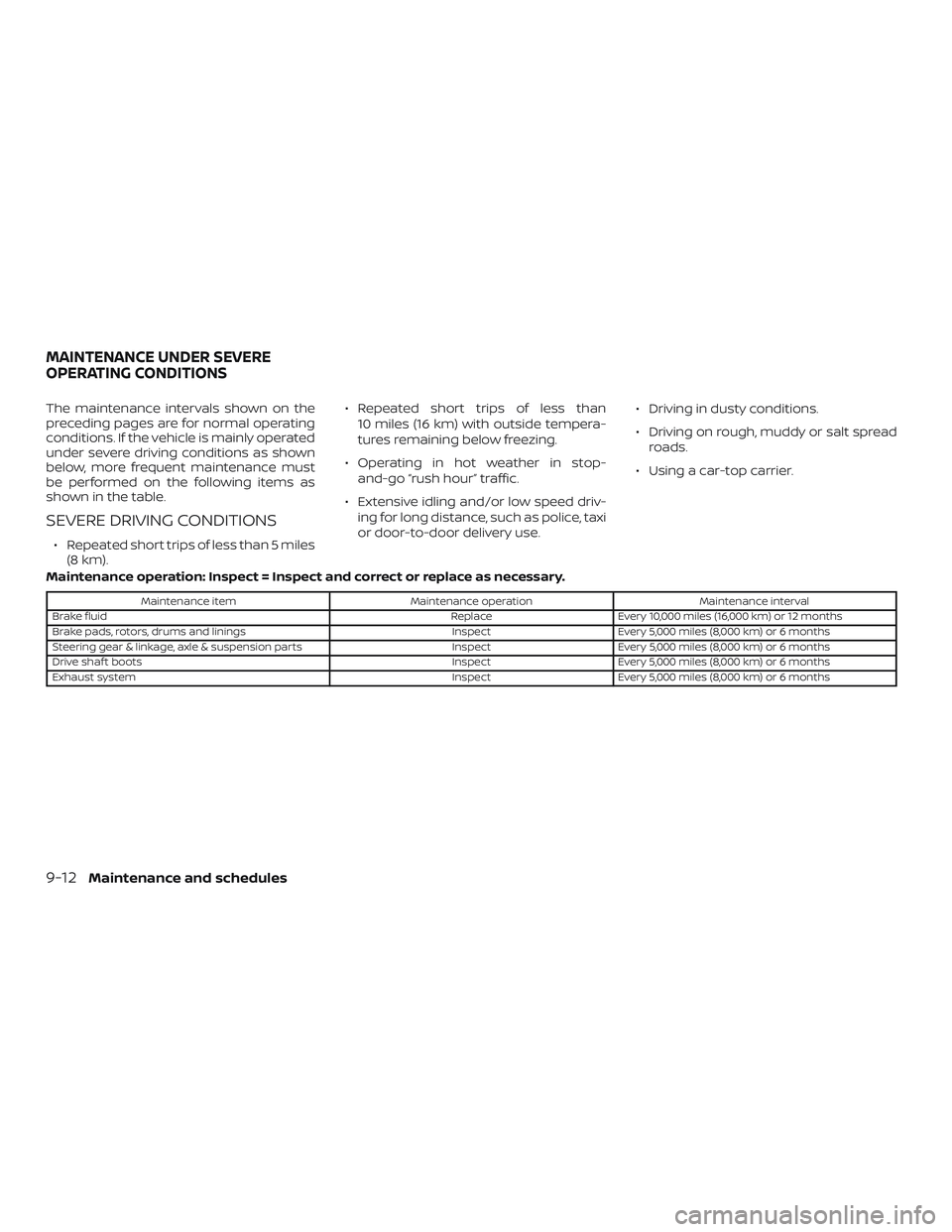
The maintenance intervals shown on the
preceding pages are for normal operating
conditions. If the vehicle is mainly operated
under severe driving conditions as shown
below, more frequent maintenance must
be performed on the following items as
shown in the table.
SEVERE DRIVING CONDITIONS
∙ Repeated short trips of less than 5 miles(8 km). ∙ Repeated short trips of less than
10 miles (16 km) with outside tempera-
tures remaining below freezing.
∙ Operating in hot weather in stop- and-go “rush hour” traffic.
∙ Extensive idling and/or low speed driv- ing for long distance, such as police, taxi
or door-to-door delivery use. ∙ Driving in dusty conditions.
∙ Driving on rough, muddy or salt spread
roads.
∙ Using a car-top carrier.
Maintenance operation: Inspect = Inspect and correct or replace as necessary.
Maintenance item Maintenance operation Maintenance interval
Brake fluid ReplaceEvery 10,000 miles (16,000 km) or 12 months
Brake pads, rotors, drums and linings InspectEvery 5,000 miles (8,000 km) or 6 months
Steering gear & linkage, axle & suspension parts InspectEvery 5,000 miles (8,000 km) or 6 months
Drive shaf t boots InspectEvery 5,000 miles (8,000 km) or 6 months
Exhaust system InspectEvery 5,000 miles (8,000 km) or 6 months
MAINTENANCE UNDER SEVERE
OPERATING CONDITIONS
9-12Maintenance and schedules

