Page 81 of 388

smoke is not harmful and does not indi-
cate a fire. Care should be taken not to
inhale it, as it may cause irritation and
choking. Those with a history of a breath-
ing condition should get fresh air promptly.
Af ter the pretensioner(s’) activation, load
limiters allow the seat belt to release web-
bing (if necessary) to reduce forces against
the chest.
The supplemental air bag warning
light
is used to indicate malfunctions
in the pretensioner(s) system. For addi-
tional information, refer to “Supplemental
air bag warning light” in this section. If the
operation of the supplemental air bag
warning light indicates there is a malfunc-
tion, have the system checked. It is recom-
mended that you visit a NISSAN dealer for
this service.
When selling your vehicle, we request that
you inform the buyer about the preten-
sioner system and guide the buyer to the
appropriate sections in this Owner’s
Manual.
1. SRS Air Bag Warning Labels (lo-
cated on the sun visors)
SUPPLEMENTAL AIR BAG WARNING
LABELS
Warning labels about the supplemental
front-impact air bag system are placed in
the vehicle as shown in the illustration.
WARNING
Do not use a rear-facing child restraint
on a seat protected by an air bag in
front of it. If the air bag deploys, it may
cause serious injury or death.
SUPPLEMENTAL AIR BAG WARNING
LIGHT
The supplemental air bag warning light,
displaying
in the instrument panel,
monitors the circuits for the air bag sys-
tems, pretensioner(s) and all related wiring.
When the ignition switch is placed in the ON
position, the supplemental air bag warning
light illuminates for about 7 seconds and
then turns off. This means the system is
operational.
WRS0897LRS0100
Safety—Seats, seat belts and supplemental restraint system1-63
Page 82 of 388

If any of the following conditions occur, the
front air bag, side air bag, curtain air bag
and pretensioner systems need servicing:∙ The supplemental air bag warning light remains on af ter approximately 7 sec-
onds.
∙ The supplemental air bag warning light flashes intermittently.
∙ The supplemental air bag warning light does not come on at all.
Under these conditions, the front air bag,
side air bag, curtain air bag or pretensioner
systems may not operate properly. They
must be checked and repaired. It is recom-
mended that you visit a NISSAN dealer for
this service.
WARNING
If the supplemental air bag warning
light is on, it could mean that the front
air bag, side air bag, curtain air bag
and/or pretensioner systems will not
operate in an accident. To help avoid
injury to yourself or others, have your
vehicle checked as soon as possible. It is
recommended that you visit a NISSAN
dealer for this service.
Repair and replacement
procedure
The front air bags, side air bags, curtain air
bags and pretensioner(s) are designed to
inflate on a one-time-only basis. As a re-
minder, unless it is damaged, the supple-
mental air bag warning light remains illu-
minated af ter inflation has occurred. These
systems should be repaired and/or re-
placed as soon as possible. It is recom-
mended that you visit a NISSAN dealer for
this service.
When maintenance work is required on the
vehicle, the front air bags, side air bags,
curtain air bags, pretensioner(s) and re-
lated parts should be pointed out to the
person performing the maintenance. The
ignition switch should always be placed in
the LOCK position when working under the
hood or inside the vehicle.
WARNING
∙ Once a front air bag, side air bag or curtain air bag has inflated, the air
bag module will not function again
and must be replaced. Additionally,
the activated pretensioner(s) must
also be replaced. The air bag module
and pretensioner(s) should be re-
placed. It is recommended that you
visit a NISSAN dealer for this service.
However, the air bag module and pre-
tensioner(s) cannot be repaired.
∙ The front air bag, side air bag, curtain air bag systems and the pretensioner
system should be inspected if there is
any damage to the front end or side
portion of the vehicle. It is recom-
mended that you visit a NISSAN dealer
for this service.
∙ If you need to dispose of the supple- mental air bag or pretensioner sys-
tems or scrap the vehicle, it is recom-
mended that you visit a NISSAN
dealer. Incorrect disposal procedures
could cause personal injury.
1-64Safety—Seats, seat belts and supplemental restraint system
Page 87 of 388
17. USB connection port(if so equipped) (P. 4-23)
AUX IN jack (if so equipped) (P. 4-23)
18. Shif t lever (P. 5-17)
19. Cup holders (P. 2-35)
20. Push-button ignition switch
(if so equipped) (P. 5-11)
21. Ignition switch (if so equipped)
(P. 5-9)
22. Cruise control switches
(if so equipped) (P. 5-24)
23. Tilt steering (P. 3-31)
24. Bluetooth® Hands-Free Phone
System (P. 4-2, 4-46)
Audio control switches (P. 4-23)
Trip computer control switches
(if so equipped) (P. 2-3)
25. Hood release lever (P. 3-26)
26. Fuel-filler door release lever
(P. 3-28)
27. Vehicle Dynamic Control (VDC) OFF
switch (P. 2-33)
28. Outside mirror control switch
(P. 3-33)
Refer to the page number indicated in
parentheses for operating details.1. Tachometer
2. Temperature gauge
3. OdometerTwin trip odometer
Trip computer 4. Fuel gauge
5. Speedometer
6. Trip odometer reset switch
Trip computer mode
Type A (if so equipped)
LIC2146
METERS AND GAUGES
Instruments and controls2-3
Page 90 of 388
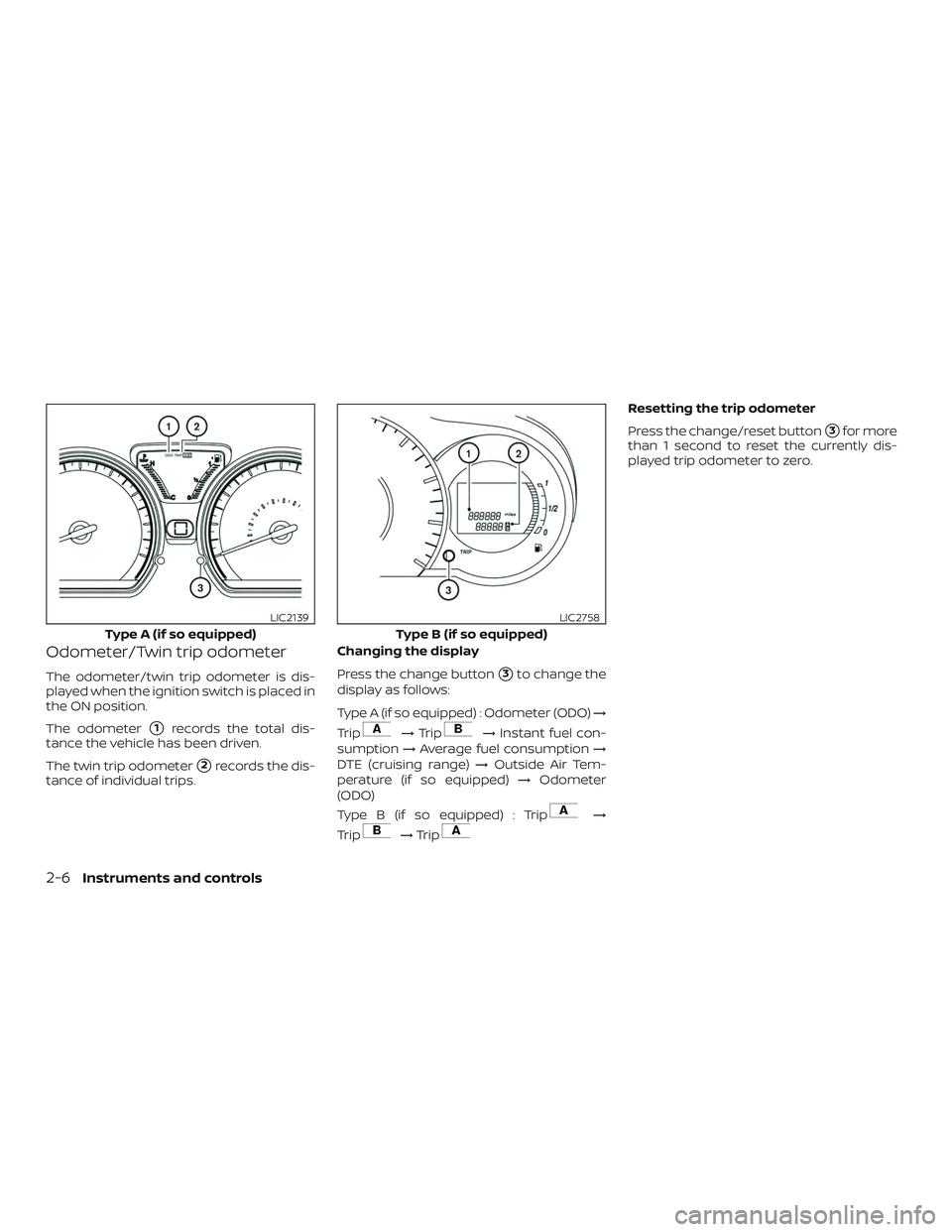
Odometer/Twin trip odometer
The odometer/twin trip odometer is dis-
played when the ignition switch is placed in
the ON position.
The odometer
�1records the total dis-
tance the vehicle has been driven.
The twin trip odometer
�2records the dis-
tance of individual trips. Changing the display
Press the change button
�3to change the
display as follows:
Type A (if so equipped) : Odometer (ODO) →
Trip
→ Trip→ Instant fuel con-
sumption →Average fuel consumption →
DTE (cruising range) →Outside Air Tem-
perature (if so equipped) →Odometer
(ODO)
Type B (if so equipped) : Trip
→
Trip
→ Trip
Resetting the trip odometer
Press the change/reset button
�3for more
than 1 second to reset the currently dis-
played trip odometer to zero.
Type A (if so equipped)
LIC2139
Type B (if so equipped)
LIC2758
2-6Instruments and controls
Page 92 of 388

Type A (if so equipped):The CHECK TIRE
PRES warning message can be turned off
using the reset button
�Aon the meter, the
low tire pressure warning light will not be
turned off.
Type B (if so equipped): The CHECK TIRE
PRES warning message is displayed when
the low tire pressure warning light is illumi-
nated and low tire pressure is detected.
Check and adjust the tire pressure to the
recommended COLD tire pressure shown
on the tire and Loading Information label. The low tire pressure warning light remains
illuminated until the tires are inflated to the
recommended COLD tire pressure.
Type A Only (if so equipped): The CHECK
TIRE PRES warning message is displayed
each time the ignition switch is placed in
the ON position as long as the low tire
pressure warning light remains illumi-
nated.
For additional information, refer to “Low tire
pressure warning light” in this section, “Tire
Pressure Monitoring System (TPMS)” in the
“Starting and driving” section and “Wheels
and tires” in the “Do-it-yourself ” section of
this manual.
TACHOMETER
The tachometer indicates engine speed in
revolutions per minute (rpm).
Do not rev the engine into the red zone
�1.
CAUTION
When engine speed approaches the red
zone, shif t to a higher gear or reduce
engine speed. Operating the engine in
the red zone may cause serious engine
damage.
Type B (if so equipped)
LIC3669
Type A (if so equipped)
LIC2151
2-8Instruments and controls
Page 93 of 388
ENGINE COOLANT TEMPERATURE
GAUGE
NOTE:
The ignition switch must be placed in the
ON position for the gauge to give a read-
ing.
Type A (if so equipped):The gauge indi-
cates the engine coolant temperature. The
engine coolant temperature will vary with
the outside air temperature and driving
conditions. Type B (if so equipped):
Engine coolant
temperature monitoring is performed by
the high temperature warning light. For ad-
ditional information, refer to “High tem-
perature warning light (red)” in this section.
Type B (if so equipped)
LIC2761
Type A (if so equipped)
LIC2501
Type B (if so equipped)
LIC4042
Instruments and controls2-9
Page 94 of 388

CAUTION
If the gauge indicates a coolant tem-
perature near the hot (H) end of the nor-
mal range, reduce vehicle speed to de-
crease the temperature. If the gauge is
over the normal range, stop the vehicle
as soon as safely possible. If the engine
is overheated, continued operation of
the vehicle may seriously damage the
engine. For additional information, re-
fer to “If your vehicle overheats” in the
“In case of emergency ” section of this
manual.
FUEL GAUGE
The gauge indicates theapproximatefuel
level in the tank when the ignition switch is
placed in the ON position.
The gauge may move slightly during brak-
ing, turning, acceleration, or going up or
down hills.
The low fuel warning light will turn on when
the amount of fuel in the tank is getting low. Refill the fuel tank before the gauge reg-
isters 0 (Empty).
Theindicates that the fuel-filler
door is located on the driver’s side of the
vehicle.
Type A (if so equipped)
LIC3257
Type B (if so equipped)
LIC2762
2-10Instruments and controls
Page 95 of 388

CAUTION
∙ If the vehicle runs out of fuel, thecheck engine light may come on. Re-
fuel as soon as possible. Af ter a few
driving trips, the
light should
turn off. If the light remains on af ter a
few driving trips, have the vehicle in-
spected. It is recommended that you
visit a NISSAN dealer for this service.
∙ For additional information, refer to “Malfunction Indicator Light (MIL)” in
this section.
TRIP COMPUTER
Type A (if so equipped): When the ignition
switch is placed in the ON position, modes
of the trip computer can be selected by
pushing the trip computer change button
�Aon the instrument panel located near
the speedometer.
The following modes can be selected in the
display
�B:
∙ Odometer
∙ Trip A
∙ Trip B ∙ Instant fuel consumption
∙ Average fuel consumption
∙ Distance to empty
∙ Outside air temperature (if so equipped)
Type B (if so equipped): When the ignition
switch is placed in the ON position, modes
of the trip computer can be selected by
pushing the menu buttonon the
steering wheel.
Type A (if so equipped)
LIC2138
Type B (if so equipped)
LIC2764
Instruments and controls2-11