2019 NISSAN TITAN air conditioning
[x] Cancel search: air conditioningPage 293 of 682
∙When parking, set the heater and air
conditioner controls to turn off air re-
circulation to allow fresh air into the
passenger compartment. This should
help reduce odors inside the vehicle.
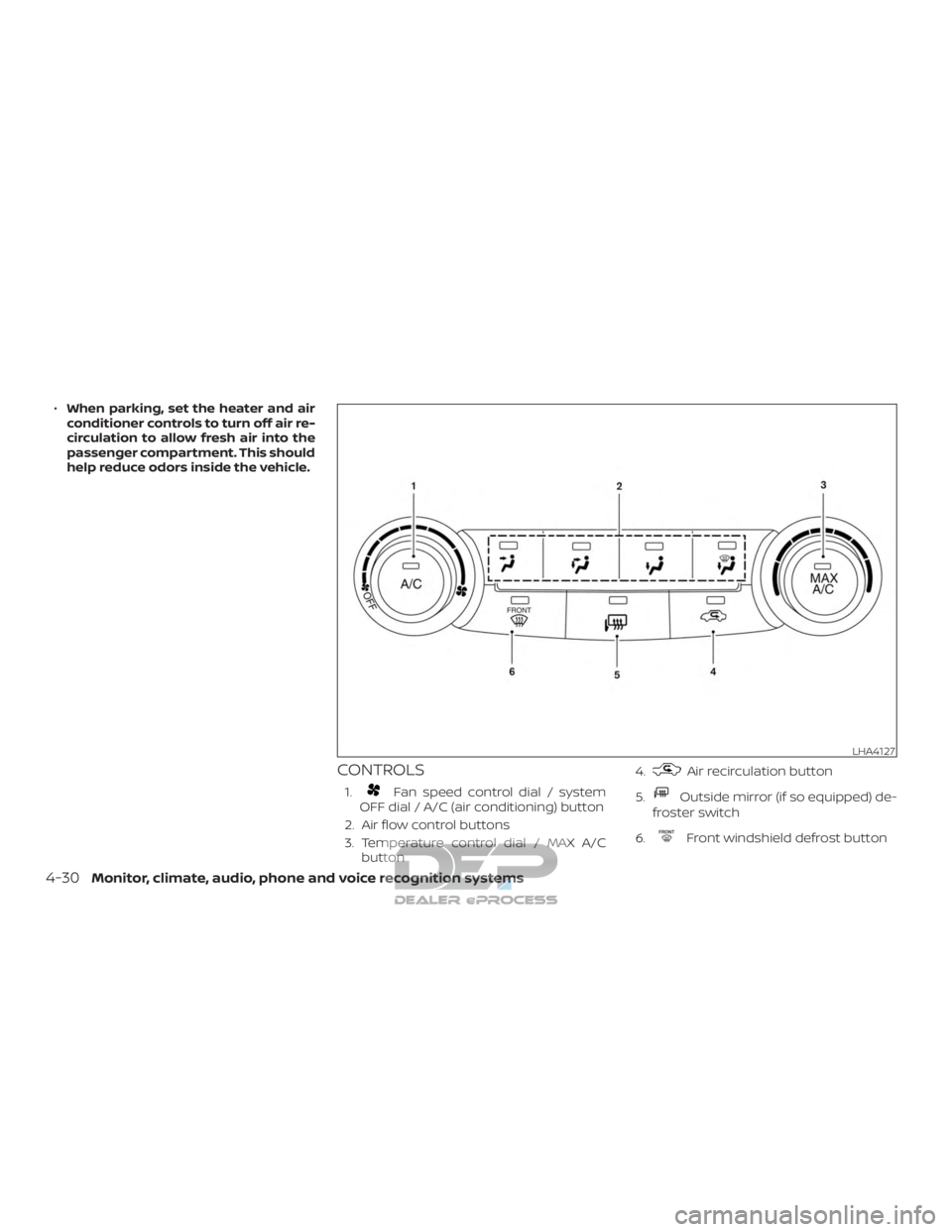
CONTROLS
1.Fan speed control dial / system
OFF dial / A/C (air conditioning) button
2. Air flow control buttons
3. Temperature control dial / MAX A/C button 4.
Air recirculation button
5.
Outside mirror (if so equipped) de-
froster switch
6.
Front windshield defrost button
LHA4127
4-30Monitor, climate, audio, phone and voice recognition systems
Page 295 of 682
3. Turn thefan speed control dial to
the desired position.
4. Turn the temperature control dial to the desired position between the
middle and the hot position.
Ventilation
This mode directs outside air to the side
and center vents.
1. Press the
button to the off posi-
tion. The indicator light on the
button will go off.
2. Press the
air flow control button.
3. Turn the
fan speed control dial to
the desired position.
4. Turn the temperature control dial to the desired position.
Defrosting or defogging
This mode directs the air to the defrost
outlets to defrost/defog the windows.
1. Press the
defrost/defog button.
2. Turn the
fan speed control dial to
the desired position. 3. Turn the temperature control dial to
the desired position between the
middle and the hot position.
∙ To quickly remove ice or fog from the windows, turn the
fan speed con-
trol dial to the highest setting and the
temperature control to the full HOT po-
sition.
∙
When theposition is selected, the
air conditioner automatically turns on if
the outside temperature is more than
36°F (2°C). This dehumidifies the air which
helps defog the windshield. The
mode automatically turns off, allowing
outside air to be drawn into the passen-
ger compartment to further improve the
defogging performance. Under this con-
dition, the indicator light on the A/C but-
ton indicator will not turn on if the user
had selected the A/C off. Turning off the
air conditioning via the A/C button is not
allowed In this mode. If the A/C button
indicator was on when entering this
mode, and the A/C button is selected in
this mode, the A/C button indicator will
turn off, but the A/C compressor will still
be automatically enabled. The recircula-
tion button indicator will not illuminate if
the button is pressed in this mode.
Bi-level heating
The bi-level mode directs warmed air to
the side and center vents and to the front
and rear floor outlets.
1. Press the
button to the off posi-
tion. The indicator light on
the
button will go off.
2. Press the
air flow control button.
3. Turn the
fan speed control dial to
the desired position.
4. Turn the temperature control dial to the desired position.
Heating and defogging
This mode heats the interior and defogs
the windshield.
1. Press the
air flow control button.
2. Turn the
fan speed control dial to
the desired position.
3. Turn the temperature control dial to the desired position between the
middle and the hot position.
4-32Monitor, climate, audio, phone and voice recognition systems
Page 296 of 682
∙ When theposition is selected, the
air conditioner automatically turns on if
the outside temperature is more than
36°F (2°C). If the
air flow control
button is selected for more than 1 min-
ute, the air conditioning system will
continue to operate until the
fan
speed control dial is turned to OFF, the
vehicle is shut off, or the A/C button is
used to turn off the compressor even if
the air flow control dial is turned to a
position other than the
position.
This dehumidifies the air which helps
defog the windshield. Under this condi-
tion, the indicator light on the A/C but-
ton indicator will not turn on if the user
had selected A/C off. Turning off the air
conditioning via the A/C button is not
allowed in this mode. If the A/C button
indicator was on when entering this
mode, and the A/C button is selected in
this mode, the A/C compressor will still
be automatically enabled. It is recom-
mended that
mode be turned off
for maximum defogging. The recircula-
tion button can be selected in this
mode to block outside odors. However,
for maximum defogging in this mode, it
is recommended to turn recirculation
off when possible.
Operating tips
Clear snow and ice from the wiper blades
and air inlet in front of the windshield.
This improves heater operation.
AIR CONDITIONER OPERATION
Start the engine, turn thefan speed
control dial to the desired position, and
press the
button to activate the air
conditioner. When the air conditioner is on,
cooling and dehumidif ying functions are
added to the heater operation.
The air conditioner cooling function op-
erates only when the engine is running.
Cooling
This mode is used to cool and dehumidif y
the air.
1. Press the
button to the off posi-
tion.
2. Press the
air flow control button.
3. Turn the
fan speed control dial to
the desired position.
4. Press the
button.
5. Turn the temperature control dial to the desired position between the
middle and the cold position. ∙ For quick cooling when the outside
temperature is high, press the
button to the on position. Be sure to
return the
to the off position for
normal cooling. The indicator light on
the
button will go off. You may
also select MAX A/C for quick cooling.
Dehumidified heating
This mode is used to heat and dehumidif y
the air.
1. Press the
button to the off posi-
tion. The indicator light on the
button will go off.
2. Press the
air flow control button.
3. Turn the
fan speed control dial to
the desired position.
4. Press the
button on.
5. Turn the temperature control dial to the desired position.
Dehumidified defogging
This mode is used to defog the windows
and dehumidif y the air.
1. Press the
front defroster button.
Monitor, climate, audio, phone and voice recognition systems4-33
Page 297 of 682
2. Turn thefan speed control dial to
the desired position.
When the
orpositions are se-
lected, the air conditioner automatically
turns on if the outside temperature is more
than 36°F (2°C). The air conditioning system
will continue to operate until the
fan
speed control dial is turned to OFF, the air
conditioner is turned OFF, or the vehicle is
shut off. If a position other than the
front defrost air flow button is selected, the
A/C compressor will not turn off even if the
user had selected A/C off prior to entering
defrost. In
front defrost orfoot
defrost the indicator light on the A/C but-
ton will not turn on if the user had selected
A/C off. Turning off the air conditioning via
the A/C button is not allowed in this mode.
If the A/C button indicator was on when
entering this mode, and the A/C button is
selected in this mode, the A/C button indi-
cator will turn off, but the A/C compressor
will still be automatically enabled. This de-
humidifies the air which helps defog the
windshield. The
mode automatically
turns off, allowing outside air to be drawn
into the passenger compartment to fur-
ther improve the defogging performance. 3. Turn the temperature control dial to
the desired position.
Operating tips
∙ Keep the windows closed while the airconditioner is in operation.
∙ Af ter parking in the sun, drive for 2 or 3 minutes with the windows open to
vent hot air from the passenger com-
partment. Then, close the windows.
This allows the air conditioner to cool
the interior more quickly.
∙ The air conditioning system should
be operated for approximately
10 minutes at least once a month.
This helps prevent damage to the
system due to lack of lubrication.
∙ A visible mist may be seen coming from the ventilators in hot, humid conditions
as the air is cooled rapidly. This does not
indicate a malfunction. ∙
If the engine coolant temperature
gauge indicates engine coolant tem-
perature over the normal range, turn
the air conditioner off. For additional
information, refer to “If your vehicle
overheats” in the “In case of emer-
gency ” section of this manual.
AIR FLOW CHARTS
The following charts show the button and
dial positions for MAXIMUM AND QUICK
heating, cooling or defrosting. For addi-
tional information on heating and cooling,
refer to “Heater and air conditioner
(manual)” in this section. The air recircula-
tion (
) button should always be in
the OFF position for heating and defrost-
ing.
4-34Monitor, climate, audio, phone and voice recognition systems
Page 302 of 682
NOTE:∙ Odors from inside and outside the ve-
hicle can build up in the air condi-
tioner unit. Odor can enter the pas-
senger compartment through the
vents.
∙ When parking, set the heater and air
conditioner controls to turn off air re-
circulation to allow fresh air into the
passenger compartment. This should
help reduce odors inside the vehicle.
AUTOMATIC OPERATION
Cooling or heating (auto)
This mode may be normally used all year
round as the system automatically works
to keep a constant temperature. Air flow
distribution and fan speed are also con-
trolled automatically.
1. Press the AUTO button on.
2. Turn the temperature dial to the lef t or right to set the desired temperature.
Driver and passenger temperatures
can be set independently. Press the
DUAL button to activate dual climate
control functions. Turn the passenger’s side temperature control dial to the lef t
or right to set the desired passenger’s
temperature.
∙ Adjust the temperature dial to about 75°F (24°C) for normal operation.
∙ The temperature of the passenger compartment will be maintained auto-
matically. Air flow distribution, fan speed
and A/C on/off are also controlled auto-
matically. The A/C button indicator will
remain in the last user setting. Under
this condition, the indicator light on the
A/C button indicator will not turn on if
the user had not selected the A/C but-
ton off. Turning off the air conditioning
via the A/C button is not allowed in this
mode. If the A/C button indicator was
on when entering this mode, and the
A/C button is selected in this mode, the
A/C button indicator will turn off, but the
A/C compressor will still be automati-
cally enabled. For additional informa-
tion, refer to “Air flow control” in this sec-
tion.
To turn off the compressor, turn off auto
mode, then turn the A/C on then off
until the A/C button indicator is not lit. ∙ A visible mist may be seen coming from
the vents in hot, humid conditions as
the air is cooled rapidly. This does not
indicate a malfunction.
Heating (A/C OFF)
The air conditioner does not activate. When
you need to heat only, use this mode.
1. Press the AUTO button.
2. Turn the temperature control dial to the lef t or the right to set the desired
temperature. Driver and passenger
temperatures can be set indepen-
dently. Press the DUAL button to acti-
vate dual climate control functions.
Turn the passenger’s side temperature
control dial to the lef t or right to set the
desired passenger’s temperature.
∙ The temperature of the passenger compartment will be maintained auto-
matically. Air flow distribution and fan
speed are also controlled automatically.
∙ Do not set the temperature lower than the outside air temperature. Otherwise,
the system may not work properly.
∙ Not recommended if windows fog up.
Monitor, climate, audio, phone and voice recognition systems4-39
Page 304 of 682
Temperature control dial
The temperature control dial allows you to
adjust the temperature of the outlet air. To
lower the temperature, turn the dial to the
lef t. To increase the temperature, turn the
dial to the right. Temperature can be ad-
justed on the driver’s and passenger’s side.
Air recirculation
Press theair recirculation button to
recirculate interior air inside the vehicle
when:
∙ driving on a dusty road
∙ to prevent traffic fumes from entering passenger compartment.
∙ for maximum cooling when using the air conditioning system.
Press the AUTO button to return to auto-
matic mode.
The air recirculation button will not be acti-
vated when the air conditioner is in
mode. When the outside temperature exceeds
70°F (21°C), the air conditioning system may
default to air recirculation mode automati-
cally to reduce overall power consumption.
To exit air recirculation mode, select the
fresh air intake button to enter fresh air
mode.
In Floor/Defrost mode, the recirculation
button can be selected to block outside
odors. However, for maximum defogging in
this mode, it is recommended to turn recir-
culation off when possible.
Fresh air intake
Press thefresh air intake button to
draw outside air into the passenger com-
partment.
Automatic intake air control
In the AUTO mode, the intake air will be
controlled automatically. When the outside
temperature exceeds 70°F (21°C), the air
conditioning system may default to air re-
circulation mode automatically to reduce
overall power consumption. To exit air re-
circulation mode, select the fresh air intake
button to enter fresh air mode. The air re-
circulation indicator will turn off, the fresh
air indicator will turn on. To manually control the intake air, press
the
fresh air intake button. To return
to the automatic control mode if
the
fresh air indicator is illuminated,
press and hold the
fresh air intake
button for about 2 seconds. The fresh air
indicator and air recirculation indicator
lights will flash twice, and then the intake air
will be controlled automatically. To return
to the automatic control mode if
the
air recirculation icon is illumi-
nated, press and hold the
air recircu-
lation button for about 2 seconds.
The
air recirculation indicator
and
fresh air intake indicator lights
will flash twice and the intake air will be
controlled automatically.
A/C (air conditioner) button
Start the engine, turn thefan speed
control buttons to the desired position and
press the
button to turn on the air
conditioner. To turn off the air conditioner,
press the
button again.
The air conditioner cooling function op-
erates only when the engine is running.
Monitor, climate, audio, phone and voice recognition systems4-41
Page 370 of 682
ENGINE PROTECTION MODE
The engine has an engine protection mode
to reduce the chance of damage if the
coolant temperature becomes too high
(for example, when climbing steep grades
in high temperatures with heavy loads,
such as when towing a trailer). When the
engine temperature reaches a certain
level:∙ The engine coolant temperature gauge will move toward the H position.
∙ Engine power may be reduced.
∙ The air conditioning cooling function may be automatically turned off for a
short time (the blower will continue to
operate).
Engine power and, under some conditions,
vehicle speed will decrease. Vehicle speed
can be controlled with the accelerator
pedal, but the vehicle may not accelerate at
the desired speed. The transmission will
downshif t or upshif t as it reaches pre-
scribed shif t points. You can also shif t
manually.
As driving conditions change and engine
coolant temperature is reduced, vehicle
speed can be increased using the accel- erator pedal, and the air conditioning cool-
ing function will automatically be turned
back on.
The Malfunction Indicator Light (MIL) may
also come on if the engine coolant tem-
perature is not reduced or the air condi-
tioning cooling function does not turn back
on. If
only it remains on, you do not need to
have your vehicle towed, but have it in-
spected soon. It is recommended that you
visit a NISSAN dealer for this service. For
additional information, refer to “Malfunc-
tion Indicator Light (MIL)” in the “Instru-
ments and controls” section of this manual.
WARNING
Overheating can result in reduced en-
gine power and vehicle speed. The re-
duced speed may be lower than other
traffic, which could increase the chance
of a collision. Be especially careful when
driving. If the vehicle cannot maintain a
safe driving speed, pull to the side of the
road in a safe area. Allow the engine to
cool and return to normal operation. For
additional information, refer to “If your
vehicle overheats” in the “In case of
emergency ” section of this manual.
CAUTION
Running the engine with the engine oil
pressure warning light on could cause
serious damage to the engine almost
immediately. Such damage is not cov-
ered by warranty. Turn off the engine as
soon as it is safe to do so.
AUTOMATIC TRANSMISSION (A/T)
WARNING
∙ Do not depress the accelerator pedal while shif ting from P (Park) or N (Neu-
tral) to R (Reverse) or D (Drive). Always
depress the brake pedal until shif ting
is completed. Failure to do so could
cause you to lose control and have an
accident.
∙ Cold engine idle speed is high, so use caution when shif ting into a forward
or reverse gear before the engine has
warmed up.
∙ Never shif t to either the P (Park) or R (Reverse) position while the vehicle is
moving forward and P (Park) or D
(Drive) position while the vehicle is re-
versing. This could cause an accident
or damage the transmission.
DRIVING THE VEHICLE
Starting and driving5-17
Page 396 of 682
CAUTION
During the first 1,200 miles (2,000 km),
follow these recommendations to ob-
tain maximum engine performance
and ensure the future reliability and
economy of your new vehicle. Failure to
follow these recommendations may re-
sult in shortened engine life and re-
duced engine performance.∙ Avoid driving for long periods at con- stant speed, either fast or slow, and do
not run the engine over 4,000 rpm.
∙ Do not accelerate at full throttle in any gear.
∙ Avoid quick starts.
∙ Avoid hard braking as much as pos- sible.
∙ Do not tow a trailer for the first 500 miles (805 kilometers). Your engine, axle or
other parts could be damaged. Follow these easy-to-use Fuel Efficient
Driving Tips to help you achieve the most
fuel economy from your vehicle.
1. Use Smooth Accelerator and Brake
Pedal Application
∙ Avoid rapid starts and stops.
∙ Use smooth, gentle accelerator and brake application whenever possible.
∙ Maintain constant speed while com- muting and coast whenever pos-
sible.
2. Maintain Constant Speed
∙ Look ahead to try and anticipate and minimize stops.
∙ Synchronizing your speed with traffic lights allows you to reduce your num-
ber of stops.
∙ Maintaining a steady speed can mini- mize red light stops and improve fuel
efficiency.
3. Use Air Conditioning (A/C) at Higher
Vehicle Speeds
∙ Below 40 mph (64 km/h), it is more efficient to open windows to cool the
vehicle due to reduced engine load. ∙ Above 40 mph (64 km/h), it is more
efficient to use A/C to cool the vehicle
due to increased aerodynamic drag.
∙ Recirculating the cool air in the cabin when the A/C is on reduces cooling
load.
4. Drive at Economical Speeds and Dis-
tances
∙ Observing the speed limit and not exceeding 60 mph (97 km/h) (where
legally allowed) can improve fuel effi-
ciency due to reduced aerodynamic
drag.
∙ Maintaining a safe following distance behind other vehicles reduces un-
necessary braking.
∙ Safely monitoring traffic to anticipate changes in speed permits reduced
braking and smooth acceleration
changes.
∙ Select a gear range suitable to road conditions.
5. Use Cruise Control
∙ Using cruise control during highway driving helps maintain a steady
speed.
BREAK-IN SCHEDULE FUEL EFFICIENT DRIVING TIPS
Starting and driving5-43