Page 86 of 461
1. Headlight/fog light (if soequipped)/turn signal switch
(P. 2-40)
2. Steering wheel switch for trip
computer (if so equipped)/vehicle
information display (if so
equipped) (P. 2-9, P.2-24)
Audio controls (P. 4-2, 4-31)
Bluetooth® Hands-Free Phone
System (P. 4-2, 4-54)
3. Driver’s supplemental air bag
(P. 1-43)
Horn (P. 2-46)
4. Meters and gauges (P. 2-3) Warning and indicators lights
(P. 2-13)
5. Cruise control switches (P. 5-45) Intelligent Cruise Control (ICC)
switches (if so equipped) (P. 5-47)
Bluetooth® Hands-Free Phone
System (P. 4-2, 4-54)
6. Wiper and washer switch (P. 2-38)
7. Vents (P. 4-15)
8. Hazard warning flasher switch
(P. 6-2)
9. Front passenger air bag status
light (P. 1-43)
10. Audio system (P. 4-2, 4-31)
LIC4037
INSTRUMENT PANEL
2-2Instruments and controls
Page 87 of 461
11. Front passenger supplemental airbag (P. 1-43)
12. Glove box (P. 2-49)
13. Shif t lever (P. 5-17)
14. Climate controls (P. 4-20, 4-28)
15. Ignition switch (if so equipped)
(P. 5-9)
Push-button ignition switch
(if so equipped) (P. 5-11)
16. Tilt/Telescopic steering (P. 3-30)
17. Hood release (P. 3-25) Fuel filler door release (P. 3-27)
18. ECO mode switch (if so equipped)
(P. 5-26)
Vehicle Dynamic Control (VDC) OFF
switch (P. 2-47)
SPORT mode switch (if so
equipped) (P. 5-26)
19. Instrument brightness control
(P. 2-40)
Power mirror switch (P. 3-31)
Trunk release (P. 3-26)
Refer to the page number indicated in
parentheses for operating details.
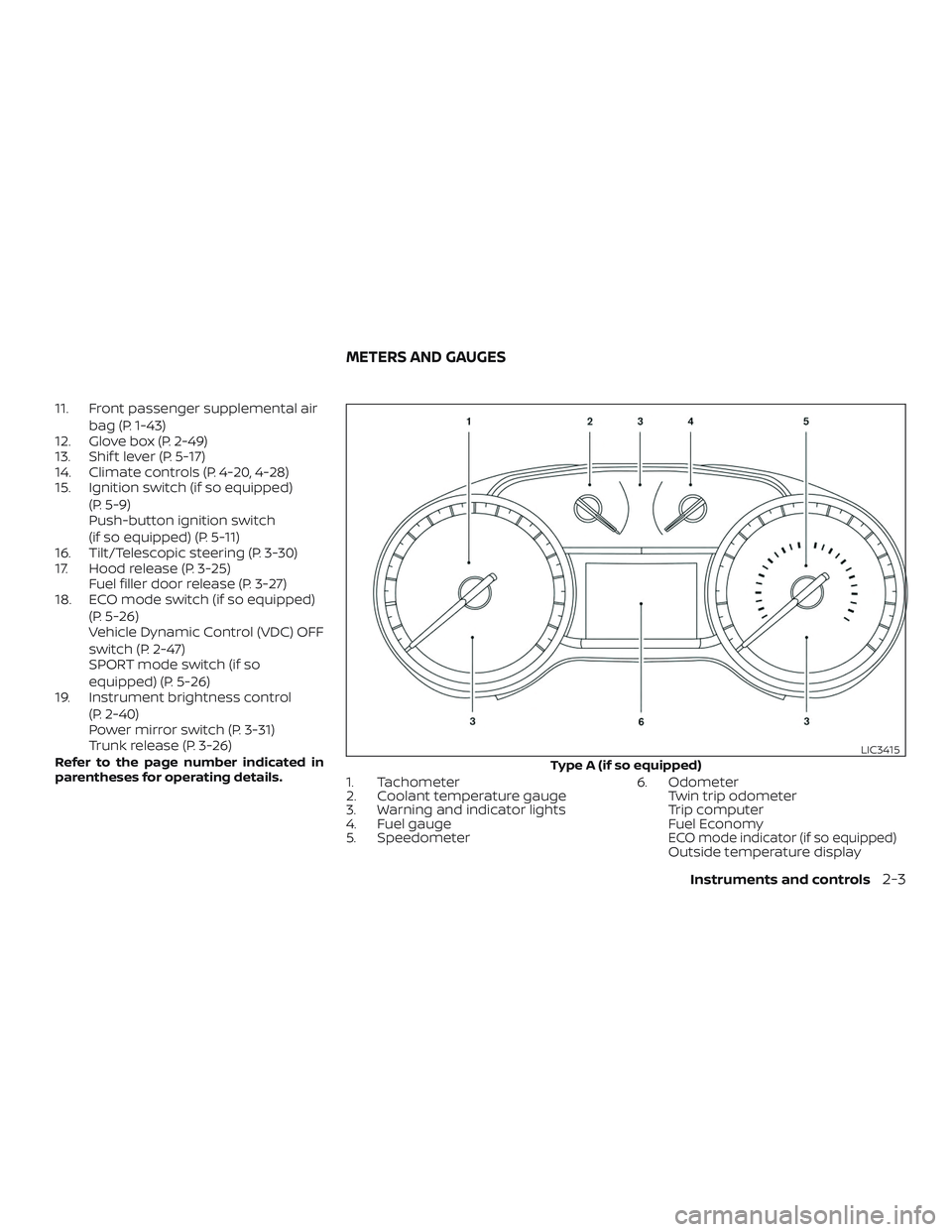
1. Tachometer
2. Coolant temperature gauge
3. Warning and indicator lights
4. Fuel gauge
5. Speedometer 6. Odometer
Twin trip odometer
Trip computer
Fuel Economy
ECO mode indicator (if so equipped)Outside temperature display
Type A (if so equipped)
LIC3415
METERS AND GAUGES
Instruments and controls2-3
Page 90 of 461

Changing the display
Press the
button on the steering
wheel to change the display as follows:
Accel guide/Average fuel economy →In-
stant fuel economy/Average fuel economy
→ Average fuel economy →Average speed
→ Distance to empty →Trip A →Trip B
Resetting the trip odometer
Press the
button on the steering
wheel for more than 1 second to reset the
currently displayed trip odometer to zero.
LOOSE FUEL CAP warning
message
For vehicles without a vehicle informa-
tion display: Push the reset button
�Afor
more than 1 second to reset the LOOSE
FUEL CAP warning message in the trip
computer
�Baf ter the fuel cap has been
tightened. For additional information, refer
to “Fuel-filler cap” in the “Pre-driving checks
and adjustments” section of this manual.
For vehicles with a vehicle information
display: For additional information, refer to
“Vehicle information display warnings and
indicators” in the section.
Check tire pressure warning
message (if so equipped)
The CHECK TIRE PRES (pressure) warning
message is displayed when the low tire
pressure warning light is illuminated and
low tire pressure is detected. Check and
adjust the tire pressure to the recom-
mended COLD tire pressure shown on the
Tire and Loading Information label. The
CHECK TIRE PRES warning message turns
off when the low tire pressure warning light
turns off.
LPD2124LIC2678
2-6Instruments and controls
Page 93 of 461

The low fuel warning light comes on when
the amount of fuel in the tank is getting low.
Refill the fuel tank before the gauge reg-
isters 0 (Empty).
The arrow on the fuel pump symbol
indicates the fuel-filler location.
CAUTION
∙ If the vehicle runs out of fuel, theMalfunction Indicator Light (MIL) may
come on. Refuel as soon as possible.
Af ter a few driving trips. the
light
should turn off. If the light remains on
af ter a few driving trips, have the ve-
hicle inspected. It is recommended
that you visit a NISSAN dealer for this
service.
∙ For additional information, refer to “Malfunction Indicator Light (MIL)” in
this section.
TRIP COMPUTER (if so equipped)
When the ignition switch is placed in the ON
position, the modes of the trip computer
can be selected by pressing the
but-
ton on the steering wheel. The following
modes can be selected:
∙ Trip A
∙ Trip B
∙ ECO Pedal Indicator (if so equipped) ∙ Instant fuel economy
∙ Average fuel economy
∙ Average speed
∙ Distance to empty
∙ Trip computer reset
Type B (if so equipped)
LIC2222
Instruments and controls2-9
Page 95 of 461
AVE & INST fuel economy
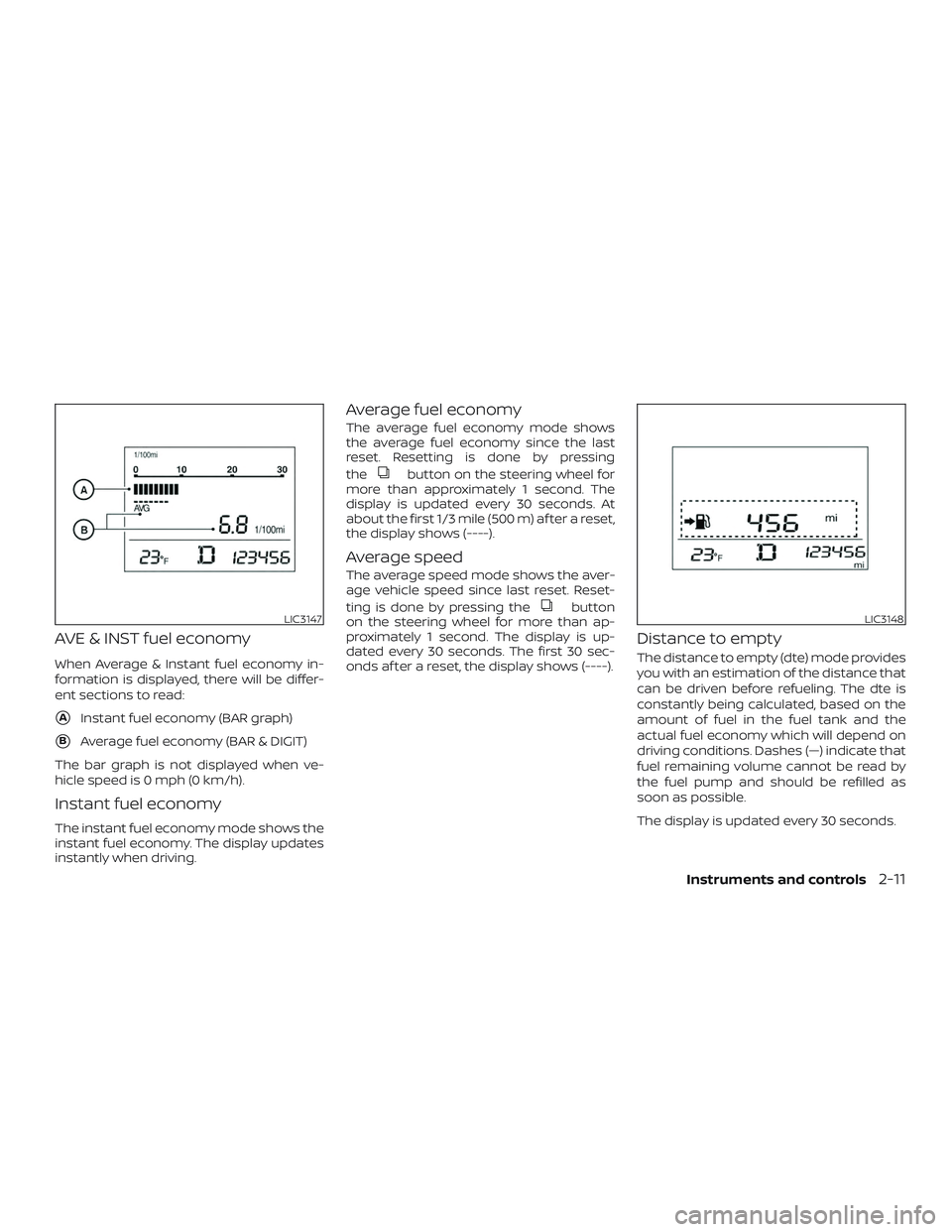
When Average & Instant fuel economy in-
formation is displayed, there will be differ-
ent sections to read:
�AInstant fuel economy (BAR graph)
�BAverage fuel economy (BAR & DIGIT)
The bar graph is not displayed when ve-
hicle speed is 0 mph (0 km/h).
Instant fuel economy
The instant fuel economy mode shows the
instant fuel economy. The display updates
instantly when driving.
Average fuel economy
The average fuel economy mode shows
the average fuel economy since the last
reset. Resetting is done by pressing
the
button on the steering wheel for
more than approximately 1 second. The
display is updated every 30 seconds. At
about the first 1/3 mile (500 m) af ter a reset,
the display shows (----).
Average speed
The average speed mode shows the aver-
age vehicle speed since last reset. Reset-
ting is done by pressing the
button
on the steering wheel for more than ap-
proximately 1 second. The display is up-
dated every 30 seconds. The first 30 sec-
onds af ter a reset, the display shows (----).
Distance to empty
The distance to empty (dte) mode provides
you with an estimation of the distance that
can be driven before refueling. The dte is
constantly being calculated, based on the
amount of fuel in the fuel tank and the
actual fuel economy which will depend on
driving conditions. Dashes (—) indicate that
fuel remaining volume cannot be read by
the fuel pump and should be refilled as
soon as possible.
The display is updated every 30 seconds.
LIC3147LIC3148
Instruments and controls2-11
Page 96 of 461
NOTE:
When driving uphill or rounding curves,
the fuel in the tank shif ts, which may
momentarily change the display.
Trip computer reset
To reset Trip A, Trip B, AVG/mpg, or
AVG/mph, go to the desired mode on the
trip computer and hold the
button on
the steering wheel for more than 3 sec-
onds.
OUTSIDE TEMPERATURE DISPLAY
The outside temperature function pro-
vides a display of the outside temperature
when the ignition switch is placed in the ON
position.
The display of positive temperatures is un-
signed (blank), negative temperatures are
prefixed with a minus sign.
The outside temperature will always be vis-
ible on the lef t side of the display.
LIC3149
2-12Instruments and controls
Page 97 of 461
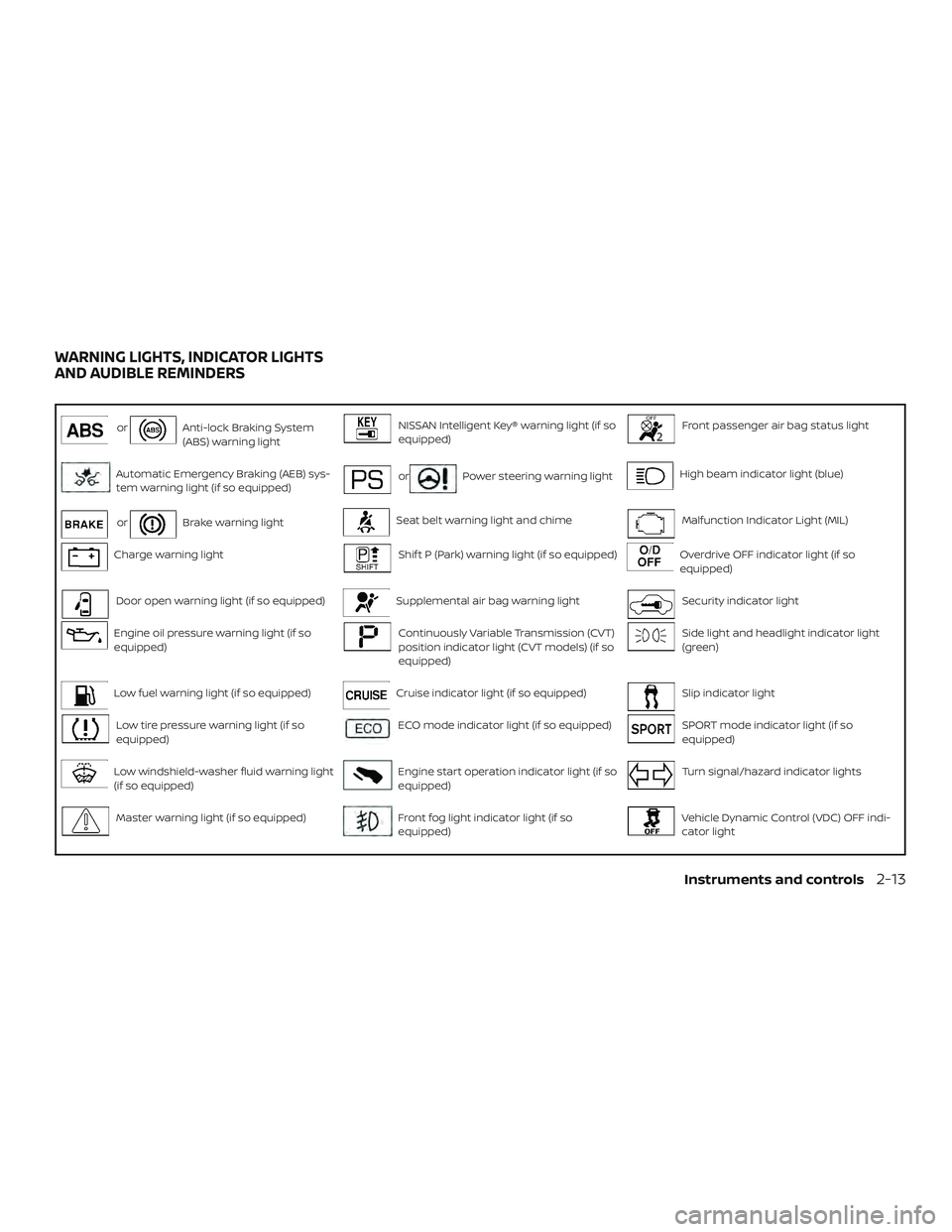
orAnti-lock Braking System
(ABS) warning lightNISSAN Intelligent Key® warning light (if so
equipped)Front passenger air bag status light
Automatic Emergency Braking (AEB) sys-
tem warning light (if so equipped)orPower steering warning lightHigh beam indicator light (blue)
orBrake warning lightSeat belt warning light and chimeMalfunction Indicator Light (MIL)
Charge warning lightShif t P (Park) warning light (if so equipped)Overdrive OFF indicator light (if so
equipped)
Door open warning light (if so equipped)Supplemental air bag warning lightSecurity indicator light
Engine oil pressure warning light (if so
equipped)Continuously Variable Transmission (CVT)
position indicator light (CVT models) (if so
equipped)Side light and headlight indicator light
(green)
Low fuel warning light (if so equipped)Cruise indicator light (if so equipped)Slip indicator light
Low tire pressure warning light (if so
equipped)ECO mode indicator light (if so equipped)SPORT mode indicator light (if so
equipped)
Low windshield-washer fluid warning light
(if so equipped)Engine start operation indicator light (if so
equipped)Turn signal/hazard indicator lights
Master warning light (if so equipped)Front fog light indicator light (if so
equipped)Vehicle Dynamic Control (VDC) OFF indi-
cator light
WARNING LIGHTS, INDICATOR LIGHTS
AND AUDIBLE REMINDERS
Instruments and controls2-13
Page 101 of 461
system checked. It is recommended that
you visit a NISSAN dealer for this service.
The "CHECK TIRE PRES" warning message
”/”Tire Pressure Low— Add Air” warning
does not appear if the low tire pressure
warning light illuminates to indicate a
TPMS malfunction.
For additional information, refer to “Tire
Pressure Monitoring System (TPMS)” in the
“Starting and driving” section and “Tire
pressure” in the “Do-it-yourself ” section of
this manual.
WARNING
∙ Radio waves could adversely affectelectric medical equipment. Those
who use a pacemaker should contact
the electric medical equipment
manufacturer for the possible influ-
ences before use.
∙ If the light does not illuminate with the ignition switch placed in the ON
position, have the vehicle checked as
soon as possible. It is recommended
that you visit a NISSAN dealer for this
service. ∙ If the light illuminates while driving,
avoid sudden steering maneuvers or
abrupt braking, reduce vehicle speed,
pull off the road to a safe location and
stop the vehicle as soon as possible.
Driving with under-inflated tires may
permanently damage the tires and in-
crease the likelihood of tire failure. Se-
rious vehicle damage could occur and
may lead to an accident and could re-
sult in serious personal injury or
death. Check the tire pressure for all
four tires. Adjust the tire pressure to
the recommended COLD tire pressure
show on the Tire and Loading Infor-
mation label located in the driver’s
door opening to turn the low tire pres-
sure warning light off. If the light still
illuminates while driving af ter adjust-
ing the tire pressure, a tire may be flat
or the TPMS may be malfunctioning. If
you have a flat tire, replace it with a
spare tire as soon as possible. If no tire
is flat and all tires are properly in-
flated, have the vehicle checked. It is
recommended that you visit a NISSAN
dealer for this service. ∙ When replacing a wheel without the
TPMS such as the spare tire, the TPMS
will not function and the low tire pres-
sure warning light will flash for ap-
proximately 1 minute. The light will re-
main on af ter 1 minute. Have your
tires replaced and/or TPMS system
reset as soon as possible. It is recom-
mended that you visit a NISSAN dealer
for these services.
∙ Replacing tires with those not origi- nally specified by NISSAN could affect
the proper operation of the TPMS.CAUTION
∙ The TPMS is not a substitute for theregular tire pressure check. Be sure to
check the tire pressure regularly.
∙ If the vehicle is being driven at speeds of less than 16 mph (25 km/h), the
TPMS may not operate correctly.
∙ Be sure to install the specified size of tires to the four wheels correctly.
Instruments and controls2-17