Page 170 of 476
WARNING
∙ Do not use the HomeLink® UniversalTransceiver with any garage door
opener that lacks safety stop and re-
verse features as required by federal
safety standards. (These standards
became effective for opener models
manufactured af ter April 1, 1982). A
garage door opener which cannot de-
tect an object in the path of a closing
garage door and then automatically
stop and reverse, does not meet cur-
rent federal safety standards. Using a
garage door opener without these
features increases the risk of serious
injury or death.
∙ During the programming procedure your garage door or security gate will
open and close (if the transmitter is
within range). Make sure that people
or objects are clear of the garage door,
gate, etc. that you are programming. ∙ Your vehicle’s engine should be
turned off while programming the
HomeLink® Universal Transceiver. Do
not breathe exhaust gases; they con-
tain colorless and odorless carbon
monoxide. Carbon monoxide is dan-
gerous. It can cause unconsciousness
or death.
PROGRAMMING HOMELINK®
If you have any questions or are having
difficulty programming your HomeLink®
buttons, refer to the HomeLink® web site at:
www.homelink.com or call 1-800-355-3515.
NOTE:
Place the ignition switch in the ACC posi-
tion when programming HomeLink®. It is
also recommended that a new battery
be placed in the hand-held transmitter
of the device being programmed to
HomeLink® for quicker programming
and accurate transmission of the radio
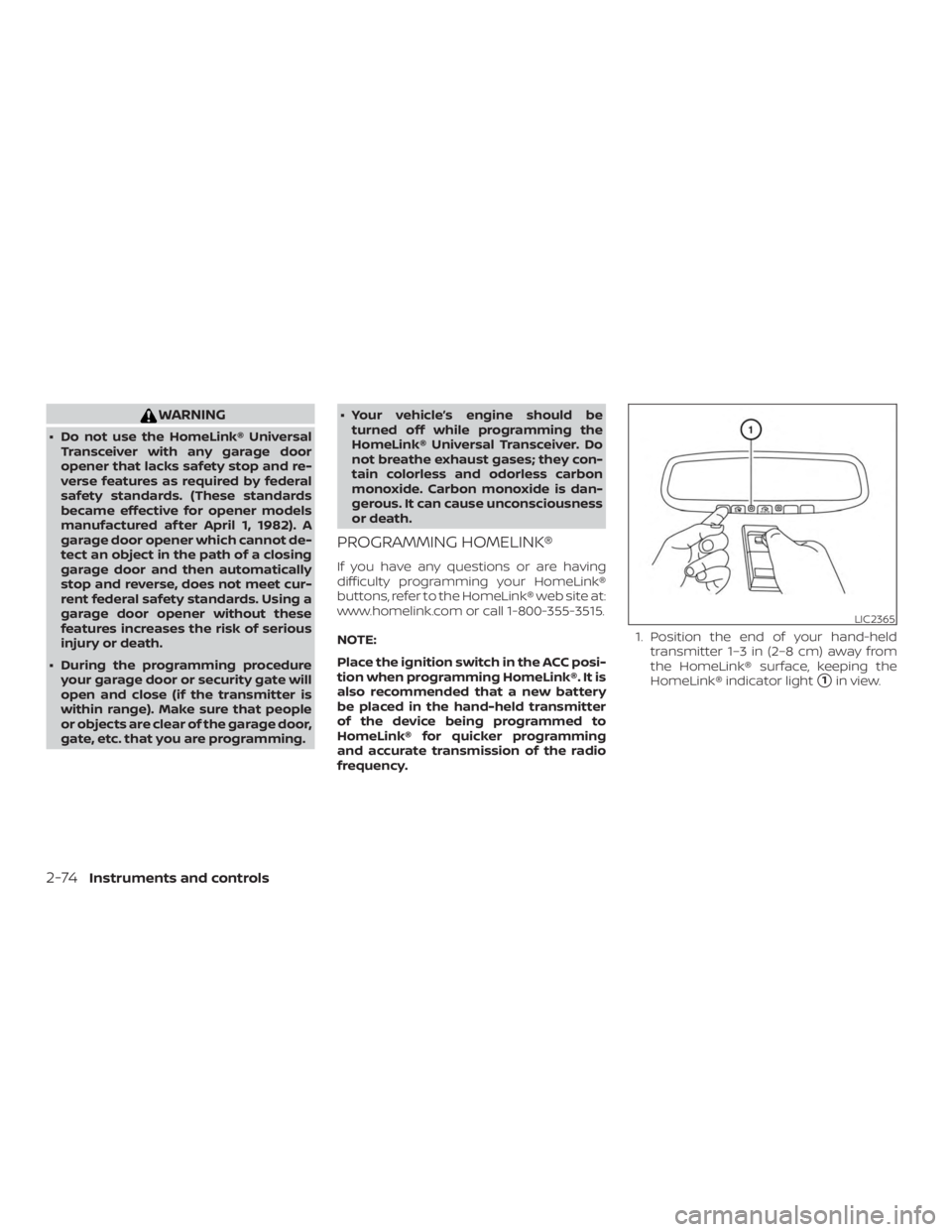
frequency. 1. Position the end of your hand-held
transmitter 1–3 in (2–8 cm) away from
the HomeLink® surface, keeping the
HomeLink® indicator light
�1in view.
Page 188 of 476
∙ Switching the Auto Room Lamp to theOFF position in “Vehicle Settings” of the
vehicle information display. For addi-
tional information, refer to “Vehicle in-
formation display” in the “Instruments
and controls” section of this manual.
HOW TO USE THE REMOTE
KEYLESS ENTRY FUNCTION
The remote keyless entry function can op-
erate all door locks using the remote key-
less function of the Intelligent Key. The re-
mote keyless function can operate at a
distance of 33 f t (10 m) away from the ve-
hicle. The operating distance depends
upon the conditions around the vehicle.
The remote keyless entry function will not
function under the following conditions:
∙ When the Intelligent Key is not within the operational range.
∙ When the doors or the rear lif tgate are open or not closed securely.
∙ When the Intelligent Key battery is dis- charged.
Page 196 of 476
CAUTION
Listed below are conditions or occur-
rences which will damage the Intelli-
gent Key:
∙ Do not allow the Intelligent Key, whichcontains electrical components, to
come into contact with water or salt
water. This could affect the system
function.
∙ Do not drop the Intelligent Key.
∙ Do not strike the Intelligent Key sharply against another object.
∙ Do not change or modif y the Intelli- gent Key.
∙ Wetting may damage the Intelligent Key. If the Intelligent Key gets wet, im-
mediately wipe until it is completely
dry.
∙ Do not place the Intelligent Key for an extended period in an area where
temperatures exceed 140°F (60°C).
∙ Do not attach the Intelligent Key with a key holder that contains a magnet.
∙ Do not place the Intelligent Key near equipment that produces a magnetic
field, such as a TV, audio equipment
and personal computers. If an Intelligent Key is lost or stolen, NISSAN
recommends erasing the ID code of that
Intelligent Key from the vehicle. This may
prevent the unauthorized use of the Intelli-
gent Key to operate the vehicle. For infor-
mation regarding the erasing procedure, it
is recommended that you visit a NISSAN
dealer.
OPERATING RANGE
The Intelligent Key functions can only be
used when the Intelligent Key is within the
specified operating range.
When the Intelligent Key battery is dis-
charged or strong radio waves are present
near the operating location, the Intelligent
Key system’s operating range becomes
narrower, and the Intelligent Key may not
function properly.
The operating range is within 33 f t (10 m) of
the vehicle.
HOW TO USE THE REMOTE
KEYLESS ENTRY FUNCTION
The remote keyless entry function can op-
erate all door locks using the remote key-
less function of the Intelligent Key. The re-
mote keyless function can operate at a
distance of 33 f t (10 m) away from the ve-
hicle. The operating distance depends
upon the conditions around the vehicle.
The remote keyless entry function will not
function under the following conditions:
∙ When the Intelligent Key is not within the operational range.
∙ When the doors or the rear lif tgate are open or not closed securely.
∙ When the Intelligent Key battery is dis- charged.
Page 217 of 476
CAUTION
For vehicles with automatic drive posi-
tioner: Failure to reset the tilt and tele-
scoping functions of the steering
wheel, af ter the vehicle’s battery has
been discharged, may prevent the
steering wheel position from being
adjusted.
For vehicles with automatic drive posi-
tioner: Both the tilt and telescopic steering
operation must be reset af ter the vehicle’s
battery has been discharged in order to
prevent the tilt and telescopic operation
from locking in one position. When the bat-
tery has been recharged or replaced, per-
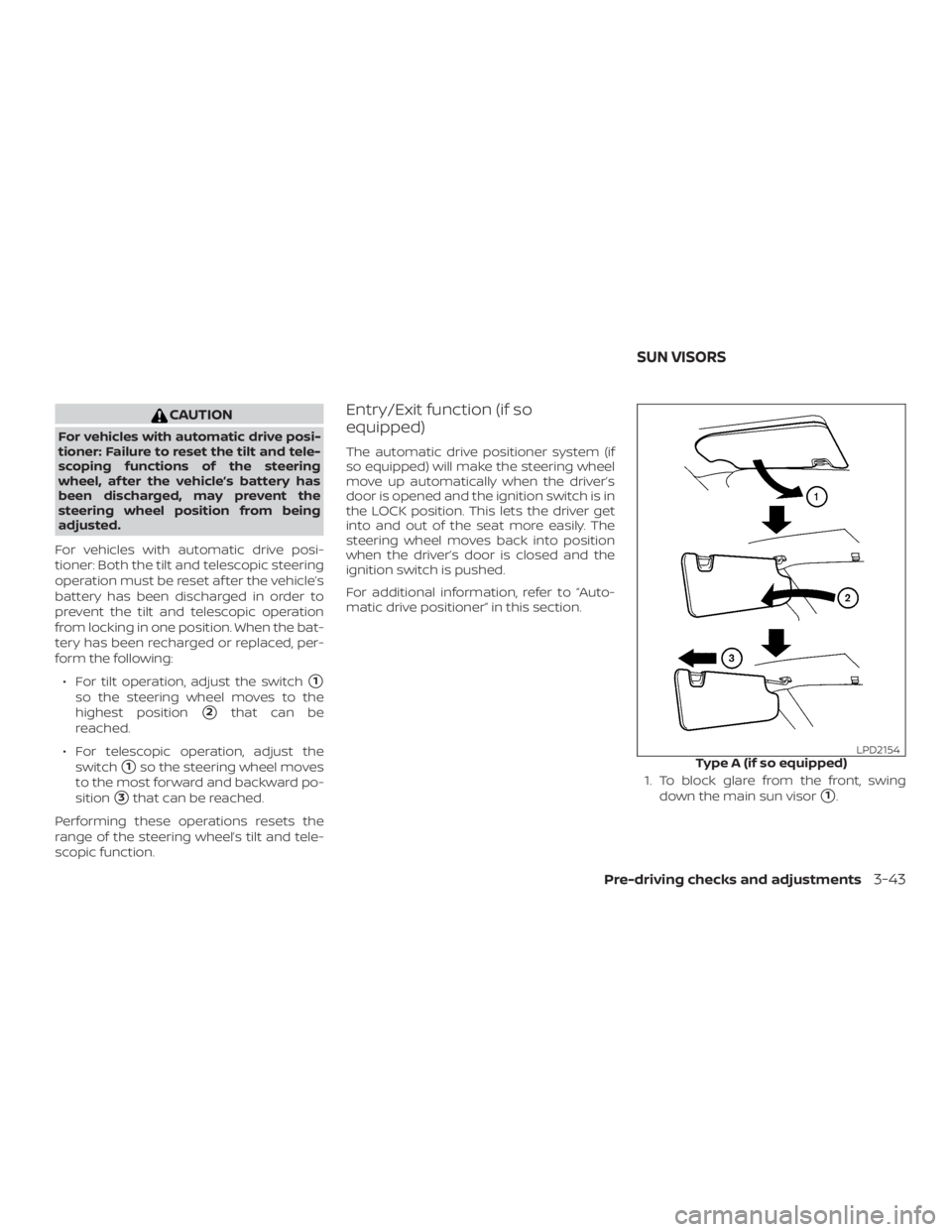
form the following: ∙ For tilt operation, adjust the switch
�1
so the steering wheel moves to the
highest position
�2that can be
reached.
∙ For telescopic operation, adjust the switch
�1so the steering wheel moves
to the most forward and backward po-
sition
�3that can be reached.
Performing these operations resets the
range of the steering wheel’s tilt and tele-
scopic function.
Entry/Exit function (if so
equipped)
The automatic drive positioner system (if
so equipped) will make the steering wheel
move up automatically when the driver’s
door is opened and the ignition switch is in
the LOCK position. This lets the driver get
into and out of the seat more easily. The
steering wheel moves back into position
when the driver’s door is closed and the
ignition switch is pushed.
For additional information, refer to “Auto-
matic drive positioner” in this section.
1. To block glare from the front, swingdown the main sun visor
�1.
Page 281 of 476
ACC (Accessories)
This position activates electrical accesso-
ries, such as the radio, when the engine is
not running.
ACC has a battery saver feature that will
place the ignition switch in the OFF position
af ter a period of time under the following
conditions:∙ All doors are closed.
∙ The shif t lever is in P (Park).
The battery saver feature will be canceled if
any of the following occur: ∙ Any door is opened.
∙ The shif t lever is moved out of P (Park).
∙ The ignition switch changes position.
ON (Normal operating position)
This position turns on the ignition system
and electrical accessories.
ON has a battery saver feature that will
place the ignition switch in the OFF posi-
tion, if the vehicle is not running, af ter some
time under the following conditions: ∙ All doors are closed.
∙ The shif t lever is in P (Park). The battery saver feature will be canceled if
any of the following occur:
∙ Any door is opened.
∙ The shif t lever is moved out of the P (Park) position.
∙ The ignition switch changes position.
Page 284 of 476

5. To stop the engine, move the shif t leverto the P (Park) position and push the
ignition switch to the OFF position.
NOTE:
Care should be taken to avoid situations
that can lead to potential battery dis-
charge and potential no-start conditions
such as: 1. Installation or extended use of elec-
tronic accessories that consume bat-
tery power when the engine is not
running (phone chargers, GPS, DVD
players, etc.).
2. The vehicle is not driven regularly
and/or only driven short distances.
In these cases, the battery may need to
be charged to maintain battery health.
REMOTE ENGINE START (if so
equipped)
Vehicles started with the Remote Engine
Start require the ignition switch to be
placed in the ON position before the shif t
lever can be moved from the P (Park) posi-
tion. To place the ignition switch in the ON
position, follow these steps: 1. Make sure that the Intelligent Key is on
you.
2. Apply the brake.
3. Push the ignition switch once to the ON position.
For additional information, refer to “NISSAN
Intelligent Key®” in the “Pre-driving checks
and adjustments” section of this manual.
CONTINUOUSLY VARIABLE
TRANSMISSION (CVT)
Page 361 of 476
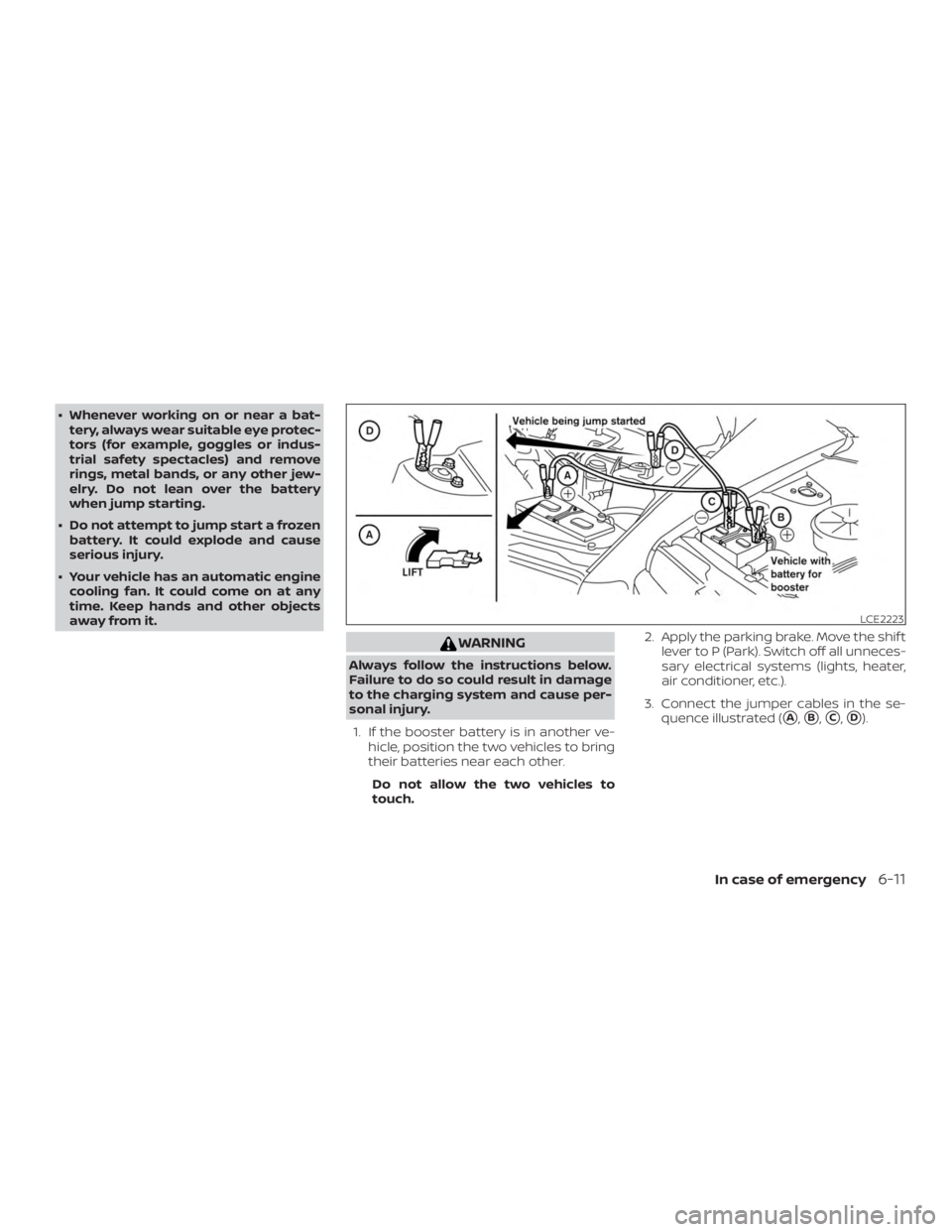
∙ Whenever working on or near a bat-tery, always wear suitable eye protec-
tors (for example, goggles or indus-
trial safety spectacles) and remove
rings, metal bands, or any other jew-
elry. Do not lean over the battery
when jump starting.
∙ Do not attempt to jump start a frozen battery. It could explode and cause
serious injury.
∙ Your vehicle has an automatic engine cooling fan. It could come on at any
time. Keep hands and other objects
away from it.
Page 362 of 476
CAUTION
∙ Always connect positive (�) to posi-tive ( �) and negative (�) to body
ground (for example, strut mounting
bolt, engine lif t bracket, etc.) — not to
the battery.
∙ Make sure the jumper cables do not touch moving parts in the engine
compartment and that the cable
clamps do not contact any other
metal.
4. Start the engine of the booster vehicle and let it run for a few minutes.
5. Keep the engine speed of the booster vehicle at about 2,000 rpm and start
the engine of the vehicle being jump
started.