Page 95 of 372
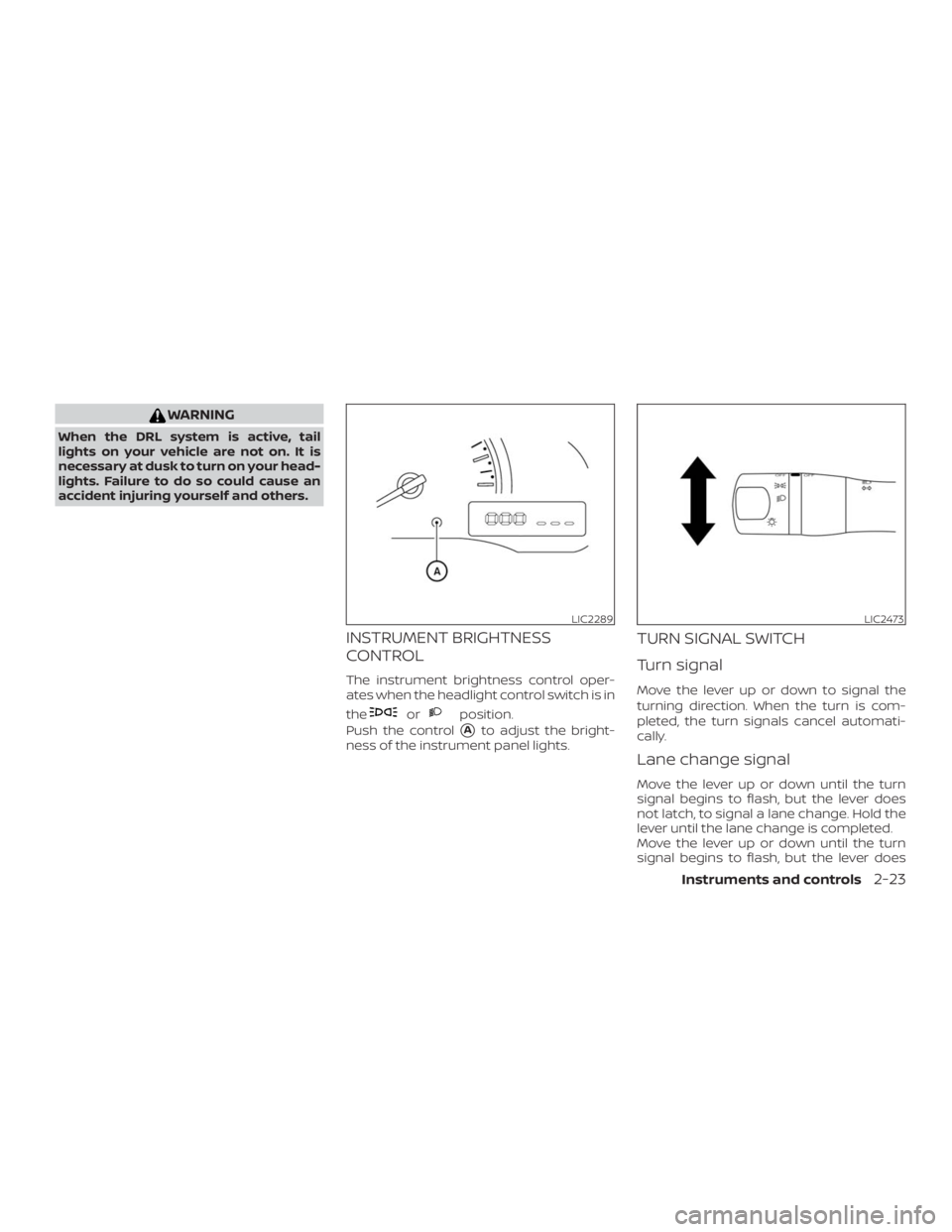
orposition.
Push the control
�Ato adjust the bright-
ness of the instrument panel lights.
TURN SIGNAL SWITCH
Turn signal
Move the lever up or down to signal the
turning direction. When the turn is com-
pleted, the turn signals cancel automati-
cally.
Lane change signal
Move the lever up or down until the turn
signal begins to flash, but the lever does
not latch, to signal a lane change. Hold the
lever until the lane change is completed.
Move the lever up or down until the turn
signal begins to flash, but the lever does
LIC2289LIC2473
Page 104 of 372
WARNING
There are some small distances imme-
diately before the closed position which
cannot be detected. Make sure that all
passengers have their hands, etc., in-
side the vehicle before closing the
window.
If the vehicle’s battery is disconnected, re-
placed, or jump started, the power window
auto-reverse function may not operate
properly. If this occurs, have the power win-
dow auto-reverse system re-initialized. It is
recommended that you visit a NISSAN
dealer for this service.
If the control unit detects something
caught in a window equipped with auto-
matic operation as it is closing, the window
will be immediately lowered.
When power window switch does
not operate
If the power window automatic function
(closing only) does not operate properly,perform the following procedure to initial-
ize the power window system:
1. Place the ignition switch in the ON po-
sition.
2. Open the window more than half way
by operating the power window switch.
3. Pull the power window switch and hold
it to close the window, and then hold
the switch more than 3 seconds af ter
the window is closed.
4. Release the power window switch. Op-
erate the window by the automatic
function to confirm the initialization is
complete. The power window auto-
matically opens or closes depending
on if the automatic down or up func-
tion is selected.
5. Perform steps 2 through 4 above for
other windows.
If the power window function does not op-
erate properly af ter performing the above
procedure have the system checked and
repaired. It is recommended that you visit a
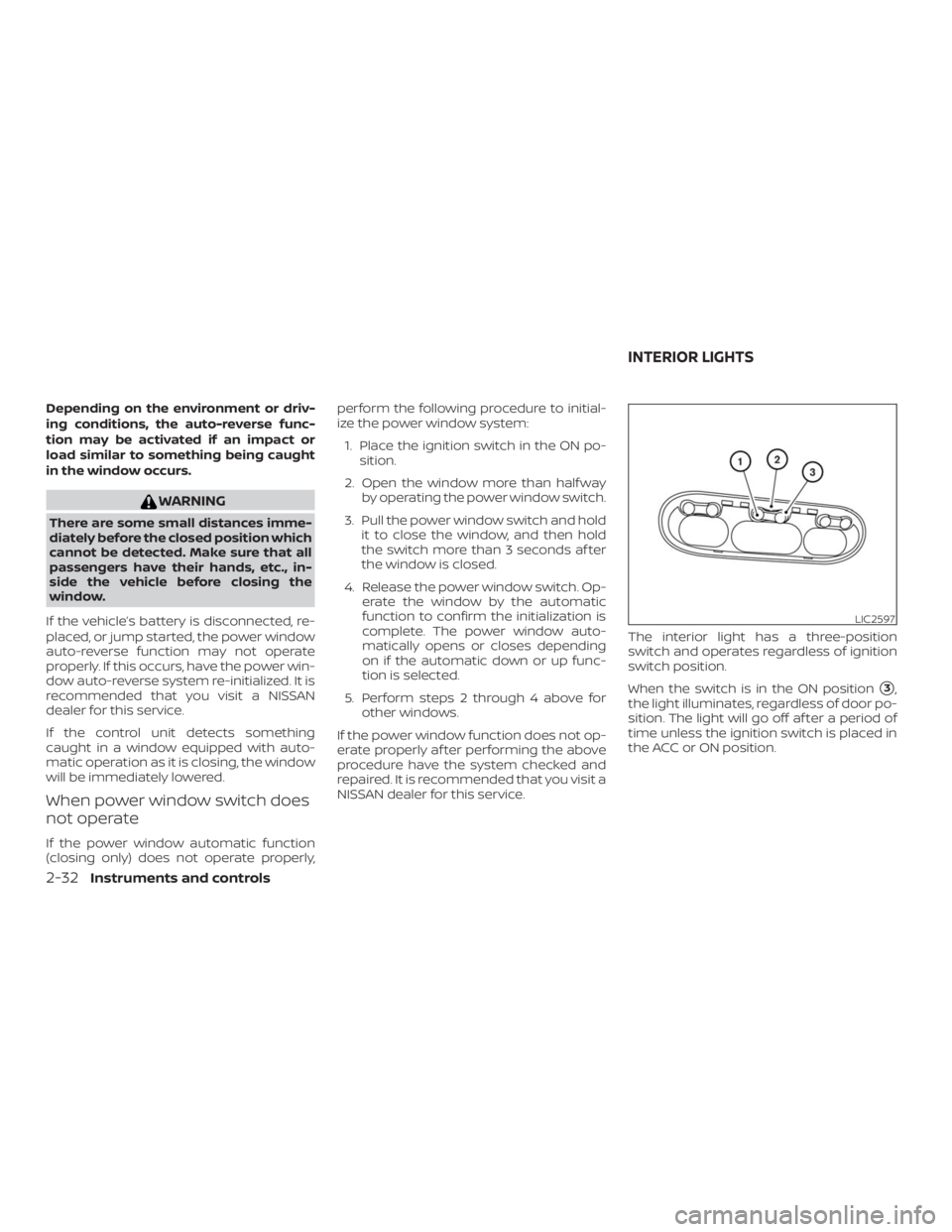
NISSAN dealer for this service.The interior light has a three-position
switch and operates regardless of ignition
switch position.
When the switch is in the ON position
�3,
the light illuminates, regardless of door po-
sition. The light will go off af ter a period of
time unless the ignition switch is placed in
the ACC or ON position.
LIC2597
INTERIOR LIGHTS
Page 117 of 372
CAUTION
Listed below are conditions or occur-
rences which will damage the key fob:
� Do not allow the key fob, which con-
tains electrical components, to come
into contact with water or salt water.
This could affect the system function.
� Do not drop the key fob.
� Do not strike the key fob sharply
against another object.
� Do not change or modif y the key fob.
� Wetting may damage the key fob. If
the key fob gets wet, immediately
wipe until it is completely dry.� Do not place the key fob for an ex-
tended period in an area where tem-
peratures exceed 140°F (60°C).
� Do not attach the key fob with a key
holder that contains a magnet.
� Do not place the key fob near equip-
ment that produces a magnetic field,
such as a TV, audio equipment and
personal computers.
If a key fob is lost or stolen, NISSAN rec-
ommends erasing the ID code of that
key fob. This will prevent the key fob
from unauthorized use to unlock the
vehicle. For information regarding the
erasing procedure, it is recommended
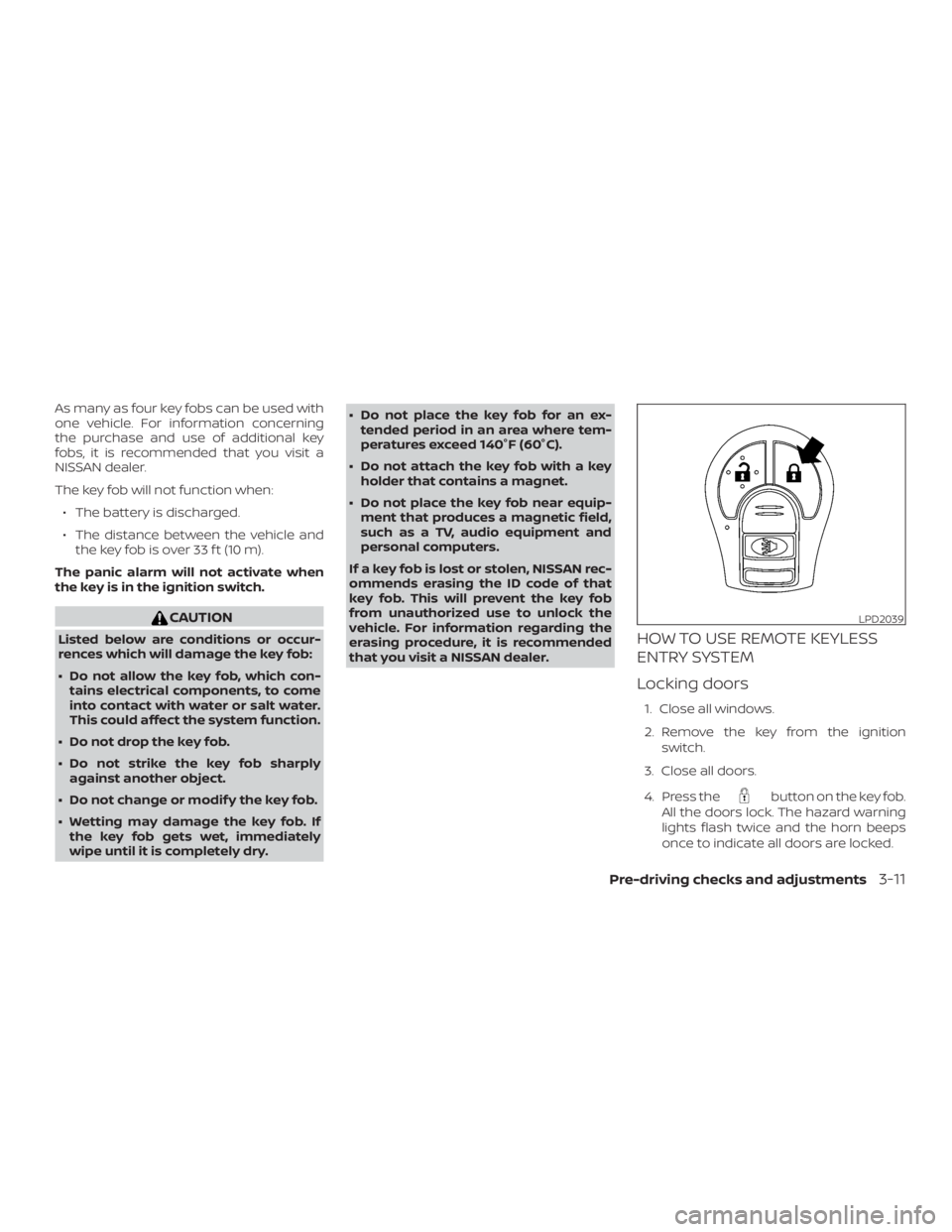
that you visit a NISSAN dealer.HOW TO USE REMOTE KEYLESS
ENTRY SYSTEM
Locking doors
1. Close all windows.
2. Remove the key from the ignition
switch.
3. Close all doors.
4. Press the
button on the key fob.
All the doors lock. The hazard warning
lights flash twice and the horn beeps
once to indicate all doors are locked.
LPD2039
Page 118 of 372
button is pressed
with all doors locked, the hazard
warning lights flash twice and the
horn beeps once as a reminder that
the doors are already locked.
� If a door is open and you press
the
button, the doors will lock
but the horn will not beep and the
hazard lights will not flash.
The horn may or may not beep. For addi-
tional information, refer to the
horn beep featureŽ in this section.
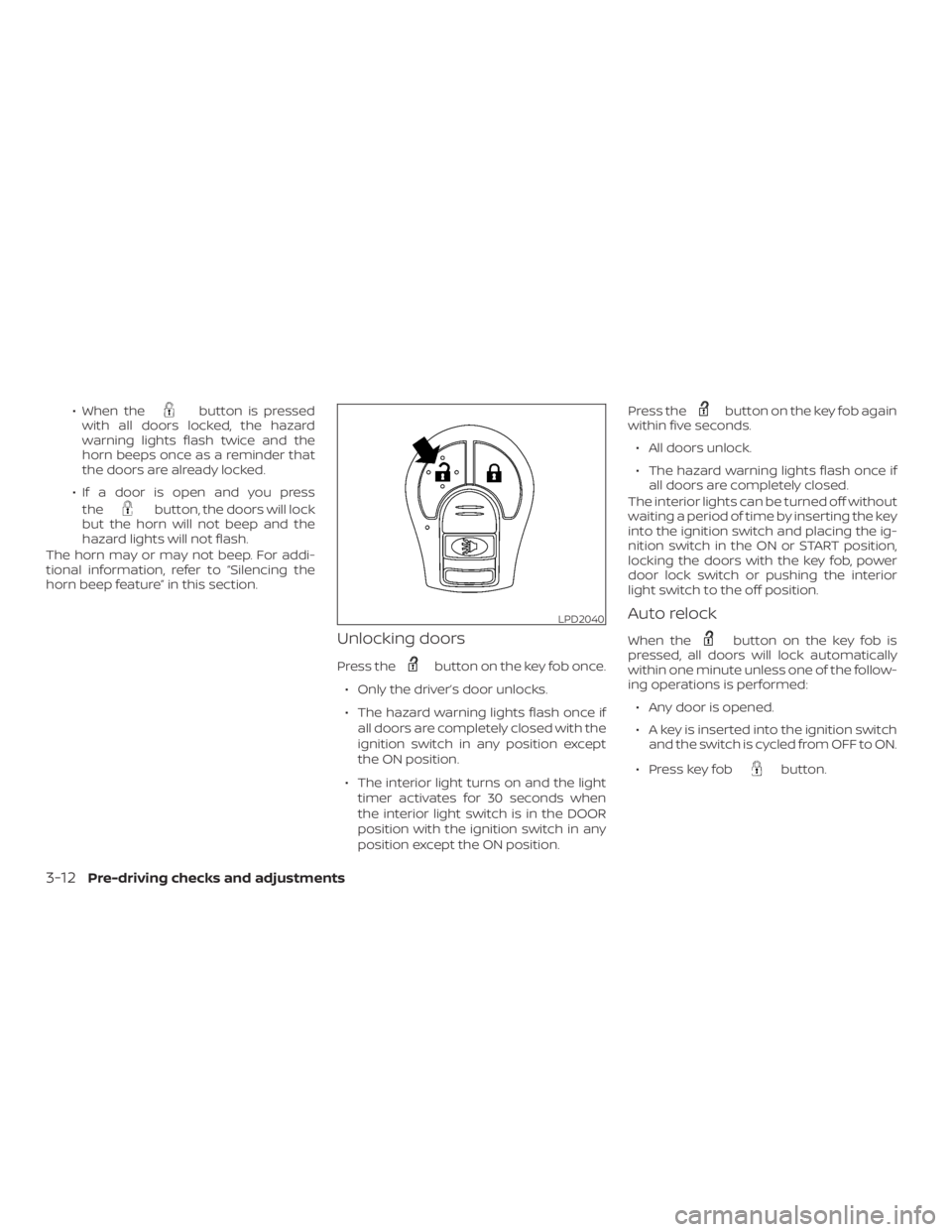
Unlocking doors
Press thebutton on the key fob once.
� Only the door unlocks.
� The hazard warning lights flash once if
all doors are completely closed with the
ignition switch in any position except
the ON position.
� The interior light turns on and the light
timer activates for 30 seconds when
the interior light switch is in the DOOR
position with the ignition switch in any
position except the ON position.Press the
button on the key fob again
within five seconds.
� All doors unlock.
� The hazard warning lights flash once if
all doors are completely closed.
The interior lights can be turned off without
waiting a period of time by inserting the key
into the ignition switch and placing the ig-
nition switch in the ON or START position,
locking the doors with the key fob, power
door lock switch or pushing the interior
light switch to the off position.
Auto relock
When thebutton on the key fob is
pressed, all doors will lock automatically
within one minute unless one of the follow-
ing operations is performed:
� Any door is opened.
� A key is inserted into the ignition switch
and the switch is cycled from OFF to ON.
� Press key fob
button.
LPD2040
3-12Pre-driving checks and adjustments
Page 119 of 372
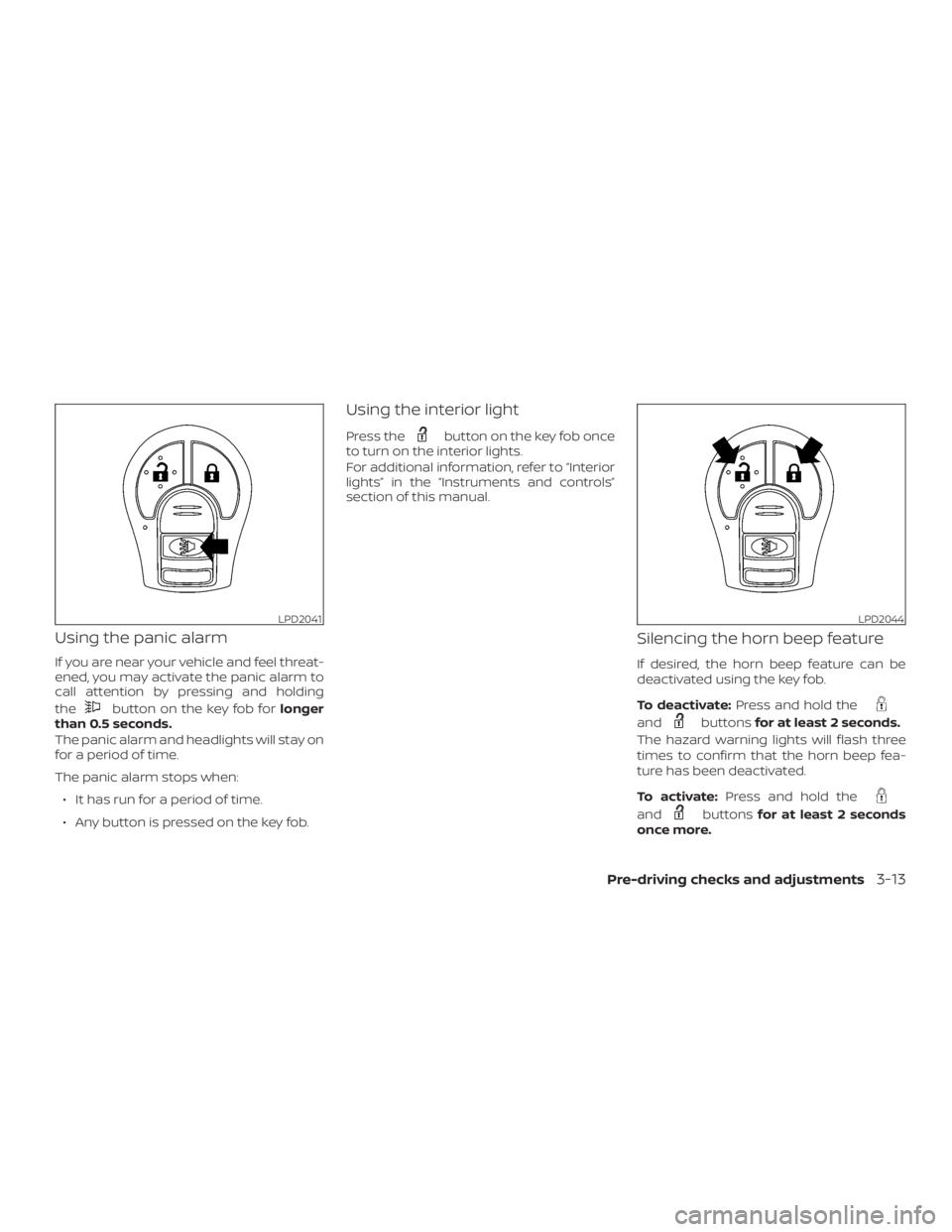
button on the key fob forlonger
than 0.5 seconds.
The panic alarm and headlights will stay on
for a period of time.
The panic alarm stops when:
∙ It has run for a period of time.
∙ Any button is pressed on the key fob.
Using the interior light
Press thebutton on the key fob once
to turn on the interior lights.
For additional information, refer to “Interior
lights” in the “Instruments and controls”
section of this manual.
Silencing the horn beep feature
If desired, the horn beep feature can be
deactivated using the key fob.
To deactivate:Press and hold the
andbuttonsfor at least 2 seconds.
The hazard warning lights will flash three
times to confirm that the horn beep fea-
ture has been deactivated.
To activate:Press and hold the
andbuttonsfor at least 2 seconds
once more.
LPD2044
Page 245 of 372
indicator flashes if this oc-
curs. All other VDC functions are off and
the
indicator will not flash.
The VDC system is automatically reset to
ON when the ignition switch is placed in the
OFF position then back to the ON position.
The computer has a built-in diagnostic fea-
ture that tests the system each time you
start the engine and move the vehicle for-
ward or in reverse at a slow speed. When
the self-test occurs, you may hear a clunk
noise and/or feel a pulsation in the brake
pedal. This is normal and is not an indica-
tion of a malfunction.
indicator may flash or
the
indicator light may
illuminate.
� If brake related parts such as brake
pads, rotors and calipers are not
NISSAN recommended or are ex-
tremely deteriorated, the VDC system
may not operate properly and both
the
andindicator lights
may illuminate.
� If engine control related parts are not
NISSAN recommended or are ex-
tremely deteriorated, both the
and theindicator lights may
illuminate.� When driving on extremely inclined
surfaces such as higher banked cor-
ners, the VDC system may not operate
properly and the
indicator may
flash or the
indicator light may
illuminate. Do not drive on these types
of roads.
� When driving on an unstable surface
such as a turntable, ferry, elevator or
ramp, the
indicator may flash or
the
indicator light may illumi-
nate. This is not a malfunction. Re-
start the engine af ter driving onto a
stable surface.
� If wheels or tires other than the
NISSAN recommended ones are used,
the VDC system may not operate
properly and the
indicator may
flash or the
indicator light may
illuminate.
� The VDC system is not a substitute for
winter tires or tire chains on a snow
covered road.
Starting and driving5-27
Page 246 of 372
indicator may flash or
the
indicator light may
illuminate.
� If brake related parts such as brake
pads, rotors and calipers are not
NISSAN recommended or are ex-
tremely deteriorated, the VDC system
may not operate properly and both
the
andindicator lights
may illuminate.
� If engine control related parts are not
NISSAN recommended or are ex-
tremely deteriorated, both the
and theindicator lights may
illuminate.� When driving on extremely inclined
surfaces such as higher banked cor-
ners, the VDC system may not operate
properly and the
indicator may
flash or the
indicator light may
illuminate. Do not drive on these types
of roads.
� When driving on an unstable surface
such as a turntable, ferry, elevator or
ramp, the
indicator may flash or
the
indicator light may illumi-
nate. This is not a malfunction. Re-
start the engine af ter driving onto a
stable surface.
� If wheels or tires other than the
NISSAN recommended ones are used,
the VDC system may not operate
properly and the
indicator may
flash or the
indicator light may
illuminate.
� The VDC system is not a substitute for
winter tires or tire chains on a snow
covered road.
5-28Starting and driving
Page 302 of 372