2019 NISSAN MAXIMA ignition
[x] Cancel search: ignitionPage 107 of 492

Driver Assistance
The driver assistance menu allows the user
to change the various driving aids and as-
sistance options.
Menu itemResult
Lane (if so equipped) Displays the available lane options.
Lane Departure Warning Allows user to turn the Lane Departure Warning (LDW) system on or off. For additional information, refer to “Lane
Departure Warning (LDW)” in the “Starting and driving” section of this manual.
Lane Departure Prevention Allows user to turn Intelligent Lane Intervention (I-LI) system on or off when the engine is running The system will reset to off af ter every ignition cycle. For additional information, refer to “Intelligent Lane Intervention (I-LI) in the
“Starting and driving” section of this manual.
Blind Spot (if so equipped) Allows user to turn the blind spot feature on or off. For additional information, refer to “Blind Spot Warning (BSW)”
and “Rear Cross Traffic Alert (RCTA)” in the “Starting and driving” section of this manual.
Speed Limit Sign (if so equipped) Allows user to turn the Speed Limit Sign feature on or off. For additional information, refer to "Traffic Sign Recogni-
tion (TSR)” in the “Starting and driving” section of this manual.
Parking Aids (if so equipped) Displays the available parking aids. For additional information, refer to “Front and rear sonar system” in the “Start-
ing and driving” section of this manual.
Sensor Allows user to turn the sensor on, off, or front only.
Display Allows user to turn the display on or off.
Volume Allows user to adjust the volume to Low/Med./High.
Range Allows user to adjust the range to Near/Mid./Far.
Emergency Brake Displays the available emergency braking options.
Front Allows user to turn the front emergency braking system on or off. For additional information, refer to “Automatic
Emergency Braking (AEB)” “Automatic Emergency Braking (AEB) with Pedestrian Detection” and “Intelligent For-
ward Collision Warning (I-FCW)” in the “Starting and driving” section of this manual.
Rear (if so equipped) Allows user to turn the rear emergency braking system on or off. For additional information, refer to “Rear Auto-
matic Braking (RAB)” in the “Starting and driving” section of this manual.
Driver Attention Alert (if so equipped) Allows user to turn the driver attention feature on or off. For additional information, refer to “Intelligent Driver Alert-
ness (I-DA)” in the “Starting and driving” section of this manual.
Timer Alert Allows user to set or reset an alert at a specific time interval.
Low Temperature Alert Allows user to turn the low temperature alert on or off.
Instruments and controls2-21
Page 110 of 492
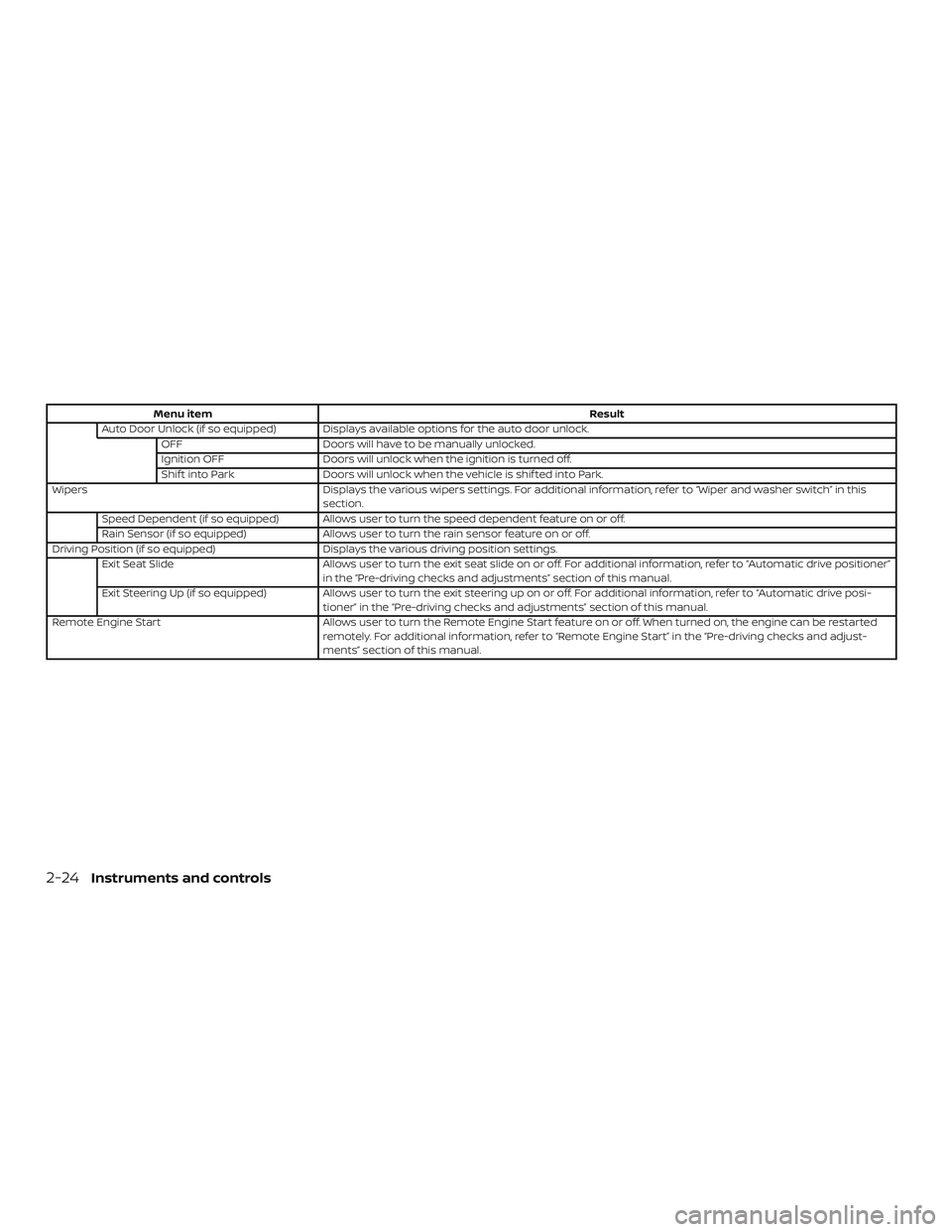
Menu itemResult
Auto Door Unlock (if so equipped) Displays available options for the auto door unlock. OFF Doors will have to be manually unlocked.
Ignition OFF Doors will unlock when the ignition is turned off.
Shif t into Park Doors will unlock when the vehicle is shif ted into Park.
Wipers Displays the various wipers settings. For additional information, refer to “Wiper and washer switch” in this
section.
Speed Dependent (if so equipped) Allows user to turn the speed dependent feature on or off.
Rain Sensor (if so equipped) Allows user to turn the rain sensor feature on or off.
Driving Position (if so equipped) Displays the various driving position settings.
Exit Seat Slide Allows user to turn the exit seat slide on or off. For additional information, refer to “Automatic drive positioner”
in the “Pre-driving checks and adjustments” section of this manual.
Exit Steering Up (if so equipped) Allows user to turn the exit steering up on or off. For additional information, refer to “Automatic drive posi-
tioner” in the “Pre-driving checks and adjustments” section of this manual.
Remote Engine Start Allows user to turn the Remote Engine Start feature on or off. When turned on, the engine can be restarted
remotely. For additional information, refer to “Remote Engine Start” in the “Pre-driving checks and adjust-
ments” section of this manual.
2-24Instruments and controls
Page 116 of 492

22. Push ignition to OFF
23. Chassis Control System Error: SeeOwner’s Manual (if so equipped)
24. Cruise control indicator (if so equipped)
25. Intelligent Cruise Control (ICC) indicator (if so equipped)
26. Driver Attention Alert — Take a Break? (if so equipped)
27. Driver Attention Alert Malfunction (if so equipped)
28. Shipping Mode On Push Storage Fuse
29. CVT Error: See Owner’s Manual
30. SPORT
31. Illumination indicator
32. Transmission Shif t Position indicator
33. Outside Temperature Display
34. Low Outside Temperature
35. Oil and Filter
36. Tire
37. Other 38. Loose Fuel Cap
39. Unavailable: Front Radar Obstruction (if
so equipped)
40. Side Radar Obstruction (if so equipped)
41. Rear Door Alert is activated
42. Check Rear Seat For All Articles
43. Rear Automatic Braking (RAB) system warning indicator (if so equipped)
44. Unavailable High Cabin Temperature (if so equipped)
45. Unavailable Road is Slippery (if so equipped)
46. Currently Unavailable (If so equipped)
47. Lane Departure Warning (LDW) indica- tor (if so equipped)
48. Speed Limit Sign indicator (if so equipped)
49. Vehicle ahead detection indicator (if so equipped)
50. Automatic Emergency Braking (AEB) warning indicator (if so equipped) 51. Cruise ON (if so equipped)
52. Cruise Target Speed SET (if so
equipped)
53. Intelligent Cruise ON (if so equipped)
54. Target Speed SET with Intelligent Dis- tance Control (if so equipped)
No Key Detected
This warning appears when the Intelligent
Key is lef t outside the vehicle with the igni-
tion switch in the ON position. Make sure
the Intelligent Key is inside the vehicle.
For additional information, refer to “NISSAN
Intelligent Key®” in the “Pre-driving checks
and adjustments” section of this manual.
Key ID Incorrect
This warning appears when the ignition
switch is placed from the OFF position and
the Intelligent Key is not recognized by the
system. You cannot start the engine with
an unregistered key.
For additional information, refer to “NISSAN
Intelligent Key®” in the “Pre-driving checks
and adjustments” section of this manual.
2-30Instruments and controls
Page 117 of 492

Key Battery Low
This indicator illuminates when the Intelli-
gent Key battery is running out of power.
If this indicator illuminates, replace the bat-
tery with a new one. For additional infor-
mation, refer to “Battery replacement” in
the “Do-it-yourself ” section of this manual.
Key System Fault See Owner’s Manual
Af ter the ignition switch is pushed to the
ON position, this light comes on for a period
of time and then turns off.
The Key System Fault message warns of a
malfunction with the Intelligent Key sys-
tem. If the light comes on while the engine
is stopped, it may be impossible to start
the engine.
If the light comes on while the engine is
running, you can drive the vehicle. However,
in these cases, have the system checked. It
is recommended that you visit a NISSAN
dealer for this service.
Shif t to Park
This warning illuminates when the ignition
switch is in the ACC or OFF position and the
shif t lever is not in the P (Park) position. Also,
a chime sounds when the ignition switch is
in the ACC or OFF position.If this warning illuminates, move the shif t
lever to the P (Park) position and start the
engine.
Push brake and start switch to drive
This indicator appears when the shif t lever
is in the P (Park) position.
This indicator also appears when the ve-
hicle has been started using the Remote
Engine Start function.
This indicator means that the engine will
start by pushing the ignition switch with
the brake pedal depressed. You can start
the engine from any position of the ignition
switch.
Engine start operation for Intelligent
Key system (if I-Key battery level is low)
This indicator appears when the battery of
the Intelligent Key is low and when the In-
telligent Key system and the vehicle are not
communicating normally.
If this appears, touch the ignition switch
with the Intelligent Key while depressing
the brake pedal. For additional information,
refer to “NISSAN Intelligent Key® battery dis-
charge” in the “Starting and driving” section
of this manual.
Release Parking Brake
This warning illuminates in the message
area of the vehicle information display
when the parking brake is set and the ve-
hicle is driven.
Low Fuel
This warning illuminates when the fuel level
in the fuel tank is getting low. Refuel as
soon as it is convenient, preferably before
the fuel gauge reaches 0 (Empty).
There
will be a small reserve of fuel in the tank
when the fuel gauge needle reaches 0
(Empty).
Low Washer Fluid
This warning illuminates when the
windshield-washer fluid is at a low level.
Add windshield-washer fluid as necessary.
For additional information, refer to
“Windshield-washer fluid” in the “Do-it-
yourself ” section of this manual.
Tire Pressure Low - Add Air
This warning appears when the low tire
pressure warning light in the meter illumi-
nates and low tire pressure is detected. The
warning appears each time the ignition
switch is placed in the ON position as long
as the low tire pressure warning light re-
Instruments and controls2-31
Page 118 of 492

mains illuminated. If this warning appears,
stop the vehicle and adjust the tire pres-
sures of all four tires to the recommended
COLD tire pressure shown on the Tire and
Loading Information label. For additional
information, refer to “Low tire pressure
warning light” in this section and “Tire Pres-
sure Monitoring System (TPMS)” in the
“Starting and driving” section of this
manual.
Door/Trunk Open
This warning illuminates when a door or
the trunk has been opened.
Alarm - Time for a break?
This indicator appears when the driver en-
ables the Timer Alert function within the
Driving Aids settings and the selected set
time is expired. The time is based on igni-
tion on time and can be set up to six hours.
Power will turn off to save the battery
This message appears in the vehicle infor-
mation display af ter a period of time if the
ignition switch is in the ACC or the ON po-
sition and if the vehicle is in P (Park). For
additional information, refer to “Push-
button ignition switch positions” in the
“Starting and driving” section of this
manual.Power turned off to save the battery
This message appears af ter the ignition
switch is automatically turned off. For addi-
tional information, refer to “Push-button ig-
nition switch positions” in the “Starting and
driving” section of this manual.
Reminder: Turn OFF Headlights
This warning appears when the headlights
are lef t in the ON position when exiting the
vehicle. Place the headlight switch in the
OFF or AUTO position. For additional infor-
mation, refer to “Headlight and turn signal
switch” in this section.
Headlight System Error: See Owner’s
Manual (if so equipped)
This warning illuminates when there is an
error with the system. For additional infor-
mation, refer to “Headlight and turn signal
switch” in this section.
Rotate the steering and push the start
switch (if so equipped)
This warning appears when the steering
lock cannot be unlocked or is malfunction-
ing. This warning may appear if the steer-
ing wheel is not aligned with the locking
mechanism. If this warning appears, lightly
turn the steering wheel right and lef t torealign the steering wheel position with the
locking mechanism, and then push the ig-
nition switch to ON. This warning will re-
main on until the steering lock is realigned
with the locking mechanism and the igni-
tion switch has been pressed to ON, or until
15 seconds has elapsed. If the warning con-
tinues to appear even af ter realignment,
have the system checked. It is recom-
mended that you visit a NISSAN dealer for
this service.
The Master warning light will remain illumi-
nated until the Electrical steering lock re-
lease warning is cleared.
Parking Sensor (if so equipped)
This indicator illuminates when the sensor
is activated. Pressing the OK button while
the sonar screen is displayed will dismiss
this message until the next time the sen-
sors are activated. The Parking Sensor sys-
tem will remain on, unless it is disabled in
the vehicle information display. For addi-
tional information, refer to “Front and rear
sonar system” in the “Starting and driving”
section of this manual.
2-32Instruments and controls
Page 119 of 492

Parking Sensor Error: See Owner’s
Manual (if so equipped)
This warning illuminates when there is an
error with the system. For additional infor-
mation, refer to “Front and rear sonar sys-
tem” in the “Starting and driving” section of
this manual.
Blind Spot Warning (BSW) and Rear
Cross Traffic Alert (RCTA) indicator (if so
equipped)
This indicator shows when the BSW and
RCTA systems are engaged.
For additional information, refer to “Blind
Spot Warning (BSW)” and “Rear Cross Traffic
Alert (RCTA)” in the “Starting and driving”
section of this manual.
Push ignition to OFF
Af ter the Push ignition to OFF warning illu-
minates, the warning will illuminate if the
ignition switch is placed in the ACC position
when the shif t lever is moved to the P (Park)
position.
To turn off the Push warning, place the ig-
nition switch in the ON position and then in
the LOCK position.Chassis Control System Error: See Own-
er’s Manual (if so equipped)
This warning appears if the Integrated
Dynamics-control Module detects an error
in the Intelligent Trace Control, Intelligent
Engine Brake, or the Active Ride Control
systems. Have the system checked. It is
recommended that you visit a NISSAN
dealer for this service. For additional infor-
mation, refer to “Chassis control” in the
“Starting and driving” section of this
manual.
Cruise control indicator (if so equipped)
This indicator shows the cruise control sys-
tem status.
When cruise control is activated, a green
circle will illuminate to indicate it is set. The
vehicle information display will also display
the speed the cruise control was set at. If
you accelerate past the set speed, the
speed will blink until you either cancel
cruise control or go back to the set speed. If
cruise control is on and canceled, the
speed will be displayed to show the speed
the vehicle will return to if the resume but-
ton is activated.
Intelligent Cruise Control (ICC) indicator
(if so equipped)
This indicator shows the Intelligent Cruise
Control (ICC) system status. The status is
shown by the color. For additional informa-
tion, refer to “Intelligent Cruise Control (ICC)”
in the “Starting and driving” section of this
manual.
Driver Attention Alert - Take a Break? (if
so equipped)
This alert appears when the system has
detected that the driver may be displaying
fatigue or a lack of attention.
Driver Attention Alert Malfunction (if so
equipped)
This warning appears when the Intelligent
Driver Alertness (I-DA) system is not func-
tioning properly. For additional information,
refer to “Intelligent Driver Alertness (I-DA)” in
the “Starting and driving” section of this
manual.
Shipping Mode On Push Storage Fuse
This warning may appear if the extended
storage switch is not pushed in. When this
warning appears, push in the extended
storage switch to turn off the warning. For
Instruments and controls2-33
Page 123 of 492

Automatic Emergency Braking (AEB)
emergency warning indicator (if so
equipped)
This indicator illuminates along, with an au-
dible warning, when the system detects
the possibility of a forward collision.
For additional information, refer to “Auto-
matic Emergency Braking (AEB)” in the
“Starting and driving” section of this
manual.
Cruise ON (if so equipped)
This message appears if the
cruise
control switch on the steering wheel is
pressed and Cruise Control Alerts are en-
abled in the vehicle information display.
For additional information, refer to “Cruise
control” in the “Starting and driving” section
of this manual.
Cruise Target Speed SET (if so equipped)
This message will appear if the Cruise Con-
trol system is on when the SET switch is
pushed and the Cruise Control Alerts are
enabled.
For additional information, refer to “Cruise
control” in the “Starting and driving” section
of this manual. Intelligent Cruise ON (if so equipped)
This message appears if the
Intelli-
gent Cruise Control (ICC) switch on the
steering wheel is pressed and Cruise Con-
trol Alerts are enabled in the vehicle infor-
mation display.
For additional information, refer to “Intelli-
gent Cruise Control (ICC)” in the “Starting
and driving” section of this manual.
Target Speed SET with Intelligent Dis-
tance Control (if so equipped)
This message will appear if the Intelligent
Cruise Control system is on when the SET
switch is pushed and the Cruise Control
Alerts are enabled.
For additional information, refer to “Cruise
control” in the “Starting and driving” section
of this manual. Some of the information and operations
available on the control panel can also be
viewed and operated on the vehicle infor-
mation display. The vehicle information
display operations can be conducted with
the switches on the steering wheel.
AUDIO
Useorand selecton the
vehicle information display main menu.
The vehicle information display shows the
status for the audio source currently in use.
Some examples of what will be displayed:
∙ Source
∙ Artist
∙ Song
∙ Album
Pushing the SOURCE button will display a
list of available sources to select with the
steering switch controls if the ignition is on,
or cycle through the available audio
sources in accessory mode.
CONTROL PANEL AND VEHICLE
INFORMATION DISPLAY
INTERACTION
Instruments and controls2-37
Page 130 of 492

Your vehicle has two types of security sys-
tems:∙ Vehicle security system
∙ NISSAN Vehicle Immobilizer System
VEHICLE SECURITY SYSTEM
The vehicle security system provides visual
and audible alarm signals if someone
opens the doors, trunk, or hood when the
system is armed. It is not, however, a mo-
tion detection type system that activates
when a vehicle is moved or when a vibra-
tion occurs. The system helps deter vehicle thef t but
cannot prevent it, nor can it prevent the
thef t of interior or exterior vehicle compo-
nents in all situations. Always secure your
vehicle even if parking for a brief period.
Never leave your Intelligent Key in the ve-
hicle, and always lock the vehicle when un-
attended. Be aware of your surroundings,
and park in secure, well-lit areas whenever
possible.
Many devices offering additional protec-
tion, such as component locks, identifica-
tion markers, and tracking systems, are
available at auto supply stores and spe-
cialty shops. A NISSAN dealer may also offer
such equipment. Check with your insur-
ance company to see if you may be eligible
for discounts for various thef t protection
features.
How to arm the vehicle security
system
1. Close all windows.
(The system can be
armed even if the windows are open.)
2. Remove the Intelligent Key from the ve- hicle. 3. Close all doors, hood and trunk. Lock all
doors. The doors can be locked with
the Intelligent Key or door handle re-
quest switch.
4. Confirm that the
security indica-
tor light stays on for about 30 seconds.
The vehicle security system is now pre-
armed. The vehicle security system will
automatically shif t into the armed
phase. The
security light begins
to flash once every three seconds. If
during the pre-armed phase one of the
following occurs, the system will not
arm:
∙ Any door is unlocked with the Intelligent Key or door request switch.
∙ Ignition switch is placed in ACC or ON position.
∙ Even when the driver and/or passen-
gers are in the vehicle, the system will
activate with all the doors, hood and
trunk lid locked with the ignition
switch placed in the LOCK position.
When placing the ignition switch in
the ACC or ON position, the system
will be released.
LIC2930
SECURITY SYSTEMS
2-44Instruments and controls