Page 11 of 444
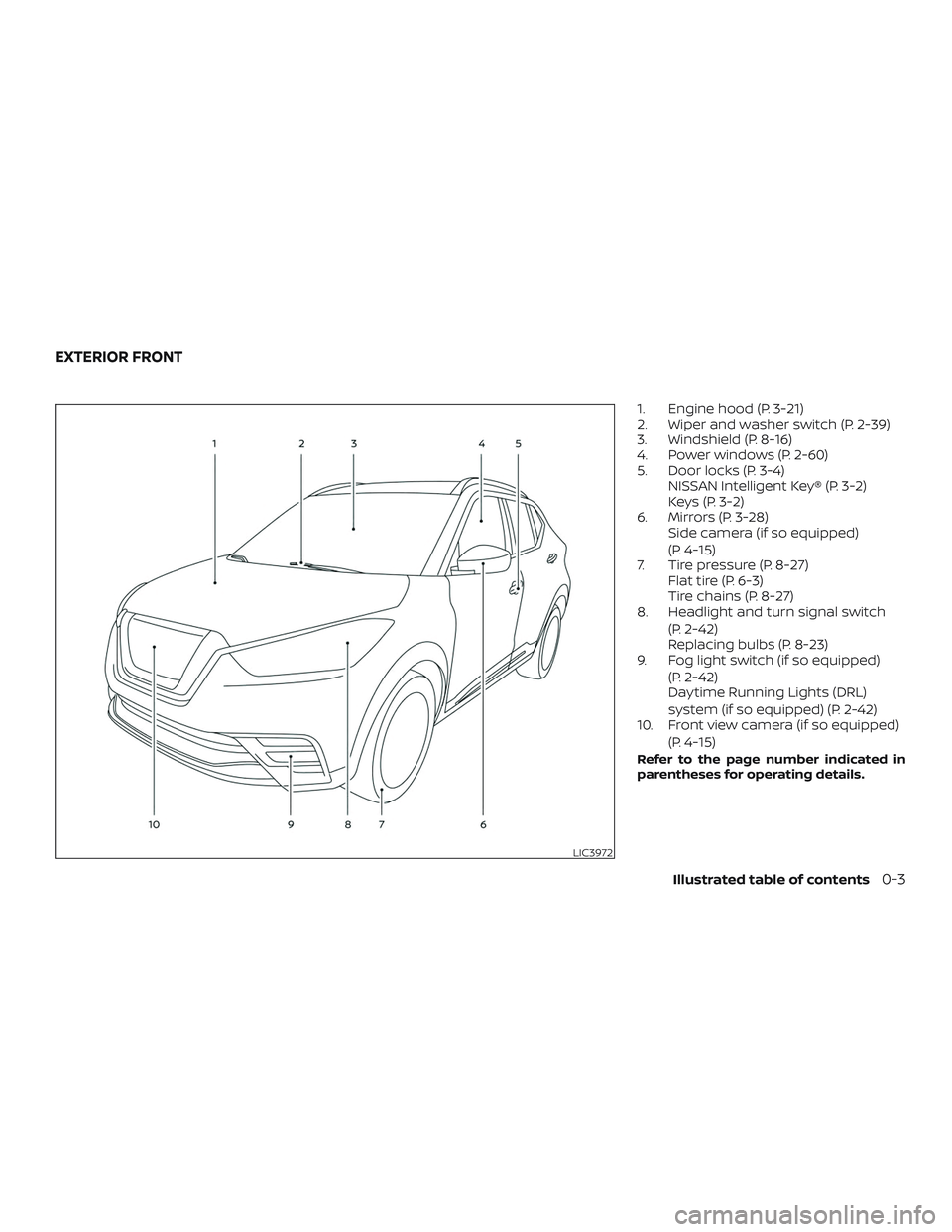
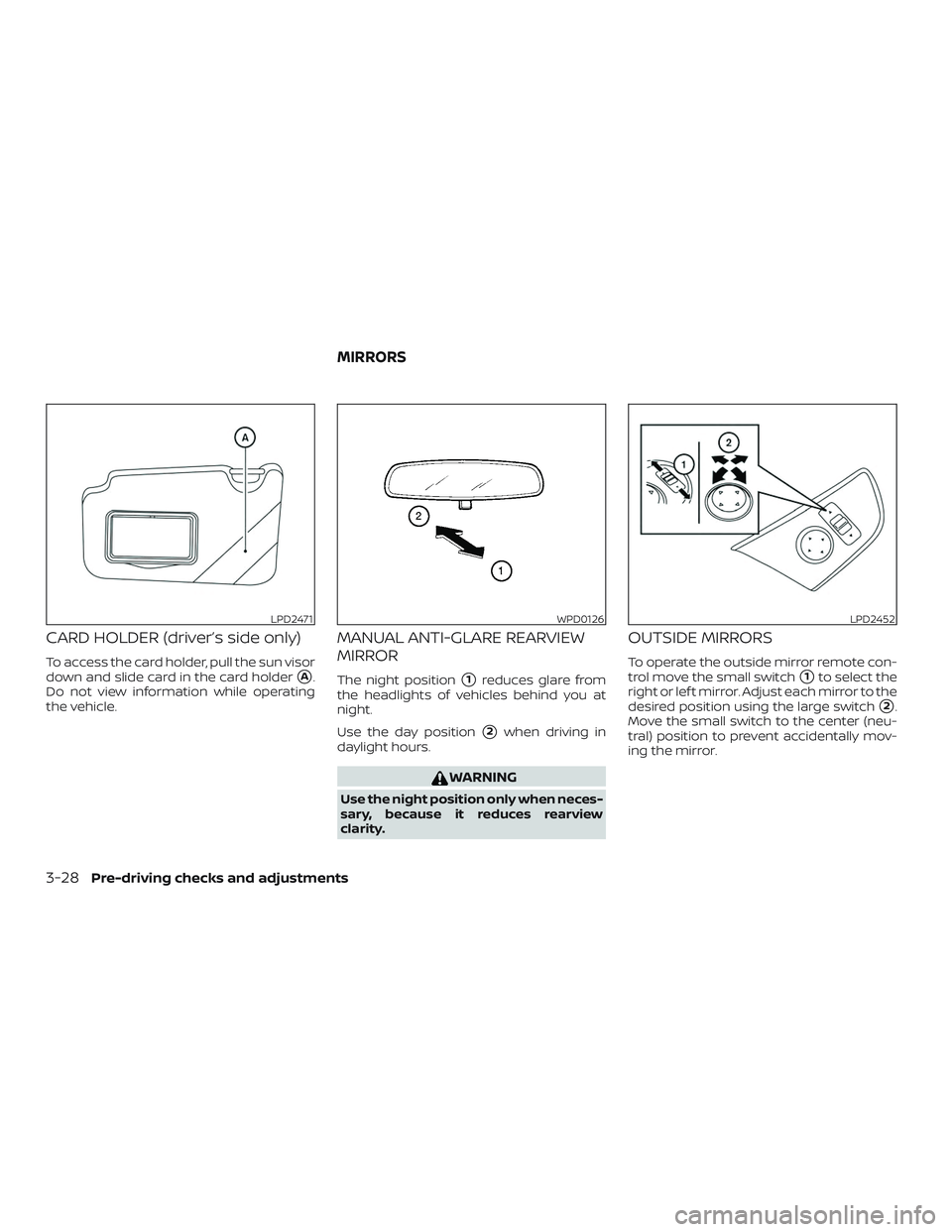
1. Engine hood (P. 3-21)
2. Wiper and washer switch (P. 2-39)
3. Windshield (P. 8-16)
4. Power windows (P. 2-60)
5. Door locks (P. 3-4)NISSAN Intelligent Key® (P. 3-2)
Keys (P. 3-2)
6. Mirrors (P. 3-28) Side camera (if so equipped)
(P. 4-15)
7. Tire pressure (P. 8-27) Flat tire (P. 6-3)
Tire chains (P. 8-27)
8. Headlight and turn signal switch
(P. 2-42)
Replacing bulbs (P. 8-23)
9. Fog light switch (if so equipped)
(P. 2-42)
Daytime Running Lights (DRL)
system (if so equipped) (P. 2-42)
10. Front view camera (if so equipped)
(P. 4-15)
Refer to the page number indicated in
parentheses for operating details.
LIC3972
EXTERIOR FRONT
Illustrated table of contents0-3
Page 13 of 444
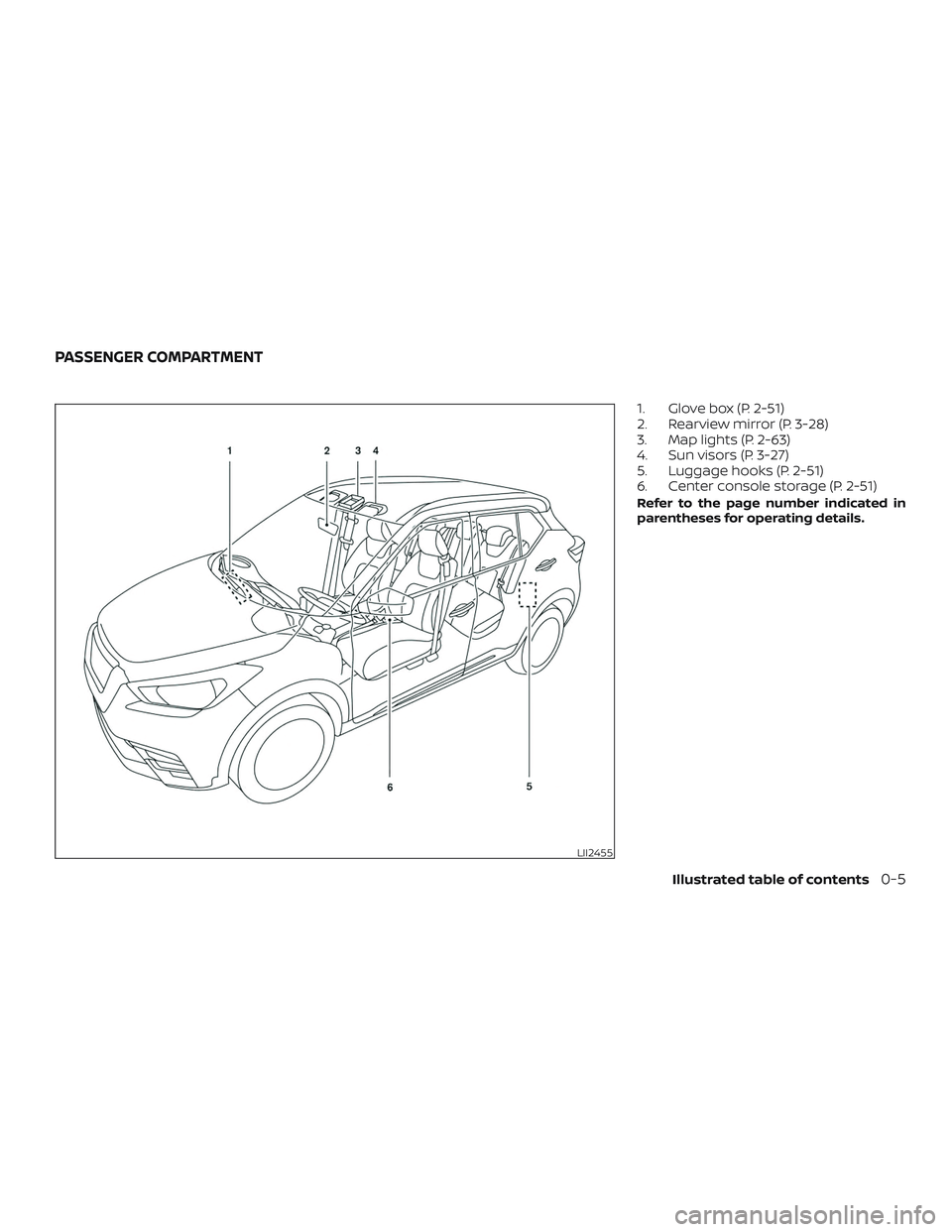
1. Glove box (P. 2-51)
2. Rearview mirror (P. 3-28)
3. Map lights (P. 2-63)
4. Sun visors (P. 3-27)
5. Luggage hooks (P. 2-51)
6. Center console storage (P. 2-51)
Refer to the page number indicated in
parentheses for operating details.
LII2455
PASSENGER COMPARTMENT
Illustrated table of contents0-5
Page 84 of 444
2 Instruments and controls
Instrument panel................................2-2
Meters and gauges ..............................2-4
Speedometer and odometer .................2-5
Tachometer .................................. 2-7
Fuel gauge ...................................2-8
Distance To Empty (DTE) ......................2-8
Trip computer (if so equipped) ................2-9
Warning lights, indicator lights and audible
reminders ....................................... 2-11
Checking lights .............................. 2-12
Warning lights ............................... 2-12
Indicator lights .............................. 2-18
Audible reminders ........................... 2-21
Vehicle information display (if so equipped) .....2-22
How to use the vehicle information
display ...................................... 2-22
Startup display .............................. 2-23
Settings ..................................... 2-23
Vehicle information display warnings
and indicators ............................... 2-31
Security systems (if so equipped) ...............2-35
Vehicle security system .....................2-35
NISSAN Anti-Thef t System (NATS)
(if so equipped) .............................. 2-37NISSAN Vehicle Immobilizer System
(if so equipped)
.............................. 2-37
Wiper and washer switch .......................2-39
Switch operation ............................ 2-39
Rear switch operation .......................2-40
Rear window or outside mirror defroster
switch (if so equipped) .......................... 2-41
Headlight and turn signal switch ...............2-42
Headlight control switch .....................2-42
Daytime Running Lights (DRL) system
(if so equipped) .............................. 2-45
Instrument brightness control ...............2-45
Turn signal switch ........................... 2-46
Fog light switch (if so equipped) .............2-46
Horn ...........................................2-47
Heated seat switches (if so equipped) ..........2-47
Automatic Emergency Braking (AEB) switch
(if so equipped) ................................. 2-48
Vehicle Dynamic Control (VDC) OFF switch ......2-48
P
ower outlets .................................. 2-49
12v outlets ................................... 2-49
Extended storage switch .......................2-50
Storage ........................................ 2-51
Seatback pockets ........................... 2-51
Page 125 of 444
NOTE:
If the rear window wiper operation is in-
terrupted by snow, etc., the wiper may
stop moving to protect its motor. If this
occurs, turn the wiper switch to OFF and
remove the snow, etc. on and around the
wiper arms. Af ter about 1 minute, turn
the switch on again to operate the wiper.
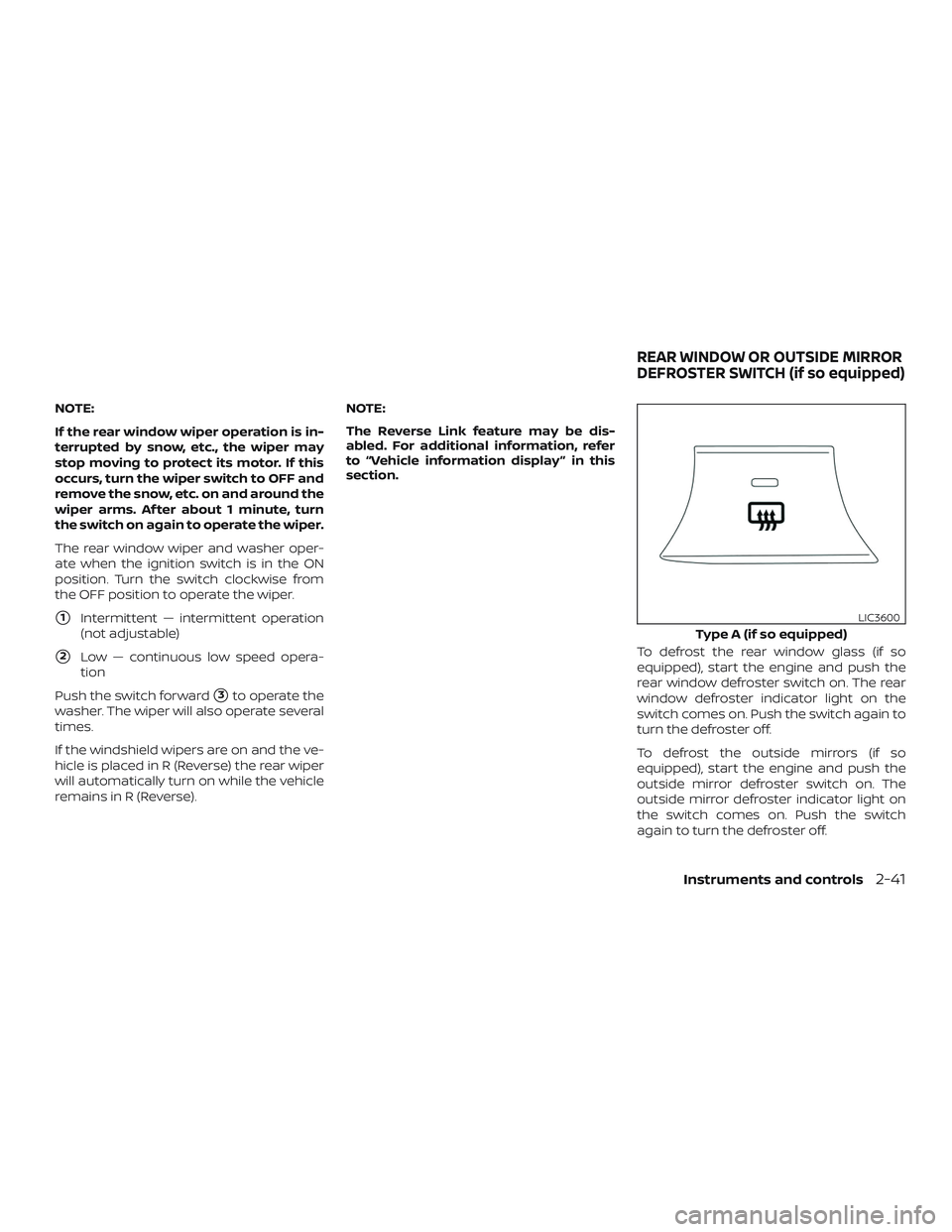
The rear window wiper and washer oper-
ate when the ignition switch is in the ON
position. Turn the switch clockwise from
the OFF position to operate the wiper.
�1Intermittent — intermittent operation
(not adjustable)
�2Low — continuous low speed opera-
tion
Push the switch forward
�3to operate the
washer. The wiper will also operate several
times.
If the windshield wipers are on and the ve-
hicle is placed in R (Reverse) the rear wiper
will automatically turn on while the vehicle
remains in R (Reverse). NOTE:
The Reverse Link feature may be dis-
abled. For additional information, refer
to “Vehicle information display ” in this
section.
To defrost the rear window glass (if so
equipped), start the engine and push the
rear window defroster switch on. The rear
window defroster indicator light on the
switch comes on. Push the switch again to
turn the defroster off.
To defrost the outside mirrors (if so
equipped), start the engine and push the
outside mirror defroster switch on. The
outside mirror defroster indicator light on
the switch comes on. Push the switch
again to turn the defroster off.
Type A (if so equipped)
LIC3600
REAR WINDOW OR OUTSIDE MIRROR
DEFROSTER SWITCH (if so equipped)
Instruments and controls2-41
Page 126 of 444
The rear window/outside mirror defroster
(if so equipped) automatically turns off af-
ter approximately 15 minutes.
NOTE:
Use defogger and/or outside mirror de-
froster when engine is running to avoid
discharging the battery.
CAUTION
When cleaning the inner side of the rear
window, be careful not to scratch or
damage the rear window defroster.
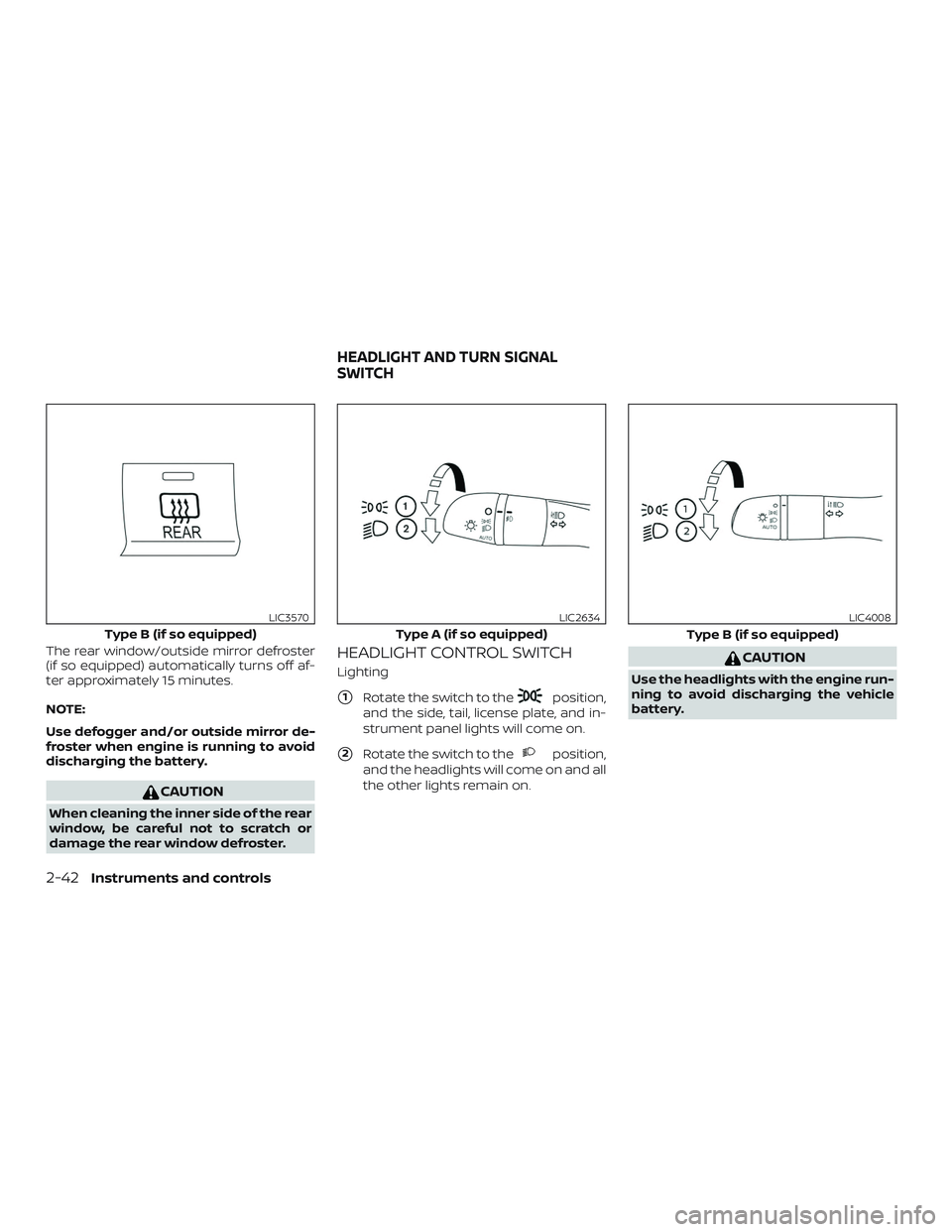
HEADLIGHT CONTROL SWITCH
Lighting
�1Rotate the switch to theposition,
and the side, tail, license plate, and in-
strument panel lights will come on.
�2Rotate the switch to theposition,
and the headlights will come on and all
the other lights remain on.
CAUTION
Use the headlights with the engine run-
ning to avoid discharging the vehicle
battery.
Type B (if so equipped)
LIC3570
Type A (if so equipped)
LIC2634
Type B (if so equipped)
LIC4008
HEADLIGHT AND TURN SIGNAL
SWITCH
2-42Instruments and controls
Page 151 of 444
3 Pre-driving checks and adjustments
Keys.............................................3-2NISSAN Intelligent Key® .......................3-2
NISSAN Vehicle Immobilizer System
keys..........................................3-3
Doors ...........................................3-4
Locking with key ..............................3-5
Locking with inside lock knob .................3-5
Locking with power door lock switch .........3-6
Automatic door locks.........................3-6
Child safety rear door lock ....................3-6
NISSAN Intelligent Key® .......................... 3-7
Operating range ..............................3-8
Door locks/unlocks precaution ...............3-8
NISSAN Intelligent Key® operation .............3-9
How to use the remote keyless entry
function ..................................... 3-12
Warning signals ............................. 3-15
Troubleshooting guide ......................3-16
Remote Engine Start (if so equipped) ...........3-18
Remote Engine Start operating range .......3-18
Remote starting the vehicle .................3-19Extending engine run time
..................3-19
Canceling a Remote Engine Start ............3-19
Conditions the Remote Engine Start will
notwork .................................... 3-20
Hood ........................................... 3-21
Lif tgate ......................................... 3-21
Opening the lif tgate ......................... 3-23
Closing the lif tgate .......................... 3-23
Secondary lif tgate unlock ...................3-23
Fuel-filler door .................................. 3-24
Opener operation ........................... 3-24
Fuel-filler cap ................................ 3-25
Steering wheel ................................. 3-26
Manual operation ........................... 3-26
Sun visors ...................................... 3-27
Vanity mirrors ............................... 3-27
Card holder (driver’s side only) ...............3-28
Mirrors ......................................... 3-28
Manual anti-glare rearview mirror ...........3-28
Outside mirrors ............................. 3-28
Page 177 of 444
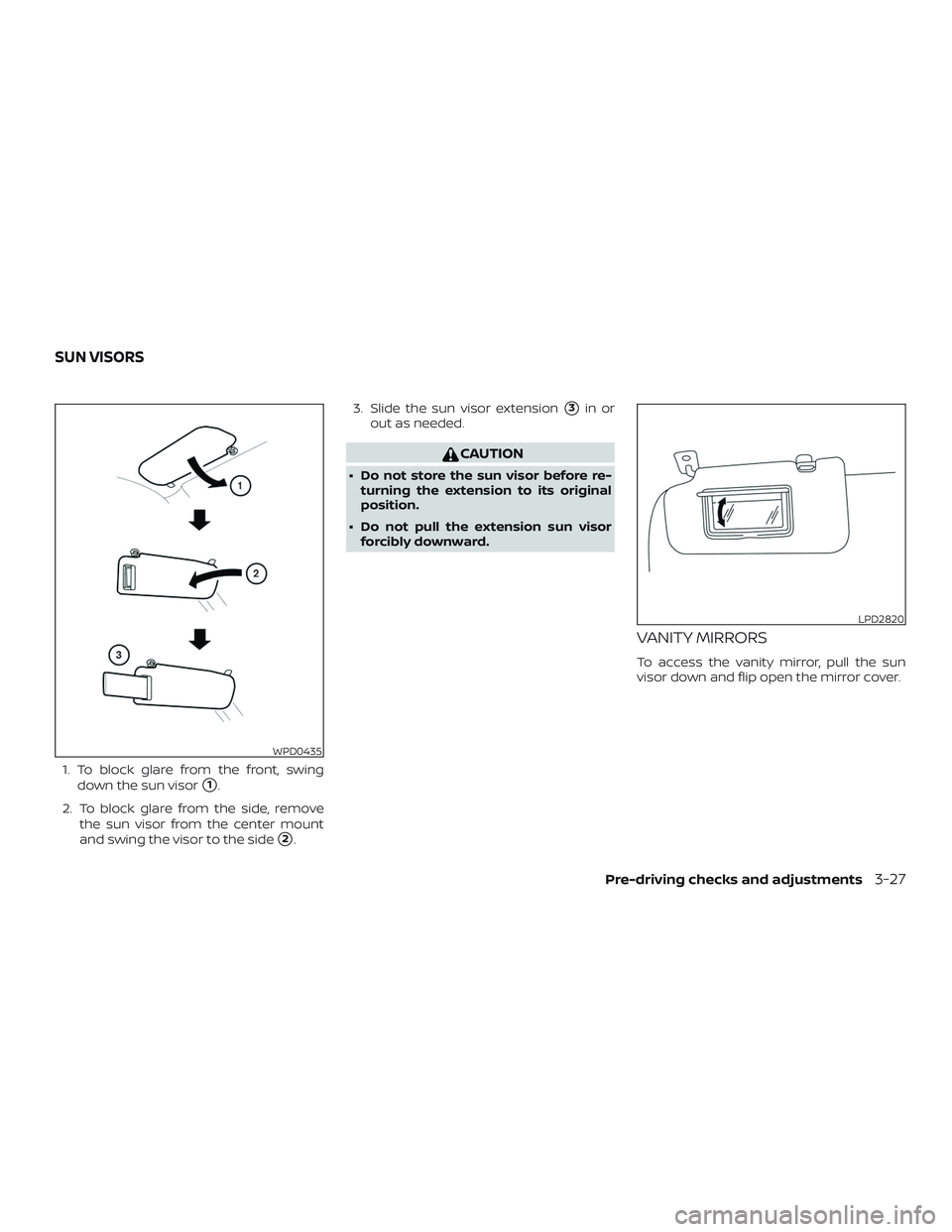
1. To block glare from the front, swingdown the sun visor
�1.
2. To block glare from the side, remove the sun visor from the center mount
and swing the visor to the side
�2. 3. Slide the sun visor extension
�3in or
out as needed.
CAUTION
∙ Do not store the sun visor before re- turning the extension to its original
position.
∙ Do not pull the extension sun visor forcibly downward.
VANITY MIRRORS
To access the vanity mirror, pull the sun
visor down and flip open the mirror cover.
WPD0435
LPD2820
SUN VISORS
Pre-driving checks and adjustments3-27
Page 178 of 444
CARD HOLDER (driver’s side only)
To access the card holder, pull the sun visor
down and slide card in the card holder
�A.
Do not view information while operating
the vehicle.
MANUAL ANTI-GLARE REARVIEW
MIRROR
The night position�1reduces glare from
the headlights of vehicles behind you at
night.
Use the day position
�2when driving in
daylight hours.
WARNING
Use the night position only when neces-
sary, because it reduces rearview
clarity.
OUTSIDE MIRRORS
To operate the outside mirror remote con-
trol move the small switch
�1to select the
right or lef t mirror. Adjust each mirror to the
desired position using the large switch
�2.
Move the small switch to the center (neu-
tral) position to prevent accidentally mov-
ing the mirror.
LPD2471WPD0126LPD2452
MIRRORS
3-28Pre-driving checks and adjustments