Page 236 of 444
supports charging via a USB connection, its
battery will be charged while connected to
the vehicle with the ignition switch in the
ON position. The port is illuminated for bet-
ter visibility when the headlight switch is in
the ON position.
While connected to the vehicle, the iPod®
can only be operated by the vehicle audio
controls.
To disconnect the iPod® from the vehicle,
remove the USB end of the cable from the
USB connection port on the vehicle, then
remove the cable from the iPod®.
* iPod® is a trademark of Apple Inc., regis-
tered in the U.S. and other countries.
Compatibility
The following models are compatible:∙ iPod® Classic 5th generation (firmware version 1.3.0 or later)
∙ iPod® Classic 6th generation (firmware version 2.0.1 or later)
∙ iPod® Classic 7th generation (firmware version 2.0.4 or later) ∙ iPod® Touch 2nd generation (firmware
version 4.2.1 or later)*
∙ iPod® Touch 3rd generation (firmware version 5.1 or later)
∙ iPod® Touch 4th generation (firmware version 5.1 or later)
∙ iPod® nano - 1st generation (firmware version 1.3.1 or later)
∙ iPod® nano - 2nd generation (firmware version 1.1.3 or later)
∙ iPod® nano - 3rd generation (firmware version 1.1.3 or later)
∙ iPod® nano - 4th generation (firmware version 1.0.4 or later)
∙ iPod® nano - 5th generation (firmware version 1.0.2 or later)
∙ iPod® nano - 6th generation (firmware version 1.1 or later)
∙ iPhone® 3G (firmware version 4.2.1 or later) ∙ iPhone® 3GS (firmware version 5.1 or
later)
∙ iPhone® 4 (firmware version 5.1 or later)
∙ iPhone® 4S (firmware version 5.1 or later)
* Some features of this iPod® may not be
fully functional.
Make sure that your iPod® firmware is up-
dated to the version indicated above.
4-56Monitor, climate, audio, phone and voice recognition systems
Page 243 of 444
USB/iPod® CHARGING PORTS
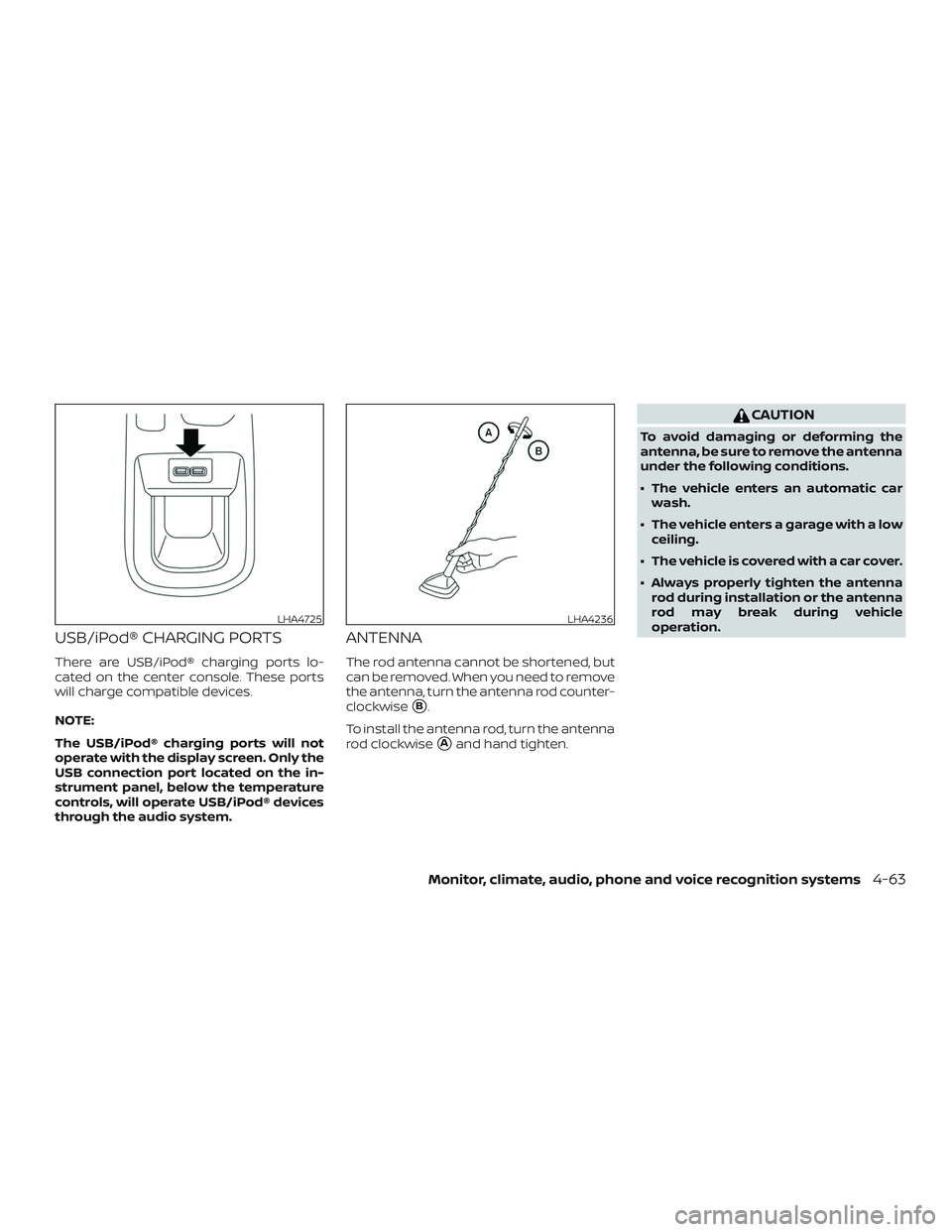
There are USB/iPod® charging ports lo-
cated on the center console. These ports
will charge compatible devices.
NOTE:
The USB/iPod® charging ports will not
operate with the display screen. Only the
USB connection port located on the in-
strument panel, below the temperature
controls, will operate USB/iPod® devices
through the audio system.
ANTENNA
The rod antenna cannot be shortened, but
can be removed. When you need to remove
the antenna, turn the antenna rod counter-
clockwise
�B.
To install the antenna rod, turn the antenna
rod clockwise
�Aand hand tighten.
CAUTION
To avoid damaging or deforming the
antenna, be sure to remove the antenna
under the following conditions.
∙ The vehicle enters an automatic car wash.
∙ The vehicle enters a garage with a low ceiling.
∙ The vehicle is covered with a car cover.
∙ Always properly tighten the antenna rod during installation or the antenna
rod may break during vehicle
operation.
LHA4725LHA4236
Monitor, climate, audio, phone and voice recognition systems4-63
Page 435 of 444
Towingatrailer................10-17
Towingyourvehicle..............6-12
TransmissionContinuously Variable Transmission (CVT)
fluid......................8-9
Driving with Continuously Variable
Transmission (CVT) ............5-15
Travel (See registering a vehicle in another
country) .....................10-10
Trip odometer ...............2-5,2-6
Trunklight....................2-65
Turn signal switch ...............2-46
U
Uniform tire quality grading ........10-18
USB/iPod® Charging Ports .........4-63
USB (Universal Serial Bus) Connection Port
(models without Navigation System) . . .4-52
V
Vanitymirror..................3-27
Variable voltage control system ......8-13
Vehicle dimensions and weights ......10-9
Vehicle Dynamic Control (VDC) OFF switch ..........................2-48
Vehicle Dynamic Control (VDC) system . .5-56
Vehicle identification .............10-10
Vehicle identification number (VIN) . . . .10-10
Vehicle identification number (VIN)
(Chassis number) ...............10-10
Vehicle identification number (VIN)
plate.......................10-10 Vehicle immobilizer system
......2-37,5-13
VehicleInformationDisplay.........2-22
Vehicle loading information ........10-13
Vehiclerecovery................6-14
Vehicle security system ...........2-35
Vehicle security system (NISSAN Anti-Thef t
System), engine start ..........2-37,5-13
Vehicle security system (NISSAN Vehicle
Immobilizer System), engine start . .2-37, 5-13
Vents.......................4-30
Visors.......................3-27
Voice Prompt Interrupt ............4-70
W
Warning Airbagwarninglight........1-63, 2-17
Anti-lock brake warning light ......2-12
Battery charge warning light ......2-13
Brakewarninglight............2-12
Door open warning light .........2-13
Engine oil pressure warning light ....2-13
Hazard warning flasher switch ......6-2
Lowfuelwarninglight....2-14,2-16,2-32
Lowtirepressurewarninglight.....2-14
Low windshield-washer fluid warning
light......................2-16
Passenger air bag and status light . . .1-53
Seatbeltwarninglight .......1-13, 2-17
Supplemental air bag warning
light.................. .1-63, 2-17
Vehicle security system .........2-35
Warning/indicator lights and audible
reminders ..................2-18
Warning labels (for SRS) ..........1-63Warning/indicator lights and audible
reminders
....................2-18
Audible reminders .............2-18
Indicatorlights...............2-18
Warninglights ...............2-18
Warninglights .................2-18
Warning lights, indicator lights and audible
reminders ..................0-9,2-11
Warningsystemsswitch...........2-48
Washer switch Rear window wiper and washer
switches ................... 2-40
Weights (See dimensions and weights) . .10-9
Wheels and tires .............8-27,10-9
Wheel/tire size .................10-9
When traveling or registering in another
country .....................10-10
Windows ................... .2-60
Locking passengers' windows .....2-61
Powerrearwindows ...........2-61
Powerwindows..............2-60
Rearpowerwindows...........2-61
Windshield-washer fluid ...........8-10
Windshield wiper blades ...........8-16
Wiper Rear window wiper and washer
switches ................... 2-40
Wiper
blades ................8-16
Wiper and washer switch ..........2-39
11-7