2019 NISSAN ARMADA vent
[x] Cancel search: ventPage 91 of 536
electrical equipment. Unauthor-
ized electrical test equipment
and probing devices should not
be used on the pretensioner sys-
tem.
. If you need to dispose of a pre-
tensioner or scrap the vehicle, it is
recommended you visit a NISSAN
dealer for this service. Correct
pretensioner disposal procedures
are set forth in the appropriate
NISSAN Service Manual. Incorrect
disposal procedures could cause
personal injury.
The pretensioner system may activate
with the supplemental air bag system in
certain types of collisions. Working with
the seat belt retractor, it helps tighten the
seat belt when the vehicle becomes
involved in certain types of collisions,
helping to restrain front seat occupants.
The pretensioner is encased with the seat
belt retractor and buckle anchor. These
seat belts are used the same way as
conventional seat belts.
When a pretensioner activates, smoke is
released and a loud noise may be heard.
The smoke is not harmful, and it does not
indicate a fire. Care should be taken not
to inhale it as it may cause irritation and
choking. Those with a history of a breath- ing condition should get fresh air
promptly.
After pretensioner activation, load limiters
allow the seat belt to release webbing (if
necessary) to reduce forces against the
chest.
The supplemental air bag warning light
is used to indicate malfunctions in
the pretensioner system. (See “Supple-
mental air bag warning light” (P.1-72) for
more details.) If the operation of the
supplemental air bag warning light indi-
cates there is a malfunction, have the
system checked. It is recommended you
visit a NISSAN dealer for this service.
When selling your vehicle, we request that
you inform the buyer about the preten-
sioner system and guide the buyer to the
appropriate sections in this Owner’s Man-
ual.
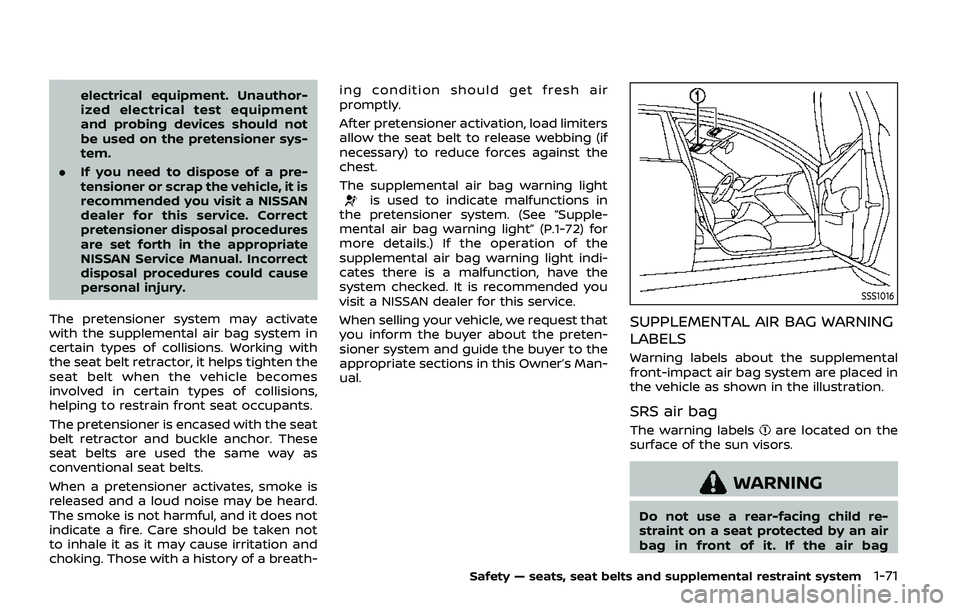
SSS1016
SUPPLEMENTAL AIR BAG WARNING
LABELS
Warning labels about the supplemental
front-impact air bag system are placed in
the vehicle as shown in the illustration.
SRS air bag
The warning labelsare located on the
surface of the sun visors.
WARNING
Do not use a rear-facing child re-
straint on a seat protected by an air
bag in front of it. If the air bag
Safety — seats, seat belts and supplemental restraint system1-71
Page 97 of 536

JVC1234X
1. Power liftgate switch (if so equipped)
2. Heated steering wheel switch (if soequipped)
3. Instrument brightness control switch
4. TRIP/RESET switch for twin trip odometer
5. Headlight, fog light and turn signal switch — Headlight — Turn signal
— Fog light (if so equipped)
6. Steering-wheel-mounted controls (left side)
— Audio control steering switch
— Hands-Free Phone System switch
7. Trip computer switch 8. Wiper and washer switch
9. Steering-wheel-mounted controls (right
side)
— Intelligent Cruise Control (ICC) system
10. Dynamic driver assistance switch (if so equipped)
— Intelligent Lane Intervention (I-LI) sys-
tem (if so equipped)
— Intelligent Distance Control (I-DC) sys-
tem (if so equipped)
— Intelligent Blind Spot Intervention (I-
BSI) system (if so equipped)
11. Shift lever
12. Four-Wheel Drive (4WD) shift switch (if so equipped)/SNOW mode switch/TOW
MODE switch/Vehicle Dynamic Control
(VDC) OFF switch
13. Headlight aiming control
14. Power liftgate main switch (if so equipped)
15. Warning systems switch (if so equipped) — Lane Departure Warning (LDW) (if so
equipped)
— Blind Spot Warning (BSW) (if so
equipped)
16. Rear door alert switch
17. Electric tilting/telescopic steering wheel switch
Instruments and controls2-3
COCKPIT
Page 98 of 536
2-4Instruments and controls
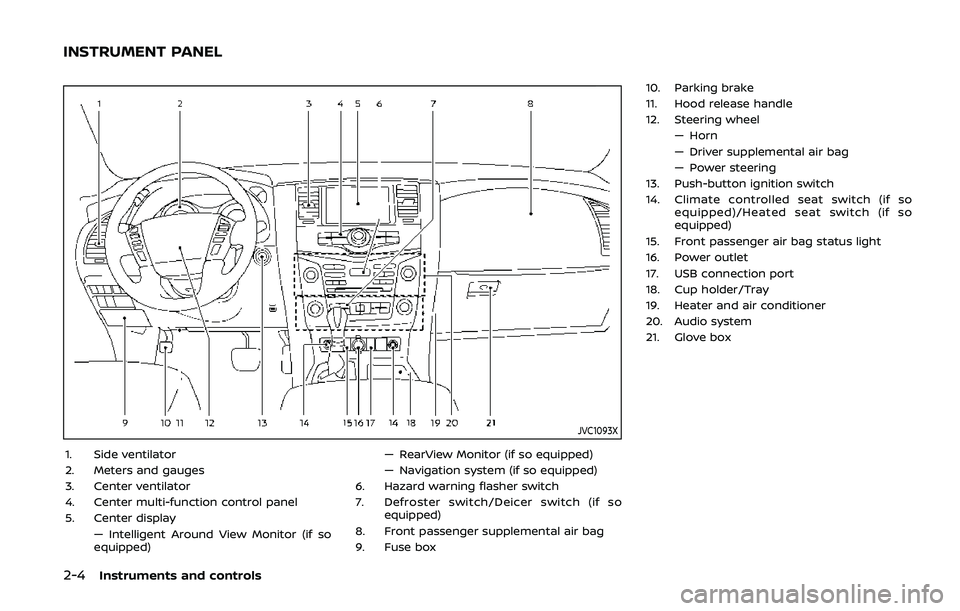
JVC1093X
1. Side ventilator
2. Meters and gauges
3. Center ventilator
4. Center multi-function control panel
5. Center display— Intelligent Around View Monitor (if so
equipped) — RearView Monitor (if so equipped)
— Navigation system (if so equipped)
6. Hazard warning flasher switch
7. Defroster switch/Deicer switch (if so equipped)
8. Front passenger supplemental air bag
9. Fuse box 10. Parking brake
11. Hood release handle
12. Steering wheel
— Horn
— Driver supplemental air bag
— Power steering
13. Push-button ignition switch
14. Climate controlled seat switch (if so equipped)/Heated seat switch (if so
equipped)
15. Front passenger air bag status light
16. Power outlet
17. USB connection port
18. Cup holder/Tray
19. Heater and air conditioner
20. Audio system
21. Glove box
INSTRUMENT PANEL
Page 99 of 536
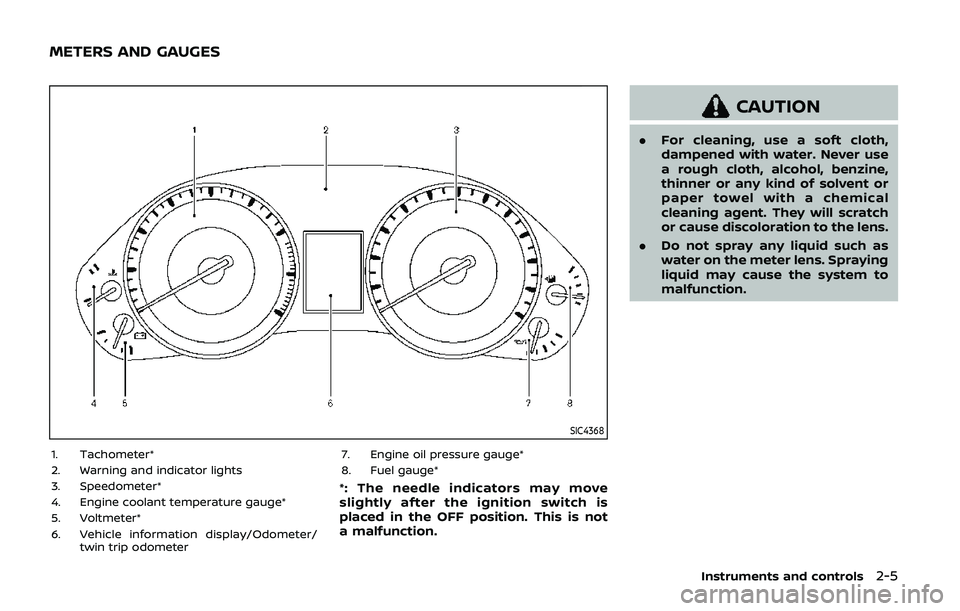
SIC4368
1. Tachometer*
2. Warning and indicator lights
3. Speedometer*
4. Engine coolant temperature gauge*
5. Voltmeter*
6. Vehicle information display/Odometer/twin trip odometer 7. Engine oil pressure gauge*
8. Fuel gauge*
*: The needle indicators may move
slightly after the ignition switch is
placed in the OFF position. This is not
a malfunction.
CAUTION
.
For cleaning, use a soft cloth,
dampened with water. Never use
a rough cloth, alcohol, benzine,
thinner or any kind of solvent or
paper towel with a chemical
cleaning agent. They will scratch
or cause discoloration to the lens.
. Do not spray any liquid such as
water on the meter lens. Spraying
liquid may cause the system to
malfunction.
Instruments and controls2-5
METERS AND GAUGES
Page 104 of 536

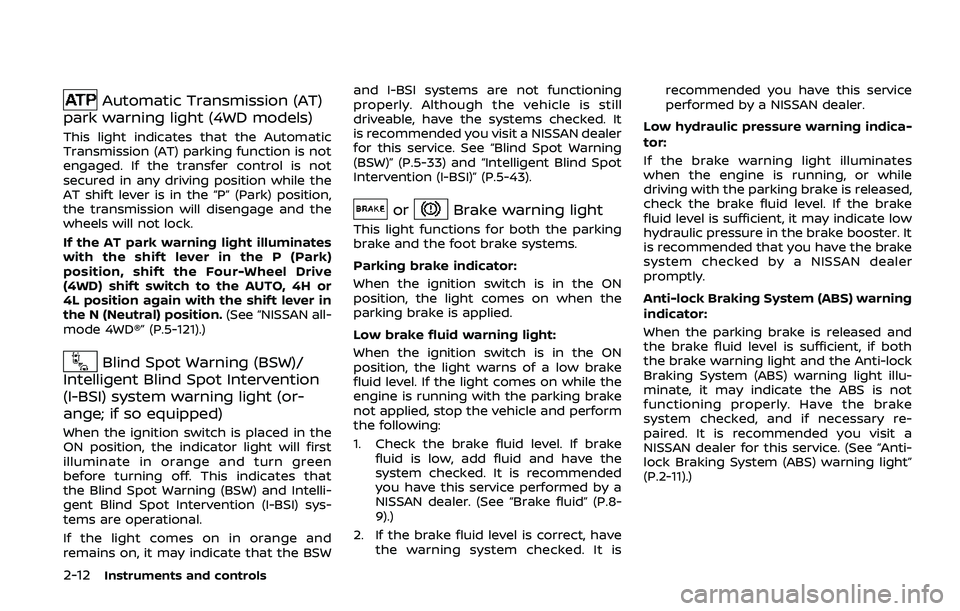
2-10Instruments and controls
Anti-lock Braking System (ABS) warn-
ing lightFour-Wheel Drive (4WD) warning light
(4WD models)Exterior light indicator
Intelligent Cruise Control (ICC) system
warning light (orange)Front fog light indicator light (if so
equipped)
Automatic Emergency Braking (AEB)
system warning lightIntelligent Key warning lightFront passenger air bag status light
Automatic transmission check warn-
ing lightLane Departure Warning (LDW) indica-
tor light (orange; if so equipped)High beam indicator light
Automatic Transmission (AT) oil tem-
perature warning lightLow tire pressure warning lightIntelligent Lane Intervention (I-LI) ON
indicator light (green; if so equipped)
Automatic Transmission (AT) park
warning lightMaster warning lightMalfunction Indicator Light (MIL)
Blind Spot Warning (BSW)/Intelligent
Blind Spot Intervention (I-BSI) system
warning light (orange; if so equipped)Seat belt warning lightSecurity indicator light
Brake warning lightSupplemental air bag warning lightSNOW mode indicator light
Vehicle Dynamic Control (VDC) warn-
ing lightTOW mode indicator light
Charge warning lightAutomatic transmission position indi-
cator lightTurn signal/hazard indicator lights
Intelligent Distance Control (I-DC)
system warning light (orange; if so
equipped)Intelligent Blind Spot Intervention (I-
BSI) ON indicator light (green; if so
equipped)Vehicle Dynamic Control (VDC) off
indicator light
Engine oil pressure warning lightCheck suspension indicator light
WARNING LIGHTS, INDICATOR
LIGHTS AND AUDIBLE REMINDERS
Page 106 of 536
2-12Instruments and controls
Automatic Transmission (AT)
park warning light (4WD models)
This light indicates that the Automatic
Transmission (AT) parking function is not
engaged. If the transfer control is not
secured in any driving position while the
AT shift lever is in the “P” (Park) position,
the transmission will disengage and the
wheels will not lock.
If the AT park warning light illuminates
with the shift lever in the P (Park)
position, shift the Four-Wheel Drive
(4WD) shift switch to the AUTO, 4H or
4L position again with the shift lever in
the N (Neutral) position. (See “NISSAN all-
mode 4WD®” (P.5-121).)
Blind Spot Warning (BSW)/
Intelligent Blind Spot Intervention
(I-BSI) system warning light (or-
ange; if so equipped)
When the ignition switch is placed in the
ON position, the indicator light will first
illuminate in orange and turn green
before turning off. This indicates that
the Blind Spot Warning (BSW) and Intelli-
gent Blind Spot Intervention (I-BSI) sys-
tems are operational.
If the light comes on in orange and
remains on, it may indicate that the BSW and I-BSI systems are not functioning
properly. Although the vehicle is still
driveable, have the systems checked. It
is recommended you visit a NISSAN dealer
for this service. See “Blind Spot Warning
(BSW)” (P.5-33) and “Intelligent Blind Spot
Intervention (I-BSI)” (P.5-43).
orBrake warning light
This light functions for both the parking
brake and the foot brake systems.
Parking brake indicator:
When the ignition switch is in the ON
position, the light comes on when the
parking brake is applied.
Low brake fluid warning light:
When the ignition switch is in the ON
position, the light warns of a low brake
fluid level. If the light comes on while the
engine is running with the parking brake
not applied, stop the vehicle and perform
the following:
1. Check the brake fluid level. If brake
fluid is low, add fluid and have the
system checked. It is recommended
you have this service performed by a
NISSAN dealer. (See “Brake fluid” (P.8-
9).)
2. If the brake fluid level is correct, have the warning system checked. It is recommended you have this service
performed by a NISSAN dealer.
Low hydraulic pressure warning indica-
tor:
If the brake warning light illuminates
when the engine is running, or while
driving with the parking brake is released,
check the brake fluid level. If the brake
fluid level is sufficient, it may indicate low
hydraulic pressure in the brake booster. It
is recommended that you have the brake
system checked by a NISSAN dealer
promptly.
Anti-lock Braking System (ABS) warning
indicator:
When the parking brake is released and
the brake fluid level is sufficient, if both
the brake warning light and the Anti-lock
Braking System (ABS) warning light illu-
minate, it may indicate the ABS is not
functioning properly. Have the brake
system checked, and if necessary re-
paired. It is recommended you visit a
NISSAN dealer for this service. (See “Anti-
lock Braking System (ABS) warning light”
(P.2-11).)
Page 109 of 536
If the light comes on in orange and
remains on, it may indicate that the LDW
and I-LI systems are not functioning
properly. Although the vehicle is still
driveable, have the systems checked. It
is recommended you visit a NISSAN dealer
for this service.
See “Lane Departure Warning (LDW)/In-
telligent Lane Intervention (I-LI)” (P.5-23).
Low tire pressure warning
light
Your vehicle is equipped with a Tire
Pressure Monitoring System (TPMS) that
monitors the tire pressure of all tires
except the spare.
The low tire pressure warning light warns
of low tire pressure or indicates that the
TPMS is not functioning properly.
After the ignition switch is placed in the
ON position, this light illuminates for
about 1 second and turns off.
Low tire pressure warning:
If the vehicle is being driven with low tire
pressure, the warning light will illuminate.
A CHECK TIRE PRESSURE warning also
appears in the vehicle information dis-
play. If you select the tire pressure in-
formation in the center display, the Low
Pressure information will be displayed. The tire pressure for each tire will also
be displayed.
When the low tire pressure warning light
illuminates, you should stop and adjust
the tire pressure to the recommended
COLD tire pressure shown on the Tire and
Loading Information label. The low tire
pressure warning light does not automa-
tically turn off when the tire pressure is
adjusted. After the tire is inflated to the
recommended pressure, the vehicle must
be driven at speeds above 16 MPH (25
km/h) to activate the TPMS and turn off
the low tire pressure warning light. Use a
tire pressure gauge to check the tire
pressure.
The CHECK TIRE PRESSURE warning ap-
pears each time the ignition switch is
placed in the ON position as long as the
low tire pressure warning light remains
illuminated.
For additional information, see “Vehicle
information display” (P.2-20), “Tire Pres-
sure Monitoring System (TPMS)” (P.5-5)
and “Tire Pressure Monitoring System
(TPMS) ” (P.6-3).
TPMS malfunction:
If the TPMS is not functioning properly,
the low tire pressure warning light will
flash for approximately 1 minute when the
ignition switch is placed in the ON posi- tion. The light will remain on after 1
minute. Have the system checked. It is
recommended you visit a NISSAN dealer
for this service. The CHECK TIRE PRES-
SURE warning does not appear if the low
tire pressure warning light illuminates to
indicate a TPMS malfunction.
For additional information, see “Tire Pres-
sure Monitoring System (TPMS)” (P.5-5).
WARNING
. If the light does not illuminate
with the ignition switch placed in
the ON position, have the vehicle
checked as soon as possible. It is
recommended you visit a NISSAN
dealer for this service.
. If the light illuminates or Low
Pressure information is displayed
on the monitor screen while driv-
ing, avoid sudden steering man-
euvers or abrupt braking, reduce
vehicle speed, pull off the road to
a safe location and stop the
vehicle as soon as possible. Driv-
ing with under-inflated tires may
permanently damage the tires
and increase the likelihood of tire
failure. Serious vehicle damage
could occur and may lead to an
Instruments and controls2-15
Page 110 of 536

2-16Instruments and controls
accident and could result in ser-
ious personal injury. Check the
tire pressure for all four tires.
Adjust the tire pressure to the
recommended COLD tire pressure
shown on the Tire and Loading
Information label to turn the low
tire pressure warning light OFF. If
the light still illuminates while
driving after adjusting the tire
pressure, a tire may be flat or
the TPMS may be malfunctioning.
If you have a flat tire, replace it
with a spare tire as soon as
possible. If no tire is flat and all
tires are properly inflated, it is
recommended you consult a
NISSAN dealer.
. Since the spare tire is not
equipped with the TPMS, when a
spare tire is mounted or a wheel
is replaced, the TPMS will not
function and the low tire pressure
warning light will flash for ap-
proximately 1 minute. The light
will remain on after 1 minute.
Have your tires replaced and/or
TPMS system reset as soon as
possible. It is recommended you
visit a NISSAN dealer for these
services. .
Replacing tires with those not
originally specified by NISSAN
could affect the proper operation
of the TPMS.
CAUTION
.The TPMS is not a substitute for
the regular tire pressure check.
Be sure to check the tire pressure
regularly.
. If the vehicle is being driven at
speeds of less than 16 MPH (25
km/h), the TPMS may not operate
correctly.
. Be sure to install the specified
size of tires to the four wheels
correctly.
Master warning light
When the ignition switch is in the ON
position, the master warning light illumi-
nates if any of the following are displayed
on the vehicle information display:
.No key warning
. Low fuel warning
. Low washer fluid warning .
Parking brake release warning
. Door/liftgate open warning
. Front radar obstruction warning
. Headlight warning
. Loose fuel cap warning
. Check tire pressure warning
. Intelligent Back-up Intervention (I-BI)
not available warning (if so equipped)
. Intelligent Back-up Intervention (I-BI)
malfunction warning (if so equipped)
. Automatic Emergency Braking (AEB)
system warning
. Extended storage fuse warning (if so
equipped)
See “Vehicle information display” (P.2-20).
Seat belt warning light and
chime
The light and chime remind you to fasten
seat belts. The light illuminates whenever
the ignition switch is placed in the ON
position, and will remain illuminated until
the driver’s seat belt is fastened. At the
same time, the chime will sound for about
6 seconds unless the driver’s seat belt is
securely fastened.
The seat belt warning light for the front
passenger will illuminate if the seat belt is
not fastened when the front passenger’s
seat is occupied. For approximately 5