2019 NISSAN 370Z ROADSTER display
[x] Cancel search: displayPage 236 of 460

SAA2503
Movie file operation
Park the vehicle in a safe location for
the front seat occupants to operate the
USB memory while watching the
images.
PLAY:
When the DISC·AUX button is pushed with
the system off and the USB memory
inserted, the system will turn on.
If another audio source is playing with an
USB memory inserted, push the DISC·AUX
button repeatedly until the center display
changes to the USB memory mode. Operation keys:
To operate the USB memory, select the
desired key displayed on the operation
screen using the multi-function control-
ler.
Pause
Select the “
” key to pause the movie
file. To resume playing the movie file,
select the “
” key.
Play
Select the “
” key to start playing a
movie file, for example, after pausing a
movie file.
STOP
Select the “
” key to stop playing a
movie file.
Skip (Next chapter)
Select the “
” key to skip the chapter(s)
of the disc forward. The chapters will
advance the number of times the ENTER
button is pushed.
Skip (Previous chapter)
Select the “
” key to skip the chapter(s)
of the disc backward. The chapters will go
back the number of times the “
” key is selected.
List:
Select the “List” key on the movie file
operation screen to display the file list.
Center display, heater, air conditioner, audio, phone and voice recognition systems4-69
Page 237 of 460

4-70Center display, heater, air conditioner, audio, phone and voice recognition systems
SAA2504Example
Settings:
Select the “Settings” key to adjust the
following settings.
.Audio File Playback
Switch to the audio playback mode.
This item is displayed only when the
USB memory contains the audio files.
. Play Mode
Select the “Normal” or “1 Track Repeat”
play mode.
. 10 Key Search
Select the “10 Key Search” key to open
the number entry screen.
Input the number to be searched and
select the “OK” key. The specified folder/file will be played.
. Display
To adjust the image quality of the
screen, select the preferred adjust-
ment items.
. DRC
DRC (Dynamic Range Compression)
automatically adjusts the soundtrack
volume level to maintain a more even
sound to the speakers.
. Audio
Select the preferred language for
audio.
. Subtitle
Select the preferred language for
subtitle.
. Display Mode
Select the “Normal”, “Wide”, “Cinema” or
“Full” mode.
Bluetooth® STREAMING AUDIO
(models with navigation system)
Your NISSAN is equipped with Bluetooth®
Streaming Audio. If you have a compati-
ble Bluetooth® device with streaming
audio (A2DP profile), you can set up the
wireless connection between your Blue-
tooth® device and the in-vehicle audio
system. This connection allows you to
listen to the audio from the Bluetooth®
device using your vehicle speakers. It also
may allow basic control of the device for playing and skipping audio files using the
AVRCP Bluetooth® profile. All Bluetooth®
Devices do not have the same level of
controls for AVRCP. Please consult the
manual for your Bluetooth® Device for
more details.
Once your Bluetooth® device is con-
nected to the in-vehicle audio system, it
will automatically reconnect whenever
the device is present in the vehicle and
you select Bluetooth® Audio from your
audio system. You do not need to manu-
ally reconnect for each usage.
Wireless LAN (Wi-Fi) and the Bluetooth®
functions share the same frequency band
(2.4 GHz). Using the Bluetooth® and the
wireless LAN functions at the same time
may slow down or disconnect the com-
munication and cause undesired noise. It
is recommended that you turn off the
wireless LAN (Wi-Fi) when using the Blue-
tooth® functions.
Page 238 of 460

Regulatory information
FCC Regulatory information:
.CAUTION: To maintain compliance
with FCC’s RF exposure guidelines,
use only the supplied antenna. Un-
authorized antenna, modification, or
attachments could damage the trans-
mitter and may violate FCC regula-
tions.
. Operation is subject to the following
two conditions:
1) This device may not cause inter-
ference and
2) This device must accept any inter- ference, including interference
that may cause undesired opera-
tion of the device
IC Regulatory information:
. Operation is subject to the following
two conditions:
1) This device may not cause inter-
ference, and
2) This device must accept any inter- ference, including interference
that may cause undesired opera-
tion of the device.
. This Class B digital apparatus meets
all requirements of the Canadian In-
terference-Causing Equipment Regu-
lations. Bluetooth® trademark:Bluetooth® is a trademark
owned by Bluetooth SIG, Inc.
and licensed to Clarion Co.,
Ltd.
SAA2505
Connecting procedure
1. Push the SETTING button and select
the “Bluetooth” key.
Center display, heater, air conditioner, audio, phone and voice recognition systems4-71
Page 239 of 460

4-72Center display, heater, air conditioner, audio, phone and voice recognition systems
SAA2506
2. Select the “Connect Bluetooth” key.
SAA2507
3. A confirmation screen will be dis-played. Select “No”.
Note: Selecting “Yes” will only connect
the hands free phone portion of a
Bluetooth® device.
SAA3005
4. Choose a PIN code to use with thecompatible Bluetooth® audio device
using the number input screen. The
PIN code will need to be entered into
the Bluetooth® audio device after step
5. Select the “OK” key.
Page 240 of 460

SAA3006
5. The standby message screen willappear. Operate the compatible Blue-
tooth® audio device. For the connect-
ing procedure of the audio device, see
the Bluetooth® audio instructions.
When the connecting is completed,
the screen will return to the Blue-
tooth® setup display.
SAA2510
Audio main operation
Push the ignition switch to the ACC or ON
position. Then, push the DISC·AUX button
repeatedly to switch to the Bluetooth®
audio mode. If the system has been
turned off while the Bluetooth® audio
device was playing, pushing the ON·OFF/
VOL control knob will start the Bluetooth®
audio device.
The ability to pause, change tracks, fast
forward, rewind, randomize and repeat
music may be different between devices.
Some or all of these functions may not be
supported on each device.
DISC·AUX button:
When the DISC·AUX button is pushed with
the system off and the Bluetooth® audio
device connected, the system will turn on.
If another audio source is playing and the
Bluetooth® audio device is connected,
push the DISC·AUX button repeatedly
until the display changes to the Blue-
tooth® audio mode.
Next/Previous Track and
Fast Forward/Rewind:
When the
orbutton is pushed for
more than 1.5 seconds while a Bluetooth®
audio file is being played, the Bluetooth®
audio device will play while forwarding or
rewinding. When the button is released,
the Bluetooth® audio device will return to
normal play speed.
When the
orbutton is pushed for
less than 1.5 seconds while a Bluetooth®
audio file is being played, the next track or
the beginning of the current track on the
Bluetooth® audio device will be played.
When the rewind button is pushed for less
than 1.5 seconds within 3 seconds after
the current track starts playing, the pre-
vious track will be played. Push the button
several times to skip through the tracks.
The multi-function controller can also be
Center display, heater, air conditioner, audio, phone and voice recognition systems4-73
Page 241 of 460

4-74Center display, heater, air conditioner, audio, phone and voice recognition systems
used to select tracks when the Blue-
tooth® audio play mode screen is shown
on the display. (“Bluetooth audio” will be
indicated on the header of the screen.)
REPEAT (RPT), RANDOM (RDM):
To change the play mode, push the
button repeatedly and the mode changes
as follows.
Normal ?Shuffle All Tracks ?Shuffle
Group ?Repeat 1 Track ?Repeat All
Tracks ?Repeat Group ?Normal
Operation keys:
To operate a Bluetooth® audio device,
select a key displayed on the operation
screen using the multi-function control-
ler.
Play
Select the “
” key to start playing when
pausing. Select this key again to pause
the audio play.
Pause
Select the “
” key to pause the Blue-
tooth® audio device. Select this key again
to resume playing.
Play Mode:
The play mode setting display will appear
when the “Menu” key is selected. Choose the preferred play mode from the
following items.
.
Shuffle
Choose “Shuffle OFF”, “Shuffle All
Tracks” and “Shuffle Group”.
. Repeat
Choose from “Repeat OFF”, “Repeat 1
Track”, “Repeat All Tracks” and “Repeat
Group”.
SAA2511
Bluetooth® settings
To set up the Bluetooth® device system to
the preferred settings, push the SETTING
button and select the “Bluetooth” key.
Bluetooth:
If this setting is turned off, the connection
between the Bluetooth® devices and the
in-vehicle Bluetooth® module will be can-
celed.
Connect Bluetooth:
Connects to the Bluetooth® device. See
“Connecting procedure” (P.4-71). Up to 5
devices can be registered.
Page 242 of 460
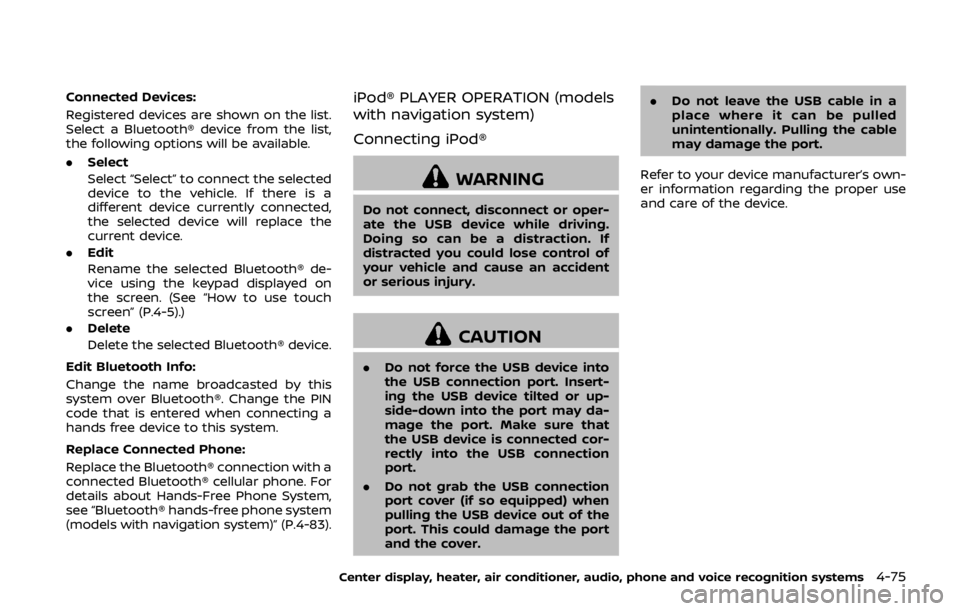
Connected Devices:
Registered devices are shown on the list.
Select a Bluetooth® device from the list,
the following options will be available.
.Select
Select “Select” to connect the selected
device to the vehicle. If there is a
different device currently connected,
the selected device will replace the
current device.
. Edit
Rename the selected Bluetooth® de-
vice using the keypad displayed on
the screen. (See “How to use touch
screen” (P.4-5).)
. Delete
Delete the selected Bluetooth® device.
Edit Bluetooth Info:
Change the name broadcasted by this
system over Bluetooth®. Change the PIN
code that is entered when connecting a
hands free device to this system.
Replace Connected Phone:
Replace the Bluetooth® connection with a
connected Bluetooth® cellular phone. For
details about Hands-Free Phone System,
see “Bluetooth® hands-free phone system
(models with navigation system)” (P.4-83).iPod® PLAYER OPERATION (models
with navigation system)
Connecting iPod®
WARNING
Do not connect, disconnect or oper-
ate the USB device while driving.
Doing so can be a distraction. If
distracted you could lose control of
your vehicle and cause an accident
or serious injury.
CAUTION
. Do not force the USB device into
the USB connection port. Insert-
ing the USB device tilted or up-
side-down into the port may da-
mage the port. Make sure that
the USB device is connected cor-
rectly into the USB connection
port.
. Do not grab the USB connection
port cover (if so equipped) when
pulling the USB device out of the
port. This could damage the port
and the cover. .
Do not leave the USB cable in a
place where it can be pulled
unintentionally. Pulling the cable
may damage the port.
Refer to your device manufacturer’s own-
er information regarding the proper use
and care of the device.
Center display, heater, air conditioner, audio, phone and voice recognition systems4-75
Page 243 of 460

4-76Center display, heater, air conditioner, audio, phone and voice recognition systems
SAA2512
Open the console lid and connect the
iPod® cable to the USB connection port. If
compatible, the battery of the iPod® is
charged while the connection to the
vehicle.
Depending on the version of the iPod®,
the display on the iPod® shows a NISSAN
or Accessory Attached screen when the
connection is completed. When the iPod®
is connected to the vehicle, the iPod®
music library can only be operated by the
vehicle audio controls.
Compatibility
The following models are available:
.Fifth generation iPod® (version 1.2.3 or
later)
. iPod Classic® (version 1.1.1 or later)
. First generation iPod touch® (version
2.0.0 or later)
. Second generation iPod touch® (ver-
sion 1.2.3 or later)
. First generation iPod nano® (version
1.3.1 or later)
. Second generation iPod nano® (ver-
sion 1.1.3 or later)
. Third generation iPod nano® (version
1.1 or later)
. Fourth generation iPod nano® (version
1.0.2 or later)
Make sure that the iPod® version is
updated.
Audio main operation
Push the ignition switch to the ACC or ON
position. Then, push the DISC·AUX button
repeatedly to switch to the iPod® mode.
If the system has been turned off while
the iPod® was playing, pushing the
ON·OFF button will start the iPod®.
DISC·AUX button:
When the DISC·AUX button is pushed with
the system off and the iPod® connected,
the system will turn on. If another audio
source is playing and the iPod® is con-
nected, push the DISC·AUX button repeat-
edly until the center display changes to
the iPod® mode.
Interface:
The interface for iPod® operation shown
on the vehicle center display is similar to
the iPod® interface. Use the multi-func-
tion controller and the ENTER or BACK
button to play the iPod® with your
favorite settings.
The following items can be chosen from
the menu list screen. For further informa-
tion about each item, see the iPod®
Owner’s Manual.
. Now Playing
. Playlists