2019 MITSUBISHI MIRAGE G4 radio controls
[x] Cancel search: radio controlsPage 152 of 267

12 V power outlets
Features and controls 5-87
5
Cards can be slipped into the holder (A) on the sun visor.
N00525001670
Accessories can be ope
rated while the igni-
tion switch or the operation mode is in ON or ACC. To use a “plug-in” type accessory, open thecover, and insert the plug in the power outlet.
N00554301040
HomeLink
® Wireless Control System is a
registered trademark of Gentex Corporation. HomeLink
® provides a convenient way to
replace up to 3 hand-held radio-frequency (RF) transmitters used
to activate devices
such as gate operators, garage door openers, entry door locks, securi
ty systems, even home
lighting. Addi
tional HomeLink
® information
can be found at www.homelink.com, www.youtube.com/HomeL
inkGentex, or by
calling the toll-free HomeLink
®-Hotline at 1-
800-355-3515.
Card holder
12 V power outlets
CAUTION Be sure to use a “plug-in” type accessory operating at 12 V and at 120 W or less. Also be aware that
using electronic equip-
ment with the engine
off may run the battery
down. When the power outlet is not in use, be sure to close the power outlet
cover. This will pre-
vent the power out
let from becoming
clogged and short circuiting.
HomeLink
® Wireless Con-
trol System
(if so equipped)
WA R N I N G Do not use HomeLink
® with any garage
door opener that lacks safety stop and reverse features as re
quired by U.S. Fed-
eral Regulations.
A garage door opener
which cannot detect an object in the path of a closing garage d
oor and then auto-
matically stop and reverse, does not meetcurrent U.S. Federal Regulations. Using a garage door opener wi
thout these features
increases the risk of serious injury ordeath.
BK0267800US.book 87 ページ 2018年5月30日 水曜日 午後4時24分
Page 153 of 267

HomeLink® Wireless Control System (if so equipped) 5-88 Features and controls
5
N00584600029
Some garage door ope
ners manufactured
after 1995 have “rolling code protection”. To program a garage door openerequipped with “rolli
ng code protection”;
you will need to access the garage door opener motor to press the motor’s “Learn”or “Smart” buttons. Fo
r convenience, use
a ladder and another person to assist you. It is recommended that a new battery be placed in the hand-held transmitter of the device being programmed to HomeLink
®
for quicker training and accurate trans- mission of the radio-frequency signal.
N00584700020
To program HomeLink
® to operate a garage
door, gate, or entry door opener, home oroffice lighting, you need to be at the same location as the device. 1. Press the HomeLink
® button that you
would like to progra
m. The indicator light
(A) will flash
orange slowly.
During programming, your garage door or gate may open or close. Make sure thatpeople and objects ar
e clear of the garage
door or gate that
you are programming.
NOTE
Once HomeLink
® is programmed, retain the
original transmitter for future programming procedures (for exam
ple, new vehicle pur-
chases). Upon sale of the vehicle, the pro- grammed HomeLink
® buttons should be
erased for security purposes. Refer to “Cleaning the programmed information” on page 5-91. You can program a maximum of 3 devices. To change or replace
any of the 3 devices
after it has been in
itially programmed, you
must first erase the current settings. See “Cleaning the programmed information”on page 5-91 or “Reprogramming a single HomeLink
® button” on page 5-92.
WA R N I N G
1-
HomeLink
® button 1
2-
HomeLink
® button 2
3-
HomeLink
® button 3
Before programming Home- Link
®
Programming a new Home- Link
®
NOTE
You do not need to continue holding the HomeLink
® button.
If the indicator light doe
s not flash, refer to
“Cleaning the programmed information” on page 5-91.
BK0267800US.book 88 ページ 2018年5月30日 水曜日 午後4時24分
Page 155 of 267
HomeLink® Wireless Control System (if so equipped) 5-90 Features and controls
5
N00584800021
Canadian radio-frequenc
y laws require trans-
mitter signals to “time-out” (or quit) afterseveral seconds of tr
ansmission - which may
not be long enough for HomeLink
® to pick
up the signal during programming. Similar to this Canadian law, some U.S. gate operators are designed to “time-
out” in the same man-
ner. The indicator LED on the hand-held transmit- ter will go off when th
e device time
s out indi-
cating that it has finished transmitting. If you live in Canada or you are having diffi- culties programming a gate operator orgarage door opener by using the “Program- ming” procedures, replace “Programming a new HomeLink
®” step 3 with the following:
3. Press and release - every 2 seconds (“cycle”) your hand-held transmitter until the HomeLink
® indicator light changes from
slowly flashing orange to either rapidly flash- ing green (rolling code
) or continuously lit
green (fixed code). Now you may release the hand-held transmitter button. Proceed with “Programming a new Home- Link
®” step 4 to complete.
N00584900022
The HomeLink
® has the capability of receiv-
ing garage door status from compatiblegarage door opener systems. Check your garage door opener manual for the available feature and HomeLink
® compatibility. Also
for a listing of compatible systems contact HomeLink
® at: www.homelink.com
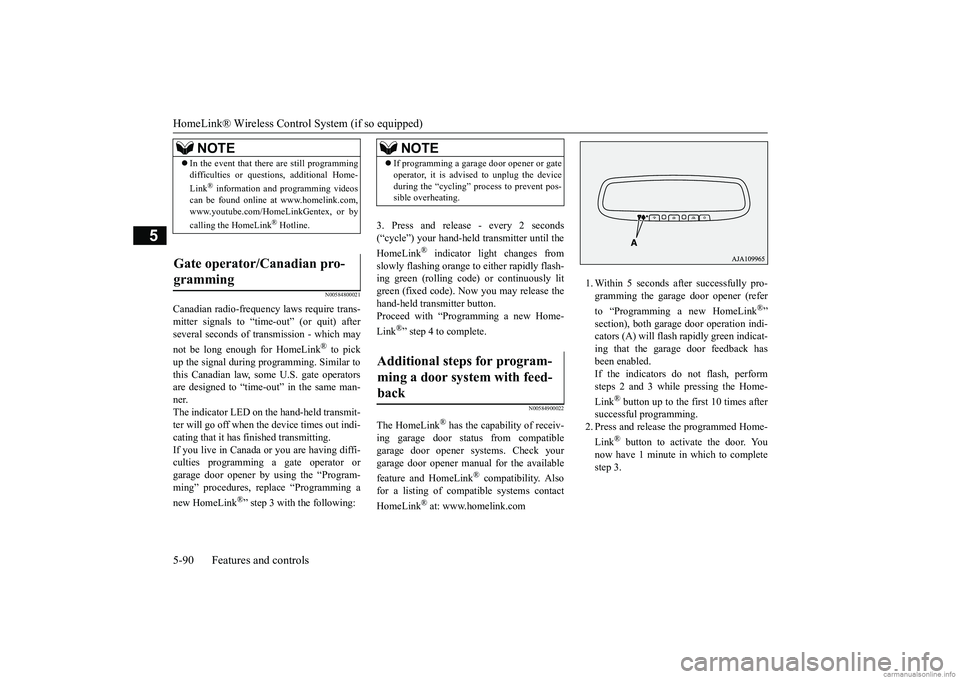
1. Within 5 seconds after successfully pro- gramming the garage door opener (refer to “Programming a new HomeLink
®”
section), both garage
door operation indi-
cators (A) will flash
rapidly green indicat-
ing that the garage door feedback has been enabled. If the indicators do not flash, performsteps 2 and 3 while pressing the Home- Link
® button up to the first 10 times after
successful programming.2. Press and release
the programmed Home-
Link
® button to activate the door. You
now have 1 minute in which to completestep 3.
NOTE
In the event that there are still programming difficulties or quest
ions, additional Home-
Link
® information and programming videos
can be found online at www.homelink.com,www.youtube.com/HomeLinkGentex, or by calling the HomeLink
® Hotline.
Gate operator/Canadian pro- gramming
NOTE
If programming a garage door opener or gate operator, it is advise
d to unplug the device
during the “cycling” pr
ocess to prevent pos-
sible overheating.
Additional steps for program- ming a door system with feed- back
BK0267800US.book 90 ページ 2018年5月30日 水曜日 午後4時24分
Page 157 of 267

Interior lights 5-92 Features and controls
5
1. Press and hold the 2 outer HomeLink
®
buttons for at least
10 seconds. The indi-
cator will change
from continuous yellow
to rapidly flashing green. 2. Release both buttons. 3. HomeLink
® is now in the train (or learn-
ing) mode and can be programmed at anytime beginning with
“Programming a new
HomeLink
®” step 1.
N00585400024
To reprogram a HomeLink
® button, complete
the following. 1. Press and hold the desired HomeLink
®
button. Do not release the button. 2. The indicator light will begin to slowly flash orange after 20
seconds. The Home-
Link
® button can be released at this point.
Proceed with “P
rogramming a new
HomeLink
®” step 2.
N00585600026
Your HomeLink
® system operates on a radio
frequency subject to
Federal Communica-
tions Commission (FCC)
Rules (For vehicles
sold in U.S.A.) and Industry Canada Rules (For vehicles sold in Canada). This devicecomplies with Part 15 of the FCC Rules and RSS- 210 of the Industry Canada Rules. Operation is subject to the following two con-ditions. This device may not
cause harmful inter-
ference. This device must ac
cept any interference
that may be received, including interfer- ence that may cause undesired operation.
This equipment complies with FCC radiation exposure limits set forth for an uncontrolled environment. End Users must follow the spe- cific operating instruc
tions for satisfying RF
exposure compliance. This transmitter must be at least 12 inches (20 cm) from the user and must not be co-located or operating inconjunction with any other antenna or trans- mitter. The term “IC:” before the certification/regis-tration number only signi
fies that Industry
Canada technical spec
ifications were met.
N00525301644
NOTE
Do not hold for longer than 20 seconds.
Reprogramming a single HomeLink
® button
NOTE
If you do not complete the programming of a new device to the button,
it will revert to the
previously stored programming.For questions or comments, visit www.homelink.com, www.youtube.com/HomeLinkGentex, or by calling the HomeLink
® Hotline.
General information
CAUTION The transmitter has been tested and complies with FCC and IC rules.Changes or modifica
tions not expressly
approved by the party responsible for com- pliance could void the
user’s authority to
operate the device.
Interior lights
NOTE
Be aware that leaving the light illuminated with the engine off may run the batterydown. Never leave the vehi
cle without checking
that the light is off.
BK0267800US.book 92 ページ 2018年5月30日 水曜日 午後4時24分
Page 174 of 267

7
Comfort controlsVents ................................................................................................7-2 Heater without air conditioning functi
on (if so equipped) ...............7-4
Manual air conditioning (if so equipped) .........................................7-7Automatic air conditioning (if so equipped)...................................7-12 Important air conditioning operating tips ..
...........
...........
.........
.....7-18
Air purifier (if so equipped)............................................................7-19Antenna ..........................................................................................7-19 General information about your radio .....
...........
...........
...........
.....7-20
BK0267800US.book 1 ページ 2018年5月30日 水曜日 午後4時24分
Page 193 of 267

General information about your radio 7-20 Comfort controls
7
N00733901540
Your vehicle’s radio receives both AM and FM stations. The quality of your reception is affected bydistance, obstacles, an
d signal interference.
This radio complies with Part 15 of Federal Communications Commission (FCC) Rules (for vehicles sold in U.S.A.). Operation issubject to the following conditions: The device may not cause harmful inter- ference. This device must ac
cept any interference
recieved, including interference that may cause undesirable operation.
FM signals do not follow the earth surface nor are they reflected by the upper atmo- sphere. For this reason,
FM broadcasts cannot
be received over long distances. AM signalsfollow the earth’s surface and are reflected by the upper atmosphere. For this reason, AM broadcasts can be received over longer dis-tances. Because of the limited
range of FM signals
and the way FM waves transmit, you may experience weak or fading FM reception.When the broadcast is blocked by mountains or similar obstructions,
reception can be dis-
turbed.
The reason why one can hear FM but not AM in parking garages, unde
r bridges etc., is that
FM signals, unlike AM
signals, are reflected
by solid objects such
as buildings, etc.
Because FM signals are easily reflected by buildings, this can also
cause reception dis-
turbances.The direct signal from
the broadcast station
reaches the antenna slightly before the reflected signal. This
time difference may
cause some reception di
sturbance or flutter.
This problem occurs primarily in urban areas.
• When driving into a structure that has a low ceiling
General information about your radio
CAUTION Changes or modifica
tions not expressly
approved by the party meeting the above conditions could void the user’s authority tooperate the equipment.NOTE
Signal transmission Weak reception (fading) FM AM 25 to 40 mile radius (40 to 64 km)
100 mile radius (160 km)
Reflection
BK0267800US.book 20 ページ 2018年5月30日 水曜日 午後4時24分
Page 194 of 267

General information about your radio
Comfort controls 7-21
7
If one listens to a weak station and is in the vicinity of another st
rong station, both sta-
tions might be received simultaneously. Stereo reception re
quires a high quality
broadcast signal. This means that types ofdisturbances mentioned previously become more marked and the reception range is somewhat diminished during stereo recep-tion.
FM reception is affected by the electrical sys- tems of vehicles in the vicinity, especially those without an electr
onic noise suppression
device. The disturbance is even greater if thestation is weak or poorly tuned. FM reception is not as sensitive to electrical disturbances as AM. AM
reception is sensi-
tive to electrical dist
urbances such as power
lines, lightning and ot
her types of similar
electrical phenomena.
Cross modulation FM stereo reception
Causes of disturbances
BK0267800US.book 21 ページ 2018年5月30日 水曜日 午後4時24分
Page 231 of 267

Emission-control system maintenance 9-20 Vehicle care and maintenance
9
N00940800328
Your vehicle is equi
pped with an emission-
control system that me
ets all the requirements
of the U.S. Environmental Protection Agencyand Environment Cana
da. The emission-con-
trol system is made of: a positive crankcase ventilation system an evaporative emission-control system an exhaust emission-control system
To be sure the emission-control system works properly, have your vehicle inspected andmaintained by an authorized Mitsubishi Motors dealer or a repair facility of your choice. This should be
done at the time or
mileage specified in the “WARRANTY AND MAINTENANCE MANUAL”. These, and all the other “general” mainte-nance services listed in this manual, need to be performed to keep your vehicle running properly and reliably.You should also have an inspection and ser- vice any time you
suspect a malfunction.
N00940900228
Spark plugs must fire properly for good engine performance
and emission-control.
Do not reuse them by cleaning or regapping.Change them at the mileage listed in the “WARRANTY AND MAINTENANCE MANUAL”.
N00941000040
Check the hose surfaces for any heat and mechanical damage, ha
rd and brittle rubber,
cracking, tears, cuts and abrasions. Pay spe-cial attention to the hos
es closest to high heat
sources such as the exhaust manifold. Check all the hose connections, such as clamps andcouplings, to make sure they are secure and that there are no leaks. If you see any wear or damage, replace the hoses immediately.
N00950100050
Have the valve clea
rance checked at an
authorized Mitsubishi Motors dealer at the mileage specified in
the “WARRANTY AND
MAINTENANCE MANUAL”.If the engine sounds ab
normally loud, have
adjustments made by an authorized Mitsubishi Motors dealer.
N00941300173
Check these regularly for damage or leaks in the fuel lines and conne
ctions. Check the fuel
tank filler cap for dama
ge or looseness. Pay
special attention to the fuel lines closest to
Emission-control system maintenance
NOTE
To meet government
regulations and pro-
mote cleaner air, your
vehicle is equipped
with an onboard diagnostic system (OBD).The engine electroni
c control module that
controls OBD functions
stores various data
(especially about th
e exhaust emissions).
This data will be erased if the battery cable is disconnected, which c
ould make a rapid
diagnosis difficult.
Do not disconnect the
battery cable when the engine malfunction indicator (“SERVIC
E ENGINE SOON” or
“Check engine light”) is ON.
Spark plugs
NOTE
Use the spark plugs listed under “Engine specifications” on page
11-5 or plugs that are
exactly the same. Othe
r plugs could cause
engine damage, perf
ormance problems or
radio noise.
Fuel hoses Intake valve clearance Fuel system (tank, pipe line and connection, and fuel tank filler cap)
BK0267800US.book 20 ページ 2018年5月30日 水曜日 午後4時24分