Page 110 of 330
When leaving the vehicle, always take the
SmartKey with you and lock the vehicle. This
also applies for the Digital Vehicle Key if the
"Digital Vehicle Key" function is activated via
Mercedes me connect.
The memory function can be activated at anytime, e.g. even when the SmartKey is not inthe ignition lock.
With the memory function, you can store up tothree different settings, e.g. for three differentpeople.
The following settings are stored as a singlememory preset:
RPosition of the seat, backrest and headrestraint
RDriver's side: steering wheel position
RDriver's side: position of the exterior mirrorson the driver's and front-passenger sides
XAdjust the seat electrically (Ypage 99).
XOn the driver's side, adjust the steeringwheel (Ypage 103) and the exterior mirrors(Ypage 105).
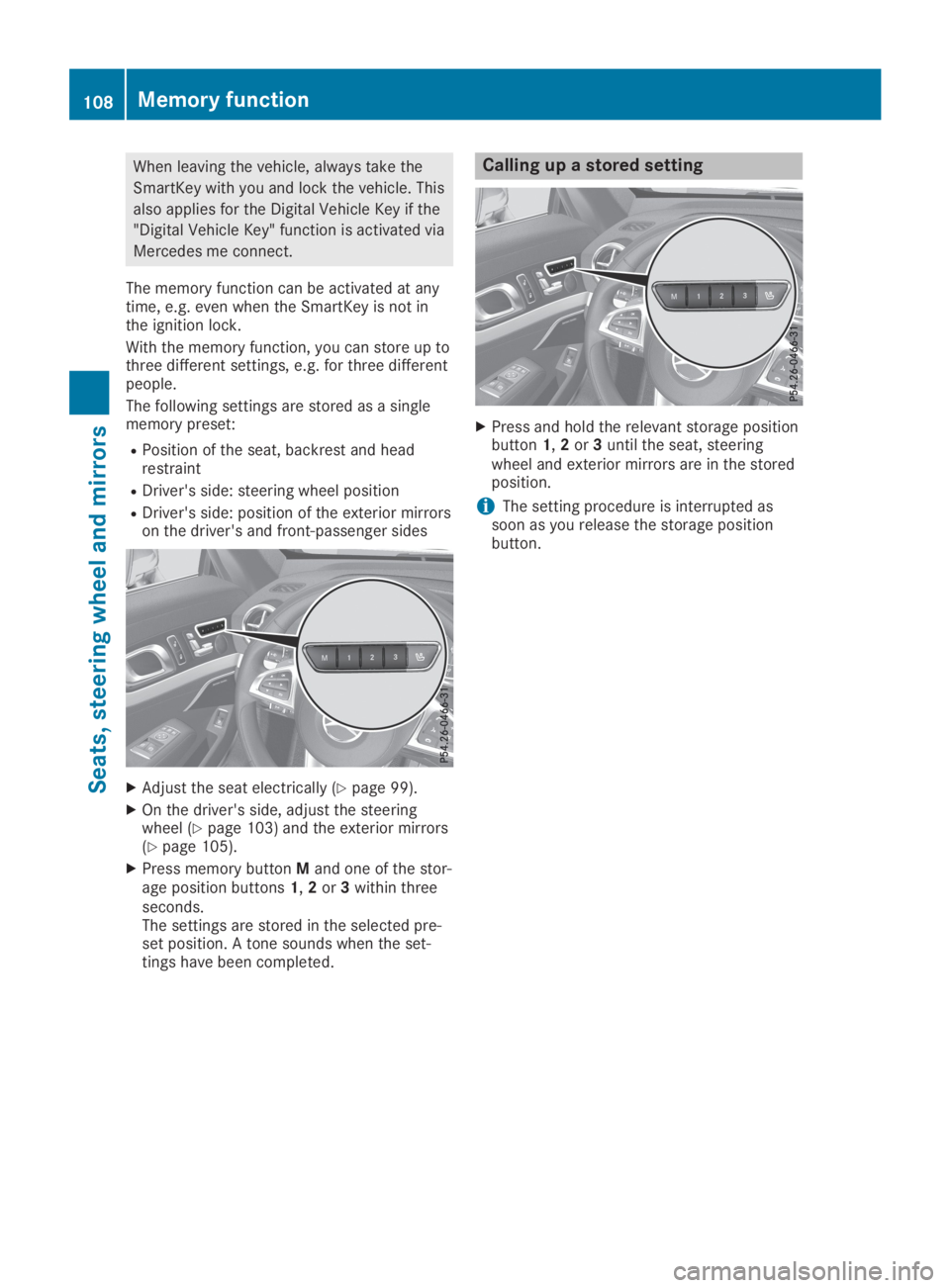
XPress memory buttonMand one of the stor-age position buttons1,2or3within threeseconds.The settings are stored in the selected pre-set position. A tone sounds when the set-tings have been completed.
Calling up a stored setting
XPress and hold the relevant storage positionbutton1,2or3until the seat, steeringwheel and exterior mirrors are in the storedposition.
iThe setting procedure is interrupted assoon as you release the storage positionbutton.
108Memory function
Seats, steering wheel and mirrors
Page 203 of 330

automatic headlamp mode is activated(Ypage 109).
Rexterior lighting delayed switch-off:theexterior lighting remains lit for 60 secondsafter the engine is switched off. If you closeall the doors and the trunk lid, the exteriorlighting goes off after 15 seconds.
Depending on your vehicle's equipment, whenthe surround lighting and delayed switch-offexterior lighting are on, the following light up:
Rparking lamps
Rlow-beam headlamps
Rdaytime running lamps
Rside marker lamps
Rsurround lighting in the exterior mirrors
Activating/deactivating the interior
lighting delayed switch-off
If you activate theInterior LightingInterior LightingDelayDelayfunction, the interior lighting remainson for 20 seconds after you remove the Smart-Key from the ignition lock.
XPress theYorebutton on the steer-ing wheel to select theSett.Sett.menu.
XPress thedorcbutton to select theLightLightsubmenu.
XPressvto confirm.
XPress thedorcbutton to select theInterior Lighting DelayInterior Lighting Delayfunction.When theInterior Lighting DelayInterior Lighting Delayfunc-tion is activated, the vehicle interior is dis-played in orange in the multifunction dis-play.
XPress thevbutton to save the setting.
Vehicle
Activating/deactivating the automatic
door locking mechanism
If you activate theAutomatic Door LockAutomatic Door Lockfunction, the vehicle is centrally locked abovea speed of approximately 9 mph (15 km/h).
XPress theYorebutton on the steer-ing wheel to select theSett.Sett.menu.
XPress thedorcbutton to select theVehicleVehiclesubmenu.
XPressvto confirm.
XPress thedorcbutton to select theAutomatic Door LockAutomatic Door Lockfunction.When theAutomatic Door LockAutomatic Door Lockfunctionis activated, the multifunction display showsthe left-hand vehicle door in orange.
XPress thevbutton to save the setting.
For further information on the automatic lock-ing feature, see (Ypage 81).
Activating/deactivating the acoustic
locking verification signal
If you switch on theAcoustic LockAcoustic Lockfunction,an acoustic signal sounds when you lock thevehicle.
XPress theYorebutton on the steer-ing wheel to select theSett.Sett.menu.
XPress thedorcbutton to select theVehicleVehiclesubmenu.
XPressvto confirm.
XPress thedorcbutton to select theAcoustic LockAcoustic Lockfunction.If theAcoustic LockAcoustic Lockfunction is activated,the7symbol in the multifunction displaylights up orange.
XPress thevbutton to save the setting.
Comfort
Activating/deactivating the EASY-
ENTRY/EXIT feature
GWARNING
When the EASY-ENTRY/EXIT feature adjusts
the steering wheel, you and other vehicle
occupants – particularly children – could
become trapped. There is a risk of injury.
While the EASY-ENTRY/EXIT feature is mak-
ing adjustments, make sure that no one has
any body parts in the sweep of the steering
wheel.
If somebody becomes trapped:
Rpress one of the memory function posi-
tion buttons, or
Rmove the switch for steering wheel
adjustment in the opposite direction to
that in which the steering wheel is mov-
ing.
The adjustment process is stopped.
Menus and submenus201
On-board computer and displays
Z
Page 258 of 330
RThe indicator lamp in one or more of the fol-lowing buttons continues to light up redafter the system self-diagnosis:
-SOS button
-RRoadside Assistance call button
-
Page 262 of 330
garage door opener, contact an authorizedMercedes-Benz Center.
Alternatively, you can call the following tele-phone assistance services:
RUSA:Mercedes-Benz Customer AssistanceCenter at 1-800-FOR-MERCedes
RCanada:Customer Service at1-800-387-0100
RHomeLink®hotline 1-800-355-3515 (free ofcharge)
More information on HomeLink®and/or com-patible products is also available online athttp://www.homelink.com.
Notes on the declaration of conformity(Ypage 27).
USA: FCC ID: CB2HMIHL4
Canada: IC: 279B-HMIHL4
Important safety notes
GWARNING
When you operate or program the door with
the integrated garage door opener, persons
in the range of movement of the door may
become trapped or be struck by the door.
There is a risk of injury.
When using the integrated garage door
opener, always make sure that nobody is
within the range of movement of the door.
GDANGER
Combustion engines emit poisonous
exhaust gases such as carbon monoxide.
Inhaling these exhaust gases is hazardous to
health and can result in poisoning. There is a
risk of fatal injury. Therefore, never leave the
engine running an enclosed space without
adequate ventilation.
Programming
Programming the buttons
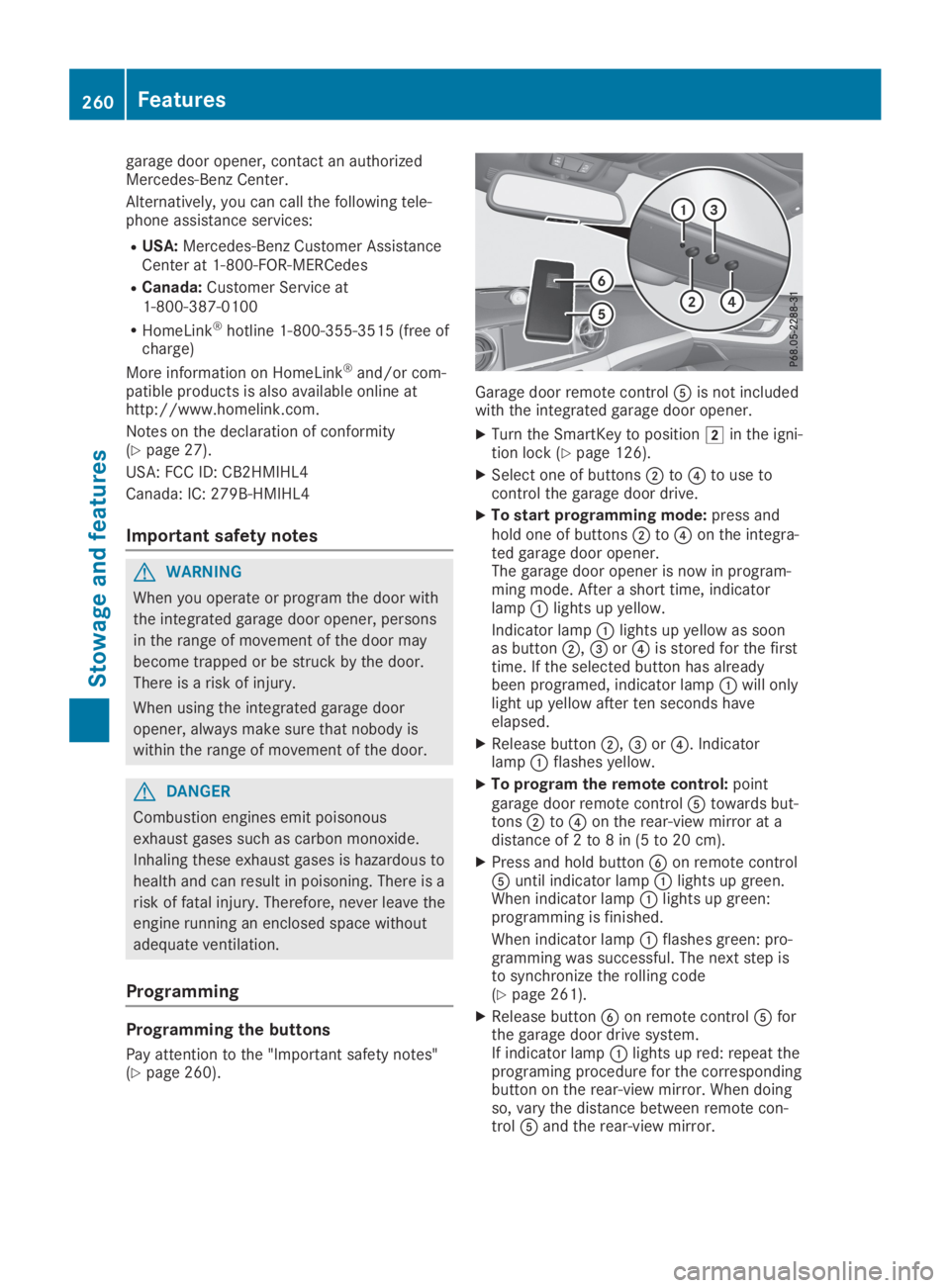
Pay attention to the "Important safety notes"(Ypage 260).
Garage door remote control