2019 MERCEDES-BENZ GLC SUV Mercedes me
[x] Cancel search: Mercedes mePage 77 of 673
Key
Overview of
key functions &
WARNING Risk of accident and inju ry
due tochildren left unat tended in the
ve hicle
If ch ildren are left unat tended in theve hicle,
th ey could:
R Open doo rs,th ereby endangering other
persons or road users.
R Get out and be stru ck byoncoming traf‐
fi c.
R Ope rate ve hicle equipment and become
trapped, forex ample.
In addition, thech ildren could also set the
ve hicle in motion, forex ample by:
R Releasing the parking brake.
R Changing the transmission position.
R Starting theve hicle. #
Never lea vechildren unat tended in the
ve hicle. #
When leaving theve hicle, alw aysta ke
th eke y with you and lock theve hicle. #
Keep theve hicle key out of reach of
ch ildren. This also applies
tothe Digital Vehicle Key if the
"Digital Vehicle Key" function is activated via
Mercedes me connect.
* NO
TEDama getotheke y caused by
magnetic fields #
Keep theke yaw ay from strong mag‐
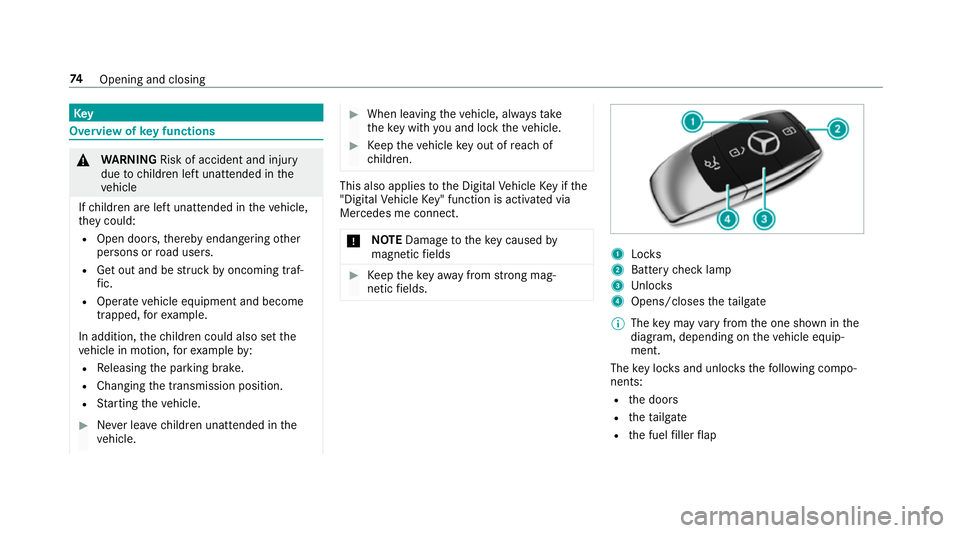
netic fields. 1
Locks
2 Battery check lamp
3 Unloc ks
4 Opens/closes theta ilgate
% The key may vary from the one shown in the
diagram, depending on theve hicle equip‐
ment.
The key loc ksand unlo cksth efo llowing compo‐
nents:
R the doors
R theta ilgate
R the fuel filler flap 74
Opening and closing
Page 79 of 673
Re
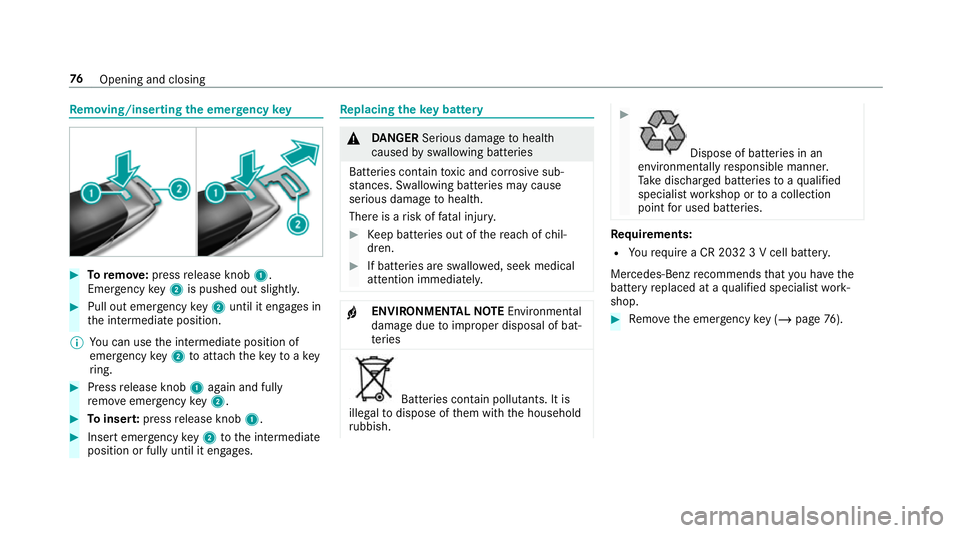
moving/inserting the eme rgency key #
Toremo ve:press release knob 1.
Emer gency key2 is pushed out slight ly.#
Pull out emer gency key2 until it en gage s in
th e intermediate position.
% You can use the intermediate position of
emer gency key2 toattach theke yto akey
ri ng. #
Press release knob 1again and fully
re mo veemer gency key2. #
Toinser t:press release knob 1. #
Insert emer gency key2 tothe intermediate
position or fully until it engages. Re
placing the key battery &
DANG ER Serious damage tohealth
caused byswallowing batteries
Batteries contain toxic and cor rosive sub‐
st ances. Swallowing bat teries may cause
serious damage tohealth.
There is a risk of fata l injur y. #
Keep batteries out of there ach of chil‐
dren. #
If batteries are swallo wed, seek medical
attention immediately. +
ENVIRONMEN
TALNO TEEnvironmental
dama gedue toimproper disposal of bat‐
te ries Batteries conta
in pollutants. It is
illegal todispose of them with the household
ru bbish. #
Dispose of batteries in an
environmen tally responsible manner.
Ta ke dischar ged batteries toaqu alified
specialist workshop or toa collection
point for used batteries. Re
quirements:
R Yourequ ire a CR 2032 3 V cell batter y.
Mercedes-Benz recommends that you ha vethe
battery replaced at a qualified specialist work‐
shop. #
Remo vethe emer gency key ( / page 76). 76
Opening and closing
Page 81 of 673
Problem
Possible causes/consequences and M
MSolutions
Yo u ha velost a key. #
If necessar y,ha ve the mechanical lock changed as well. Doors
Note
s onthe additional door lock The additional door lock is only
available for
ve hicles forth eUni ted Kingdom. &
WARNING Risk of inju ryto persons
inside theve hicle when the additional
door lock is activated
If th e additional door lock is activated, the
doors can no longer be opened from the
inside.
If th ere are persons in theve hicle, they can
no longer le aveth eve hicle, e.g. in hazardous
situations. #
Never lea vepersons unattended in the
ve hicle, particularly children, elderly
persons or persons in need of help. #
Ifth ere are persons in theve hicle, do
not activate the additional door loc k. The additional door lock is automatically activa‐
te d in thefo llowing situations:
R The vehicle is loc ked using thekey.
R The vehicle is loc ked using KEYLESS-GO.
If th eve hicle has been loc ked via Mercedes me
connect, the additional door lock is not activa‐
te d.
If th e additional door lock is activated, the doors
cann otbe opened from the inside.
% After locking you can issue a signal with the
horn.
Yo u can pr eventthe additional door lock from
being activated bydeactivating interior pr otec‐
tion before locking theve hicle (/ page102). Un
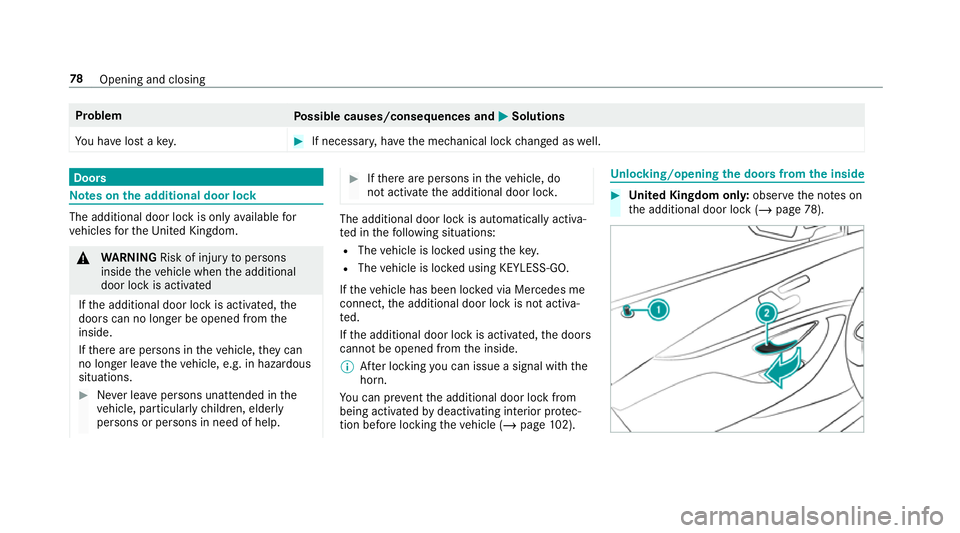
locking/opening the doors from the inside #
United Kingdom onl y:obser vethe no tes on
th e additional door lock (/ page78). 78
Opening and closing
Page 82 of 673
#
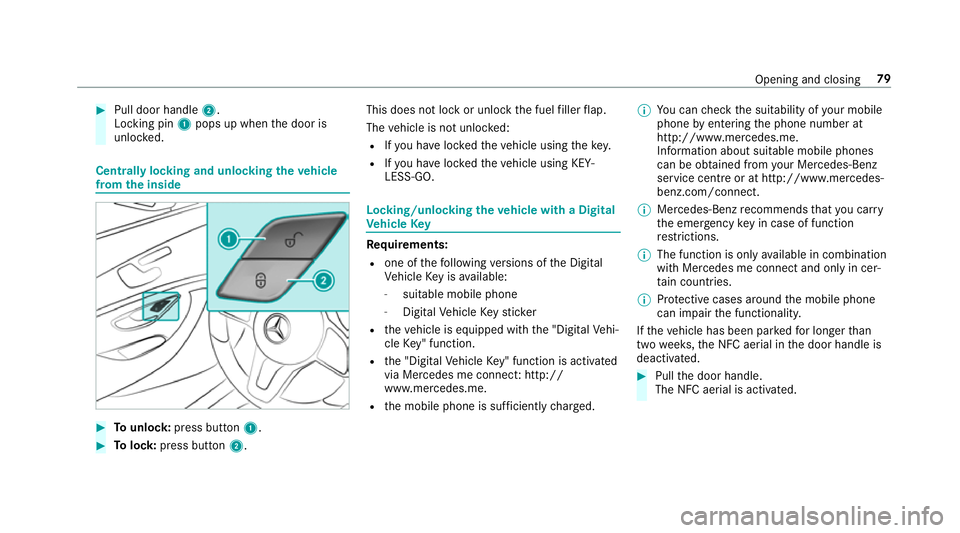
Pull door handle 2.
Locking pin 1pops up when the door is
unloc ked. Centrally locking and unlocking
theve hicle
from the inside #
Tounlo ck:press button 1. #
Tolock: press button 2. This does not lock or unlock
the fuel filler flap.
The vehicle is not unloc ked:
R Ifyo u ha veloc kedth eve hicle using thekey.
R Ifyo u ha veloc kedth eve hicle using KEY‐
LESS-GO. Locking/unlocking
theve hicle with a Digital
Ve hicle Key Re
quirements:
R one of thefo llowing versions of the Digital
Ve hicle Key is available:
- suitable mobile phone
- Digital Vehicle Keyst icker
R theve hicle is equipped with the "Digital Vehi‐
cle Key" function.
R the "Digital Vehicle Key" function is activated
via Mercedes me connec t:http://
www.mercedes.me.
R the mobile phone is suf ficiently charge d. %
You can check the suitability of your mobile
phone byentering the phone number at
http://www.mercedes.me.
Information about suitable mobile phones
can be obtained from your Mercedes-Benz
service centre or at http://www.mercedes-
benz.com/connect.
% Mercedes-Benz recommends that you car ry
th e emer gency key in case of function
re strictions.
% The function is only available in combination
with Mercedes me connect and on lyin cer‐
ta in countries.
% Protective cases around the mobile phone
can impair the functionality.
If th eve hicle has been par kedfo r longer than
two weeks, the NFC aerial in the door handle is
deactivated. #
Pull the door handle.
The NFC aerial is activated. Opening and closing
79
Page 83 of 673
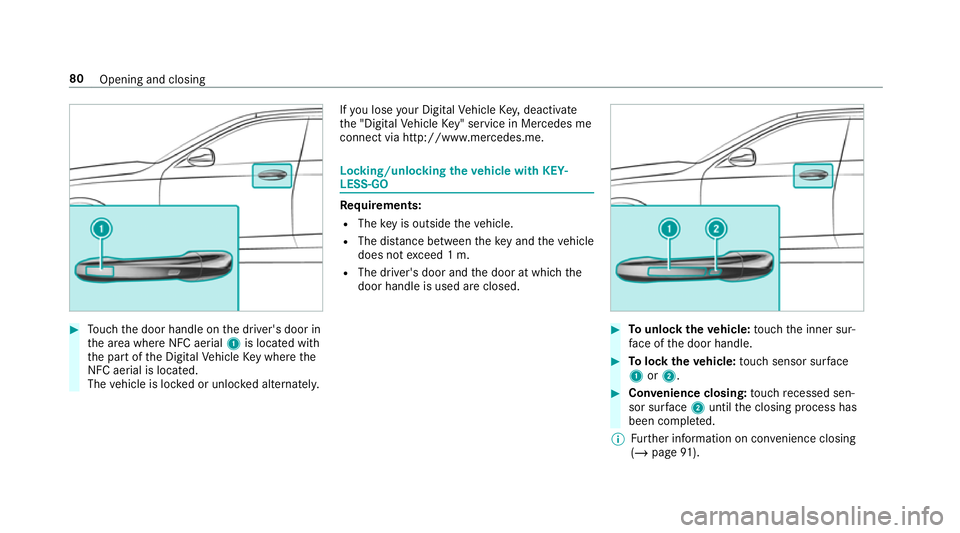
#
Touch the door handle on the driver's door in
th e area where NFC aerial 1is located with
th e part of the Digital Vehicle Key where the
NFC aerial is located.
The vehicle is loc ked or unloc ked alternately. If
yo u lose your Digital Vehicle Key,deactivate
th e "Digital Vehicle Key" service in Mercedes me
connect via http://www.mercedes.m e. Locking/unlocking
theve hicle with KEY‐
LESS-GO Re
quirements:
R The key is outside theve hicle.
R The dis tance between theke y and theve hicle
does not exceed 1 m.
R The driver's door and the door at which the
door handle is used are closed. #
Tounlo cktheve hicle: touch the inner sur‐
fa ce of the door handle. #
Tolock theve hicle: touch sensor sur face
1 or2. #
Convenience closing: touch recessed sen‐
sor su rface 2until the closing process has
been comple ted.
% Further information on con venience closing
(/ page 91). 80
Opening and closing
Page 104 of 673
R
afte r pressing thest art/ stop button with the
ke y in thestow age compartment
(/ page 174)
% When the Mercedes‑Benz emer gency call
sy stem is active and the alarm stay s on for
more than 30 seconds, a message is auto‐
matically sent tothe Cus tomer Assis tance
Centre (/ page 439).
Deactivating theATA #
Press theÜ, ßorp button on the
key.
or #
Press thest art/ stop button with theke y in
th estow age compartment (/ page174)
Deactivating the ala rmusing KEYLESS-GO: #
Grasp the outside door handle with thekey
outside theve hicle. Fu
nction of tow- aw ay protection An audible and visual alarm is triggered if an
alteration
to yourvehicle's angle of inclination is
de tected while tow- aw ay protection is primed. To
w- aw ay protection is automatically primed
af te r appro ximately 60 seconds:
R afte r locking theve hicle with thekey
R afte r locking theve hicle using KEYLESS-GO
To w- aw ay protection is only primed when thefo l‐
lowing components are closed:
R the doors
R theta ilgate
To w- aw ay protection is automatically deactiva‐
te d:
R afte r pressing theÜ orp button on
th ekey
R afte r pressing thest art/ stop button with the
ke y in thestow age compartment
(/ page 174)
R afte r unlocking theve hicle using KEYLESS-
GO
R when using HANDS-FREE ACCESS
In fo rm ation on de tecting damage on a pa rked
ve hicle (/ page 207). Priming/deactivating
tow- aw ay protection Multimedia sy
stem:
4 © 5
Settings 5
Quick access #
Prime or deactivate Tow-away protection .
To w- aw ay protection is primed again in thefo l‐
lowing cases:
R The vehicle is unloc ked again.
R A door is opened.
R The vehicle is loc ked again.
% Ifqu ick access is una vailable, select the
Vehicle submenu in theSettings main menu
to prime or deactivate tow- aw ay protection. Fu
nction of interior pr otection When interior pr
otection is primed, a visual and
audible alarm is triggered if mo vement is de tec‐
te d in theve hicle interior.
Interior pr otection is primed automatically af ter
appr oximately ten seconds:
R afte r locking theve hicle with thekey
R afte r locking theve hicle using KEYLESS-GO Opening and closing
101
Page 107 of 673
Seats
Ad
justing the front seat mechanically and
electrically (without Seat Comfort Package) &
WARNING Risk of becoming trapped if
th e seats are adjus tedby children
Children could become trapped if they adjust
th e seats, particularly when unattended. #
When leaving theve hicle, alw aysta ke
th eke y with you and lock theve hicle.
This also applies tothe digital vehicle
ke y if the "Digital Vehicle Key" function
is activated via Mercedes me connect. #
Never lea vechildren unat tended in the
ve hicle. The seats can be adjus
ted when the ignition is
switched off. &
WARNING Risk of becoming trapped
when adjusting the seats
When you adjust a seat, you or other vehicle
occupants could become trapped, e.g. on the
seat guide rail. #
When adjusting a seat, make sure that
no one has any body parts in the sweep
of the seat. Obser
vethe saf ety no tes on "Airbags" and "Chil‐
dren in theve hicle". &
WARNING Risk of accident due tothe
driver's seat not being engaged
If th e driver's seat is not engaged, it could
mo veunexpectedly while theve hicle is in
motion.
This could cause youto lose control of the
ve hicle. #
Alw ays make sure that the driver's seat
is engaged before starting theve hicle. &
WARNING Risk of inju rythro ugh adjust‐
ing vehicle settings while theve hicle is in
motion
Yo u could lose cont rol of theve hicle in the
fo llowing situations:
R ifyo u adjust the driver's seat, the head
re stra ints, thesteering wheel or the mir‐
ro r while theve hicle is in motion
R ifyo ufast enyour seat belt while theve hi‐
cle is in motion #
Before starting the engine: adjust the
driver's seat, the head restra ints, the
st eering wheel or the mir ror and fasten
yo ur seat belt. &
WARNING Risk of becoming trapped if
th e seat height is adjus ted carelessly
If yo u adjust the seat height carelessly, you
or other vehicle occupants could be trapped
and thereby injured. 104
Seats and stowing
Page 113 of 673
If
th ere is a risk of someone becoming trap‐
ped, stop the adjustment process immedi‐
ately: #
a)Tapth ewa rning message on the
media displa y.
or #
b) Press a memory position button or a
seat adjustment switch on the driver's
door.
The adjustment process is stopped. Re
quirements for adjusting the driver's seat
position tobody size:
R Automatic seat adju stment is activated.
Multimedia sy stem:
4 © 5
Settings 5
Vehicle
5 Auto. seat adjustment
Switching automatic seat adjustment on/off
When the active user profile is changed while
th eve hicle is stationar y,the driver's seat, out‐
side mir ror and seat contour will auto matically
be adapte dto the driver. #
Select OnorOff.
% This setting is available on lyfor individual
user profiles. Forth e guest profile, auto‐
matic seat adjustment cann otbe switched
on or off. Further information about user
profiles (/ page 331).
Ad justing the driver's seat position tobody
size
The vehicle will calculate a suitable driver's seat
position on the basis of the driver's body size
and set this direct ly. #
Select SEAT POSITIONING . #
Toset the unit of measurement: select cm
or ft/in. #
Set the size using the scale. #
Select Start positioning.
The driver's seat position will be adjus tedto
th e body size that has been set.
% Ifth e driver's seat position calculated bythe
ve hicle is not practical or comfor table, it can
be changed manually at any time via the
control buttons. The outside mir
rors are not set via this func‐
tion. Ins tead, they have tobe set manually
via the control switches.
% You can also make these settings via the
Mercedes me por talfo ryo ur user profile. By
syn chro nising the profiles in theve hicle and
th e Mercedes me connect profiles, you can
car ryove rth ese settings foryo ur vehicle.
Fu rther information about synchronising
user profiles (/ page 333).
Setting the easy entry and exitfeature #
Activate or deacti vate the function.
% Ifyo u use an individual user profile and ha ve
set your body size, this information is car ried
ove rfo rth e easy entry andexitfeature. This
causes the driver's seat toautomatically
mo veinto the cor rect position
(/ page 332). 11 0
Seats and stowing