Fu
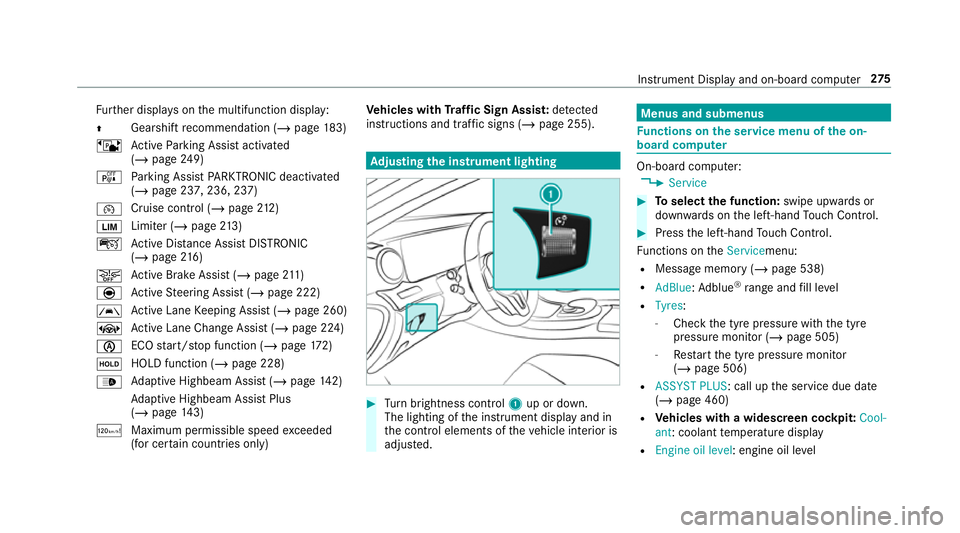
rther displa yson the multifunction display:
Z Gearshift
recommendation (/ page 183)
ë Active Parking Assist activated
(/ page 249)
é Parking Assist PARKTRONIC deacti vated
( / page 237, 236, 237)
¯ Cruise control (/
page212)
È Limi
ter (/ page213)
ç Active Dis tance Assi stDISTRONIC
(/ page 216)
æ Ac
tive Brake Assi st (/ page 211)
è Active Steering Assist (/ page 222)
à Ac
tive Lane Keeping Assist (/ page 260)
± Active Lane Change Assi st (/ page 224)
è ECO
start/ stop function (/ page172)
ë HOLD fu
nction (/ page 228)
_ Ad
aptive Highbeam Assist (/ page142)
Ad aptive Highbeam Assist Plus
(/ page 143)
ð Maximum pe rmissible speed exceeded
(for cer tain countries only) Ve
hicles with Traf fic Sign Assis t:de tected
instructions and traf fic signs (/ page 255). Ad
justing the in stru ment lighting #
Turn brightness control 1up or down.
The lighting of the instrument display and in
th e control elements of theve hicle interior is
adjus ted. Menus and submenus
Fu
nctions on the service menu of the on-
board compu ter On-board computer:
4 Service #
Toselect the function: swipe upwards or
down wards on the left-hand Touch Control. #
Press the left-hand Touch Control.
Fu nctions on theServicemenu:
R Message memory (/ page 538)
R AdBlue: Adblue ®
ra nge and fill le vel
R Tyres:
- Check the tyre pressure with the tyre
pressure monitor (/ page 505)
- Restart the tyre pressure monitor
(/ page 506)
R ASSYST PLUS: call up the service due date
(/ page 460)
R Vehicles with a widescreen cock pit:Cool-
ant: coolant temp erature display
R Engine oil level: engine oil le vel Instrument Display and on-board computer
275