2019 MERCEDES-BENZ G-CLASS ESP
[x] Cancel search: ESPPage 198 of 514
canno
tta ke intoacc ount road, weather ortraf fic
condi tions.Ac tiveLa ne Keeping Assistis onl yan
aid. Youar ere sponsible forth edis tance tothe
ve hicle infront, forve hicle speed, forbr aking in
good timeandforst ay ing inyour lane .
Ac tiveLa ne Keeping Assistcan bring theve hicle
bac kint oth elane withalane-c orrecting brak e
ap plica tion. Inthecase ofabr ok en lane marking
being detected, abr ak eap plica tion willonly be
mad eif ave hicle hasbeen detected intheadja‐
cent lane. Oncoming traffic can bedetected.
Ac tiveLa ne Keeping Assistis available inthe
speed rang ebe twee n37 mph(6 0km/h) and
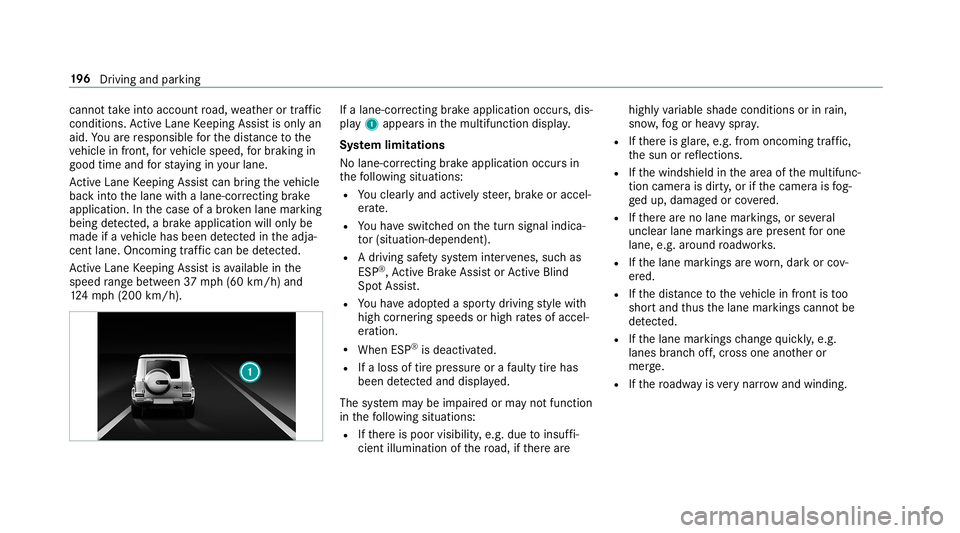
12 4mp h(2 00 km/h) . If
alane-cor recting brak eap plica tion occu rs,dis‐
pla y1 appear sin themultifunc tiondispla y.
Sy stem limita tions
No lane- correcting brak eap plica tion occu rsin
th efo llo wing situat ions:
R Youcle arly and activel yst eer ,br ak eor accel‐
er ate.
R Youha ve switc hedonthetur nsignal indica‐
to r(situ ation-dep endent).
R Adr iving safetysy stem interve nes, such as
ES P®
,Ac tiveBr ak eAssi stor ActiveBli nd
Spo tAssi st.
R Youha ve adop tedaspor tydriving style wit h
high corner ing speeds orhigh ratesof accel‐
er ation.
R When ESP®
is deactiv ated.
R Ifaloss oftirepr essur eor afa ulty tirehas
been detected and displ ayed.
The system maybe impair edorma yno tfunc tion
in thefo llo wing situat ions:
R Ifth er eis poor visibility ,e.g. due toinsuf fi‐
cie ntillu mina tionofthero ad, ifth er ear e highl
yva riable shade condition sor inrain,
sno w,fogor hea vyspr ay.
R Ifth er eis glar e, e.g .fr om oncom ingtraf fic,
th esun orreflect ions.
R Ifth ewindshield inthear ea ofthemultifunc ‐
tion camer ais dir ty,or ifth ecamer ais fog‐
ge dup, damag edorcovered.
R Ifth er ear eno lane marking s,or several
unc lear lane markingsarepr esen tfo rone
lane, e.g.around roadw orks .
R Ifth elane marking sar ewo rn,dar kor cov‐
er ed.
R Ifth edis tance totheve hicle infront istoo
shor tand thus thelane marking scann otbe
de tected.
R Ifth elane markings chang equ ickl y, e.g.
lanes branc hof f,cr oss one another or
mer ge.
R Ifth ero adw ayisvery nar row and wind ing. 19
6
Driving and parking
Page 199 of 514
Ac
tiv atin g/deac tivatin gAc tiv eLan eKe eping
Assis t(v ehicles withPa rking Assis t
PA RK TRONI C) &
WARNIN GRisk ofacci dent despite
Ac tiveLa ne Keeping Assistwa rning
A lane- correcting brak eap plica tion canno t
al wa ys bring theve hicle backint oth eor igi‐
nal lane. #
Alw aysst eer ,br ak eor accelera teyour‐
self ,espe ciallyif Ac tiveLa ne Keeping
Assis twa rnsyo uor mak esalane -cor‐
re cting brak eap plica tion. &
WARNIN GRisk ofacci dent despite inter‐
ve ntio nof ActiveLa ne Keeping Assist
Ac tiveLa ne Keeping Assistdoes notde tect
tr af fic condi tions orroad user s.In very rare
case s,thesy stem maymak ean inappr opri‐
at ebr ak eapplication, e.g.afte rint entional ly
dr iving overa soli dlane marking.
The brak eapp lication canbeinterru pte dat
an ytime ifyo usteer slightl yin theopposit e
dir ect ion. #
Alw aysmak esur eth at ther eis suf fi‐
cie ntdist anc eto theside forot her traf‐
fi c or obs tacle s. &
WARNIN GRisk ofacci dent despite Lane
Ke eping Assist
Lane Keeping Assistcann otalw aysclear ly
de tect lane mar kings .
In such case s,Lane Keeping Assistcan:
R givean unnec essarywa rning
R notgiv eawa rning #
Alw ayspa ypar ticular attention tothe
tr af fic situ ation and keep within the
lane, espec iallyif Ac tiveLa ne Keeping
Assis taler tsyou. Be
sureto obser vethesy stem limit ations of
Ac tiveLa ne Keeping Assist. Ve
hicl eswith Parking Assis tPA RK TRONI C: #
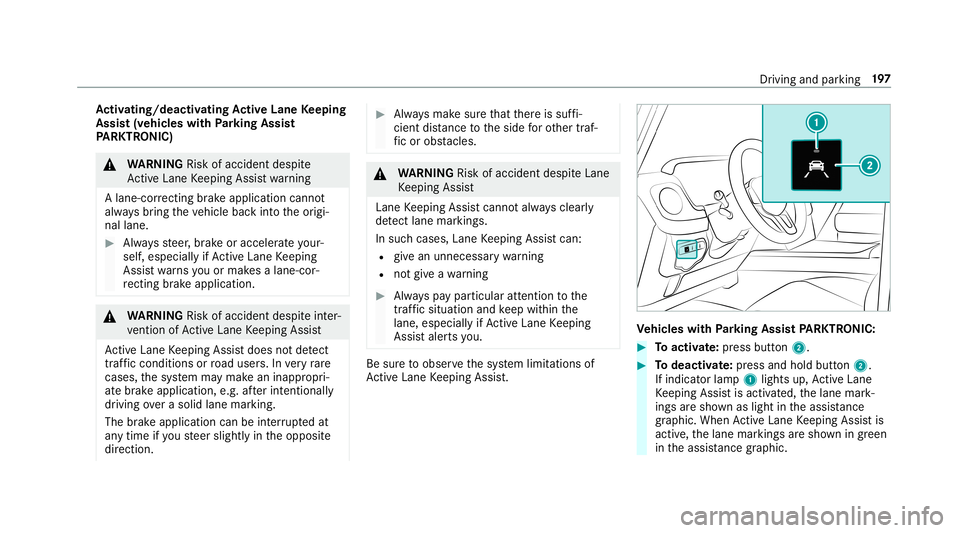
Toactiv ate: press butt on2. #
Todeac tivate: press and holdbu tton 2.
If indi catorlamp 1light sup, ActiveLa ne
Ke eping Assistis activ ated, thelane mark‐
ings aresho wnaslight intheassis tance
gr ap hic. Whe nAc tiveLa ne Keeping Assistis
activ e,thelane marking sar esho wningreen
in theassis tance grap hic. Dr
iving and parking 19
7
Page 200 of 514
Ve
hicl eswithout Parking Assis t
PA RK TRONI C: #
Activate/d eactiv ateAc tiveLa ne Keeping
Assis tvia themultimedia system
(/ page19 8).
Se nsitiv ity of Activ eLan eKe eping Assist
Wi th theSt andar dor Adaptivese tting ,yo ucan
inf luen cewhen thewa rning vibra tionofLane
Ke eping Assisttak esplace.
In both theSt andar dand Adaptivese tting s,no
wa rning vibra tionoccursin thefo llo wing situa‐
tion s:
R Youha ve switc hedonthetur nsignal indica‐
to r.
R Adr ivi ng safety system interve nes, such as
AB S,BA Sor ESP ®
.
In theAd aptivese tting ,th er ewill also beno
wa rning vibra tioninthefo llo wing situat ions:
R The vehicle isacceler ated orbrak ed consid‐
er abl y.
R Yousteer activ ely, e.g. swerve toavo idan
obs tacle orchang elane quickl y. R
Youcut thecor ner onashar pbend.
Se tting thesensit ivityof Activ eLan eKe ep‐
ing Assis t
Multi media system:
4 Vehicle 5
k Assist ance
5 Act .Lane Keep. Assist #
Select Adaptive orStandard.
Ac tiveLa ne Keeping Assistis activ ated with
th eselect edsetting.
or #
Select Off.
Ac tiveLa ne Keeping Assistis deactiv ated. Tr
aile rhitc h No
teson towing atrail er Mer
cede s‑AMG vehicl es:alwaysobser vethe
no tesin theSupplement .Ot her wise, youma y
no tre cogni zedangers. Obs
erve thefo llo wing noteson theto ngu e
we ight :
R Donotuse ato ngu ewe ight that exceed sor
fa lls belo wtheper missible tongu ewe ight
R Use ato ngu ewe ight asclos eas possible to
th emaximum tongu ewe ight
Do notex ceed thefo llo wing values:
R Perm issible towing capac ity
R Perm issible rear axle load oftheto wing vehi‐
cle
R Perm issible gross mass oftheto wing vehicle
R Perm issible gross mass ofthetra iler
R Maximum permissible speedofthetra iler
En sur eth efo llo wing beforest ar tin gajo ur ne y:
R The tirepr essur eon there ar axle oftheto w‐
ing vehicle issetfo ra maximu mloa d
R The lighting ofthecon nect edtrailer isoper a‐
tion al
R Vehicl eswithout LEDheadlam psorMUL‐
TIBEA MLED headlam ps:theheadlam ps
ha ve been setcor rectl y 19
8
Driving and parking
Page 201 of 514

In
theeve ntofincr eased rear axle load, theve hi‐
cle/tra ilercombination mayno texc eed amaxi‐
mum speed of62 mph(1 00 km/h) forre ason s
con cerningth eoper ating permit. This also
applies incount ries inwhic hth eper missible
maximum speedforve hicle/tr ailercombinations
is abo ve62 mph(1 00 km/h). Coupling
up/uncoupling atrailer Re
quirement s:
Tr ailer swit ha7- pin plug canbecon nectedto
th eve hicle withth efo llo wing adapters:
R Adapterplu g
R Adaptercabl e
The trail er wil lbe cor rectly detected bytheve hi‐
cle onlyif th efo llo wing condition sar eme t:
R The trailer isconn ectedcor rectly
R The trai le rlighti ngsystem isin wo rking order
The func tionsof thefo llo wing systems areaf fec‐
te dby acor rectly connect edtrai le r:
R ActiveLa ne Keeping Assist R
ESP®
tra iler stabiliz ation
R Parking AssistPA RK TRONI C
R ActivePa rking Assist
R Blin dSpo tAss ist
Couplin gup atrailer
* NO
TEDama getotheve hicle batterydue
to full disc harge Char
gingth etra iler batt eryusing thepo we r
supply ofthetra iler can damag eth eve hicle
batt ery. #
Donotus eth eve hicle's powe rsupp ly
to charge thetrailer battery. Inf
ormation abouta suit ablebal lhead for
Mer cedes-Ben zve hicles canbeobt ained from a
qu alif ied spec ialistwo rkshop, e.g.anaut hor ized
Mer cedes-Benz Center. #
Position thetra iler onaleve lsur face beh ind
th eve hicle andcouple itup totheve hicle. #
Open thesoc ketcap . #
Inse rttheplug withlug 1ingroo ve 3 on
th esoc ket. #
Turn theba yone tcou pling 2clockwise as
fa ras itwil lgo. #
Letth ecap engage. #
Secur eth ecable tothetrailer withcable ties
(onl yif yo uar eusin gan adap tercabl e). #
Mak esur eth at thecable isalw aysslac kfo r
ease ofmo vement during corner ing. Dr
iving andparking 19
9
Page 210 of 514
Ex
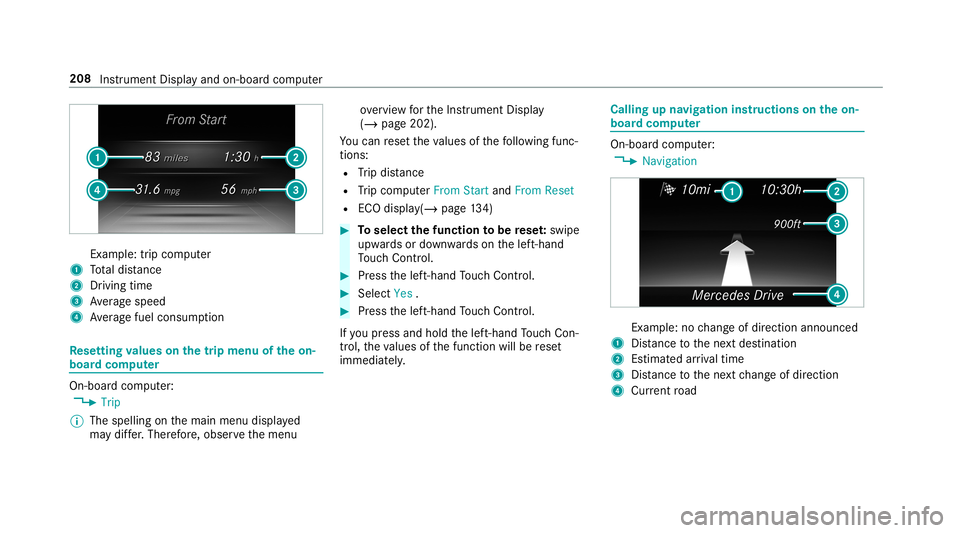
am ple: trip comput er
1 Totaldis tance
2 Driving time
3 Averag espeed
4 Averag efuel consum ption Re
setting values onthetrip menu oftheon-
boar dcom puter On-boar
dcom puter:
4 Trip
% The spelli ngon themain menu displayed
ma ydif fer. Ther efor e, obser vethemenu ove
rview forth eIns trument Display
(/ page202).
Yo ucan rese tth eva lues ofthefo llo wing func‐
tion s:
R Trip dis tance
R Trip com puterFro mStart and FromReset
R ECOdispla y(/ pag e13 4) #
Toselect thefun ction tobe rese t:swipe
upw ards ordown wardson thelef t-hand
To uc hCon trol. #
Press thelef t-hand Touc hCon trol. #
Select Yes . #
Press thelef t-hand Touc hCon trol.
If yo upr ess and hold thelef t-hand Touc hCon ‐
tr ol, theva lues ofthefunc tion willberese t
immediat ely. Callin
gup navig ation instruct ions ontheon-
boar dcom puter On-boar
dcom puter:
4 Navigation Ex
am ple: nochang eof dir ect ion ann oun ced
1 Distance tothene xt des tinat ion
2 Estimat edarriva ltim e
3 Distance tothene xt chang eof dir ect ion
4 Current road 208
Instru ment Displa yand on-boar dcom puter
Page 215 of 514
No
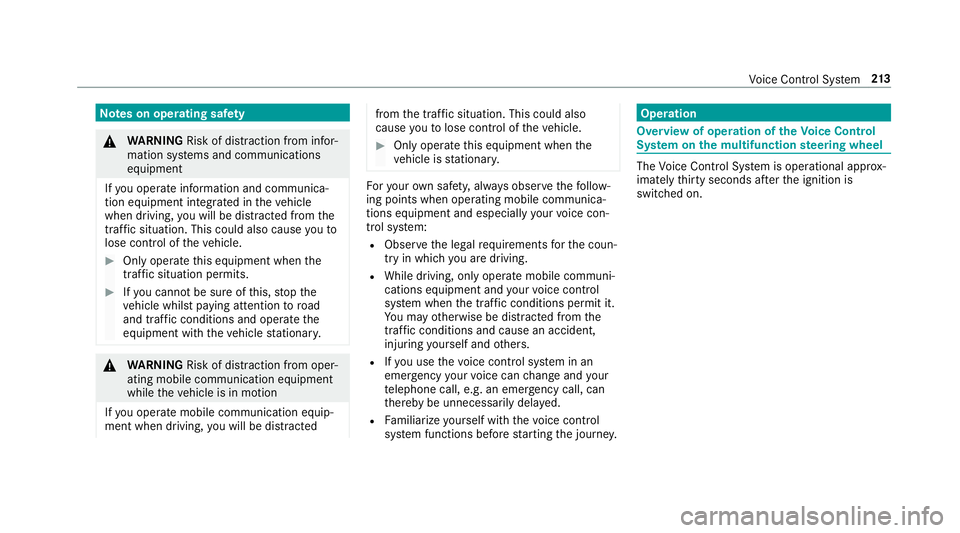
teson oper ating safety &
WARNIN GRisk ofdist ra ction from infor‐
mati onsystems andcomm unication s
eq uipment
If yo uoper ateinf ormat ionand comm unic a‐
tio neq uipme ntintegratedin theve hicle
when driving, youwill bedistract ed from the
tr af fic situ ation. Thiscou ldalso cau seyouto
lose control of theve hicle. #
Onlyoper ateth is eq uipmen twhen the
tr af fic situ ation per mits. #
Ifyo ucan notbe sur eof this, stop the
ve hicle whilstpa ying attention toroad
and traffic condi tions andoperate the
eq uipment withth eve hicle statio nary. &
WARNIN GRisk ofdist ra ction from oper‐
ati ng mob ile commu nication equipme nt
whi letheve hicle isin mo tion
If yo uoper atemob ilecomm unic ationeq uip‐
men twhen drivin g,youwill bedistract ed fr
om thetra ffic situat ion.This could also
cause youto lose control of theve hicle. #
Onlyoper ateth is eq uipmen twhen the
ve hicle isstatio nary. Fo
ryo ur ow nsa fety,al wa ys obser vethefo llo w‐
ing point swhen operatingmobile communic a‐
tion seq uipmen tand espec iallyyo ur voice con ‐
tr ol system:
R Obser vetheleg alrequ iremen tsforth ecoun‐
tr y in whic hyo uar edr ivin g.
R While drivin g,on lyop eratemobi lecom mun i‐
cat ionseq uipme ntand your voice con trol
sy stem when thetra ffic con dition sper mit it.
Yo uma yot her wise bedistract ed from the
tr af fic condi tions andcausean acci dent,
inju ring yourself and other s.
R Ifyo uuse thevo ice con trol system inan
emer gency your voice can chang eand your
te lephon ecall, e.g.anemer gency call,can
th er eb ybe unnec essarilydela yed.
R Famili arize yourself withth evo ice con trol
sy stem func tionsbef orest ar tin gth ejour ney. Oper
ation Ov
ervie wof oper ation oftheVo ice Contr ol
Sy stem onthemu ltifunct ionsteer ing wheel The
Voice Cont rolSy stem isoper ational approx‐
imat elyth irty seco ndsafte rth eignition is
switc hedon. Vo
ice Cont rolSy stem 21
3
Page 227 of 514
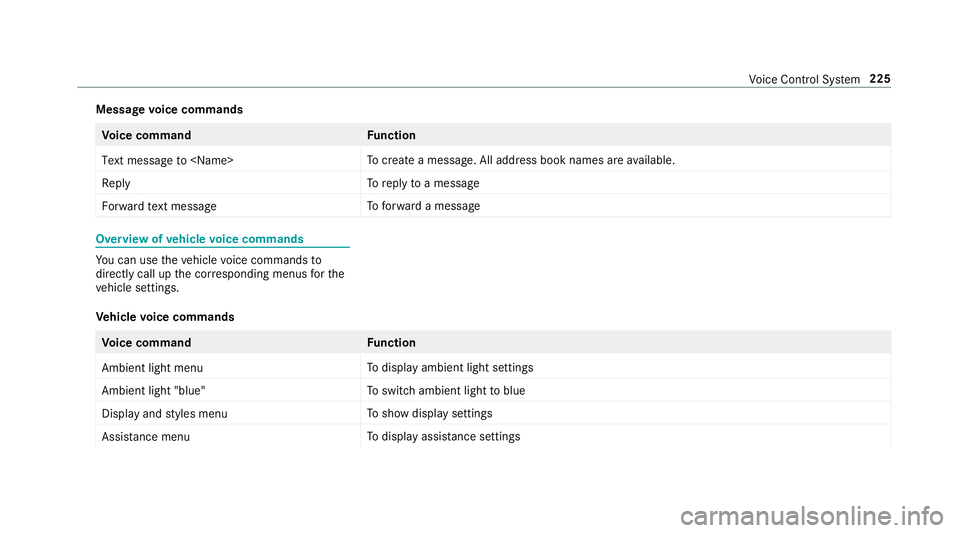
Messag
evo ice comm ands Vo
ice comm and Function
Text message to
crea te ames sage.All addr essbook namesareav ailable.
Reply To
reply toames sage
For ward text mes sage To
forw ardames sage Ov
ervie wof vehicl evo ice comm ands Yo
ucan usetheve hicle voice com mand sto
dir ect lycall upthecor responding menusforth e
ve hicle settin gs.
Ve hicl evo ice comm ands Vo
ice comm and Function
Ambien tlight menu To
displa yambient lightsettings
Ambien tlight "blue" To
switc hambient lighttoblue
Display andstyles menu To
sho wdispla yse ttin gs
Assistance menu To
displa yassis tance settings Vo
ice Cont rolSy stem 225
Page 248 of 514
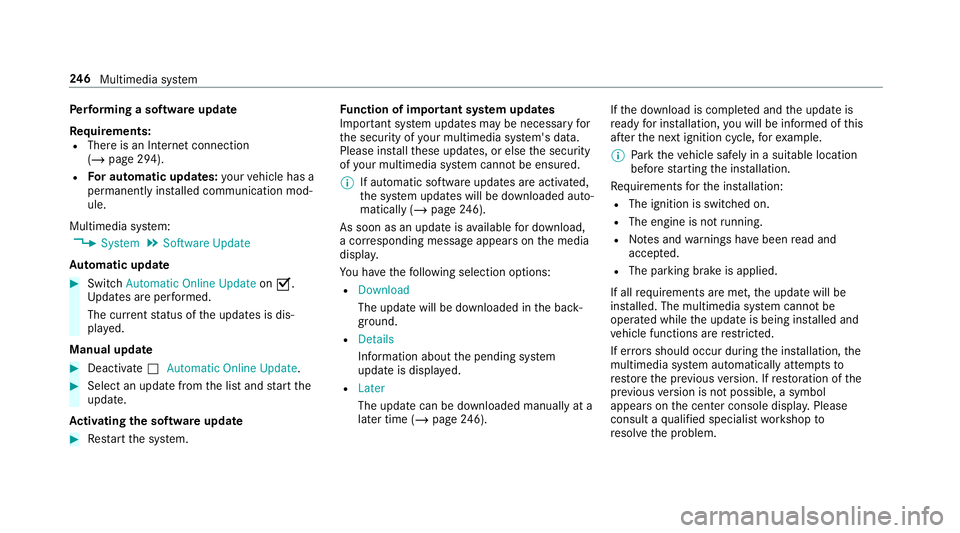
Pe
rfor min gasof twareup date
Re quirement s:
R Ther eis an Interne tcon nection
(/ page29 4).
R Foraut omat icupdat es:yo ur vehicle hasa
per manent lyins talled com munic ationmod‐
ule.
Multim ediasystem:
4 System 5
Soft ware Update
Au tomatic update #
Swi tchAuto matic Onl ine Update on 0073.
Up dat esareper form ed.
The current status oftheupdat esisdis‐
pla yed.
Manu alupd ate #
Deact ivat e0053 Auto matic OnlineUpdate. #
Select anupdat efrom thelis tand star tth e
updat e.
Ac tiv atin gthe softwa reupdat e #
Restar tth esy stem. Fu
nction ofimpor tant system updates
Im por tant system updat esma ybe neces saryfo r
th esecur ityofyour mult imed iasystem's data.
Please installth ese updat es,orelse thesecur ity
of your mult imed iasystem cann otbe ensur ed.
% Ifaut omatic softwareupdat esareactiv ated,
th esy stem updat eswill bedownloaded auto‐
maticall y(/ page24 6).
As soon asan upd ateis available fordo wnloa d,
a cor responding messageappea rson themedia
displa y.
Yo uha ve thefo llo wing selectionoption s:
R Down load
The updat ewill bedownloaded inthebac k‐
gr ound.
R Det ails
Inf ormation aboutthepending system
updat eis displa yed.
R Later
The updat ecan bedownloaded manuallyata
lat er time (/page24 6). If
th edo wnload iscom pletedand theupdat eis
re ady forins tallation ,yo uwill beinformed ofthis
af te rth ene xt ignition cycle, forex am ple.
% Park theve hicle safely inasuit able location
bef orest ar tin gth eins tallation .
Re quiremen tsforth eins tallation :
R The ignit ionisswitc hedon.
R The engin eis no tru nning .
R Notesand warnings have been read and
acc epted.
R The parkingbr ak eis applied.
If all requ iremen tsareme t,th eupdat ewill be
ins talled. Themultim ediasystem cann otbe
oper ated while theupdat eis being installed and
ve hicle functionsarere strict ed.
If er ro rs should occurduring theins tallation ,th e
multime diasystem automatic allyatt em ptsto
re stor eth epr ev ious version. Ifre stor ation ofthe
pr ev ious version isno tpossible ,a symbol
appear son thecent ercon sole displa y.Please
cons ultaqu alif ied spec ialistwo rkshop to
re solv eth epr oblem. 24
6
Multimedia system