2019 MERCEDES-BENZ E-CLASS CABRIOLET service
[x] Cancel search: servicePage 30 of 530

Dep
endingontheeq uipment, this inc ludes, for
ex am ple:
R setting sfo rth eseat andsteer ing wheel posi‐
tion s
R suspension andclimat econ trol settings
R customizations suchas interior ligh ting
If yo ur vehicle isaccor dinglyeq uipped ,yo ucan
co nn ect your smar tphon eor ano ther mobile end
de vice totheve hicle. Youcan contro lth is by
means ofthecon trol element sint egr ated inthe
ve hicle. Imagesand audiofrom thesmar tphon e
can beoutput viathemultimedia system. Cer‐
tai ninf orma tionis simu ltane ously trans ferred to
yo ur smar tphon e.
De pen dingon thetype ofintegr ation, this can
inc lude:
R gener alvehicle data
R position data
This allowsyouto use selected apps onyour
smar tphon e,suc has navig atio nor musi cpla y‐
bac k.Ther eis no further interaction between the
smar tphone andtheve hicle; inpar ticular ,ve hi‐
cle datais no tdir ectl yaccessible. Whichtype of fur
ther dat apr ocessin goccur sis de term ined by
th epr ov ider ofthespecif icapp used. Whichse t‐
ting syo ucan make,ifan y,depends onthespe‐
cif icapp andtheoper ating system ofyour
smar tphon e. Onlin
eser vices Wi
reless netw orkconnection
If yo ur vehicle hasawir eless networkconn ec‐
tion, itenables datato be exc hang edbetween
yo ur vehicle andadditional systems. Thewire‐
less networkcon nect ionisenabled viatheve hi‐
cle's transmission andrecep tion unitor via con‐
nect edmob ile end device s(e.g .sma rtphones).
Onlin efunc tionscan beused viathewir eless
ne tworkcon nect ion.This includes onlineserv‐
ices andapplications/ appsprov ided bytheman‐
uf actur eror other prov ider s.
Manu factu rer's services
Re garding onlin eser vice sof themanuf acturer,
th eindividual functionsar edescr ibedbythe
manuf acturerinasui table place (e.g.Operator's
Manual, websit eof themanuf acturer)along with
th ere leva nt data protect ion information .Pe r‐ sonal
datama ybe used forth epr ov ision of
onlin eser vice s.Dat ais exc hang edvia asecur e
conn ection, e.g.themanuf acturer'sdesignat ed
IT systems. Personal datais collect ed,pro‐
cessed andused viathepr ov ision ofser vice s
exc lusiv elyon thebasis ofleg alper missions or
wit hpr ior con sent .
The services andfunc tions(some times subject
to afe e) can usually beactiv ated ordeactiv ated.
In some cases, this also applies totheent ire
ve hicle's dataconn ection. Thisexcludes, inpar‐
tic ular ,leg allypr escr ibed functionsand service s.
Th ird pa rty ser vice s
If it is possibl eto use onlineser vices from other
pr ov ider s,these services aresubject tothedat a
pr otect ion and term sof use ofthere sponsible
pr ov ider .The manuf acturer has noinfluenc eon
th econ tent exc hang ed.
Please inquire,ther efor e, about thetype, scope
and purpose ofthecollect ionand useofper‐
sonal dataas par tof third par tyser vice sfrom
th eir respectiv epr ov ider . 28
General notes
Page 139 of 530

0007
Mak esur eth at mar kedspace 2isem pty. 0007
Remo veSmar tKey 1 from theke yring. 0007
Place Sma rtKe y1 inmar kedspace 2.
The vehicle willstar taf te ra shor ttime.
If yo ure mo veSmar tKey 1 from mar ked
space 2theengine continues running .Fo r
fur ther vehicle star ts howe ver,Smar tKey 1
mus tbe locat edinmar kedspace 2during
th eent ire jour ney. 0007
Have theSmar tKey 1 checkedat aqu alif ied
spec ialistwo rkshop. If
th eve hicl edoes notst ar t: 0007
Place SmartKey 1 inmar kedspace 2and
lea veitth er e. 0007
Depr essthebr ak epedal andstar tth eve hicle
using thest ar t/ stop butt on.
0009 Youcan also switchon thepo we rsupp lyor
th eignition withth est ar t/ stop butt on. St
arting theve hicl evia Remo teOnline serv‐
ices Cooling
orheating theve hicl eint erior before
co mmenci ngyour jour ney
0009 This function isno tav ailable inall coun tries.
If yo ustar tth eve hicle viayour smar tphon e,the
pr ev iousl yselec tedair con dition ingadjus tment
is activ e.
En sur eth efo llo wing beforest ar tin gth eengine:
R The legalstipulation sin thear ea wher eyo ur
ve hicle ispar kedallo wengin est ar tin gvia
smar tphon e.
R Itis saf eto star tand runth eengine where
yo ur vehicle ispar ked. R
The fuel tank issu fficien tly filled.
R The star terbatt eryis suf ficie ntly charge d.
0009 Youcan also setth ete mp eratur ewit hyo ur
smar tphon e.Info rm atio non Mer cedesme
con nectand other services: http://
www .mercedes.me
This funct ionisno tav ailable forall model s.
Char ging thebat tery bef orecommencing
yo ur jour ney
0009 This function isno tav ailable inall coun tries.
R Ifth eve hicle batteryis disc harg ed,you
re cei veames sageon your smar tphon e.
R Youcan then star tth eve hicle withth e
smar tphone tocharge thebatt ery.
R The vehicle isaut omaticall yswitc hedoff
af te rte nminu tes.
Ensur eth efo llo wing beforest ar tin gth eengine:
R The legalstipulation sin thear ea wher eyo ur
ve hicle ispar kedallo wengin est ar tin gvia
smar tphon e.
R Itis saf eto star tand runth eengine where
yo ur vehicle ispar ked. Dr
iving andparking 13
7
Page 163 of 530

0009
The electr icpar king brak eis onl ysecur ely
applied ifth eindicat orlam pis lit con tinu‐
ously .
Re leasing 0007
Swit chon theignition . 0007
Pull handle 1.
The red0049 (USA)or0024 (Canada) indica‐
to rlam pin theins trument clustergoes out.
Emer gency braking 0007
Press and hold handle 1.
When theve hicle hasbeen brak ed toa
st ands till,th eelectr icpar king brak eis
applied. Thered0049 (USA)or0024 (Can‐
ada) indicat orlam pappear sin theins tru‐
ment cluster. No
teson par king theve hicl efo ran extended
per iod If
yo ulea vetheve hicle parkedfo rlong erthan
fo ur we eks,thediscon nectedbatt eryma ybe
damag edbydeep discharge. If
yo ulea vetheve hicle parkedfo rlong erthan six
we eks,itma ysuf ferdisu sedama ge.
0009 Further information canbeobt ained ata
qu alif ied spec ialistwo rkshop. St
andb ymode (ext ens ion ofthe star terbat‐
te ry 's per iod out ofuse) St
andb ymode function
0009 This function isno tav ailable forall model s.
If standb ymode isact ivat ed, theve hicle canbe
par kedfo ran extende dpe riod oftime without
losing powe r.
St andb ymode isch aract erize dby thefo llo wing:
R The star terbatt eryis preser ved.
R The maximum non-opera tionaltime outof
use isdispla yedin themultimedia system
displa y.
R The conn ection toonline services isint erru p‐
te d. If
th efo llo wing condition sar efulf illed, standb y
mode canbeact ivat ed ordeac tivated usin gth e
multime diasystem:
R The engine isswitc hedoff.
R The ignition isswitc hedon.
Ex ceeding theve hicle's displayednon -oper a‐
tion altime maycause inconvenience, i.e.it can‐
no tbe guarant eedth at thest ar terbatt erywil l
re liabl yst ar tth eengine.
The star terbatt erymus tbe charge dfirs tin the
fo llo wing situat ions:
R The vehicle's non-oper ational timemustbe
ex tende d.
R The Batte ryCh arg eInsu fficie ntfor Stand by
Mod emes sage appear sin themultimedia
sy stem displa y.
0009 Standb ymode isaut omat icallydeac tivated
when theignition isswitc hedon. Dr
iving andparking 16
1
Page 221 of 530

0076
Rejects /end sa cal l
5 00E2 Calls up thehome screen
6 Touc hCon trol mult imed iasystem
7 0038 Backbutt on(press and hold) Oper
ating theon-boa rdcom puter 000A
WARNIN GRisk ofdist ra ction from infor‐
mati onsystems andcomm unication s
eq uipment
If yo uoper ateinf ormat ionand comm unic a‐
tio neq uipme ntintegratedin theve hicle
when driving, youwill bedistract ed from the
tr af fic situ ation. Thiscou ldalso cau seyouto
lose control of theve hicle. 0007
Onlyoper ateth is eq uipmen twhen the
tr af fic situ ation per mits. 0007
Ifyo ucan notbe sur eof this, stop the
ve hicle whilstpa ying attention toroad
and traffic condi tions andoperate the
eq uipment withth eve hicle statio nary. Obser
vetheleg alrequ iremen tsforth ecount ry
in whic hyo uar ecur rently drivi ng when you
oper ateth eon- boar dcom puter.
0009 The on-boar dcom puterdispla ysappear on
th emultifunc tiondispla y(→ pag e22 1). The
on-boar dcom putercan beoper ated using
lef t-hand Touc hCon trol 2 and left-han dbac k/
hom ebut ton1. Whe
nth eon- boar dcom puterisbeing operated,
dif fere nt aco ustic signa lssou ndasoperati ng
fe edbac k,e.g. when theend ofalis tis reac hed
or when youar esc rolling thro ugh alis t.
The follo wing menusareav ailable:
R Service
R Assist anc e
R Trip
R Navi gation
R Radio
R Media
R Phon e
R HUD
R Vehicl eswith anIns trument Displayin
th eWi des cree nCo ckpit :Desi gns
The menu scan becalled up from themenu bar
on themultifunc tiondispla y. 0007
Tocall upthemenu bar:press thebac k
butt ononthelef t1 until themenu baris
displa yed. Ins
trument Displayand on-boar dcom puter 21
9
Page 224 of 530

Ad
jus tingthe inst ru men tlighti ng 0007
Turn brightn esscontrol 1 upordown.
The lightin gof theIns trument Displayand in
th econ trol element sof theve hicle interior is
adjus ted. Menus
andsubmenu s Fu
nctions ontheser vice menu oftheon-
boar dcom puter On-boar
dcom puter:
Service 0007
Toselect thefun ction: swipeupwards or
do wn wardson thelef t-hand Touc hCon trol. 0007
Press thelef t-hand Touc hCon trol.
Fu nctio nson theServ icemenu:
R Messag ememor y(→ pag e425)
R Tires :
- Restar tth etir epr essur eloss warning
sy stem (→pag e390)
- Chec kth etir epr essur ewit hth etir epr es‐
sur emonit or(→ pag e388)
- Restar tth etir epr essur emonit or
(→ pag e389)
R ASSYST PLUS: callsuptheser vice duedate
(→ pag e34 4)
R Vehicl eswith aWi des cree nCo ckpit: Cool-
ant :cool anttemp eratur edispla y R
Engine OilLevel: engine oilleve l Callin
gup theAssis tance Grap hic On
-bo ardcom puter:
As sist anc e
0009 Ve
hicl eswith theIns trum ent Displa yin
th eWi des cree nCo ckpit: whenyo uha ve
th edesign setto Progressive ,yo ucan view
th eAssis tance Grap hicin thelef t-hand area
of theIns trument Display.
The follo wing displa ysareav ailable ontheAssis‐
ta nce Grap hicmenu :
R Assi stanc eGr aphic
R Attentio nleve l(→ pag e206) 0007
Toswitc hbe tw een thedisp lays :swipe
upw ards ordown wardson thelef t-hand
To uc hCon trol. 222
Instru ment Displa yand on-boar dcom puter
Page 264 of 530

or
iginat esfrom another vehicle, this isrecog‐
nized during data readin g.
The mult imed iasystem isrestar tedonc eth e
dat ahas been impor ted.
0009 Current vehicle settin gscan beedit edafte r
th eim por t.
Expor ting
If PIN protect ion isactiv ated, your PIN isrequ es‐
te d. 0007
Enterth efo ur -di git PIN. 0007
Select adat ast or ag emedium.
The datais ex por ted. The dataex por tma y
ta ke severalmin utes. Ac
tiv atin g/deac tivatin gPI N protection Multi
media system:
System PINProtec tion
Se tting thePIN 0007
Sele ctSet PIN. 0007
Entera fo ur -di git PIN. 0007
Enterth efo ur -di git PIN again.
If bo th PINs match,PIN protect ion isactiv e.
Changing thePIN
Re quiremen ts
R Acur rent PIN mustbe set. 0007
Select Change Settings. 0007
Enterth ecur rent PIN . 0007
Select Chang ePIN . 0007
Seta ne wPIN .
Ac tiv atin gPI N protection fordat aex por t 0007
Select Change Setting s.
Co nfirm with thePIN. 0007
Select ProtectData Export .
Ac tivate0073 ordeacti vate 0053 thefunc tion.
Un bloc king thePIN
Re quiremen ts:
R Ther eis an Interne tcon nection .
R AMer cedes meaccount exists at htt p:/ /
www .mercedes.me . R
The Person alization service isactiv e
(→ pag e263).
If th ePIN has been entered incor rectly thre e
tim es,th ePIN willbebloc ked. Youcan have a
sing le-use passwordsent toyouvia the
Mer cedes meconn ectonline portalto rese tth e
PIN protect ion. 0007
Select Unbloc kPIN. 0007
Enterth esing le-use password.
PIN protect ion isrese t,and youcan seta
ne wPIN.
0009 Alternat ivel y, yo ucan have PIN protect ion
re se tat an aut hor ized Mercedes-Benz Cen‐
te r. 262
Multimedia system
Page 265 of 530

User
profile Se
tting auser profile
Multimedia system:
System gPerson alization
Displa yingauser profile when star ting
If th is func tion isact ive, apr om ptappear swhen
st ar tin gth esy stem asking whichuser profile to
use. 0007
Select Display Profile Select ion afterStart . 0007
Activate0073 ordeacti vate 0053 thefunc tion.
Selecting auser profile 0007
Select GuestProfile orindividual profile 003B.
0009 Some settings from theuser profile areonl y
loaded whentheve hicle isstatio naryor
when theignition isswitc hedon.
Au tomatic synchronizat ion
Eac htime theignition isswitc hedoffor on, the
indiv idual userprofiles aresync hroniz edon the
multime diasystem and ontheser ver.This
ensur esthat thelat estuser profiles arealw ays
av ailable. 0007
Select Automat icSyn chron izat ion. 0007
Activate0073 ordeacti vate 0053 thefunc tion.
0009 Formor einf ormation aboutimpor ting/
ex por tinguser profiles (→pag e263 ).
Cr eating auser profile
Multimedia system:
System gPerson alization Create
Profile 0007
Entera name. 0007
Select 0076.
The follo wing informatio nis save din theuser
pr ofile, forex am ple:
R System settings
R Settings intheTV tune r'schann ellist
R Navig ation andtraf fic inf ormati on
The settings differ depending ontheve hicle
eq uipment.
Im por ting/e xportinguser profiles
Re quirement s:
R Ther eis an Interne tcon nection . R
AMer cedes meacco untexists at htt p:/ /
www .mercedes.me .
R The Person alization service isactiv e.
Multimedia system:
System gPerson alization Manual
Ex port/ Import
This function isno tav ailable inall coun tries.
On lyindi vidu alprofiles can beimpor tedor
ex por ted.
The individual profiles arealw ayscollectiv ely
im por tedor expor ted. 0007
Impor t:select Import Profiles fromServer.
The Theprofile dataimport overwrites all
existing profiledata.Doyou want tocon-
tinue? messag eappea rs. 0007
Select Yes.
Use rpr ofiles areim por ted. 0007
Expor t:select Export Profiles tothe Server.
User profiles areex por ted.
0009 Certain settings ,suc has addr essbook
ent ries orprev ious destination sfrom the
na vig ation system, areno tex por ted. Multimedia
system 263
Page 271 of 530
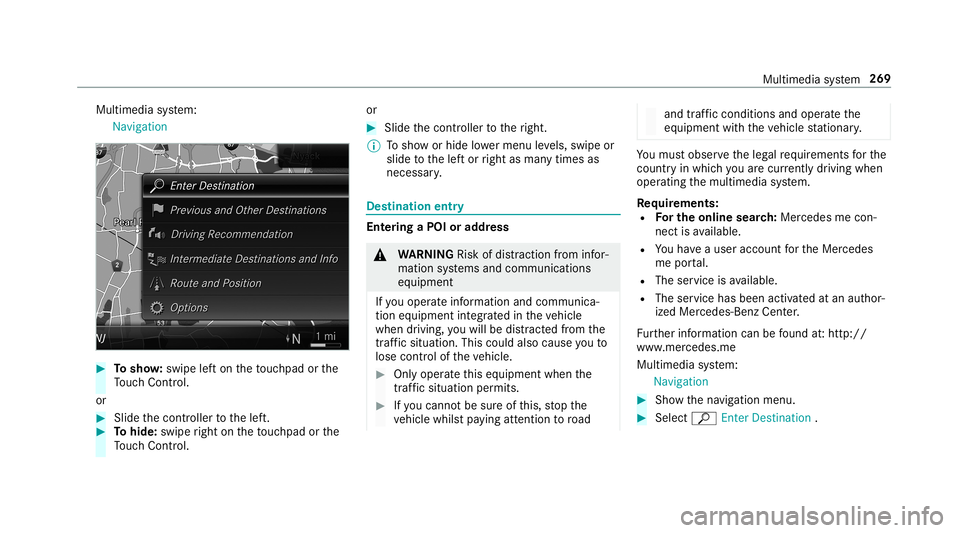
Multimedia
system:
Navigation 0007
Tosho w:swipe lefton theto uc hpad orthe
To uc hCon trol.
or 0007
Slid eth econ troller tothelef t. 0007
Tohide: swiperight ontheto uc hpad orthe
To uc hCon trol. or 0007
Slid eth econ troller totheright.
0009 Tosho wor hide lowe rmenu leve ls, swipe or
slide tothelef tor right asman ytimes as
necessar y. Des
tinat ion entry Ent
ering aPOI oraddress 000A
WARNIN GRisk ofdist ra ction from infor‐
mati onsystems andcomm unication s
eq uipment
If yo uoper ateinf ormat ionand comm unic a‐
tio neq uipme ntintegratedin theve hicle
when driving, youwill bedistract ed from the
tr af fic situ ation. Thiscou ldalso cau seyouto
lose control of theve hicle. 0007
Onlyoper ateth is eq uipmen twhen the
tr af fic situ ation per mits. 0007
Ifyo ucan notbe sur eof this, stop the
ve hicle whilstpa ying attention toroad and
traffic condi tions andoperate the
eq uipment withth eve hicle statio nary. Yo
umus tobse rveth eleg alrequ iremen tsforth e
cou ntryin whi chyouar ecur rentl ydr ivi ng when
op erati ng themultimedia system.
Re quirement s:
R Forthe online search :Mer cedes mecon‐
nect isavailable.
R Youha ve auser accoun tfo rth eMer cedes
me portal.
R The service isavailable.
R The servicehas been activat ed atan aut hor ‐
ize dMer cedes-Ben zCent er.
Fu rther information canbefound at:ht tp :/ /
www .merced es.me
Mult imed iasystem:
Navigation 0007
Sho wthena vig ation menu. 0007
Select ªEnter Dest ination . Multimedia
system 269