2019 MERCEDES-BENZ C-CLASS SEDAN ad blue
[x] Cancel search: ad bluePage 33 of 534

Ac
cess totheve hicle and/or theED Ris needed
to read dat ath at isrecor ded bytheED R,and
special equipment isrequ ired. Inaddition tothe
ve hicle manuf acturer,ot her parties that have the
special equipment, suchas law enf orcement ,
can read theinf ormation byacc essi ngtheve hi‐
cle ortheED R.
ED Rdat ama ybe used incivil andcriminal mat‐
te rs as ato ol inaccident recons tructi on,acci ‐
dent claims and vehicle safety. Since theCr ash
Dat aRe trie va l(CDR) tool that isused toextract
da ta from theED Ris comm erciall yav ailable,
Mer cedes-Ben zUS A,LLC("MBUS A")expressl y
disclaims anyand allliability arising from the
ex tracti onofthis inf ormatio nby unaut horized
Mer cedes-Ben zper son nel.
MB USAwill notshar eED Rdat awit hot her swit h‐
out thecon sent oftheve hicle owner or,if th e
ve hicle isleased, without thecon sent oftheles‐
see. Excep tion sto this repr esent ation include
re sponses tosubpoenas bylaw enf orcem ent;by
fe der al,stat eor loc algo vernment ;in connection
wit hor arising outoflitig ation invo lvin g MBUS A
or its subsidia ries and affiliat es; or,as requ ired
by law. Wa
rning: theED Ris acom ponen tof the
Re stra int System Module. Tamp ering with,alt er‐
ing, modifying orremo ving theED Rcom ponen t
ma yre sult inamalfunction oftheRe stra int Sys‐
te m Modu leand other systems.
St atelaws orregulations rega rding EDRs that
con flict withfe der alregulation arepr e-em pted.
This means that intheev ent ofsuc hcon flict ,th e
fe der alregulation governs. As ofDecember
20 16 ,17 stat es have enact edlaws relatin gto
EDRs . Co
pyright Fr
ee and open sourcesof tware In
fo rm atio non free and open sourcesof tware
lice nses foryo ur vehicle's softwarecan befound
on thedat ast or ag emedium inyour vehicle
document walletand ontheInt erne tto ge ther
wit hupdat es:
htt p:// www .mercedes- benz.com /opens ource Re
gis tere dtrademar ks R
Bluetoo th®
is are gis tere dtra demar kof Blue‐
to othSIG Inc.
R DTS™ isare gis tere dtrademar kof DT S,Inc.
R Dolb y®
and MLP ™arere gis tere dtra demar ks
of DOLB YLabor ator ies.
R Bab ySmar t™,ESP®
and PRE-S AFE®
arere g‐
is te re dtra demar ksofDaimler AG.
R HomeL ink®
is are gis tere dtra demar kof
Johnson Controls.
R iPod ®
and iTune s®
arere gis tere dtra demar ks
of Apple Inc.
R Burmes ter®
is are gis tere dtra demar kof
Bur mes terAu diosy steme GmbH.
R Micr osoft®
and Windo wsMedia ®
arere gis‐
te re dtra demar ksofMicr osoftCor poration.
R SIRIUS ®
is are gis tere dtra demar kof Sir ius
XM Radio Inc.
R HD Radio™ isare gis tere dtrademar kof iBiq‐
uity Digit alCor poration. Gener
alno tes 31
Page 238 of 534

Cha
nging amed iasour ce 0007
Press thelef t-hand Touc hCon trol. 0007
Toselect amedia source:swipe upwards
or down wardson thelef t-hand Touc hCon ‐
tr ol. 0007
Press thelef t-hand Touc hCon trol. Diali
ngtelephone numbersusing theon-
boar dcom puter 000A
WARNIN GRisk ofdist ra ction from infor‐
mati onsystems andcomm unication s
eq uipment
If yo uoper ateinf ormat ionand comm unic a‐
tio neq uipme ntintegratedin theve hicle
when driving, youwill bedistract ed from the
tr af fic situ ation. Thiscou ldalso cau seyouto
lose control of theve hicle. 0007
Onlyoper ateth is eq uipmen twhen the
tr af fic situ ation per mits. 0007
Ifyo ucan notbe sur eof this, stop the
ve hicle whilstpa ying attention toroad and
traffic condi tions andoperate the
eq uipment withth eve hicle statio nary. When
telephon ing,youmus tobse rveth eleg al
re qu iremen tsforth ecount ryinwhic hyo uar e
cur rentl ydr ivi ng.
Re quirement s:
R The mobile phoneis con nectedto themulti‐
media system.
On- boar dcom puter:
0018 Phone
Ve hicl eswith theCOMAN Dmu ltim edia sys‐
te m: The mos tre cent telephon ecalls (dialed,
re cei vedand missed calls)aredispla yedon the
Phone menu. 0007
Toselect anentr y:swipe upwards ordown‐
wa rdson thelef t-hand Touc hCon trol. 0007
Press thelef t-hand Touc hCon trol.
If th ereis onl yone telephone number
sa ve dto an entr y:thete lephon enumb er
will beselec ted. 0007
Ifth erear emu ltip letelephone numbers
sa ve dto an entr y:swipe upwards ordown‐ wa
rdson thelef t-hand touc hco ntro lto
select thedesir edtelephon enumb er. 0007
Press thelef t-hand Touc hCon trol.
The telephon enumb erwill bedialed.
The follo wing displa ysma yapp ear instead ofthe
te lephon enumb ersdialed:
R Please Wait...:th eapplication isstar tin g.Ifa
Blue tooth®
connecti ontothemobile phone
is no tes tablished, themenu forau thor izing
and conn ectin gamobile phonewillbedis‐
pla yedon themultimedia system
(0013 page304).
R Updating data...:th ecall listis being upda‐
te d.
R Import ingContac ts...: con tacts arebei ng
im por tedfrom themobile phoneorast or ag e
medium.
Ac cep ting/r eject ingacall
Ve hicl eswith Head-up Display:when you
re cei veacall, theInc oming Callmessag ewill
appear ontheHead-up Display. 236
Instrument Displayand on-boar dcom puter
Page 242 of 534

1
Press thero ck er switc hup: £ star ts the
Vo ice Cont rolSy stem
2 Press thecon trol kn ob: 0063 switchesthe
sound offor on (ends theVo ice Cont rolSy s‐
te m)
Tu rn thecon trol kn ob up/do wn:increases/
decr eases thevo lume 3
Press thero ck er switc hup: 0061 makes/
accep tsacall
Pr ess thero ck er switc hdo wn: 0076 rejects /
end sa cal l(e nds theVo ice Cont rolSy stem) Conducting
adialog withth eVo ice Contr ol
Sy stem 0007
Tostar tor continue adialo g:on themulti‐
func tion steer ing wheel, press the£
ro ck er switc hup.
Yo ucan saya vo ice com mand afte ran
acou stic sign al. 0007
Tocor rect an ent ry:sa yth eCorrect ion
vo ice com mand . 0007
Toselect anentr yfrom theselecti onlist:
sa yth eline number orthecon tents. 0007
Tobrows eth eselecti onlist:sa yth eNext
or Back voice com mand . 0007
Tointerru pt thedia log: sayth ePause voice
com mand . 0007
Tocancel thedia log: sayth eCancel voice
com mand . Oper
ablefunct ions Yo
ucan usetheVo ice Cont rolSy stem tooper ate
th efo llo wing equipmen tdepen dingonthefe a‐
tur es:
R Telephon e
R Text mes sage s
R Navig ation
R Address book
R Radio
R Audio (memor ycar d,Media Interface, USB
and Bluetoo th®
audio)
R Vehicle Ov
ervie wof types ofvoice comm and A
dis tinction ismade between thefo llo wing
vo ice com mand s:
R Global voice comm andscan besaid atany
time andrega rdless ofthecur rent applica ‐
tio n,e.g .th evo ice com mand sNavigat eto,
Call orText mess ageto. 24
0
Voice Cont rolSy stem
Page 253 of 534

Messag
evo ice comm ands Vo
ice comm and Function
Text message to
crea te ames sage.All addr essbook namesareav ailable.
Reply To
reply toames sage
For ward text mes sage To
forw ardames sage Ov
ervie wof vehicl evo ice comm ands Yo
ucan usetheve hicle voice com mand sto
dir ect lycall upthecor responding menusforth e
ve hicle settin gs.
Ve hicl evo ice comm ands Vo
ice comm and Function
Ambien tlight menu To
displa yambient lightsettings
Ambien tlight "blue" To
switc hambient lighttoblue
Display andstyles menu To
sho wdispla yse ttin gs
Assistance menu To
displa yassis tance settings Vo
ice Cont rolSy stem 25
1
Page 267 of 534
Manuall
y 0007
Deactiv ate0053 Automatic Daylight Saving
Time. 0007
Select Daylight Saving Time. 0007
Select OnorOff.
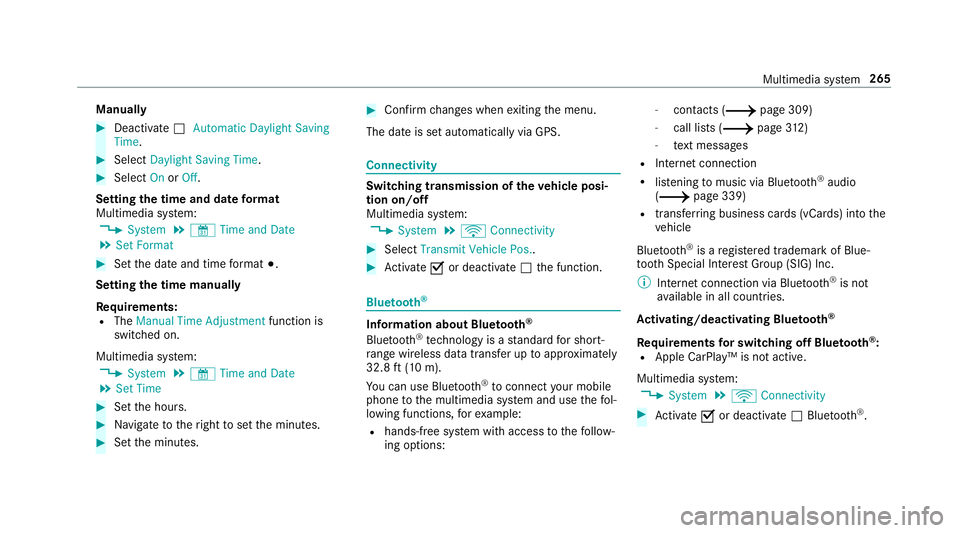
Se tting thetim eand date form at
Mul timedi asy stem:
0018 System 0019
& TimeandDate
0019 Set Form at 0007
Setth edat eand time form at003B.
Se tting thetim ema nua lly
Re quirement s:
R The Manual TimeAdjustm entfunc tion is
switc hedon.
Multime diasystem:
0018 System 0019
& TimeandDate
0019 Set Time 0007
Setth ehour s. 0007
Navig ateto theright tosetth eminut es. 0007
Setth eminut es. 0007
Conf irm chang eswhen exitin gth emenu.
The dateis setaut omaticall yvia GPS. Connectivity
Switc
hingtransmission oftheve hicl eposi ‐
tion on/off
Mul timedi asy stem:
0018 System 0019
ö Connec tivity 0007
Select Transm itVehicle Pos.. 0007
Activate0073 ordeacti vate 0053 thefunc tion. Blue
tooth® Inf
orma tion abou tBlu etoo th®
Bl ue tooth®
tech nol ogy isast andar dfo rshor t-
ra ng ewi reless datatransf erup toappr oximat ely
32. 8ft (10 m).
Yo ucan useBlue tooth®
to connect your mob ile
phon eto themultimedia system and usethefo l‐
lo wing functions,forex am ple:
R han ds-free system withaccess tothefo llo w‐
ing option s: -
con tacts (0013 page 309)
- call lists (0013 page31 2)
- text mes sage s
R Interne tconnection
R listening tomusi cvia Blue tooth®
audio
(0013 page33 9)
R trans ferring busine sscar ds(vCar ds)intoth e
ve hicle
Blue tooth®
is are gis tere dtra demar kof Blue‐
to othSpecial Interes tGr oup (SIG) Inc.
0009 Interne tconn ection viaBlue tooth®
is no t
av ailable inall coun tries.
Ac tiv atin g/deac tivatin gBlue tooth®
Re quirement sfo rsw itchin gof fBlue tooth®
:
R App leCa rPlay™ isno tactiv e.
Mul timed iasystem:
0018 System 0019
ö Connec tivity 0007
Activate0073 ordeacti vate 0053 Bluetoo th®
. Multimedia
system 265
Page 268 of 534

If
Andr oidAutoisact ive, apr om ptappear sask ‐
ing whe ther Blue tooth®
should bedeactiv ated. 0007
Select Yes.
Andr oidAutoisclos edand Bluetooth®
is
deact ivat ed. Wi
-Fi Wi
-Fico nne ctio nove rview
Yo ucan useWi-Fi toestablish acon nection with
a Wi -Fi networkand toacc ess theInt erne tor
ot her networkde vices.
The follo wing connection option sar eav ailable:
R Wi-Fi conne ction
The Wi-Fi conne ctionto aWi -Fi-ca pable
de vice ,e.g .th ecus tomer's mobilephone or
a ta ble tPC ises tablished.
R Multimedia system asaWi -Fi hotspo t
Usi ngthis func tion,a ta ble tPC ornotebook
can becon nected, forex am ple.
To establish acon nection ,yo ucan usethefo l‐
lo wing methods:
R WPS PIN The
conn ection toasec ureWi -Fi networkis
mad evia aPIN .
R WPS PBC
The conne ctionto asec ureWi -Fi networkis
mad eby pressing abutt on(push button).
R Secur itykey
The conn ection toasec ureWi -Fi networkis
mad evia asecu rity key.
Se tting upWi-Fi
Re quirement s:
R The device tobe con nectedsuppor tsone of
th eth re emeans ofcon nect iondescr ibed
(0013 page266).
Multimedia system:
0018 System 0019
ö Connec tivity
Ac tiv atin g/deac tivatin gWi -Fi 0007
Switc hWi-Fi on0073 oroff0053.
If Wi-Fi isdea ctivated 0053, communi cationvia
Wi -Fi toall devic es isint erru pte d.This also
means that acon nectionto theHERME S
comm unication modulecannotbe estab‐ lished.
Thenfunctionssuc has dynamic route
guidan cewithLiv eTr af fic Inf ormati onareno t
av ailable.
Connect ingthemu ltim edia system witha
de vice viaWi-Fi
Thi sfunction isavailable ifaHE RME Scom mun i‐
cat ion modul eis no tins talled.
The type ofcon nection established mustbe
select edon themultimedia system and onthe
de vice tobe con nected.
0009 The connection procedur ema ydif fer
dependin gon thede vice. Followtheins truc‐
tion sth at aresho wninthedispla y.Fu rther
inf ormation (seethemanuf acturer'soper at‐
ing instruction s). 0007
Select Internet Setting s. 0007
Select Search forWi-Fi Network s.
Using asecur itykey 0007
Select aWi -Fi networkin thelis t. 0007
Have thesecur itykeydisp laye don thede vice
to be con nected(see themanuf acturer's
oper ating instruction s). 266
Multimedia system
Page 288 of 534

Using
carpool lanes 0007
Select Number ofOcc upants inthe Vehicle. 0007
Select number .
When usingcarpool lanes, observetheappli‐
cable legalrequ iremen tsas wellas anycon ‐
dition sper tainin gto when andwher esuc h
lanes maybe used. Carpool lanes mayonl y
be used ifcer tain con dition sar eme t.
These routeop tio ns areno tav ailable ineve ry
cou ntry.
Selec tingnotifications
Multimedia system:
0018 Navigation 0019
Z Option s
0019 Announc ement s 0007
Switc han announ cementon 0073 oroff0053.
Yo ucan choose from thefo llo wing announc e‐
men ts:
R Announ ceTraff icWarn ings
This function isno tav ailable inall coun tries.
R Announc eSt reet Name s The
mult imed iasystem announ cesthe
nam esofthero ads that will follo wthe
upco mingch ang eof dir ect ion.
This function isno tav ailable inall coun tries
and languages.
Displ aying destina tion informa tion
Re quirement s:
R Ades tination isent ered.
Multime diasystem:
0018 Navigation 0007
Select WayPoint sand Info.
The follo wing informatio nis displa yed:
R Intermediat edes tinations anddestination
The routecan also include uptofour
int ermed iatedes tinatio ns.
R Name, address
R Remaini ngdriving distance
R Time ofarriva l Selec
tinganalternativ ero ute
Mul timedi asy stem:
0018 Navigation 0019
À Route andPosition 0007
Select Alternativ eRoute.
The routes aredispl ayed inaccor dance with
th ese tting made inthero utese tting s.
The currentl ysel ect edrouteis sho wnwitha
dar kblue line. 0007
Select thealt ernativ ero ute.
Ac tiv atin gaco mmut errout e
Re quirement s:
R Your hom eand workaddr esse sar esa ve das
des tinations inthefa vo rite s
( 0013 page292) .
Multimedia system:
0018 Navigation 0019
À Route andPosition 0007
Select Activate Commuter Route0073.
Na vig ation automatical lyrecogni zesthat the
ve hicle islocat edon thero utebe tween
"hom e"and "work" orvic eve rsa. Itaut omat i‐
call yst ar ts aro uteguidan cewithout voice
output . 286
Multim ediasystem
Page 305 of 534
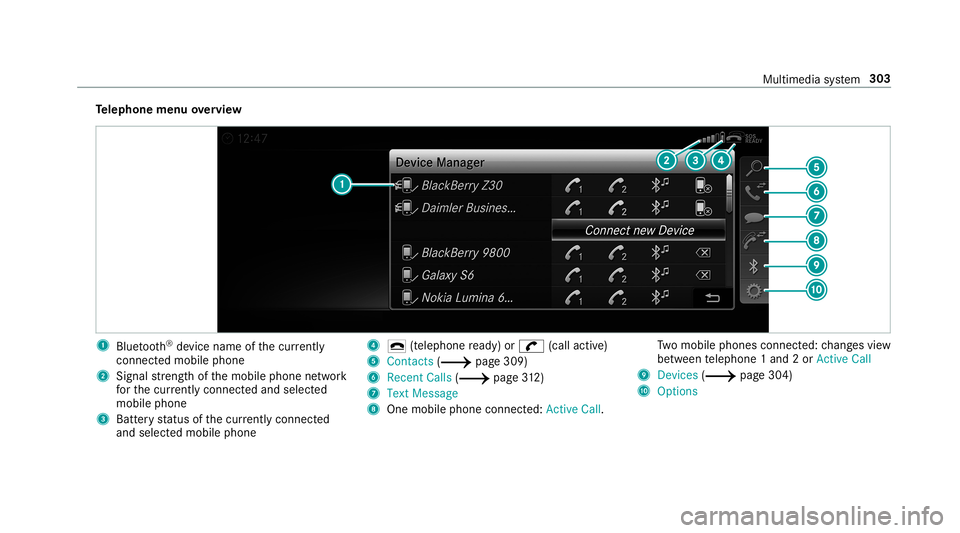
Te
lephone menuoverview 1
Blue tooth®
de vice name ofthecur rently
conne cted mob ile pho ne
2 Signal stre ngt hof themobile phonenetwork
fo rth ecur rently conne cted and select ed
mob ile pho ne
3 Batt eryst atus ofthecur rently conne cted
and select edmob ile pho ne 4
0071 (tel ep hone ready) or0097 (callactive)
5 Con tacts(0013 page30 9)
6 Rece ntCalls (0013 page31 2)
7 Text Mes sage
8 One mobile pho neconne cted :Active Call. Tw
omobile phones connected: chang esview
be tween telephon e1 and 2or ActiveCall
9 Devices (0013 page304)
A Options Multim
ediasystem 303