Page 236 of 534

Example:change of direction announced
1Distancetothechange of direction
2Roadtowhichthechange of direction leads
3Change-of-direction symbol
4Recommended lane (white)
5Possible lane
6Lane notrecommended (darkgray)
Further possible displaysontheNavigationmenu:
RDirection of Travel: display of direction oftravel androad currently being traveled on.
RNew Route...orCalculating Route...: a newroute is being calculated.
RRoad Not Mapped:theroad is unknown, e.g.for newly builtroads.
RNo Route: noroute could be calculatedtothe selected destination.
ROff Map:the mapforthe current location isnotavailable.
RArea of Destination Reached:you havereachedthe area ofthe destination.
RK:you havereachedthe destination or anintermediate destination.
�Toexitthe menu:pressthe back button onthe left.Vehicles withthe COMAND multimedia sys‐tem:You can alsostart navigationtoone oftherecent destinations ontheNavigationmenu:
�Pressthe left-handTouch Control.
�Toselect a destination:swipe upwards ordownwards onthe left-handTouch Control.
�Pressthe left-handTouch Control.Route guidance isstarted.
Ifroute guidance has already been activated,arequest will appear asking whetheryouwishtoendthe currentroute guidance.
�SelectYes.
�Pressthe left-handTouch Control.Route guidance isstarted.
234Instrument Display and on-board computer
Page 239 of 534

�Swipe upwards or downwards onthe left-handTouch Control and selecta(Accept)orv(Reject).
�Pressthe left-handTouch Control.
You may accept/rejectthe call using buttonaorvonthesteering wheel.
Adjusting the Head-up Displaysettings onthe on-boardcomputer
On-board computer:
�HUD
Thefollowing Head-up Display settings can beadjusted:
RPosition
RBrightness
RDisplay Content
�Toselect a setting:swipe upwards or down‐wards onthe left-handTouch Control.
�Pressthe left-handTouch Control.
�Toadjust avalue:swipe upwards or down‐wards onthe left-handTouch Control.
�Pressthe left-handTouch Control.
1Setting currently selected
2Digital speedometer
3Traffic Sign Assist
4Navigation displays
Head-up Display
Function ofthe Head-up Display
Mercedes-AMGvehicles:be suretoobservethe information inthe Supplement. Otherwise,you may notrecognize dangers.
The Head-up Display projects intothe driver'sfield of vision:
RInformation fromthe navigation system
RInformation fromthe driver assistance sys‐tems
RSomewarning messages
Display elements
1Navigation messages
2Current speed
3Detected instructions and traffic signs
4Set speed inthe driver assistance system(e.g. cruise control)
Instrument Display and on-board computer237
Page 242 of 534

1Presstherocker switch up:£startstheVoice Control System
2Pressthe control knob:cswitchesthesound off or on (endstheVoice Control Sys‐tem)
Turnthe control knob up/down: increases/decreasesthevolume
3Presstherocker switch up:amakes/accepts a call
Presstherocker switch down:vrejects/ends a call (endstheVoice Control System)
Conducting a dialog withtheVoice ControlSystem
�Tostart or continue a dialog:onthe multi‐functionsteering wheel, pressthe£rocker switch up.You can say avoice command after anacoustic signal.
�Tocorrect an entry:saytheCorrectionvoice command.
�Toselect an entry fromthe selection list:saythe line number orthe contents.
�Tobrowsethe selection list:saytheNextorBackvoice command.
�Tointerruptthe dialog:saythePausevoicecommand.
�Tocancelthe dialog:saytheCancelvoicecommand.
Operable functions
You can usetheVoice Control Systemtooperatethefollowing equipment depending onthefea‐tures:
RTelephone
RText messages
RNavigation
RAddress book
RRadio
RAudio (memory card, Media Interface, USB
and Bluetooth®audio)
RVehicle
Overview of types ofvoice command
A distinction is made betweenthefollowingvoice commands:
RGlobalvoice commandscan be said at anytime andregardless ofthe current applica‐tion, e.g.thevoice commandsNavigate to,CallorText message to.
240Voice Control System
Page 244 of 534
Switchvoice commands
Voice commandFunction
NavigationToswitchtonavigation mode
MapToswitchtomap display
Address bookToswitchtoaddress book
TelephoneToswitchtotelephone mode
Text messageToswitchtotext messages
RadioToswitchtoradio mode
MediaToswitchtomedia mode
USBToswitchtoUSB
Memory cardToswitchtomemory card
Internet application Tostart a Mercedes-Benz online application. The application must be called upbytouch once priortouse.
Mercedes-Benz AppsToswitchtoMercedes-Benz Apps
ConnectToswitchtoInternet mode
242Voice Control System
Page 245 of 534
Voice commandFunction
Vehicle menuToswitchtovehicle settings
System settings menuToswitchtosystem settings
Overview of navigationvoice commands
Using navigationvoice commands,you can enterPOIs or conventional addresses aswell asdirectlychange important navigation settings.
Navigationvoice commands
Voice commandFunction
Navigate to
Universal searchfor all types of destinations. A search is conducted inthe address book contacts,the navigation database and onthe Internet (POIs). The order ofthe details, e.g. city,streetorhouse number, can bechanged.
Address in Destination entryin a desired country,e.g. address inFrance
HomeStarts navigationtohome address
WorkStarts navigationto yourworkspace
Voice Control System243
Page 246 of 534
Voice commandFunction
POI Destination entryfor a POI, e.g.the POI Brandenburg Gate. A searchis performed inthe navigationdatabase and onthe Internet.
POI online search Conducts a POI searchonthe Internet only
Navigate to contact Destination entrytoa contact inthe address book
Enter country
Enter city
Enter district
Enter street
Enter intersection
Enter house number
Enter ZIP code
Entersa country/city/district/street/intersection/house number/ZIP code
Nearest restaurant
Nearest parking lot
Nearest rest area with restrooms
Nearest gas station
Searchesfor nearbyrestaurants, parking spaces,restareas withrestrooms andgasstations
244Voice Control System
Page 262 of 534
�Movethefavorite tothe desired position.If afavoritehas already been added atthisposition, it will beoverwritten.
Deletingfavorites�Pressthe©button.The main functions are displayed.
�Navigate downwards once.
�Select afavorite.
�Navigate downwards once.TheFavorites menu appears.
�Todelete:selectDelete.
�SelectYes.
�Torestoreallfavorites:selectReset All.A promptappears.
�SelectYes.Thefavorites areresettothefactory set‐tings.
Switching the sound on/off
Onthe multifunctionsteering wheel
Onthe multimedia system
�Tomute:pressvolume control1.Thecsymbol appears inthestatus lineofthe display.
You will also hear traffic announcements andnavigation announcementseven whenthesound is muted.
260Multimedia system
Page 263 of 534
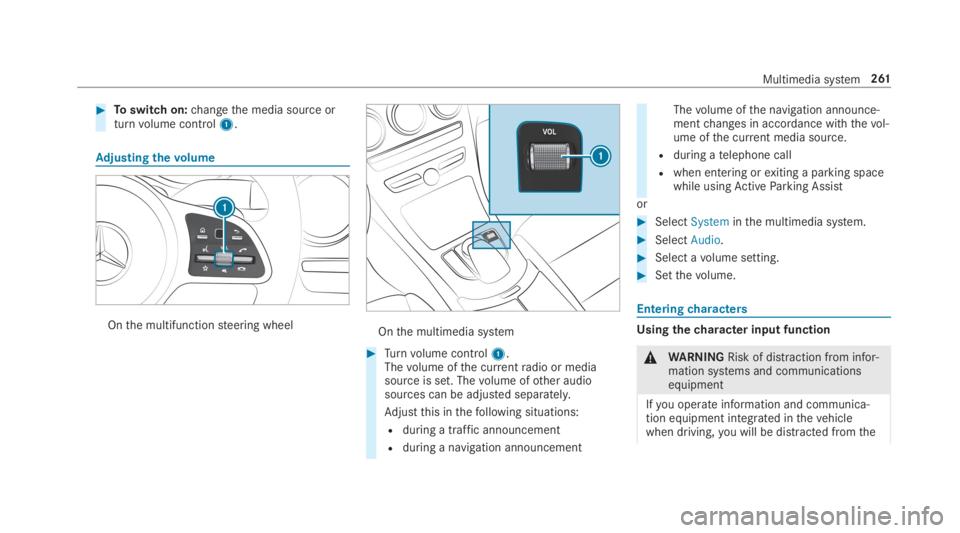
�Toswitch on:changethe media source orturnvolume control1.
Adjusting thevolume
Onthe multifunctionsteering wheelOnthe multimedia system
�Turnvolume control1.Thevolume ofthe currentradio or mediasource is set. Thevolume ofother audiosources can be adjusted separately.
Adjustthis inthefollowing situations:
Rduring a traffic announcement
Rduring a navigation announcement
Thevolume ofthe navigation announce‐mentchanges in accordance withthevol‐ume ofthe current media source.
Rduring atelephone call
Rwhen entering orexiting a parking spacewhile usingActiveParking Assist
or
�SelectSysteminthe multimedia system.
�SelectAudio.
�Select avolume setting.
�Setthevolume.
Enteringcharacters
Usingthecharacter input function
\nWARNINGRisk of distraction from infor‐mation systems and communicationsequipment
Ifyou operate information and communica‐tion equipment integrated inthevehiclewhen driving,you will be distracted fromthe
Multimedia system261